USPS Guide

Service Type Codes for the Intelligent Mail Package Barcode (IMpb): A Field Guide for USPS API Integrators

If you integrate USPS shipping into a fulfillment platform, a 3PL stack, or an ecommerce backend, the Intelligent Mail Package Barcode (IMpb) is the single most consequential label element you will generate, and its least understood field is the Service Type Code (STC). The STC is a short numeric field buried inside the 20-digit tracking code, and USPS uses it to decide what product you actually shipped, what you should have paid, and which tracking events you get to see. Get it wrong and the label prints fine, but the package can be rejected at induction, billed at penalty postage, or silently stripped of tracking events.

This guide walks the full lifecycle from the barcode's bit layout to the debug session at 2 a.m. when a customer's package shows no scans. It is written for engineers who build or maintain USPS integrations: how the 31-digit barcode is structured, how the STC field maps to the official code table, how the MOD 10 check digit is computed, and how to wire all of it into a shipping pipeline that fails loudly instead of failing quietly.

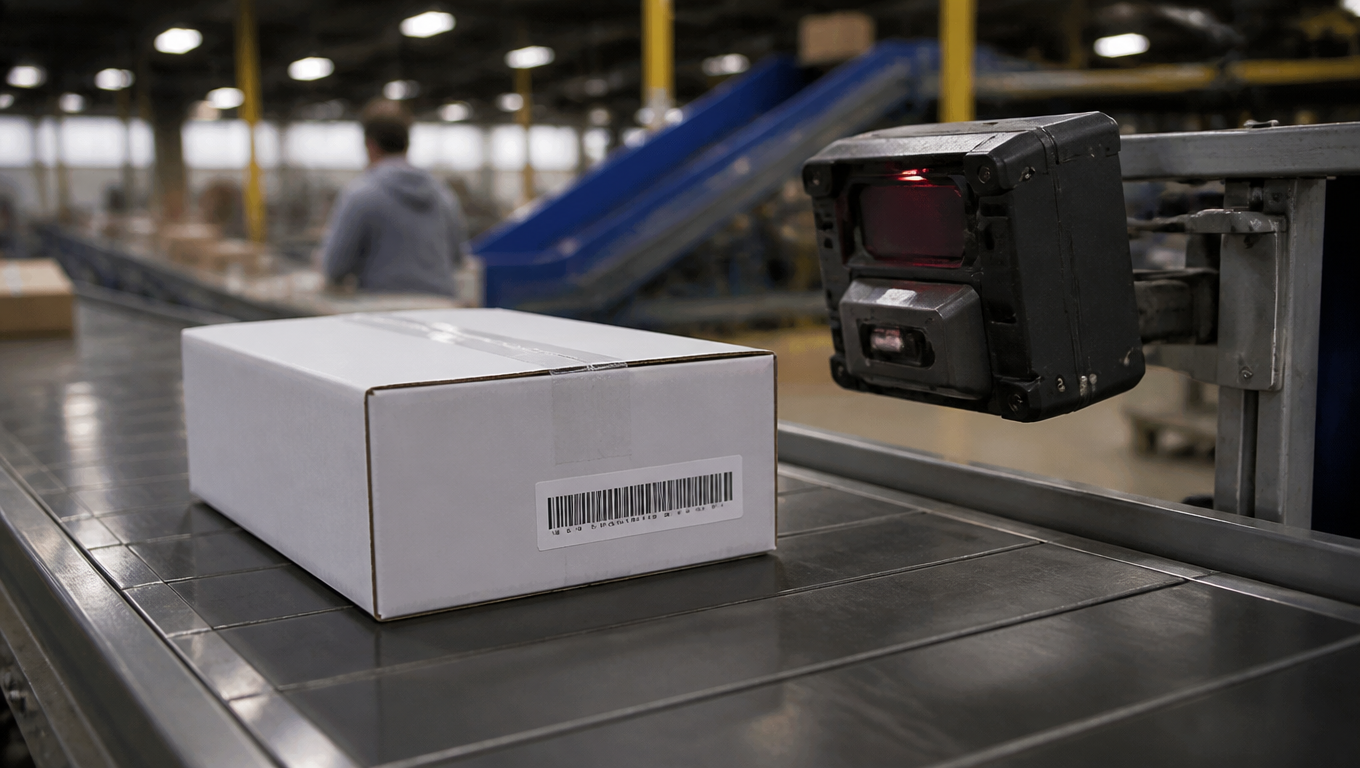
A USPS parcel with an Intelligent Mail package barcode label passing a scanner at a package sorting facility, conveyor belt, shallow depth of field
The IMpb is the machine-readable contract between the mailer and the Postal Service, and the STC is its most overlooked field

Why the Service Type Code Matters

USPS began phasing in IMpb requirements for commercial package classes in January 2013. Today, every commercial First-Class Mail Parcel, Priority Mail, Priority Mail Express, Parcel Select, Media Mail, Library Mail, and international package product must carry an IMpb to earn automation pricing and full tracking visibility. The barcode is not optional decoration: it is the machine-readable contract between the mailer and the Postal Service about what the mailpiece is.

Within that contract, the STC is the two-digit field (positions 3-4 of the tracking code) that tells USPS which product class and extra services the mailpiece belongs to. Everything downstream keys off it: the rate validation at induction (does the postage paid match the product?), the sortation plan (which network and service standard apply?), the tracking events exposed through the Tracking API (does the customer see scans at all?), and the compliance review (is a penalty postage bill coming in 90 days?).

For an API integrator, the STC is the field most likely to be wrong in ways that are invisible at label-print time. A label with the wrong STC looks perfect: the barcode scans, the address prints, the carrier picks it up. The failure surfaces later, as a missing scan, a rejected parcel, or an invoice adjustment. That asymmetry is why this guide exists: the STC deserves the same attention as the destination address, because it is the field that defines the mailpiece to USPS.
Anatomy of the 31-Digit IMpb

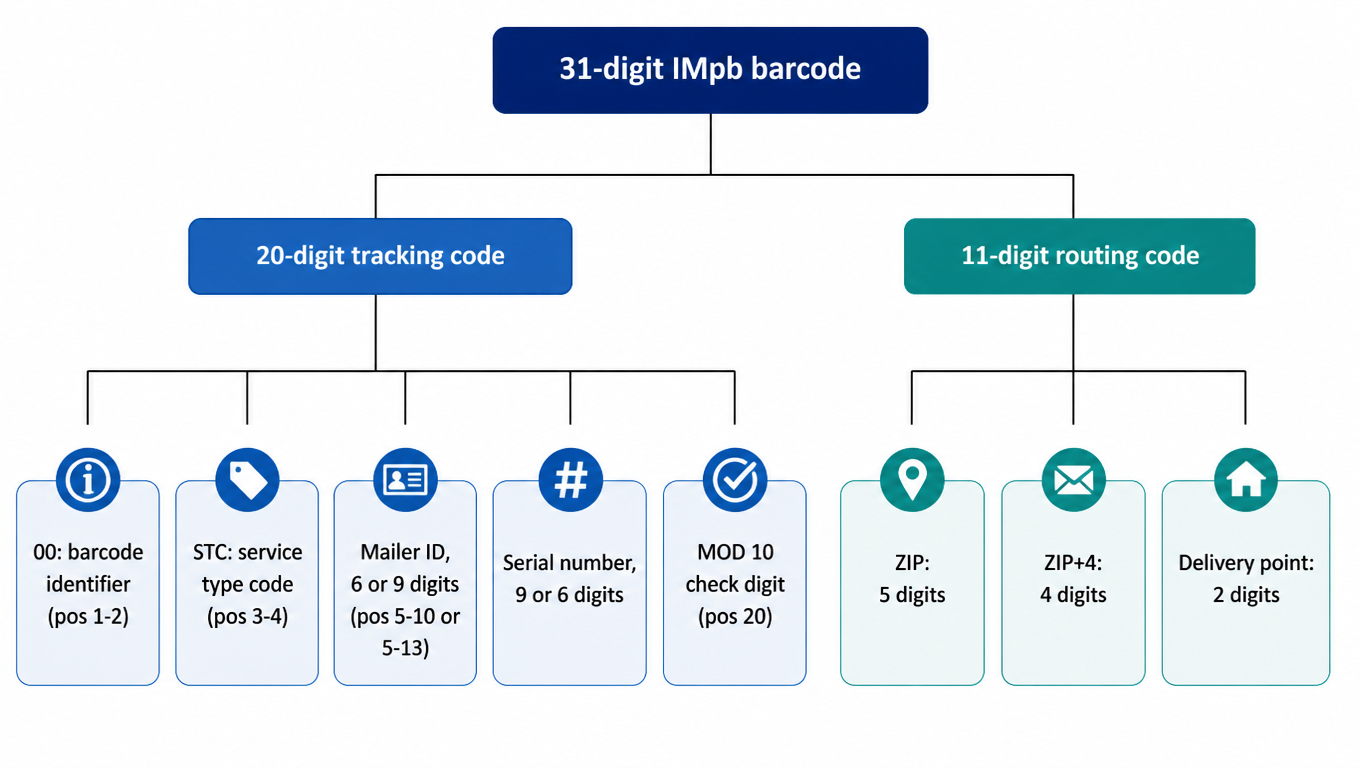
The IMpb is a 31-digit barcode built from two parts: a 20-digit tracking code and an 11-digit routing code. The tracking code identifies the mailpiece and its mailer; the routing code carries the destination address in machine-readable form (5-digit ZIP, 4-digit ZIP+4, 2-digit delivery point). Including the full 11-digit routing code is what earns automation discounts, so most commercial labels carry the full 31 digits, but shorter routing codes (0, 5, or 9 digits) are legal and simply shrink the barcode.

The 20-digit tracking code decomposes into five fixed fields. Digits 1-2 are the barcode identifier, always "00" for IMpb. Digits 3-4 are the Service Type Code, the subject of this guide. Digits 5-10 hold a 6-digit Mailer ID (MID), or digits 5-13 hold a 9-digit MID; 9-digit MIDs always begin with "9", per the USPS Publication 199 rules. The remaining digits before the last one are the serial number: 9 digits when the MID is 6 digits, 6 digits when the MID is 9 digits. The final digit, position 20, is the MOD 10 check digit. The serial number must be unique within a given MID and STC combination, and reusing a serial is one of the classic silent failures discussed later.

31-digit IMpb barcode structure: a 20-digit tracking code made of barcode identifier 00, STC service type code, Mailer ID, serial number and MOD 10 check digit, plus an 11-digit routing code of ZIP, ZIP+4 and delivery point
The 31-digit IMpb: a 20-digit tracking code plus an 11-digit routing code

Physically, the IMpb is a 4-state barcode: 65 vertical bars, each bar drawn in one of four states (full bar, ascender, descender, tracker), encoding 130 bits of data plus error-correction bits. As an integrator you normally never touch the symbology directly; your barcode library or postage provider handles it. What you do touch is the data: the 20-digit tracking code and, optionally, the routing code.

One confusion worth clearing up now: the human-readable tracking number printed on the label is a display rendering of the tracking data, not a second identifier. Different label software groups the digits differently, and the leading digits you see on a printed label are not a reliable way to read the STC. The authoritative value for your integration, and the value the USPS Tracking API expects, is the 20-digit tracking code as encoded in the barcode. Parse the structured fields, never the printed prefix.

Decoding the Service Type Code Field

The STC occupies positions 3-4 of the tracking code, immediately after the "00" barcode identifier. Semantically it identifies the product class and any extra services (signature confirmation, insurance, registered, and so on), not the shipper and not the destination. Two packages to the same ZIP from the same mailer with different postage products must carry different STCs; that is exactly the information USPS needs to validate the mailpiece.

The codes fall into broad families. Domestic package services live in 030-061: First-Class Mail Parcel in 030-034, Priority Mail in 040-048, Parcel Select in 050-053 and 058, and Media Mail / Library Mail in 060-061. Priority Mail Express occupies its own band, 100-180. International products sit at the top of the range, 930-961, with 930-932 for Priority Mail International, 940 for Priority Mail Express International, and 950 for First-Class Package International Service.

USPS downstream systems consume the STC in three places. Rate validation checks the postage on the label against the product implied by the STC at induction. The sortation plan uses it to route the parcel into the correct network and service standard. Tracking visibility uses it to decide which events are published: a First-Class parcel gets basic scan events, while a product with signature confirmation surfaces the signature event in the Tracking API. A malformed or mismatched STC can fail any of these three checks independently, which is why a wrong code can produce such confusing symptoms.

The Service Type Code Tables

The authoritative list is the "Service Type Codes for Intelligent Mail Package Barcode (IMpb)" document published on USPS PostalPro[1]. The table is rendered with three-digit codes for readability (030, 040, 100, 930), and it is updated over time as products change, so treat it as a moving target and pin a dated copy into your integration documentation.

The domestic table covers the everyday ecommerce products. First-Class Mail Parcel spans 030-034, with variants for nonprofit and high-density pricing. Priority Mail spans 040-048, including retail and commercial rates and hold-for-pickup variants. Parcel Select spans 050-053 plus 058, covering the consolidated-entry products that 3PLs and regional carriers hand to USPS for final-mile delivery. Media Mail is 060 and Library Mail is 061. Priority Mail Express occupies 100-180, a wider band because it encodes retail/commercial, flat-rate, and open-and-distribute variants.

The international table is smaller but just as load-bearing. Priority Mail International is 930, 931, and 932 (retail, commercial base, and commercial plus). Priority Mail Express International is 940. First-Class Package International Service is 950, with adjacent codes in the 950-961 band used for variants. When a new product launches, USPS assigns it new codes; the Ground Advantage-era consolidation, for example, reshuffled the domestic table. Before you ship a new product through your integration, verify the STC your postage provider maps to it against the current official table. Keeping a local, dated copy of the PDF in your repo is cheap insurance.

The MOD 10 Check Digit

The 20th digit of the tracking code is a MOD 10 check digit that catches transcription and encoding errors. USPS uses a weighted scheme: assign weights of 3 and 1 alternately to the 19 data digits, starting with weight 3 on the rightmost data digit (position 19) and moving left. Sum the weighted digits, take the sum modulo 10, and the check digit is 10 minus that remainder, where a result of 10 becomes 0.

Here is a worked example on a synthetic tracking code: barcode identifier "00", STC "04" (Priority Mail family), 6-digit MID "001234", serial "567890123". The 19 data digits are 0 0 0 4 0 0 1 2 3 4 5 6 7 8 9 0 1 2 3, and the alternating weights, applied right to left, are 3 1 3 1 3 1 3 1 3 1 3 1 3 1 3 1 3 1 3.

The weighted sum is 0+0+0+4+0+0+3+2+9+4+15+6+21+8+27+0+3+2+9, which equals 113. Since 113 mod 10 is 3, the check digit is 10 minus 3, or 7. The complete tracking code is therefore 00040012345678901237. This number is a construction for illustration; do not reuse it for a real shipment.

When the check digit is wrong, the barcode will not validate. Depending on where the failure happens, the parcel may be rejected by the induction scanner, fail to generate tracking events, or be returned to the mailer as undeliverable. Because the check digit is deterministic, a bad check digit is almost always a code bug (wrong field length, swapped digits, a serial number that was truncated) rather than a random glitch, and it is worth adding a check-digit validator to your test suite the day you start generating tracking codes server-side.

Integrating STC Into Your Shipping Pipeline

The cleanest integration avoids generating tracking codes yourself: your postage provider's API returns the tracking number, and therefore the STC, for the product you quoted. This is the default for most rate-and-label APIs and eliminates an entire class of bugs, because the provider owns the MID, the serial allocation, and the check digit. Your job reduces to trusting the returned value and logging it for reconciliation.

If you generate tracking codes server-side, you take on the full responsibility: a valid MID from USPS, serial-number uniqueness across your fleet, correct check digit, and, critically, an STC that matches the product you quoted. The mapping from your internal product catalog to the STC must be a first-class lookup table, verified against the official PostalPro table, with a test that fails when an unmapped product reaches label generation.

Before printing, run a validation checklist: the STC matches the quoted product; the tracking code is exactly 20 digits; the check digit verifies; the serial has not been used before for this MID and STC; and the barcode data length is between 20 and 31 digits depending on whether you include the routing code. Test environments should use USPS test codes and test MIDs so a staging label never enters the live network under a real STC.

Debugging Common STC Failures

Most STC failures fall into a small set of patterns. The class mismatch is the most common: a Priority Mail quote printed with a Parcel Select STC, or a consolidated-entry product labeled with a retail code. A bad check digit usually traces to a truncation or swapped digits in serial generation. A reused serial number produces tracking events for the wrong package or none at all. And a 9-digit MID that does not start with "9" is invalid on its face, which some provider APIs reject and others quietly encode.

The symptom signature matters. A label rejected at induction means the scanner could not resolve the product: check the STC against the table first. A package that tracks for a day and then goes silent often points to a serial collision. No events at all from the first scan usually means a check-digit failure upstream, so the parcel is being handled as an unknown barcode. A penalty postage invoice weeks later is the classic late symptom of a class mismatch that passed induction.

When you debug, decode first: write a small decoder that splits the 20-digit tracking code into its five fields and recomputes the check digit, then verify the STC against the official table and the MID against your USPS record. Fix the bug in the generation code, not by hand-editing the barcode: a label that prints from a fixed code path will reproduce the same defect at scale. Add the failing tracking number to your regression suite, and let the check-digit validator and STC mapping test run on every deploy.

The STC is two digits out of twenty, but it is the field that makes the difference between a label that ships and a mailpiece that USPS recognizes. Build the structure, verify the code, and validate the check digit, and your integration will stay out of the penalty-postage inbox.

FAQ

The STC is the two-digit field at positions 3-4 of the 20-digit tracking code that tells USPS which product class and extra services a mailpiece belongs to. USPS uses it for rate validation at induction, sortation planning, and tracking event visibility. A wrong STC can cause rejection, penalty postage, or missing tracking events even though the label prints fine.
The 20-digit tracking code is: 00 (barcode identifier) + 2-digit STC + 6- or 9-digit Mailer ID + 9- or 6-digit serial + 1-digit MOD 10 check digit. The STC is the 3rd and 4th digits. Do not read it from the printed label prefix; label software groups digits differently. Parse the structured 20-digit value your provider returns or your barcode encodes.
Assign weights 3 and 1 alternately to the 19 data digits, starting with 3 on the rightmost digit (position 19). Sum the weighted digits, take the sum modulo 10, and the check digit is (10 - remainder) mod 10. Example: the synthetic code 00040012345678901237 has a weighted sum of 113, so the check digit is 10 - 3 = 7.
The symptoms depend on which downstream check fails: rejection at induction (the scanner cannot resolve the product), missing or truncated tracking events, or a penalty postage invoice weeks later if the mismatch passed induction. Because the label prints normally, the failure is usually discovered late. Validate the STC mapping against the official PostalPro table before printing.

Skip the STC mapping and check-digit traps?

EasyShippingX bakes USPS label generation, STC mapping, tracking number validation, and tracking sync into your shipping flow, so your integration is USPS-compliant from the first label.