Start a fresh blank copy for the shipment. Keep the filled example as a reference while you work so a real receiving team never has to decide which of two sets of rows belongs to it. For this run, open the purchase or replenishment instruction, the facility’s inbound confirmation and the actual carton list. If the supplier prepared the list, make sure you have the version that was on the packing bench when the cartons were closed.
Fill the batch information once
Enter the inventory owner as the 3PL knows the account. A factory can physically ship for a brand while the stock belongs under the brand’s warehouse account. A 3PL that receives for several brands may recognize “A” in more than one client catalog. Give the receiver the account and destination facility that together point to the correct catalog. Check the actual facility on the inbound instructions, especially if your logistics contact works across several buildings.
Use separate fields for your batch reference, the warehouse-assigned inbound number and the PO or replenishment reference. In this example a seller can search email for ASN-1042 while the receiving lead can search their queue for W-1042. Enter the actual purchase or transfer reference if you have one. If the receiving site has yet to issue its number, follow up with the person who creates the inbound. A guessed number is surprisingly hard to distinguish from a genuine reference once it has been printed on every carton.
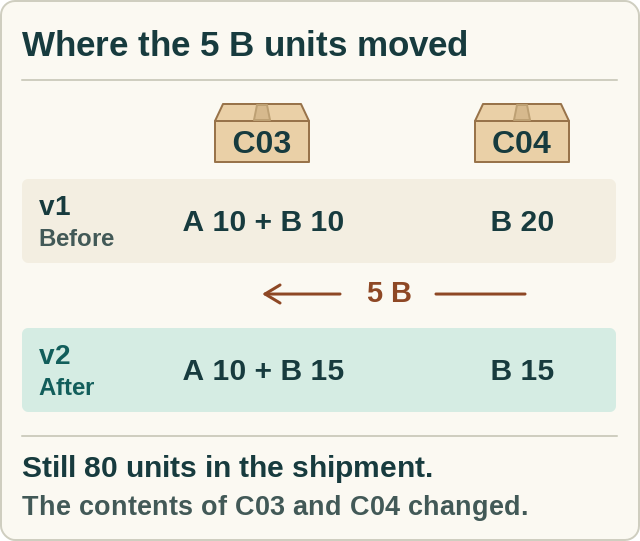
Give the expected arrival at the receiving facility, the transportation mode and the expected number of physical cartons. A pickup date at the factory goes in a separately labeled note if it helps the coordinator. For an appointment, keep its confirmation beside the batch so the dock can distinguish a requested date from a booked slot. Add a version and a contact who can reach the packer. A receiver looking at an unexpected B in C03 needs an answer about that carton during the receiving shift.
Build the carton detail where the choices are still visible
Repeat the shipment reference on each row so the relationship survives sorting or filtering. Enter the exact carton ID visible outside the box. C01 through C04 are simple example IDs unique within ASN-1042. In a real operation, follow the warehouse’s labeling instructions and keep enough context on the outside to distinguish this shipment’s C03 from the next supplier’s C03. If the site assigns its own labels, map its carton identifier to yours and let the receiver know which one to read back.
Enter the owner SKU exactly as it appears in the brand’s records and the warehouse SKU or recognized barcode when different. Use the identifier for the size, color or saleable pack actually inside the box. A product name that covers several variants will leave the receiver guessing. Treat carton IDs, tracking numbers and barcodes as text when copying into Excel. Compare a pasted code with the original label, including any leading zeros, before copying an entire column.
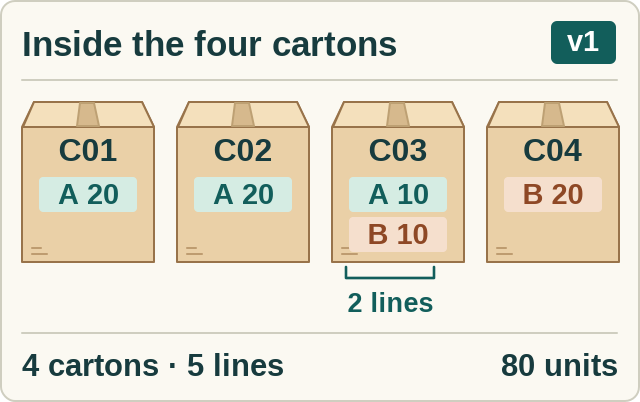
For C03, type the full batch reference, C03, A, quantity 10 and unit EA. On the next row, enter the same batch and carton, B, quantity 10 and EA. Repeat the pallet ID on both lines if the carton rides on an identified pallet. Leave a nonapplicable pallet field empty in a parcel shipment. Avoid merging the two C03 cells: when someone filters for B, that visible B row still needs its own carton identity. A note reading “mixed” can help a person recognize the box, but the quantities belong in the two detail lines.
Ask about lot and expiration information when the goods or warehouse controls call for it. Enter the specific lot and the agreed date format on the applicable item line. If one carton contains two lots of the same SKU that the receiver must distinguish, split that SKU into two rows and carry the carton ID and unit of measure onto both. Keep the lot as the supplier marked it. Guessing a missing expiry date to make the import pass turns a question the warehouse could resolve into a date it might act on.
Mark the level at which a transport reference works
If your parcel carrier actually issues a distinct tracking number per physical carton, record the real number against its carton ID. Both item rows for C03 can refer to that carton’s same number. Take the mapping from the labels or the supplier’s dispatch record. A list of four tracking numbers in an email and four carton IDs in a worksheet gives you two lists. Match each pair to a physical label before filling the row.
For freight with one shipment-level reference, put that reference in the shipment information or an explicitly labeled shipment-level note. Use the actual pallet ID, when applicable, to connect individual cartons to the pallet. If a warehouse form insists on box tracking information you do not have, ask how it wants a freight load entered. Inventing suffixes for the four boxes would send a receiving clerk searching for carrier records that never existed.
Count cartons, contents and selling units separately
Take a fresh look at C03 before you send. Its two lines let a receiver count two products, but only one box came off the packing bench. Count distinct carton IDs within the batch: C01, C02, C03 and C04 give four. Group by SKU: A is 20 + 20 + 10 = 50, B is 10 + 20 = 30. Group by carton: 20 + 20 + 20 + 20 = 80 EA. Compare the SKU sum and carton sum with the independently confirmed dispatch total. Counting the five detail lines as five boxes would create a shortage before the truck even moved.
Try a smaller unit check on a separate scratch line. Say the supplier writes “2 cartons” and each carton holds one inner pack containing two individually saleable pieces. Count two outer cartons at the dock and four EA across the shipment. Enter two EA on each carton’s item line. If the customer instead sells each sealed two-piece pack as one product and the warehouse recognizes that pack SKU, the same physical contents represent two saleable packs. Confirm that catalog unit before entering quantities. A receiver who counts four loose pieces and a seller expecting two packs may both be describing exactly what was shipped.
Give the file one final reading from the other end of the route. Filter to C03 alone. Can a receiving clerk see the owner’s SKU, the warehouse identifier when it differs, the quantity and the counting unit for each product? Clear the filter and find C04 by its exterior mark. This costs less time than asking a receiver to open all the B-containing cartons because one spreadsheet cell says “B, assorted.”
Prepare the receipt sheet before the first carton arrives
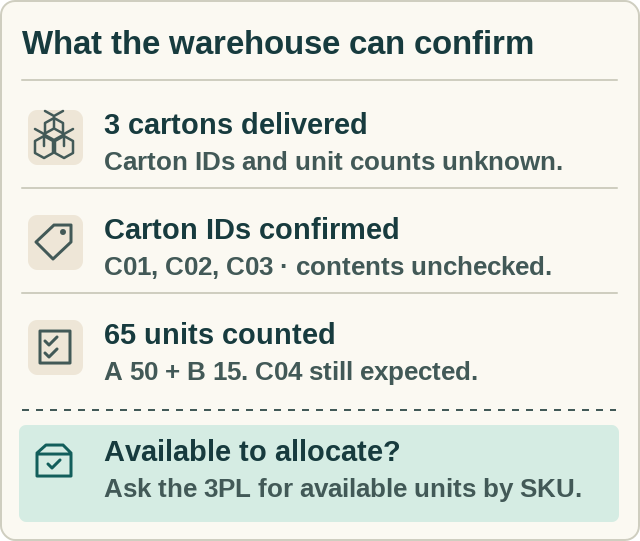
In the blank receiving sheet, copy the accepted packing values into their matching expected columns, including the batch, version, carton ID, SKU and unit. Keep those values fixed. The observed-carton column is where a warehouse-confirmed box ID goes. The counted-quantity column is for the receiver’s item count. If dispatch calls with a number of cartons and no IDs, put that message in the unmatched delivery note above the table. You can retrieve it when receiving identifies the load.
Leave an uncounted line blank. A zero is meaningful when someone has actually finished checking the identified carton and found none of that item. Keep the receipt reference alongside the count, then give any open quantity an owner and a next follow-up time. The sheet provides space to reconcile the shipment. The warehouse supplies the separate balance you need for order allocation.