
Ecommerce Shipping Guide

7 Signs You've Outgrown Your Shipping Software, and How to Migrate Without Disrupting Fulfillment

Your shipping software can still print a label. That is not the same as it still fitting your business. The trap is that "it still works" feels like a reason to stay, while the real costs keep compounding invisibly in the background: operator time, training cycles, carrier mistakes, peak backlogs.

Al's story makes the point. Al runs a DTC shop doing around 300 orders a day, spiking to 800 during sales. His shipping tool printed labels without a single failure. Yet his operation was stuck. His team manually picked a carrier for every order because negotiated rates and service tiers lived in a spreadsheet, not in the software. New hires needed two weeks of shadowing before they could ship unsupervised. Throughput per person flatlined while order volume doubled. The label button worked. The operation didn't. The problem was never the printing. It was manual carrier decisions, training time, and throughput.

"Still works" is a feeling. "Still fits" is a measurement. Before you evaluate a single vendor, you need a dashboard of operational metrics, because the decision to migrate should be triggered by numbers, not by how the software feels on a busy Monday. That dashboard has eight rows. Orders shipped per labor hour is the leading indicator, and it doubles as Signal 1. The next six metrics map to Signals 2 through 7. The eighth, API and portal fallback availability, is not a warning sign at all. It is the acceptance criterion for whatever you migrate to.

Worker packs parcels beside a thermal label printer in a small ecommerce fulfillment room.
Printing a label is not the same as still fitting your business

Signal 1: Orders Shipped per Labor Hour Has Flatlined

Orders shipped per labor hour is the truest measure of fulfillment health[^1]: total orders out the door divided by total fulfillment labor hours, including packing, labeling, exceptions, and reprints. If orders double and your labor hours double with it, you have not scaled. You hired your way back to the same ratio.

Use the Shipping API workflow overview to define which execution layer needs to change. The 3PL API procurement guide helps turn the observed bottlenecks into procurement and acceptance requirements.

The tell is disguised busyness. Copy-pasting addresses. Looking up a carrier in a browser tab. Rechecking a rate because nobody trusts the last quote. Overtime that shows up every week like clockwork. None of this looks like failure; it looks like work. But it is work the software should have absorbed.

Diagnose before you blame the season. A dip around a holiday is a blip. Flat or declining for three consecutive quarters while volume grows is a structural ceiling: the software is capping how much one operator can ship, and no amount of headcount changes the ratio.
Signal 2: Manual Decisions per 1,000 Orders Keeps Climbing

Count the operator touches on a typical order: every point where a human has to decide something the software didn't. Choose the carrier. Choose the service tier. Fix a bad address. Handle an exception. Apply a rule the system can't express.

Good systems turn decisions into rules. Bad systems turn rules into human judgment. When the software can't encode your logic, the person at the keyboard becomes the routing engine, and a human routing engine gives a slightly different answer every time. That inconsistency is where errors and customer complaints come from.

Al's single largest error source was manual carrier selection. Because his rates and service mapping lived outside the software, the decision was made fresh on every order, by whoever was packing that day, under whatever time pressure existed. The software wasn't wrong. It simply wasn't deciding.

Track touches per 1,000 orders. If that number rises quarter over quarter while volume grows, your business got more complex faster than your system learned to encode it.

Signal 3: Label Reprints and Error Rate Break the Baseline

Every reprint is a chain of costs: the label itself, the refund or reship, the customer service time, and for marketplace sellers, the platform metrics that punish late and incorrect shipments[^3].

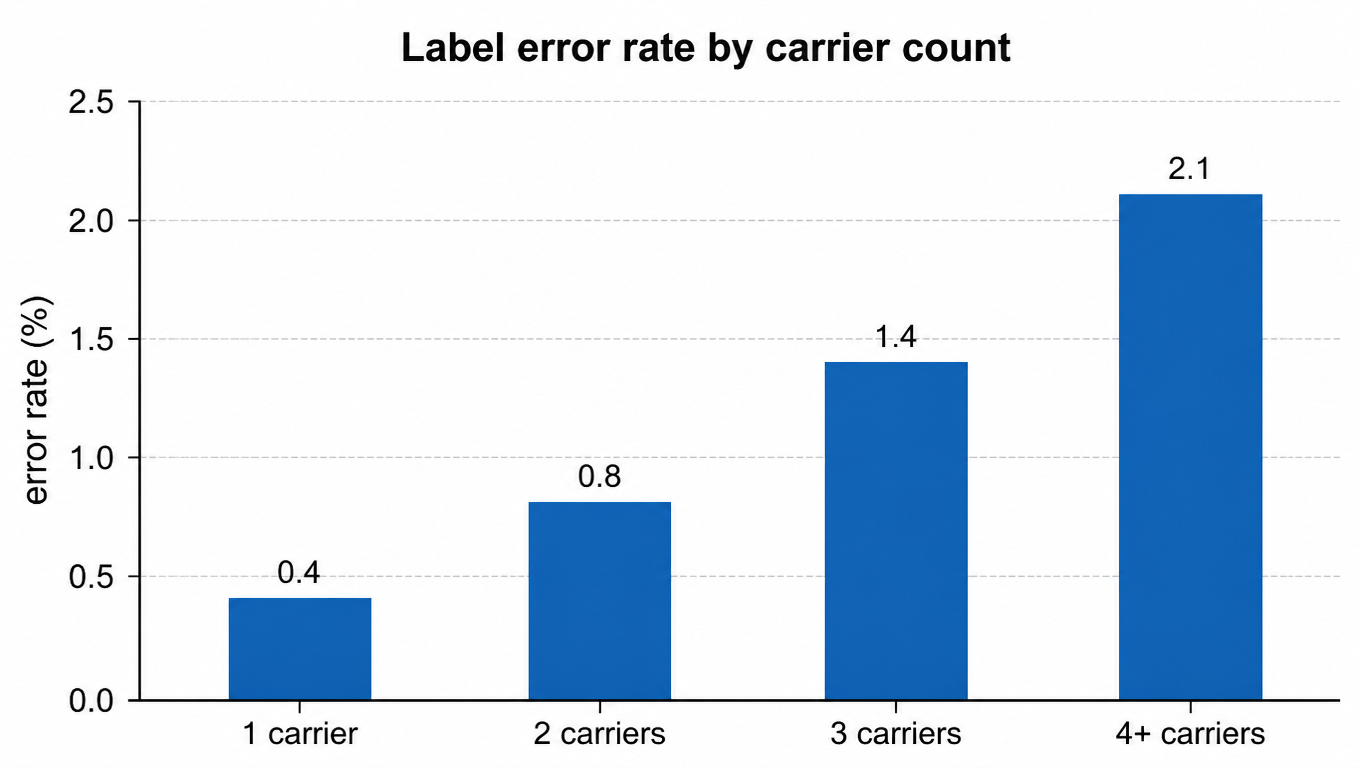
A healthy shop runs under 1 percent[^2]. The pattern as rules multiply is predictable. A single carrier and one rate tier sits around 0.4 percent. Add a second carrier with tiered services and it creeps toward 0.8. At three carriers it's about 1.4. Past four, with negotiated rates layered on top, it can pass 2 percent.

Bar chart: label error rate by carrier count, 1 carrier 0.4%, 2 carriers 0.8%, 3 carriers 1.4%, 4+ carriers 2.1%
Label error rate by carrier count

Use your own data to compare the error-rate trend with the rule-change timeline. If reprints rise after multi-carrier, tiered-service, or negotiated-rate logic expands, test system complexity as the working hypothesis instead of assigning the cause to operators.

Signal 4: New-Hire Training Takes Weeks, Not Days

Training time is a direct function of system complexity. If a new hire needs two weeks before shipping unsupervised, the knowledge isn't in the software; it lives in the heads of your tenured staff.

The unmistakable tell is tribal knowledge. Training consists of shadowing Maria for a week. The documented answer to most questions is "ask Maria." When the only way to learn the operation is to absorb it from a person, the operation is your software's undocumented UI.

A good system trains in hours, not weeks. The rules live in the software, so a new hire ships a real label on day one, safely, because the system enforces the logic. Training becomes exception handling instead of process memorization. If onboarding gets longer every time you hire, that is the metric talking.

Signal 5: Carrier Onboarding Lead Time Runs Weeks

Every carrier you add has a lead-time cost: API keys, rate setup, service mapping, testing, and training. Measure that loop with your own data; when the observed cycle is long enough that the team will not start onboarding merely to test a quote, treat it as a migration trigger.

That is the silent tax. Locked into one or two carriers, you lose negotiating leverage, because every rate conversation happens under the implicit threat of "or we switch." Without the ability to actually switch, that threat is empty. Your software is taxing every negotiation you will ever have.

A modern system onboards carriers in days, because integrations are standardized and rate setup is config, not a project. Your negotiating power comes from being able to move. If adding a carrier feels like a commitment, your software has you locked in.

Signal 6: Peak Queue Recovery Time Keeps Growing

Peaks don't fail as "busy." They fail in queue recovery time: the hours from the end of the sale until the backlog is clear.

A healthy operation clears a peak in hours. Four hours, say, with everyone at their stations. An overtaxed one takes days. The queue doesn't drain because throughput is capped by manual steps; every order needs the same human decisions, and the backlog compounds on itself. Meanwhile the SLA misses pile up, platform late-shipment metrics bite, and refunds go out.

Measure it after every peak. If recovery time grows even as you add labor, the constraint is the software's operator-touch load, not your headcount. You are solving a throughput problem with people when you should be solving it with rules.

Signal 7: Reconciliation Takes Days, Not Minutes

The carrier invoice arrives and doesn't match what you expected to pay. Somewhere, a surcharge was applied, a dimensional weight recalculated, a zone reclassified[^4]. You find out weeks later, because checking the invoice against the orders is a manual ritual nobody enjoys.

You cannot optimize a number you don't see. If per-order shipping cost is a mystery until reconciliation, then your rate negotiations, your pricing, and your product margins are all guesses stacked on top of each other.

A good system shows per-order shipping cost in real time, at the moment the label prints, and the invoice reconciles against it without a spreadsheet. When cost truth is days away instead of seconds, you are running your business on a delay.

The Migration Playbook: 5 Steps That Don't Disrupt Fulfillment

Migrations fail when they are treated as a big-bang swap: flip the switch on Friday, pray on Monday. The playbook that works treats migration like a deployment. Staged. Tested. Reversible. Same output before and after, or you don't proceed.

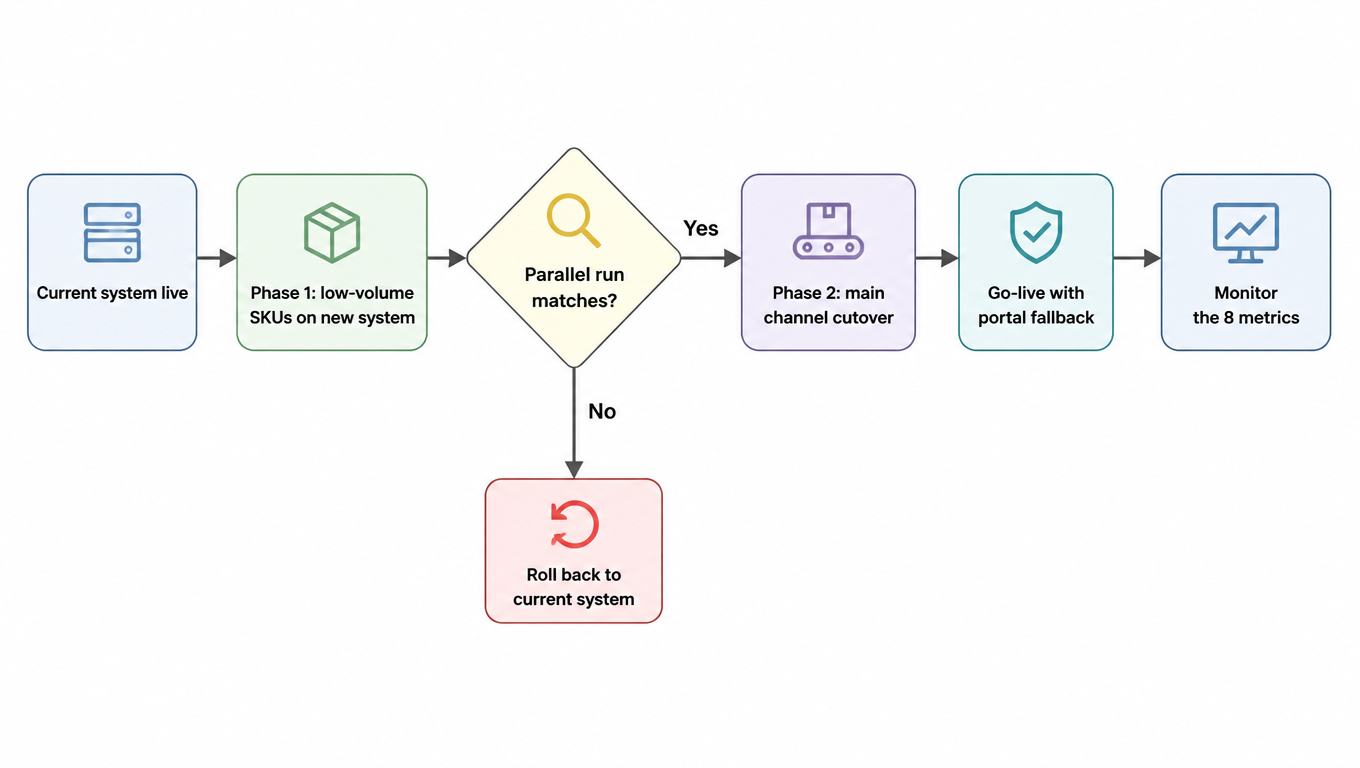
Step one is phased migration. Put the low-volume SKUs or a non-core channel on the new system first, not your flagship line. Step two is a parallel run: ship the same batch of orders through both systems and compare labels, rates, addresses, and tracking numbers. Nothing ships from the new system until its output matches the old one, order for order.

Flowchart: current system live, phase 1 low-volume SKUs on the new system, parallel run decision, rollback or main-channel cutover, go-live with portal fallback, monitor the 8 metrics
Migrate in phases, validate in parallel, roll back if needed

Step three is the representative package test. Build a test set that covers every carrier, weight band, destination zone, and service tier you actually ship, plus the weird cases: oversized boxes, freight, PO boxes, AK, HI, PR. If the new system can't reproduce your real mix, it isn't ready, no matter how nice the demo was.

Step four is the rollback plan, written before go-live, not after[^5]. Define the triggers in advance: error rate above a threshold, queue recovery over a set number of hours, a reconciliation gap that won't close. Define the data sync path so you can return to the old system without losing order history. A migration without a rollback plan is a bet, not a plan.

Step five is portal fallback. When the API is down, can your operators still ship from a web portal? Make it a contractual acceptance criterion, not a hope. The eighth dashboard row: if the new vendor can't answer yes, they don't get the migration.

The Trigger Dashboard: Turning Metrics into a Migration Decision

Here is the whole article on one page. Eight metrics, each with a yellow line and a red line. Yellow means start planning: build a shortlist, run a parallel test, price the migration. Red means migrate on a schedule, because the status quo is costing more than the switch.

Every time and percentage in the table is for planning as an illustrative internal threshold, not an industry benchmark. Calibrate the values against historical operating data and have the accountable owner approve the yellow and red lines.

MetricYellow: start planningRed: must migrate
Orders shipped per labor hourFlat for 2 quartersDown 3 consecutive quarters
Manual decisions per 1,000 ordersRising quarter over quarterManual decision on 1 in 10 orders
Label reprint / error rate1% to 2%Above 2%
New-hire training timeFor planning: 3 to 5 daysFor planning: more than a week
Carrier onboarding lead timeFor planning: 1 to 2 weeksFor planning: more than 3 weeks
Peak queue recovery timeFor planning: 8 to 24 hoursFor planning: more than 48 hours
Reconciliation delayFor planning: 1 to 3 daysFor planning: more than a week
API / portal fallbackExists but untestedMissing entirely

None of these thresholds are gospel; your numbers will differ. The point is to pick them now, before the migration debate starts, so the decision is made by the dashboard and not by whoever had the worst Monday.

Al didn't need a better printer. He needed the decisions out of his team's heads and into the system: routing rules instead of carrier pickers, standard flows instead of shadowing, per-order cost truth instead of monthly reconciliation surprises. Migration isn't switching software. It's moving operational metrics from human hands into the system. When the metrics say go, the label button was never the question.

FAQ

Don't look at whether it can print a label. Look at operational metrics: has orders shipped per labor hour flatlined, are manual decisions per 1,000 orders rising, is the label error rate above the 1 percent baseline, does new-hire training take weeks, does carrier onboarding take weeks, does peak recovery take hours or days, does reconciliation take minutes or days? Put yellow and red thresholds on each metric, and let the dashboard decide, not whoever had the worst Monday.
No. The numbers in the table are a starting point, not gospel; your business will differ. The point is to set them now, before the migration debate starts, so the decision is made by numbers rather than emotion. Once set, yellow means start planning (build a shortlist, run a parallel test, price the migration), and red means migrate on a schedule, because the status quo is costing more than the switch.
Strongly recommended. A parallel run is the cheapest validation: ship the same batch of orders through both systems and compare labels, rates, addresses, and tracking numbers order by order. Nothing ships from the new system until its output matches the old one. It turns "go live and pray" into "switch after verification," and it grounds your rollback plan.
Write the rollback triggers before go-live, not after: error rate above a threshold, queue recovery over a set number of hours, a reconciliation gap that won't close. Also define the data sync path so you can return to the old system without losing order history. A migration without a rollback plan is a bet, not a plan.
Not if you follow the playbook: phased migration starts with low-volume SKUs and non-core channels, the representative package test covers your real carrier, weight-band, and destination mix, and portal fallback keeps you shipping even when the API is down. The design principle is identical output before and after: same labels, rates, addresses, and tracking numbers, order for order. Buyers should see exactly what they saw before, or better.

Want fulfillment grounded in measurable operational metrics, not in "it can still print a label"?

EasyShippingX operates in the carrier execution layer (rates, labels, tracking). Multi-carrier live rates, routing rules you can encode instead of decisions your team has to make, real-time per-order cost at the moment the label prints, and traceable billing move the manual touches back into the system, so all seven signals turn green. When you migrate to EasyShippingX, phased parallel run, representative package testing, and rollback support follow the playbook, without disrupting your fulfillment.