Shipping Software Guide

Delivery Management Software vs. Multi-Carrier Shipping Software: Which Do You Need?

If you have shopped for shipping software recently, you have probably read product pages from two different categories and come away unsure whether they are the same product sold twice. Delivery management software and multi-carrier shipping software both promise tracking, automation, integrations, and delivery visibility. You read "track shipments," "automate your delivery operation," and "integrate with your store" on one page, then find nearly identical phrases on another. The honest conclusion looks like a coin flip. It is not.

The two categories execute different work on a normal day. Delivery management software schedules people and vehicles: who drives, which stops, in what order, and what proof comes back. Multi-carrier shipping software prices and prints labels for parcels that leave through national parcel carriers: which service, at what rate, with which tracking feed. The vocabulary converges because both products touch the last mile. What each product actually operates on does not converge at all.

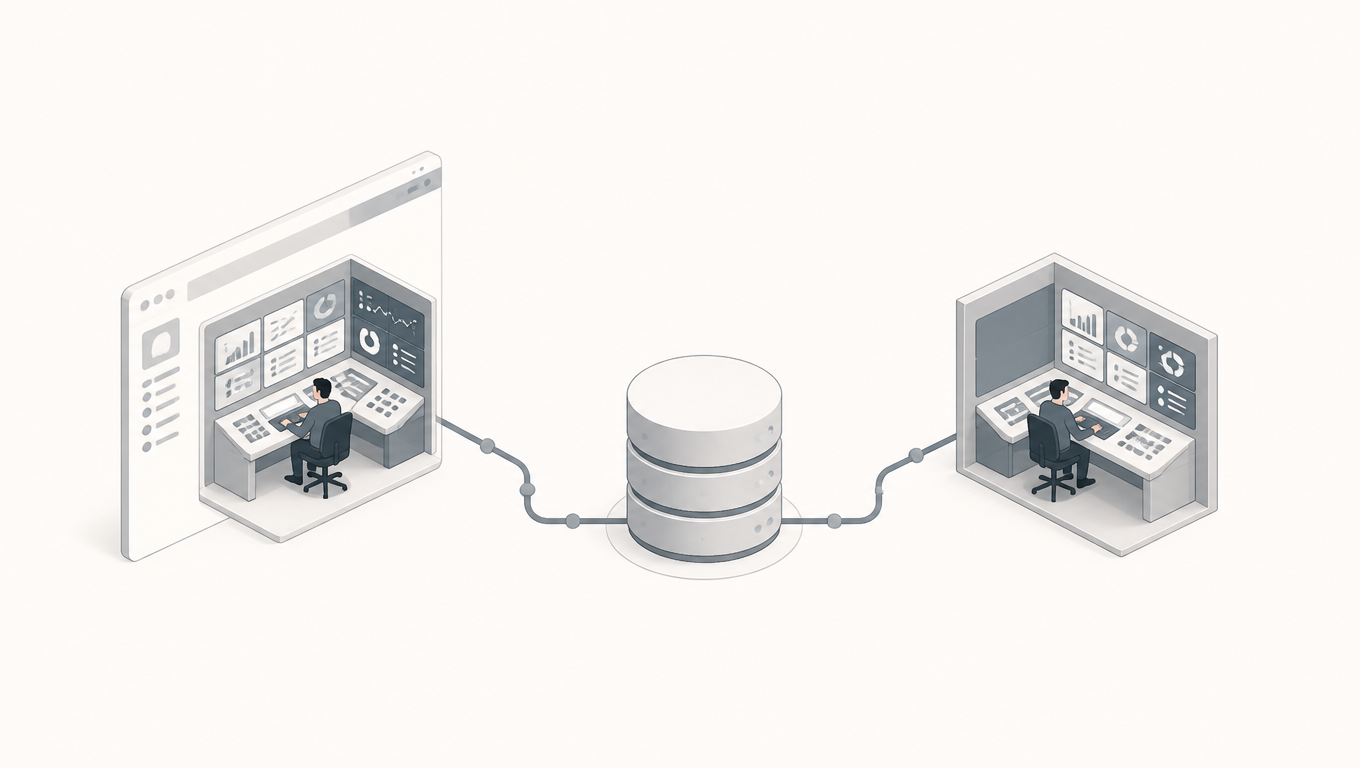
Two laptops on a dispatch desk: one displays delivery routes, the other carrier rates and a shipping label.
The same word "delivery": on the left you schedule drivers and routes, on the right you pick carriers and labels

The Confusing Purchase: Same Keywords, Different Jobs

This is why a feature-list comparison fails before it starts: two checklists can look alike while the underlying jobs are unrelated, and two tools that look different can turn out to serve one job well together. The useful question is not "does it support tracking?" but "what does the software move, schedule, and record?"

The rest of this guide follows that order: what each category actually executes, the two confusions that break most comparisons, three questions that locate your real requirement, and an acceptance test you can run on a trial account with your own orders. When you do get to comparing actual candidates, how to compare shipping software is the checklist companion; this article settles which category you should be comparing at all.

What Delivery Management Software Executes

Delivery management software runs a delivery operation that uses your people and your vehicles, or a local partner you direct. Its core objects are delivery tasks, drivers, vehicles, routes, stop sequences, and appointment windows. On a typical day a dispatcher groups orders that must reach customers on a schedule into routes, assigns each route to a driver, and sequences the stops. The driver works from a mobile app that shows a manifest and navigation, and collects proof of delivery at each stop: a signature, a photo, or a barcode scan. The system lives on a minutes-to-hours timescale, because that is the timescale of a vehicle moving through traffic.

Exceptions are handled in motion. A customer is not home, a window is missed, a stop has to be added mid-route. The dispatcher reassigns the delivery or resequences the remaining stops while the driver is still on the road, and the driver's app updates in near real time. This live control loop is the defining behavior of the category, more than any single feature.

What the software optimizes and records reflects that loop: route efficiency, on-time delivery, driver utilization, and the proof-of-delivery record that settles disputes with customers. Its natural buyers are businesses running their own fleet: local and regional delivery, same-day couriers, white-glove and field-service style operations, and retailers with their own trucks. Whether to promise same-day delivery with your own vehicles at all is a prior question, covered in the same-day delivery decision framework. Pricing follows the unit of work, which is a driver seat or a route, not a label. A useful signal when you evaluate it: if no one in your operation drives a vehicle or carries a manifest, the software has nothing to schedule, and it is the wrong category for you.

What Multi-Carrier Shipping Software Executes

Multi-carrier shipping software runs the outbound parcel operation that hands goods to parcel carriers. Its core objects are shipments, parcels, carriers, carrier services, rates, and labels. On a typical day an operator connects carrier accounts, compares rates and transit options across services, generates a compliant label for each parcel, prints labels in batch, and hands the parcels to the carrier's pickup or drop-off. From then on the system aggregates tracking milestones back from the carrier network and, at the end of the cycle, reconciles what was actually billed against what was quoted.

The record this category keeps is the shipment lifecycle: the shipment, its label, its tracking history, and its freight cost. Exceptions look different here because the parcel is inside someone else's network. A delay, a missing scan, or a delivery exception surfaces when the carrier's milestone data says so, and the available actions are to wait for the next scan, notify the customer, or open a claim. The software cannot re-route a parcel mid-flight the way a dispatcher re-routes a truck; the control it offers sits upstream, at the moment of carrier and service choice.

Its natural buyers are e-commerce and DTC sellers, plus 3PLs and warehouses that ship parcels through UPS, FedEx, USPS, and regional carriers. Value scales with parcel volume and carrier count: more shipments and more connected carriers mean more rate comparisons, more automation, and more cost data to act on. The strategic layer above it, when and how to run several carriers at once, is covered in the multi-carrier shipping strategy. Pricing follows the unit of work, typically per label or per shipment, sometimes with a platform fee underneath. A useful signal when you evaluate it: the software is only as good as its carrier connections and its rate data, so the integration list is the product, not a feature of it.

Two Confusions That Break Most Comparisons

The most common evaluation mistakes come from two pairs of terms that sound interchangeable and are not.

Route planning is not carrier selection. Both categories claim to "optimize your delivery." Delivery management software optimizes your routes: given today's orders, traffic, and appointment windows, which driver should take which stops, and in what order, to finish on time at the lowest driving cost. Multi-carrier shipping software optimizes the choice of service: for this specific parcel, which carrier service meets the transit promise at the lowest rate. One schedules your vehicles. The other picks an external network for a parcel. When a vendor from either side says "we optimize delivery," ask which object is being optimized: a route your people drive, or a service a carrier will execute.

Driver location is not a package scan. Both categories sell "real-time tracking." In delivery management software, tracking is GPS telemetry from your vehicles, refreshed in near real time, showing where the driver is on the street. In multi-carrier shipping software, tracking is a sequence of carrier milestone scans: picked up, in transit, out for delivery, delivered. The two differ in granularity, latency, and in who can act. A dispatcher can see a driver sitting in traffic and reassign the stop. A parcel in a carrier network offers no such lever; you wait for the next scan or open an inquiry.

Granularity, latency, and control are the dimensions to probe, and they sit inside a longer list of variables that separate the categories cleanly:

  • Order geography: local and denser geographies favor fleet control; dispersed national orders favor parcel carriers.
  • Parcel conditions: weight, size, and hazmat constraints shape which carrier services can carry the parcel at all.
  • Appointment windows: scheduled delivery windows are a delivery-management concern.
  • Carrier service availability: which services exist for a given origin and destination is a shipping-software concern.
  • Driver control: who can redirect a delivery in progress, and at what latency.
  • Rate procurement: negotiated carrier rates and service comparisons.
  • Labeling needs: compliant label generation and batch printing.
  • Tracking granularity: street-level driver position versus facility-level parcel milestones.
  • Exception handling: reassignment and resequencing versus waiting, notification, and claims.
  • Integration surface: which systems each category must talk to.
  • Billing unit: a route or a driver seat versus a label or a shipment.

Work through the variables once with your own operation and the category question usually answers itself before you look at a single vendor demo.

Three Questions That Locate Your Requirement

Three questions, asked in order, locate your requirement faster than any product tour:

Question 1: Who executes delivery? Your own drivers or a local delivery partner you direct, or parcel carriers? This single fact splits the market. If your people move goods to the door, you are buying a tool for your people. If a carrier network moves them, you are buying a tool for choosing and managing carriers.

Question 2: What do you need to control? Drivers, routes, stop order, and appointment windows? Or carriers, services, rates, and labels? Control is what you will actually touch on a daily basis, and it defines the workflow the software must run.

Question 3: What records must the system keep? Delivery tasks and proof of delivery, or shipments, labels, tracking, and freight cost records? The record you need is the audit trail your finance team and your customers will lean on, and the two categories keep different ones.

Business requirementPriority evaluation
You mainly assign drivers, arrange stops, and collect proof of deliveryDelivery management software
You mainly ship parcels through carriers and need rate comparison, labels, and carrier connectionsMulti-carrier shipping software
You run both self-delivery and parcel shipping at meaningful volumesTwo coordinated systems, or verify that one product genuinely executes both modes

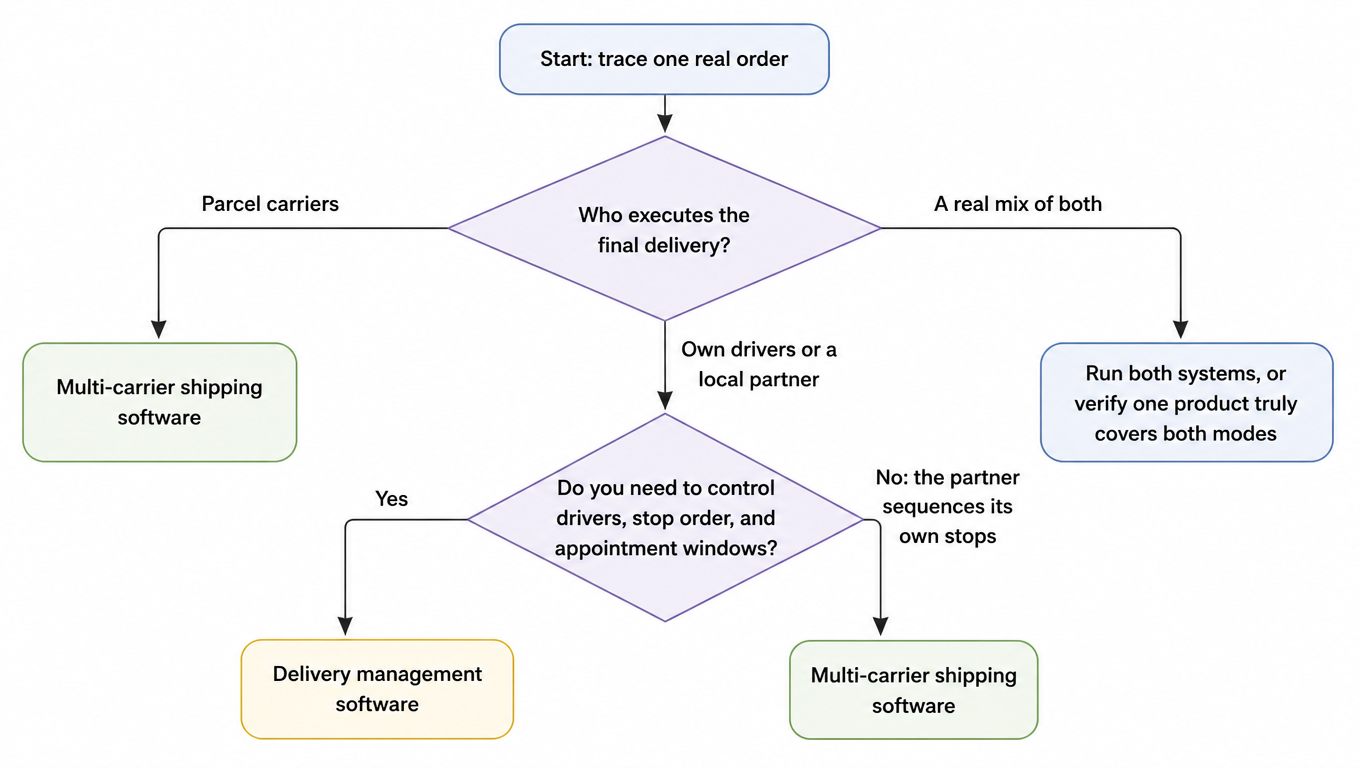
When the answer lands in the third row, resist the vendor who promises "one platform for everything" without proof. The two modes execute different objects, and coverage on paper is not coverage in daily operation. The flowchart below summarizes the first two questions as a decision path. It is a first filter, not a verdict: use the acceptance test that follows to confirm whatever branch you land on.

Decision flowchart: start by tracing one real order, ask who executes the final delivery, parcel carriers lead to multi-carrier shipping software, own drivers or a local partner lead to asking whether you need to control drivers, stop order, and appointment windows, yes leads to delivery management software, no (the partner sequences its own stops) leads to multi-carrier shipping software, and a real mix of both leads to running both systems or verifying one product truly covers both modes
The three-question decision path: who executes first, then what you control

The Acceptance Test: One Order Set, Three Journeys

Feature checklists are how the confusion starts, so the test should not use them. Instead, take one set of representative business orders and run them through each candidate in trial mode. If the software cannot complete the journey in the tool your team would actually operate, with no manual re-entry, it fails regardless of how the marketing page reads.

Use three journeys that cover the range of what your orders do.

Journey 1, a self-delivered route order. Create an order that must go out with your own driver: confirm task creation, driver assignment, and stop sequencing; execute a stop in the field and capture proof of delivery; watch the status return to the office view; and close the record with its delivery time and POD.

Journey 2, a parcel-carrier order. Create an order that ships through a parcel carrier: compare rates across at least two services, generate and print the label, hand off the parcel, and confirm that tracking comes back into the system and the shipment's freight cost lands in the record.

Journey 3, an exception order. Take any order and force an exception: a missed delivery, a delayed parcel, or a missing POD. Watch how the system surfaces it, who can see it, and who is equipped to act. This journey separates the categories more honestly than the two happy paths, because the two categories handle exceptions through entirely different mechanisms.

For each journey, walk the same four checkpoints and note where the candidate stumbles:

CheckpointJourney 1: route orderJourney 2: parcel orderJourney 3: exception
CreationTask created with stops and windowShipment created, service and rate chosenSame as the order it belongs to
ExecutionDriver runs manifest and captures PODLabel generated and printedWho is notified, and in what tool
Status returnLive position and POD back at the officeCarrier milestones aggregated in systemDelay or failure visible where you work
Record closureDelivery time and POD storedLabel, tracking, and freight cost storedException logged with owner and action

A candidate passes when it completes all three journeys in the daily tool, at your real volumes, without copy-paste between systems. A candidate that completes journeys 1 and 2 but fumbles 3 is telling you how its exception handling really works.

When You Should Run Both

The honest answer to "which do I need?" is sometimes "both." That is not a failure of software selection; it is the natural shape of an operation that runs a local delivery fleet and also ships parcels nationally. Two systems, each doing its own job well, beat one system doing neither job properly.

The seam between them is a precise moment: an order becomes either a driver task or a carrier label. Everything upstream of that moment, the order itself, its items, and its destination, should live in one source of truth so nothing is typed twice. Everything downstream is owned by whichever system took the order, and the other side needs visibility into it. A customer service agent should be able to see, without leaving their tool, that an order is on a truck two stops away or that a parcel missed its delivery scan last night.

Three operating rules keep a two-system setup honest. First, one order source: the order is created once and handed to whichever engine executes it. Second, shared status: each system publishes status the other can read, so "where is my order" has one answer. Third, explicit exception ownership: when a delivery fails, someone is named as the owner in writing, not implied. If a vendor claims a single product covers both modes, ask to see both modes executed with your own orders, not two feature lists under one brand. The acceptance test above was designed for that moment.

Cost, Deployment, and Verification Before You Buy

Pricing models differ by category, and the difference tracks the unit of work. Delivery management software typically prices per driver seat or per route, because the cost driver is the people and vehicles you staff. Multi-carrier shipping software typically prices per label or per shipment, sometimes over a platform fee, because the cost driver is parcel volume. Compare vendors on the same basis: a per-label price means nothing next to a per-seat price until you know your route count and your parcel volume. Watch for annual contracts, minimums, and overage terms in both categories, and ask what the list price includes: onboarding, support, and carrier setup are often where the real total cost hides.

Deployment shapes differ in one important way. Both categories are delivered mostly as cloud SaaS, but delivery management software lives and dies with its mobile driver app, so the strength of that app, offline handling included, is a core buying criterion. Multi-carrier shipping software lives and dies with its connections: carrier accounts and rate data on one side, and your OMS, WMS, or ERP on the other. Ask which carriers are actually connected in production, not in the sales deck, and which order systems integrate out of the box versus through custom work. A related but separate question, whether shipping capability should live embedded inside an e-commerce platform or as a standalone layer, is covered in embedded vs. standalone shipping software.

Run a short verification list before you sign anything. Which carriers are really connected, and are your negotiated rates loadable? Which OMS, WMS, or ERP systems integrate, and at what cost? If delivery management is in scope, who owns the driver app, and what happens offline? Most important: did the trial run on your own orders, at your own volumes, with your own exception cases? A trial on vendor-supplied sample data answers none of your questions. And if your audit says the current tool no longer fits the business, the migration playbook in outgrown shipping software covers the move.

The decision, compressed to one page, reads as follows. Ask who executes delivery, what you must control, and what records you need. If the answers point at drivers and routes, evaluate delivery management software; if they point at carriers and labels, evaluate multi-carrier shipping software; if they point at both, plan for two coordinated systems or demand proof that one product really executes both modes. Then run one order set, three journeys, through the finalists and watch what breaks. Software in this category is bought for the work it does on an ordinary Tuesday, so test the ordinary Tuesday, not the feature matrix.

Connect the Decision to Real Rate Comparison and Execution

Once the decision points at the multi-carrier shipping software side, the test moves to real parcels: take one representative order, compare carrier options, and see what labels and tracking look like in your workflow. EasyShippingX is a channel-neutral shipping layer: it compares US domestic carrier options and executes through the Portal, Excel, or the API. See the EasyShippingX Features page for the public scope. During an evaluation, run one real order through the shipping rate calculator for a service and rate comparison, and if you also need to decide whether shipping capability should live embedded or standalone, the embedded vs. standalone article above covers it. For plan fit, review plans and pricing.

Sources

Note: this guide is written as a decision framework and contains no benchmark statistics; the sources above ground the definitions and industry context for the two categories. For rates, features, integration scope, and availability, defer to each candidate's current official documentation.

FAQ

No. They operate on different objects: delivery management software schedules your drivers, vehicles, routes, and stop order, and records delivery tasks and proof of delivery. Multi-carrier shipping software compares rates across carriers, generates and prints labels, aggregates tracking milestones, and records shipments, labels, tracking, and freight cost. The marketing vocabulary overlaps; the daily work does not.
No, unless you run your own drivers and vehicles on the last mile. When parcel carriers move everything, the control you need sits in carrier and service selection, which is the multi-carrier shipping software domain: connecting accounts, comparing rates, printing labels, aggregating tracking, and reconciling billing. Delivery management software only matters when someone with a manifest drives to the door.
If both modes run at meaningful volume, the answer is usually two coordinated systems over one shared order source, not one software that claims everything. The seam is precise: an order becomes either a driver task or a carrier label. Ask the vendor to demonstrate both execution modes with your own orders, not two feature lists.
Run the acceptance test: take one representative order set through three journeys, a self-delivered route with proof of delivery, a parcel-carrier order with rate comparison, labeling, and tracking return, and one deliberately forced exception. Check creation, execution, status return, and record closure at each step. A candidate that cannot complete every journey fails regardless of the marketing page.
Convert to one business unit first. Delivery management software prices per driver seat or per route because the cost driver is people and vehicles; multi-carrier shipping software prices per label or per shipment because the cost driver is parcel volume. Know your monthly route count, driver count, and parcel volume before comparing, then ask each candidate for all-in cost: onboarding, support, carrier setup, annual contracts, and minimum or overage terms. Never compare a per-label price directly against a per-seat price.