Ecommerce Shipping · Full Decision Guide

Ecommerce Shipping Solutions: How to Choose the Right Setup for Your Business

Shipping is usually the second biggest line item in an ecommerce business after the cost of goods[^1], and it touches every order you ship. Get the setup right and you quietly protect margin on every single transaction; get it wrong and you leak money in label costs, surprise carrier invoices, and refunds for late or lost parcels. This is not an IT project. It is a business decision that shows up on your profit and loss statement every month.

The good news is that the whole topic can be broken into seven decisions, and each one has a clear owner and a clear answer. Who moves the parcel (carrier), where you buy the label (shipping software), who picks and packs (fulfillment), how the systems talk to each other (technology), which carrier each parcel actually gets (strategy), what you see after dispatch (visibility), and whether the money adds up (finance). You do not need to solve all seven at once. Jump to the dimension that is costing you money today, fix that, and come back for the next one.

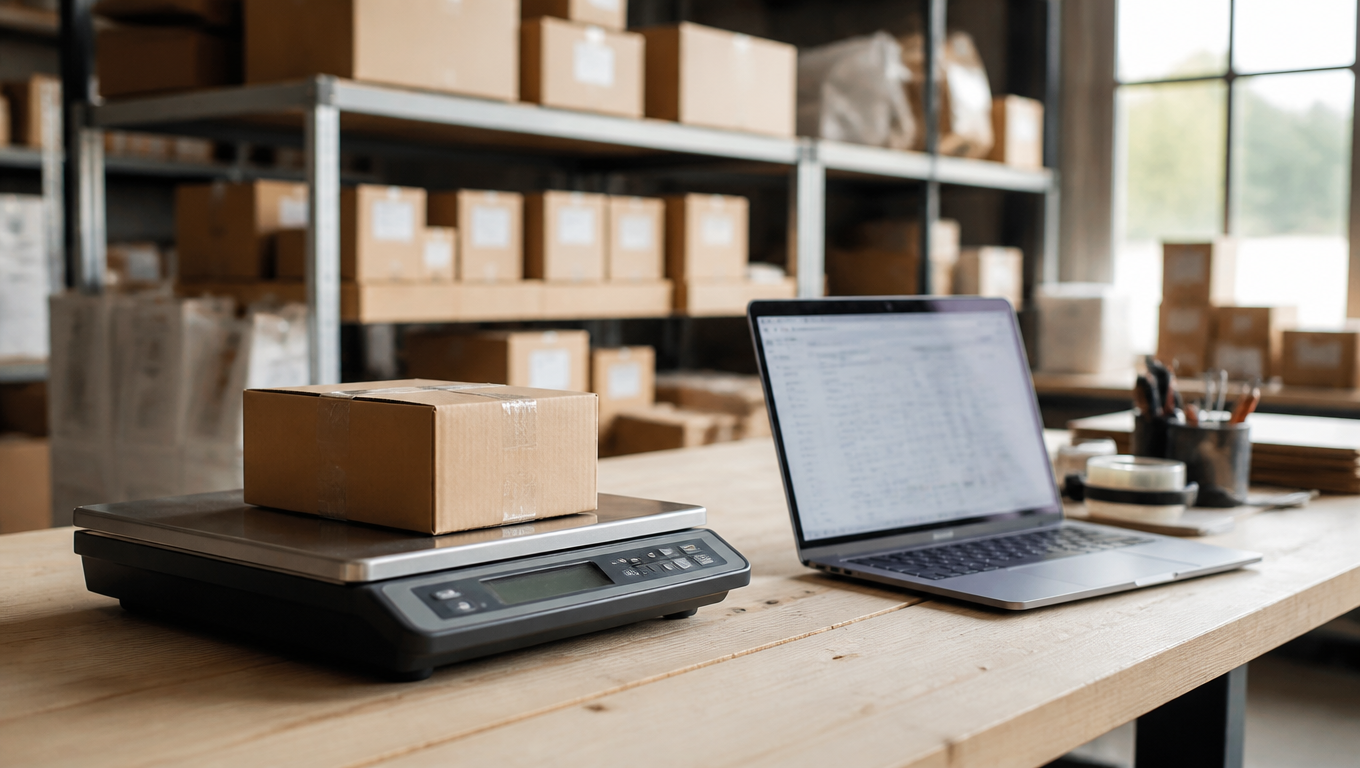
Ecommerce packing station with a box on a postal scale, thermal label printer and parcels awaiting pickup.
Your shipping setup is a margin decision: every order either protects it or leaks it

Carrier: Who Ships Your Orders

The carrier is the physical network that moves your parcels: USPS, UPS, FedEx, and a growing set of regional carriers such as OnTrac and LaserShip that cover specific parts of the country[^3]. Each one prices differently, and the differences are not cosmetic. For a light parcel, USPS is usually the cheapest option by a wide margin[^2]; for a heavy or bulky one, UPS and FedEx ground rates pull ahead; for local zones, a regional carrier can undercut all three.

Three variables decide your mix. Your package profile, which is the range of weights and sizes you actually ship. Your zone distribution, which is how far your parcels travel on average from your ship-from location. And your speed promise, because free 5-day shipping supports different economics than guaranteed next-day delivery.
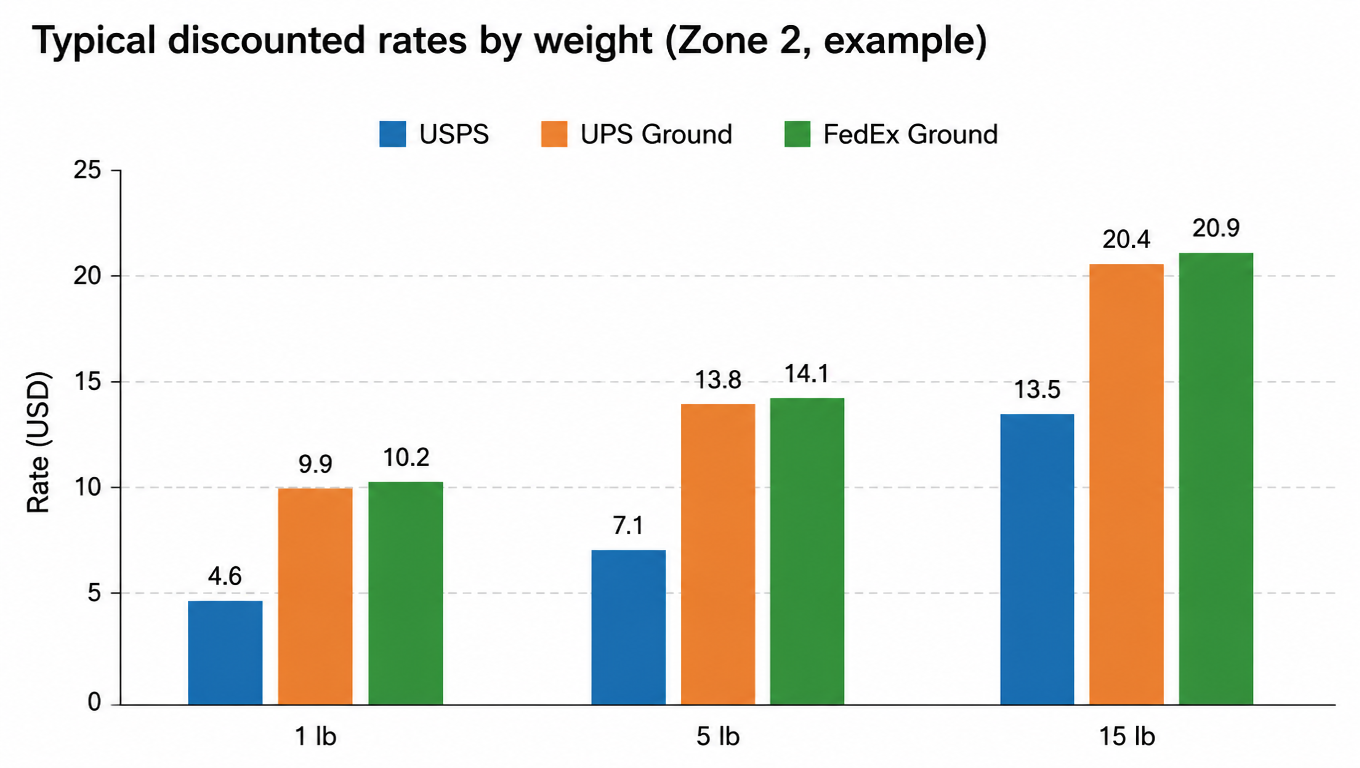
Typical discounted rates by weight (Zone 2, example): USPS cheapest at 1 lb, the gap closing by 15 lb
USPS wins light, the gap closes heavy: pick the network by your weight profile

To see why the mix matters, look at typical discounted rates for a Zone 2 shipment. At 1 lb, USPS runs about $4.60 while UPS and FedEx sit near $10. At 5 lb, USPS is about $7.10 and UPS and FedEx are roughly $14. At 15 lb the gap closes fast: USPS around $13.50, UPS around $20.40, and FedEx near $20.90. A seller whose average parcel weighs 1 lb is leaving money on the table if everything goes through UPS; a seller shipping 20 lb boxes saves nothing by forcing them through USPS.

The practical takeaway is that almost nobody uses one carrier. Most sellers split shipments across two or three: lightweight parcels to USPS, heavyweight and bulky parcels to UPS or FedEx ground, and close-zone parcels to a regional carrier. The art is not picking a winner, it is assigning each parcel to the right network, which is exactly what routing rules in your shipping software do for you.
Shipping Software: Where You Buy Labels

Shipping software is the platform where your store's orders become labels. It pulls orders in from your sales channels, compares rates across carriers, prints the label, and sends the tracking number back to the store automatically. On the simple end you have the built-in options such as Shopify Shipping and Amazon Buy Shipping. On the feature-rich end you have dedicated platforms such as ShipStation, Shippo, Pirate Ship, and EasyshippingX.

The first thing to compare is the rate. Built-in options are convenient but often quote retail or lightly discounted rates; dedicated platforms negotiate volume discounts and pass them through, which is usually the single biggest saving available to a small seller. Next, look at batch printing, because printing fifty labels one at a time is a different job than printing them in one click, and at automation rules, because a rule that assigns every under-1-lb order to USPS and every 15 lb box to UPS removes a decision your staff should not be making by hand.

There is also the buyer experience to consider. Branded tracking pages, where the customer sees your logo instead of a carrier's, measurably reduce "where is my order" tickets[^7], and built-in returns workflows close the loop without extra tools. When you outgrow a built-in option, you will feel it: you are hand-typing addresses, re-keying orders, or paying retail rates on a hundred parcels a day. That is the moment to move to a dedicated platform.

Fulfillment: Who Picks and Packs

Fulfillment is the physical part: who takes the order, walks the shelf, packs the box, and hands it to the carrier. There are three main modes. Self-fulfillment, where you do it in your own space. Marketplace fulfillment such as Amazon FBA or Walmart WFS, where the platform stores and ships for you. And a third-party logistics provider (3PL), which stores your inventory in its warehouse and picks, packs, and ships on your behalf.

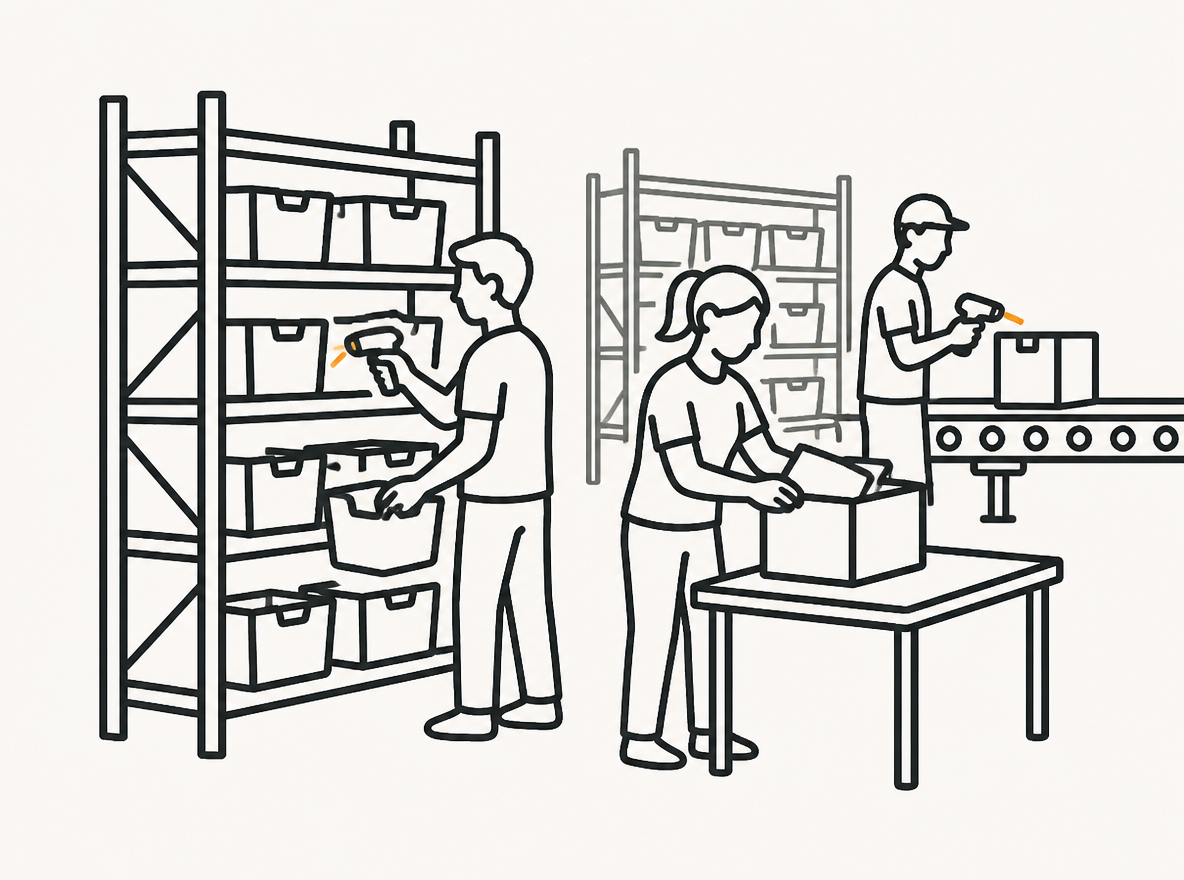
3PL warehouse workers pick and pack using scanners, storage bins and conveyors.
Fulfillment is the physical work: who takes the order, picks it, and packs it

The decision variables are order volume, SKU count, storage needs, labor cost, and peak season. Under roughly 50 to 100 orders a day, self-fulfillment is usually fine and cheapest, especially if your space is already paid for. As volume grows, labor stops being free: picking, packing, and dropping off parcels consumes hours that could go to product or marketing. Marketplace fulfillment shines for fast movers because those units sit where the customers already shop, but it charges per-unit fees and storage fees that punish slow-moving long-tail inventory[^6].

The hybrid play is the most common winning setup: fast movers go to FBA or WFS, long-tail SKUs stay self-fulfilled or go to a 3PL. When you compare costs, be honest about the full number. A 3PL charges $3 to $6 per order plus storage[^5], which sounds expensive until you add up what your own labor, packaging, and warehouse overhead actually cost. For many sellers the crossover happens well below the volume they expected, so model both sides with real numbers before defaulting to "we'll do it ourselves."

Technology: How Systems Connect

Three acronyms cover most of what you need. An API is a standard way for software to talk to software, for example your store asking a carrier's system for a label. An OMS (order management system) is the hub that holds orders from every channel and decides what gets fulfilled where. A WMS (warehouse management system) is what the people picking and packing use to know which items are where and which parcel each order needs.

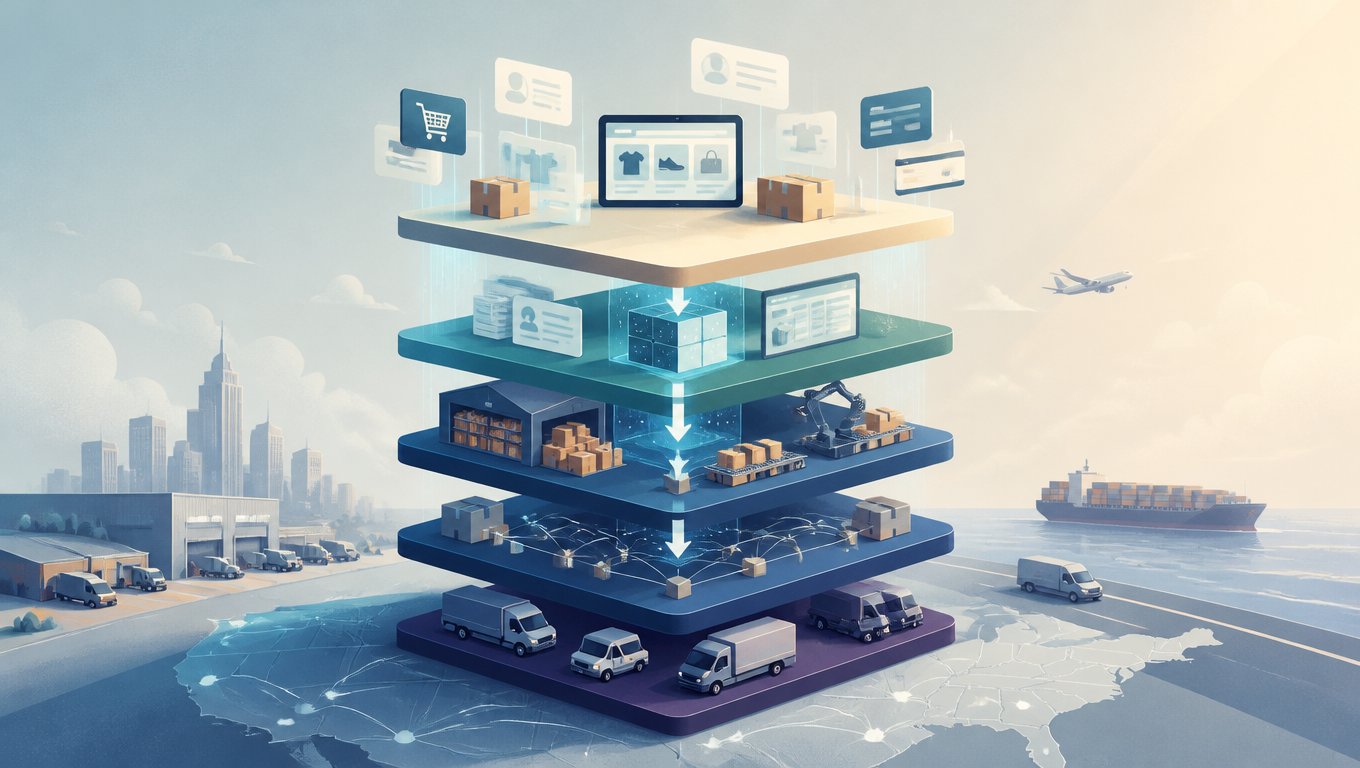
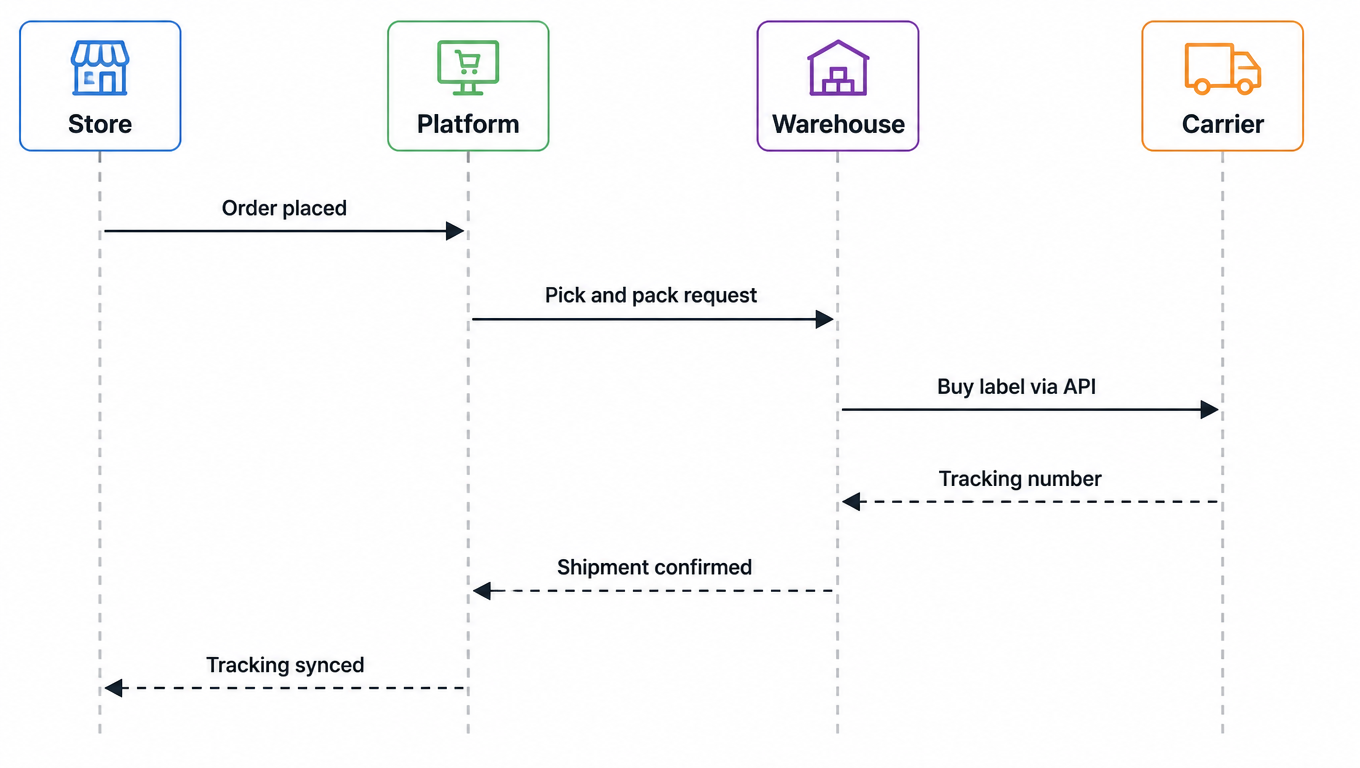
The flow is simple even when the software is not: an order lands in your store, the OMS aggregates it with your other channels, the WMS turns it into a pick and pack task, the carrier API returns a label and tracking number, and the tracking flows back to the store so the customer gets the email. Every piece of that chain can be automated, and the goal is to get to a state where an order travels the whole path with nobody re-typing anything.

Order flow sequence: store to platform to warehouse to carrier, tracking flowing back
The whole order chain can be automated; the goal is nobody re-typing anything

When you evaluate software, check three things. Native integrations: does the tool connect to Shopify, Amazon, Etsy, and Walmart out of the box, or does it need a workaround for the channel where you actually sell? API openness: can you pull your own shipment data out, or are you locked into the vendor's reports? And automation depth: can rules route, rate, and reprint without a human in the middle? The red flag is scale: if you are still copy-pasting orders by hand past a few hundred per day, you are the integration, and you are the one who will break at peak season.

Strategy: Choosing the Right Carrier per Shipment

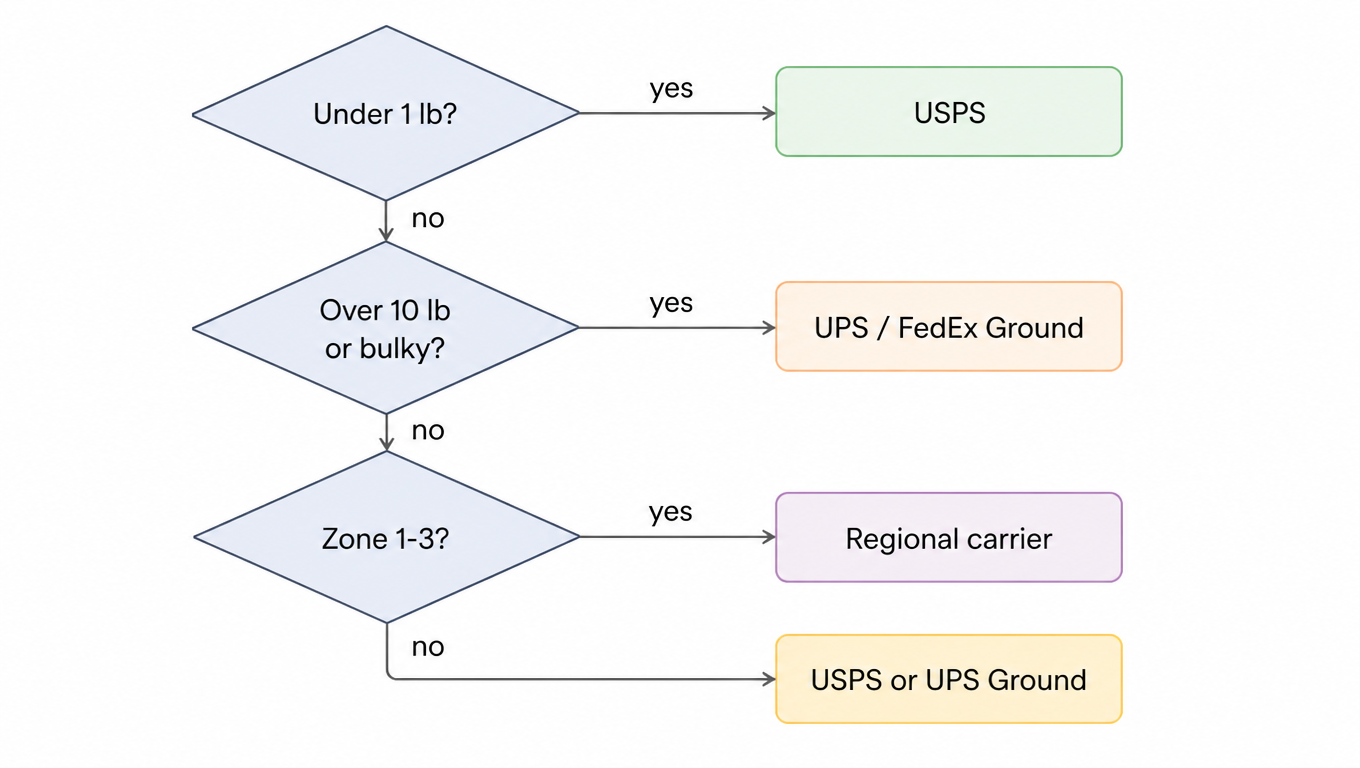
Routing is the layer that turns your carrier mix into actual decisions. Instead of every parcel going to one carrier, routing rules examine each shipment and pick the best carrier for it based on weight, zone, and the speed you promised at checkout. This is the difference between a shipping strategy on paper and one that runs itself.

Start with three or four rules and let real data refine them. The classic starter set: parcels under 1 lb go to USPS, parcels over 10 lb or with bulky dimensions go to UPS or FedEx ground, close-zone parcels go to a regional carrier, and everything in between goes to USPS or UPS ground depending on the rate. That single set of rules usually beats a one-carrier default by several percent of total shipping spend before you ever tune it.

Routing decision flow: under 1 lb to USPS, over 10 lb or bulky to UPS/FedEx ground, Zone 1-3 to regional, else USPS or UPS ground
Start with three or four rules and let real data refine them

The mistake most sellers make is over-engineering on day one. Do not build a forty-rule masterpiece before you have data. Run the starter rules for a month, pull the report on what each rule actually saved, and adjust from there: maybe your zone 1-3 parcels are rare, or your "heavy" threshold should be 8 lb because of how your products box. Routing is a compounding improvement, not a one-time project, and every month of real shipment data makes the next version better.

Visibility: What Happens After Dispatch

Visibility is what you can see after a parcel leaves your dock, and it matters more than most sellers realize because the delivery experience drives reviews, ratings, and repeat purchases. A customer who watches their parcel move on time is a happy customer; a customer who has to email you to ask where the parcel is, twice, is not, regardless of how fast it eventually arrives.

The events worth watching are scan updates, exceptions, and proof of delivery. Scans are the normal milestones: picked up, in transit, out for delivery, delivered. Exceptions are the parcels that go sideways: a delay, a damaged box, an address problem, a failed delivery attempt. Proof of delivery (POD) is the record that settles "it says delivered but I never got it" disputes with evidence instead of a refund.

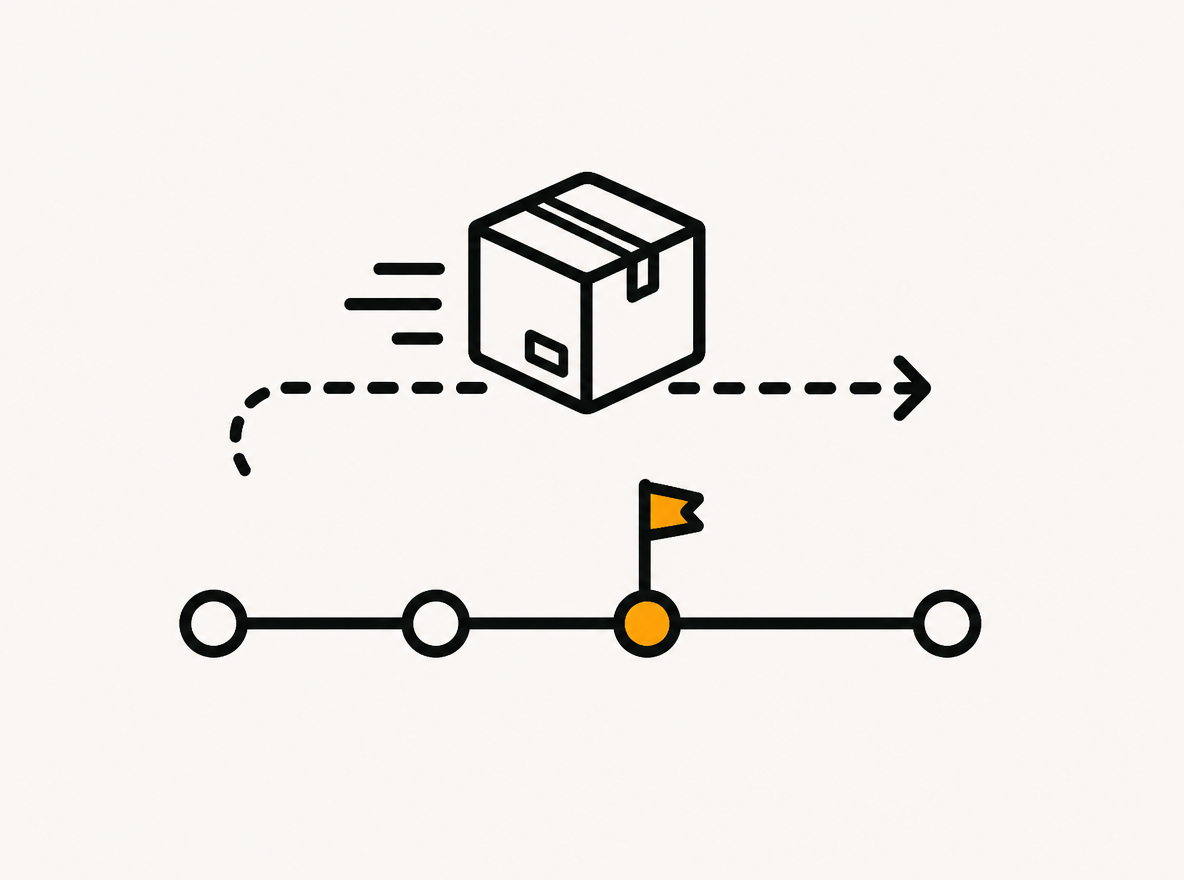
A parcel route with a warning flag marking a delivery exception.
Exceptions get caught by your tools before your customers find them

Good tools turn that raw data into action. Proactive alerts tell you the moment an exception happens instead of a customer finding it first. A branded tracking page lets buyers self-serve, which is the cheapest customer service your business will ever buy. And an exception workflow gives you a standard move for each problem: reship, refund, or hold, decided by rules instead of by whoever answers the inbox that day. The goal is that a buyer should never need to open a ticket to learn where their parcel is.

Finance: Getting the Money Right

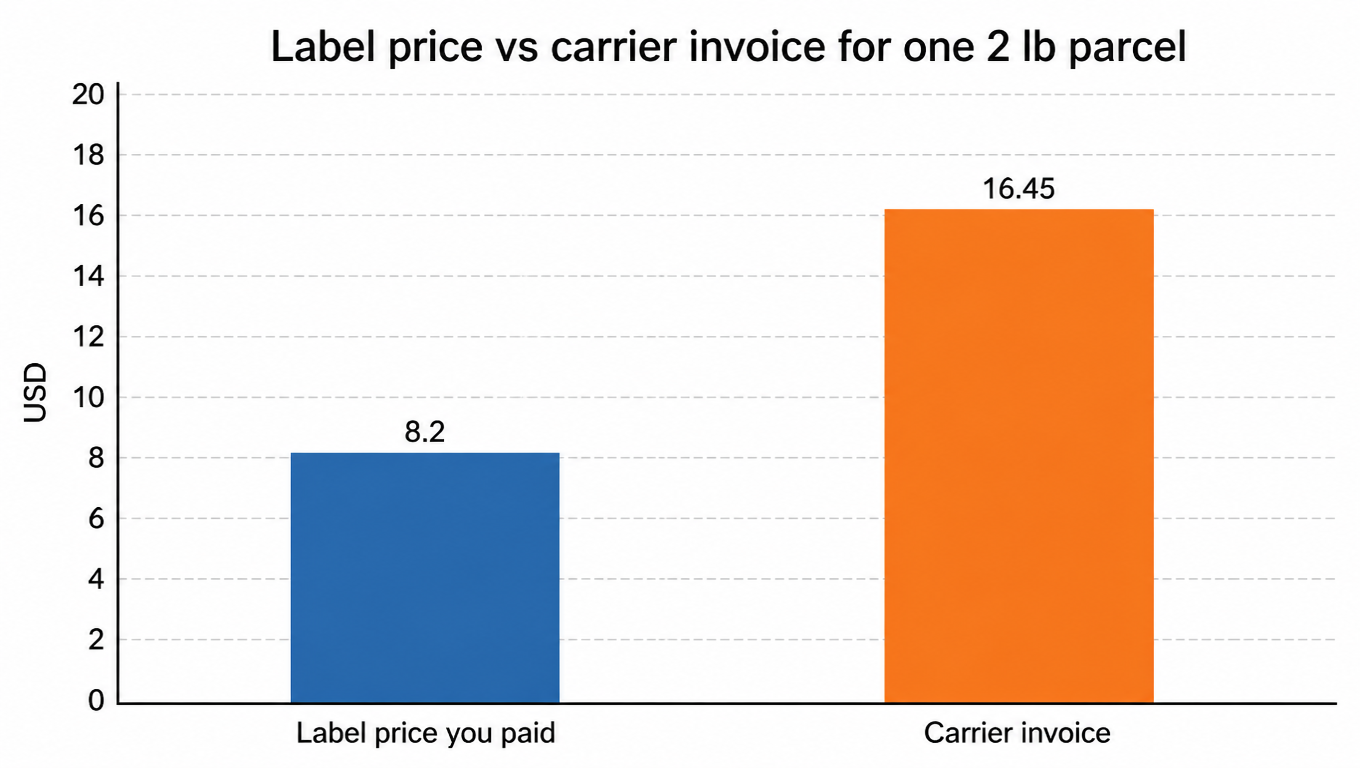
The last dimension is the one nobody enjoys and the one where the most money quietly disappears: finance. The gap is between what you paid when you bought the label and what the carrier actually bills you at the end of the month. In the worst cases, a parcel you paid $8.20 for shows up on the invoice at $16.45, and the difference is not a rounding error, it is a stack of surcharges and adjustments.

Label price vs carrier invoice for one 2 lb parcel: 8.20 paid, 16.45 billed
An $8.25 gap on one parcel, more than the entire margin on many orders

Take a concrete example: a 2 lb parcel that you quote at $8.20. The invoice may add a residential surcharge of $4.90, a fuel surcharge of $1.05, and a DIM adjustment of $2.30[^8] because the box was large enough that the carrier billed by dimensional weight instead of actual weight[^4]. That is a $8.25 gap on one parcel, which is more than the entire margin on many orders. The fix is not to complain, it is to catch it: re-box oversized SKUs, use the correct zone in your quotes, and reconcile the invoice.

Reconciliation is the discipline of matching carrier invoices against the orders you actually shipped, every month. Without it, surcharges, address corrections, and billing errors become permanent overhead that you never see. Modern shipping platforms do much of this for you: analytics show cost per parcel by carrier and by SKU, and automated refund claims chase the money carriers owe you for late deliveries and missed service guarantees, which most small sellers never file[^9].

Turn ecommerce shipping into a cross-team policy

An executable ecommerce shipping solution connects checkout promises, warehouse routing, risk protection, tracking communication, returns handling, and financial reconciliation. Every team should use the same order and shipment identifiers and be able to see why a service was selected, what the buyer was promised, and what the shipment ultimately cost.

Policy moduleWhat must be definedHow to validate
Checkout and routingDelivery promise, free-shipping threshold, eligibility, and fallbackMatch the promise to the purchased service
Protection and evidenceWhen to add protection, signature, photos, or manual reviewReview by order risk and claim outcome
Tracking and exceptionsNotification events, escalation windows, and refund or reship ownershipReview tickets, repeat contacts, and successful-delivery outcomes
Returns and financeReturn eligibility, label ownership, receiving action, and charge ownershipKeep order, return, and final invoice linked

When marketplace orders include prepaid labels, separate orders that must use the marketplace path, orders that permit independent label purchase, and ownership after an exception. Use the marketplace prepaid label operations guide to establish channel-level rules instead of forcing every marketplace through one label workflow.

Conclusion: Building Your Shipping Stack

Putting it together is a six-step sequence. Audit your current shipping costs first, because you cannot improve a number you have not measured. Fix your carrier mix based on your package profile and zones. Pick a shipping software with real discounted rates and automation. Decide your fulfillment mode, which for most sellers is a hybrid. Configure three or four routing rules and let data refine them. Then watch finance: reconcile every month and let the refunds and re-boxing decisions flow back into the earlier steps.

Run that stack for a quarter before you change anything else. Shipping is a compounding game: a few percent saved on labels, a few hours a week saved on labor, a few tickets saved on tracking, and a few dollars saved on billing errors add up to real margin, and they scale with volume without adding headcount. The right setup is not the fanciest one, it is the one that makes each of these seven decisions automatic enough that you can spend your time selling instead of shipping.

FAQ

There is no single answer, because carriers win on different weights and distances. The rule of thumb: under 1 lb, USPS is usually cheapest; over 10 lb or bulky, UPS and FedEx ground pull ahead; close zones can go regional. The real saving is not picking one carrier but setting a few routing rules in your shipping software so every parcel is assigned to the right network automatically.
A rough crossover sits around 50 to 100 orders a day: below it self-fulfillment is usually fine and cheapest, above it labor starts eating margin. Compare the full number: a 3PL at $3 to $6 per order plus storage sounds expensive until you add up your own time, packaging, and warehouse overhead. For most sellers the crossover lands well below the volume they expected, and a hybrid (fast movers in FBA, long tail in a 3PL) is often the safest middle path.
Routing rules examine each shipment and pick the carrier by weight, zone, and the speed you promised at checkout. A classic starter set: under 1 lb goes USPS, over 10 lb or bulky goes UPS or FedEx ground, close zones go regional. Start with three or four rules, run them for a month, and let real data refine them instead of over-engineering on day one.
The label price usually covers the base rate; the invoice adds residential surcharges, fuel, DIM adjustments, and address corrections on top. In the article's example, a 2 lb parcel quoted at $8.20 can hit the invoice at $16.45. The fix is monthly reconciliation: match the invoice against the orders you actually shipped, re-box oversized SKUs, confirm your quote zones, and file the refunds carriers owe for late deliveries.
Compare rates first: built-in options (Shopify Shipping, Amazon Buy Shipping) are convenient but lightly discounted, while dedicated platforms (ShipStation, Shippo, Pirate Ship, EasyshippingX) pass through volume discounts that are usually a small seller's single biggest saving. Then look at batch printing, automation rules (auto-routing by weight and zone), branded tracking pages, returns workflows, and native integrations for the channels where you actually sell. Hand-typing orders past a few hundred a day is the signal to upgrade.