US warehouse postage

How Much Postage Should a 3PL Prepay? A Funding Worksheet for Batch Shipping Labels

At 2:30 on Friday afternoon, the warehouse has $4,100 available for postage and a $1,500 transfer pending. In this fictional US shift, Friday and Saturday are funded. Monday at 7:00 a.m. is the first run that comes up short. Without new funds, the $400 reserve leaves enough for 100 of 240 labels. At least $700 must become usable before purchase. The pending transfer covers it if it posts in time.

Friday’s opening balance and the next three purchases, in US dollars and Los Angeles time
CheckpointPostage decision
Fri, Dec 4 · 2:30 p.m.$4,100 available. Count $0 of the pending $1,500 until the account makes it available.
Fri, Dec 4 · 3:00 p.m.300 × $4 = $1,200. All 300 fit. After purchase, $2,900 remains.
Sat, Dec 5 · 10:00 a.m.400 × $5 = $2,000. All 400 fit. After purchase, $900 remains.
Mon, Dec 7 · 7:00 a.m.240 × $5 = $1,200. If funding is late, all 240 would leave a projected −$300. With no reserve, buy 180 and hold 60. With a $400 reserve, buy 100 and hold 140. The reserve-inclusive gap is $700.

If funding is late, spending all $900 would cover 180 labels and leave 60 waiting. Keeping $400 in reserve leaves $500 spendable, enough for 100 labels. Hold the other 140. In the on-time case the $1,200 remaining after purchase is $800 above the reserve.

For this plan, the weekend needs $4,400 in postage and a $400 closing reserve. That is $4,800 of purchasing power by the relevant cutoffs. The operator starts with $4,100, so the minimum additional amount that must be available by Monday’s purchase is $700. The planned $1,500 would cover it. Its arrival time determines whether it helps this batch. The $700 is a funding requirement in the example, not an instruction to initiate another payment while one is already pending.

All times below are local to the fictional warehouse, America/Los_Angeles, in December 2026. The operating reserve and flat costs are examples, not platform requirements or carrier quotes. No other purchases, fees, adjustments or usable credits occur in the worked schedule. In a real shift, use the debit for the latest service, package and account, including any add-ons drawn from the same balance.

Open the funding worksheet · Recover an interrupted batch

A worker groups clipped batch cards beside a thermal label printer and staged parcels at the packing bench.
At Friday handoff, list the weekend’s label runs and check the postage available to fund them.

What happens to the balance at each purchase?

At 2:30 p.m. on Friday, December 4, record the available amount from the label account itself. Write $4,100 in the opening balance cell. Put the $1,500 in the pending-funding column with its reference, current status and a named finance contact. It is one transfer with two possible arrival times. Carry the reference forward so that a Friday request, a Monday bank update and the eventual wallet entry cannot be mistaken for three separate deposits.

Friday’s 300 purchases leave $2,900 after the afternoon wave. Reconcile those purchases before bringing the figure into Saturday’s opening. Saturday’s 400 purchases leave $900. That becomes Monday’s starting point only if no other activity hits the same account between checks. Ask anyone scheduled to buy a separate weekend wave whether their labels use this wallet, too.

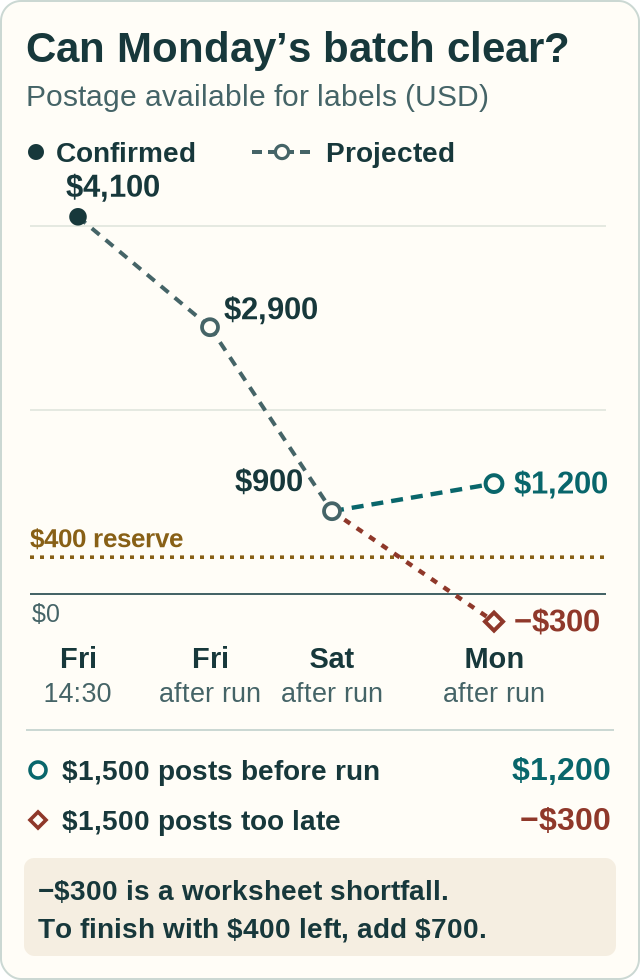
Friday at 14:30, $4,100 is confirmed available. Dashed projections show $2,900 after Friday’s run and $900 after Saturday’s. If $1,500 posts before Monday’s run, $1,200 remains. If late, the worksheet shows a $300 shortfall. Closing with a $400 reserve requires $700 more.
Only Friday’s $4,100 was confirmed at 2:30 p.m. If the $1,500 misses Monday’s run, the batch needs another $700 to finish with $400 left.

What changes if the transfer posts at 6:30 a.m. or at 9:00 a.m.?

In the on-time scenario, the top-up appears as available at 6:30 a.m. Monday. At the 6:45 a.m. pre-batch check, the lead can verify $2,400. At 7:00 a.m., the projected purchase of $1,200 leaves $1,200. Set aside the $400 reserve and the operating margin after the complete batch is $800. The extra margin belongs to the shared account. It does not enlarge either owner’s allocation unless someone responsible for that account assigns it.

In the late scenario, the same transfer becomes available at 9:00 a.m. At 6:45 the lead sees $900 and no posted funding. If that is still true at 7:00, subtracting the whole $1,200 produces −$300 in the forecast. This is a warning that the proposed purchase exceeds available funds. It is not an actual negative wallet, a line of credit or proof that a platform will sell any labels. Relative to a $400 reserve the shortfall is $700, since $1,200 for labels plus $400 to retain requires $1,600 at purchase.

The choice of reserve matters even before dealing with a provider. If the lead were authorized to spend the full $900, 180 labels would fit and 60 would remain. Under the actual reserve instruction only 100 fit and 140 remain. Those counts assume exactly $5 per label and that the operator can select a smaller group for purchase. They do not describe how a platform handles an oversized batch. If the workflow requires one purchase for the entire group, hold it or split it through an authorized workflow before submitting anything.

A 6:45 snapshot is an early check. If the transfer becomes available at 6:55, refresh the wallet and recalculate for the 7:00 purchase. If it posts at 9:00, it can fund subsequent authorized purchases. It cannot make the earlier batch fully funded at 7:00. Conversely, if another station buys labels at 6:57, that debit belongs in the 7:00 calculation. Record the time you last refreshed the balance, especially when the pickup crew has already started asking which cartons are ready.

Which number belongs on the handoff?

Write the next purchase, the available balance and the amount which must remain afterward on the same line. “Monday needs $1,200” is a useful demand estimate but leaves the next shift to discover the $400 reserve. “$1,600 required immediately before this purchase, $900 available at the check, finance verifying one $1,500 transfer” tells the lead exactly why the full wave is on hold. When a top-up posts, replace the pending entry with its posted evidence rather than adding a second deposit to the forecast.

How should finance set a trigger and a reload amount?

The trigger is the balance level that prompts a funding action. The reload amount is how much that action requests. The reserve is what this warehouse intends to keep available after authorized purchases. These are three separate decisions. Choosing $400 as the trigger because the operation wants $400 left at the end could leave a large wave with no time to fund. Choosing a large reload can still leave Monday short if the account cannot use it until 9:00.

To size a trigger, work from the moment someone or something detects the balance falling. List the purchases that could come due before the next reliable posting, including any large wave that can buy in one step. Add the amount that needs to stay available. For the projected Monday wave alone, that gives $1,600 before purchase. Earlier in the weekend, there are Friday and Saturday waves to cover too. A daily average loses the very information this warehouse needs: $2,000 is due in one Saturday run.

Size the reload from the balance you expect at the next purchase and the funding horizon you want it to cover. Include only other deposits which will in fact be available by that time. Then check whether the chosen amount, the payment method and any account-specific restrictions allow that funding action. Keep two columns for planned and posted funding. Accounting approval, a transfer initiated from a bank, and the platform balance becoming spendable are events with different timestamps. In this guide only the last changes the available balance. If a payment fee applies, check whether it is collected separately or reduces the amount posted. Forecast the net funds that become spendable. Before switching methods, check the pending payment and who can approve another request so the same funding need is not paid twice.

What if the parcel count stays the same but the packaging changes?

Take a separate promotion with 200 parcels a day. For a normal light-parcel run, 200 labels at an assumed $4 cost $800. On promotion day, 120 still cost $4, while 80 with a larger gift box now cost $7. The new total is $480 + $560 = $1,040. Using the old average underfunds one day by $240, or two days with the same mix by $480. These illustrative rates belong to the promotion example. They do not change the Friday-to-Monday ledger.

Group the forecast by wallet, warehouse, brand, purchase time and packed weight band. Update the affected band with sealed dimensions, weight and the selected service price. If you have several service quotes for a parcel, include only the one you intend to buy. Price the actual release list in priority order. When its labels have different prices, dividing the available cash by the overall average gives an estimate and may overstate how many heavy cartons can leave first.

What do EasyPost, Pirate Ship and ShipStation actually fund?

EasyPost. Its wallet pays for labels bought through EasyPost Wallet Carrier Accounts and certain add-ons. The dashboard separates the amount to load from the balance that triggers it. Its US support guide describes bank funding as taking three to five business days, and distinguishes card funding. EasyPost also documents restrictions on new ACH attempts while another from the same method is pending. Check the actual payment status before initiating another load. Neither the example’s Friday request nor its Monday posting is an EasyPost timing promise. Wallet Auto-Reload Preferences, EasyPost Wallet Setup and EasyPost pending ACH recharges, checked November 28, 2026.

Pirate Ship. Sufficient credit in the account balance pays for the label. A shipper can also pay as it buys postage. Pirate Ship’s Default Payment Amount controls how much is added when the balance is insufficient and a payment is needed. Distinguish this from a scheduled Monday deposit or a configurable low-water alert on another platform. For bank payments, the help center describes pending, paid and failed states and says a failed payment can reverse in the account balance. Use the actual available amount and keep the pending payment visible for reconciliation. Pirate Ship account credit and Pay by bank through Plaid, checked November 28, 2026.

ShipStation. ShipStation Carrier labels draw on the ShipStation Balance. Its auto-funding check operates at label purchase when the balance falls below the configured threshold. The account can specify the funding amount and the maximum number of automatic funding events per day. An independently billed carrier account can follow a different billing path. Verify which account is selected for the actual label and whether funding remains available for the shift. The example’s 240-label run does not establish any ShipStation purchase or funding limit. Fund a ShipStation Balance and US carrier account billing, checked November 28, 2026.

Who needs to see the alert on a weekend?

Give finance the local purchase time and the corresponding date and time in its own working timezone. For this December schedule, Monday at 6:45 a.m. in Los Angeles is Monday at 10:45 p.m. in Beijing. If the warehouse moves the actual purchase to 6:40 a.m., the funding cutoff moves too. A message scheduled for 6:45 would come too late for authorization. Agree who can inspect the actual balance on Saturday and who can authorize a smaller release or another permitted funding method. A notice delivered to a weekday billing inbox cannot approve Monday’s first run while that person is asleep. At Friday close, send the next two batch times, current balance, transfer reference, latest posting evidence and the name covering the 6:45 check. The warehouse lead needs a decision before purchasing, even if the finance team reconciles bank settlement later.

Can two brands use the same $900 balance?

Suppose a 3PL has Brand A and Brand B waiting on the late-funding Monday. Both purchase labels from one platform wallet. The account shows $900 to either operator who opens it. The balance is shared even if A’s orders have their own client code and B’s labels print at another station. Keep one wallet ledger and a separate owner allocation. Adding the balance displayed at each workstation would turn $900 of real money into $1,800 on the whiteboard.

Hold the $400 reserve once at the wallet level. The lead now has $500 to distribute. For illustration, authorize $300 for A and $200 for B. At exactly $5 per label, A can buy 60 and B can buy 40. Together that is 100 labels and $400 left. This is one possible allocation, not a promise to either customer or a feature attributed to a shipping platform. Choose a split based on the 3PL’s commitments, available parcels and approval rules. A payment expected from Brand B later today cannot enlarge its allocation now.

Record the authorizer, the cutoff and which group of orders each release covers. One operator might notice that A only needs 50 of its planned 60 labels. That leaves $50 of its authorized amount unspent. Before B uses it, reconcile what A actually purchased and have the lead reassign the unused amount. A notification that A’s printer has stopped cannot release those dollars. The account may already have purchased the labels and the operator may only be waiting to print them.

Which orders stay outside this wallet calculation?

Follow the charge to its billing source. A brand can supply its own already purchased label. Another shipment might use an authorized carrier account invoiced directly to the brand. If the label’s postage will never debit the shared wallet, leave that postage out of the $500 allowance calculation. Keep the order in the warehouse workload and in the correct owner’s reconciliation. Any separate fee that really does hit the shared account still belongs in its funding forecast. The three scheduled batches above already consist of wallet-funded labels, so excluding other work does not reduce their $4,400.

Also separate money owed to the warehouse from money available for labels. Finance may have issued A an invoice, received B’s remittance advice or agreed that a client can reimburse a particular charge. Those facts help collect and allocate costs. They do not prove cash is usable in the label account. Record the evidence for each in its proper ledger and link it with an owner reference. A shift lead can then distinguish an unpaid client invoice from a funding constraint that threatens the next carrier collection.

Choose the reserve to cover uncertainty you can explain. Review recent differences between estimates and actual label debits or adjustments charged to this wallet. Put known amounts with known dates into the forecast directly. Leave the reserve for remaining variation, and record who may approve a change. Counting the same known adjustment as both scheduled spend and extra reserve would overstate the cash requirement.

Use one person or coordinated queue to release competing purchases against the pool. Two leads can each make a correct calculation on an earlier balance and together authorize too much. Put an allocation against a named batch before the operators buy, refresh the available balance at purchase, and retire the allocation against actual transaction IDs afterward. If a station pauses midway, leave its unresolved orders attached to the original release until the purchasing outcome is known.

The batch stopped halfway through. Which orders can be bought again?

Imagine the late-funding scenario took a worse turn. A 240-order request was submitted before the team enforced its $500 spend limit. The purchase interface stopped returning results. The printer ejects part of the stack. A packer reaches for the original Excel file to upload it again. Ask for the original batch’s purchase results before anyone clicks “buy.” First stop automatic retries and mark this batch under review so the next shift or a second workstation does not repeat it. Save the submission time, order list, shipment references, account, any returned IDs and the last complete response. Keep other jobs from consuming the same unassigned funds while you establish what happened.

Some providers reject a whole batch. Others may expose a result per shipment, and some workflows report completion later. The following is a fictional response pattern across 240 individual orders. It does not describe how EasyPost, Pirate Ship or ShipStation must handle an insufficient balance. An interruption at the printer, in the browser or in a warehouse integration can look similar to the person waiting for labels, although the purchase records can be quite different.

The first reliable result after interruption
StatusCountEvidence and action
Purchase confirmed90Valid purchases matched to the original orders, $450 documented at $5 each. Retrieve the existing labels. Do not buy them again.
Purchase definitively failed10A final failure and the purchase records confirm no usable label was bought. Hold for funding and check the underlying error before retry.
Outcome unknown140No definitive result yet. Add no assumed debit or credit for these lines. Exclude them from retries while checking what the provider actually purchased.
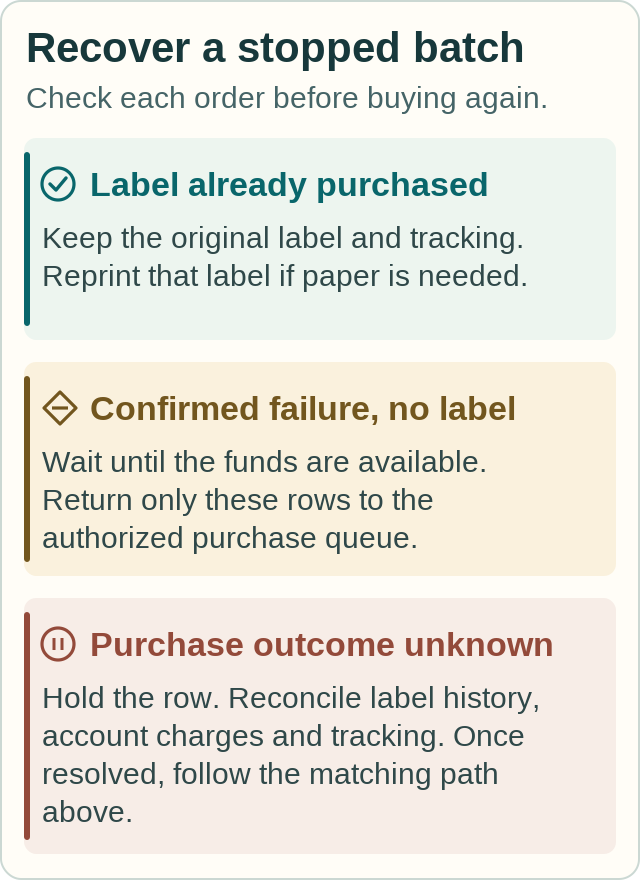
Check each order. If a label was purchased, use or reprint that same label. For confirmed failures with no label, wait for funds to post before returning those rows to the authorized purchase queue. If the outcome is unknown, hold the row and reconcile label history, charges and tracking first.
Reprint an existing label if needed. Requeue confirmed failures after funds are available. Check the original purchase on unresolved rows first.

The 90, 10 and 140 account for the full order list. The only documented label spend at this stage is $450. The unknown lines carry an unresolved exposure. A blank transaction cell means “not known,” not a confirmed $0 charge. Do not promise that the difference between the last wallet reading and the reserve is free to spend. Check the live balance, any holds, current purchase transactions and the order results together. A delayed confirmation may use the rest of the authorized amount.

How do the 140 unknown outcomes get resolved?

Search first by the original shipment, order-line or purchase request reference on the same label account. Check platform shipment history, label retrieval, batch detail and financial records appropriate to that account. Match any purchase or tracking reference back to the exact parcel. A PDF can be lost locally after a successful purchase. Conversely, an internal order advanced to “ready to ship” does not prove a valid label exists. If the platform still shows processing or the available evidence conflicts, keep the status unknown and give support a specific reference to trace.

In this example the subsequent provider checks establish that 10 of those 140 unknowns succeeded and 130 were never purchased. Keep the earlier 90 successes and add those 10, for 100 valid purchases totaling $500. At $900 opening availability, with no other movements, that leaves $400. The 10 original definitive failures and the 130 newly confirmed unpurchased orders make 140 eligible for retry after funding. Those 140 are a different set from the 140 initially unknown: ten originally unknown join the successes, and ten original failures join the retry list.

Preserve the evidence used for that split. Attach the existing labels to the 100 successful orders and reprint from the original records if needed. For each of the 140 others, verify that its shipment details are still current, any rejection cause has been addressed, and that no second order or replacement has been created. Releasing a retry changes an order’s purchase history. Retain both the reason for the retry and the new purchase reference, so a later settlement or billing adjustment can still be traced to the correct parcel.

What can the lead release when the pending payment posts?

At 9:00 a.m., if the $1,500 actually posts in the late scenario, the available balance increases from $400 to $1,900. Refresh the cost for the 140 confirmed unpurchased labels. At the example rate of $5 each, they now need $700. Spending $700 from $1,900 leaves $1,200, including the $400 reserve. Release only that verified retry list. If funding fails or a service or package has changed, update the approved scope before making the next purchase.

Give the packing team a clear distinction between labels to retrieve and purchases to retry. A missing printout on a successfully purchased order usually calls for another copy of the existing label for that parcel. If two different valid labels were actually bought for one parcel, identify the one physically attached and handle the other under the provider’s unused-label rules. A void or refund request does not add usable money until its credit is actually reflected in the relevant account. See the guide to unused and voided shipping labels.

What should the next shift put in the funding worksheet?

Start with the wallet, currency, opening available balance and the time it was checked. Use one line for each planned purchase by account and local timestamp. Record the eligible order count, forecast debit per label, batch total, protected reserve and owner allocations where applicable. Give pending funding its own entry, amount, payment reference, expected time and actual available time. A checkmark for “finance sent it” leaves the next shift unable to choose between Monday’s two scenarios.

Download the bilingual Excel funding planner (.xlsx) · Download the English formula template (.tsv)

B4–B7 hold the opening timestamp, usable opening balance, internal buffer and recheck time. In rows 11–14, B is an expected amount, C is confirmed net credit, and D/E are its usable times in the two cases. Leave an unconfirmed time blank. In batch rows 18–23, E replaces C × D with the complete batch quote. Enter the client group in H and its release owner in I. Each forecast carries the same batch ID and shows the buffer in J.

At each cutoff, add eligible net credits to the opening balance and subtract earlier planned batch costs. Subtract the requested batch once. The buffer gap is MAX(0, buffer − projected balance). For batches in the same minute, enter the actual release order. Each later row deducts earlier rows at that time. Count a same-minute credit only if it was already visible before purchase.

Illustrative USD forecast
Case06:45 recheck07:00 requested costAfter full purchaseGap to preserve $400
A · $1,500 usable at 06:30$2,400$1,200$1,200$0
B · $1,500 usable at 09:00 or still unconfirmed$900$1,200−$300$700

The −$300 is a forecast for buying all 240 labels. The late deposit cannot fund the earlier attempt.

Copy the complete formula template into Excel

Paste the full tab-separated block into A1 of an empty worksheet. All times are local to Los Angeles. If dates display as serial numbers, apply yyyy-mm-dd hh:mm to the timestamp cells.

Postage funding before label purchase									
Fictional USD example. Yellow cells are editable. All timestamps use the account’s local time, America/Los_Angeles.									
									
Opening balance timestamp	2026-12-04 14:30	Enter the usable account balance as of this time. Include cash already posted by this instant only once.							
Usable opening balance (USD)	4100	Starting funds available for label purchases. Pending transfers and available credit limits stay separate.							
Internal cash buffer (USD)	400	Internal operating policy. This amount stays in the account after a batch.							
Recheck before purchase	2026-12-07 06:45	Compare this forecast with the live available balance and receipt evidence at the recheck.							
									
Funding receipts									
Receipt reference	Expected gross (USD)	Confirmed net (USD)	Usable time A · timely	Usable time B · late	Receipt evidence				
T1	1500	1500	2026-12-07 06:30	2026-12-07 09:00	Scenario assumption; replace with the actual posting record.				


Only the confirmed net amount with a usable timestamp counts. Pending in either case? Leave that timestamp blank.									
Planned label batches									
Batch ID / shift	Purchase timestamp	Label count	Est. all-in cost per label (USD)	Full batch quote (optional USD)	Planned batch cost (USD)	Input check	Client / client group	Release owner	
FRI-01 · Friday	2026-12-04 15:00	300	4		=IF(COUNTA(A18:E18)=0,"",IF(E18<>"",IF(AND(ISNUMBER(E18),E18>=0),ROUND(E18,2),""),IF(COUNT(C18:D18)<>2,"",IF(AND(C18>=0,INT(C18)=C18,D18>=0),ROUND(C18*D18,2),""))))	=IF(COUNTA(A18:E18)=0,"",IF(NOT(ISNUMBER(B18)),"Check timestamp",IF(AND(A18<>"",ISNUMBER(F18)),"","Check batch data")))	Client group A	Friday shipping lead	
SAT-01 · Saturday	2026-12-05 10:00	400	5		=IF(COUNTA(A19:E19)=0,"",IF(E19<>"",IF(AND(ISNUMBER(E19),E19>=0),ROUND(E19,2),""),IF(COUNT(C19:D19)<>2,"",IF(AND(C19>=0,INT(C19)=C19,D19>=0),ROUND(C19*D19,2),""))))	=IF(COUNTA(A19:E19)=0,"",IF(NOT(ISNUMBER(B19)),"Check timestamp",IF(AND(A19<>"",ISNUMBER(F19)),"","Check batch data")))	Client group B	Saturday duty lead	
MON-01 · Monday	2026-12-07 07:00	240	5		=IF(COUNTA(A20:E20)=0,"",IF(E20<>"",IF(AND(ISNUMBER(E20),E20>=0),ROUND(E20,2),""),IF(COUNT(C20:D20)<>2,"",IF(AND(C20>=0,INT(C20)=C20,D20>=0),ROUND(C20*D20,2),""))))	=IF(COUNTA(A20:E20)=0,"",IF(NOT(ISNUMBER(B20)),"Check timestamp",IF(AND(A20<>"",ISNUMBER(F20)),"","Check batch data")))	Client groups A and B	Monday outbound lead	
					=IF(COUNTA(A21:E21)=0,"",IF(E21<>"",IF(AND(ISNUMBER(E21),E21>=0),ROUND(E21,2),""),IF(COUNT(C21:D21)<>2,"",IF(AND(C21>=0,INT(C21)=C21,D21>=0),ROUND(C21*D21,2),""))))	=IF(COUNTA(A21:E21)=0,"",IF(NOT(ISNUMBER(B21)),"Check timestamp",IF(AND(A21<>"",ISNUMBER(F21)),"","Check batch data")))			
					=IF(COUNTA(A22:E22)=0,"",IF(E22<>"",IF(AND(ISNUMBER(E22),E22>=0),ROUND(E22,2),""),IF(COUNT(C22:D22)<>2,"",IF(AND(C22>=0,INT(C22)=C22,D22>=0),ROUND(C22*D22,2),""))))	=IF(COUNTA(A22:E22)=0,"",IF(NOT(ISNUMBER(B22)),"Check timestamp",IF(AND(A22<>"",ISNUMBER(F22)),"","Check batch data")))			
					=IF(COUNTA(A23:E23)=0,"",IF(E23<>"",IF(AND(ISNUMBER(E23),E23>=0),ROUND(E23,2),""),IF(COUNT(C23:D23)<>2,"",IF(AND(C23>=0,INT(C23)=C23,D23>=0),ROUND(C23*D23,2),""))))	=IF(COUNTA(A23:E23)=0,"",IF(NOT(ISNUMBER(B23)),"Check timestamp",IF(AND(A23<>"",ISNUMBER(F23)),"","Check batch data")))			
A complete batch quote replaces count × estimate. For several confirmed records, enter their sum once as the batch quote.									
Balance at the recheck									
Checkpoint	Local timestamp	Receipts A (USD)	Receipts B (USD)	Prior planned spend (USD)	Usable forecast A (USD)	Usable forecast B (USD)			
Pre-purchase recheck	=IF(ISNUMBER($B$7),$B$7,"")	=IF(AND(AND(ISNUMBER($B$4),ISNUMBER($B$5),$B$5>=0),ISNUMBER(B27),B27>=$B$4),SUMIFS($C$11:$C$14,$D$11:$D$14,">"&$B$4,$D$11:$D$14,"<="&B27,$C$11:$C$14,">0"),"")	=IF(AND(AND(ISNUMBER($B$4),ISNUMBER($B$5),$B$5>=0),ISNUMBER(B27),B27>=$B$4),SUMIFS($C$11:$C$14,$E$11:$E$14,">"&$B$4,$E$11:$E$14,"<="&B27,$C$11:$C$14,">0"),"")	=IF(AND(AND(AND(ISNUMBER($B$4),ISNUMBER($B$5),$B$5>=0),ISNUMBER(B27),B27>=$B$4),AND(COUNTIF($G$18:$G$23,"Check timestamp")=0,COUNTIFS($G$18:$G$23,"Check batch data",$B$18:$B$23,">"&$B$4,$B$18:$B$23,"<"&B27)=0)),SUMIFS($F$18:$F$23,$B$18:$B$23,">"&$B$4,$B$18:$B$23,"<"&B27),"")	=IF(COUNT(C27,E27)<>2,"",ROUND($B$5+C27-E27,2))	=IF(COUNT(D27,E27)<>2,"",ROUND($B$5+D27-E27,2))			
									
Posting scenario A									
Batch ID / shift	Purchase timestamp	Requested spend (USD)	Receipts to date (USD)	Before batch (USD)	After full batch (USD)	Postage gap (USD)	Gap incl. buffer (USD)	Headroom vs. buffer (USD)	Internal buffer (USD)
=IF(A18="","",A18)	=IF(OR(A18="",NOT(ISNUMBER(B18))),"",B18)	=IF(OR(A18="",NOT(ISNUMBER(F18))),"",F18)	=IF(AND(AND(AND(ISNUMBER($B$4),ISNUMBER($B$5),$B$5>=0),ISNUMBER(B31),B31>=$B$4),B31>$B$4,ISNUMBER(C31),AND(COUNTIF($G$18:$G$23,"Check timestamp")=0,COUNTIFS($G$18:$G$23,"Check batch data",$B$18:$B$23,">"&$B$4,$B$18:$B$23,"<"&B31)=0)),SUMIFS($C$11:$C$14,$D$11:$D$14,">"&$B$4,$D$11:$D$14,"<="&B31,$C$11:$C$14,">0"),"")	=IF(ISNUMBER(D31),ROUND($B$5+D31-SUMIFS($F$18:$F$23,$B$18:$B$23,">"&$B$4,$B$18:$B$23,"<"&B31),2),"")	=IF(ISNUMBER(E31),ROUND(E31-C31,2),"")	=IF(ISNUMBER(F31),MAX(0,-F31),"")	=IF(ISNUMBER(I31),MAX(0,-I31),"")	=IF(AND(ISNUMBER(F31),ISNUMBER(J31)),ROUND(F31-J31,2),"")	=IF(AND(A31<>"",ISNUMBER($B$6),$B$6>=0),$B$6,"")
=IF(A19="","",A19)	=IF(OR(A19="",NOT(ISNUMBER(B19))),"",B19)	=IF(OR(A19="",NOT(ISNUMBER(F19))),"",F19)	=IF(AND(AND(AND(ISNUMBER($B$4),ISNUMBER($B$5),$B$5>=0),ISNUMBER(B32),B32>=$B$4),B32>$B$4,ISNUMBER(C32),AND(COUNTIF($G$18:$G$23,"Check timestamp")=0,COUNTIFS($G$18:$G$23,"Check batch data",$B$18:$B$23,">"&$B$4,$B$18:$B$23,"<"&B32)=0),COUNTIFS($G$18:G18,"Check batch data",$B$18:B18,B32)=0),SUMIFS($C$11:$C$14,$D$11:$D$14,">"&$B$4,$D$11:$D$14,"<="&B32,$C$11:$C$14,">0"),"")	=IF(ISNUMBER(D32),ROUND($B$5+D32-SUMIFS($F$18:$F$23,$B$18:$B$23,">"&$B$4,$B$18:$B$23,"<"&B32)-SUMIFS($F$18:F18,$B$18:B18,B32),2),"")	=IF(ISNUMBER(E32),ROUND(E32-C32,2),"")	=IF(ISNUMBER(F32),MAX(0,-F32),"")	=IF(ISNUMBER(I32),MAX(0,-I32),"")	=IF(AND(ISNUMBER(F32),ISNUMBER(J32)),ROUND(F32-J32,2),"")	=IF(AND(A32<>"",ISNUMBER($B$6),$B$6>=0),$B$6,"")
=IF(A20="","",A20)	=IF(OR(A20="",NOT(ISNUMBER(B20))),"",B20)	=IF(OR(A20="",NOT(ISNUMBER(F20))),"",F20)	=IF(AND(AND(AND(ISNUMBER($B$4),ISNUMBER($B$5),$B$5>=0),ISNUMBER(B33),B33>=$B$4),B33>$B$4,ISNUMBER(C33),AND(COUNTIF($G$18:$G$23,"Check timestamp")=0,COUNTIFS($G$18:$G$23,"Check batch data",$B$18:$B$23,">"&$B$4,$B$18:$B$23,"<"&B33)=0),COUNTIFS($G$18:G19,"Check batch data",$B$18:B19,B33)=0),SUMIFS($C$11:$C$14,$D$11:$D$14,">"&$B$4,$D$11:$D$14,"<="&B33,$C$11:$C$14,">0"),"")	=IF(ISNUMBER(D33),ROUND($B$5+D33-SUMIFS($F$18:$F$23,$B$18:$B$23,">"&$B$4,$B$18:$B$23,"<"&B33)-SUMIFS($F$18:F19,$B$18:B19,B33),2),"")	=IF(ISNUMBER(E33),ROUND(E33-C33,2),"")	=IF(ISNUMBER(F33),MAX(0,-F33),"")	=IF(ISNUMBER(I33),MAX(0,-I33),"")	=IF(AND(ISNUMBER(F33),ISNUMBER(J33)),ROUND(F33-J33,2),"")	=IF(AND(A33<>"",ISNUMBER($B$6),$B$6>=0),$B$6,"")
=IF(A21="","",A21)	=IF(OR(A21="",NOT(ISNUMBER(B21))),"",B21)	=IF(OR(A21="",NOT(ISNUMBER(F21))),"",F21)	=IF(AND(AND(AND(ISNUMBER($B$4),ISNUMBER($B$5),$B$5>=0),ISNUMBER(B34),B34>=$B$4),B34>$B$4,ISNUMBER(C34),AND(COUNTIF($G$18:$G$23,"Check timestamp")=0,COUNTIFS($G$18:$G$23,"Check batch data",$B$18:$B$23,">"&$B$4,$B$18:$B$23,"<"&B34)=0),COUNTIFS($G$18:G20,"Check batch data",$B$18:B20,B34)=0),SUMIFS($C$11:$C$14,$D$11:$D$14,">"&$B$4,$D$11:$D$14,"<="&B34,$C$11:$C$14,">0"),"")	=IF(ISNUMBER(D34),ROUND($B$5+D34-SUMIFS($F$18:$F$23,$B$18:$B$23,">"&$B$4,$B$18:$B$23,"<"&B34)-SUMIFS($F$18:F20,$B$18:B20,B34),2),"")	=IF(ISNUMBER(E34),ROUND(E34-C34,2),"")	=IF(ISNUMBER(F34),MAX(0,-F34),"")	=IF(ISNUMBER(I34),MAX(0,-I34),"")	=IF(AND(ISNUMBER(F34),ISNUMBER(J34)),ROUND(F34-J34,2),"")	=IF(AND(A34<>"",ISNUMBER($B$6),$B$6>=0),$B$6,"")
=IF(A22="","",A22)	=IF(OR(A22="",NOT(ISNUMBER(B22))),"",B22)	=IF(OR(A22="",NOT(ISNUMBER(F22))),"",F22)	=IF(AND(AND(AND(ISNUMBER($B$4),ISNUMBER($B$5),$B$5>=0),ISNUMBER(B35),B35>=$B$4),B35>$B$4,ISNUMBER(C35),AND(COUNTIF($G$18:$G$23,"Check timestamp")=0,COUNTIFS($G$18:$G$23,"Check batch data",$B$18:$B$23,">"&$B$4,$B$18:$B$23,"<"&B35)=0),COUNTIFS($G$18:G21,"Check batch data",$B$18:B21,B35)=0),SUMIFS($C$11:$C$14,$D$11:$D$14,">"&$B$4,$D$11:$D$14,"<="&B35,$C$11:$C$14,">0"),"")	=IF(ISNUMBER(D35),ROUND($B$5+D35-SUMIFS($F$18:$F$23,$B$18:$B$23,">"&$B$4,$B$18:$B$23,"<"&B35)-SUMIFS($F$18:F21,$B$18:B21,B35),2),"")	=IF(ISNUMBER(E35),ROUND(E35-C35,2),"")	=IF(ISNUMBER(F35),MAX(0,-F35),"")	=IF(ISNUMBER(I35),MAX(0,-I35),"")	=IF(AND(ISNUMBER(F35),ISNUMBER(J35)),ROUND(F35-J35,2),"")	=IF(AND(A35<>"",ISNUMBER($B$6),$B$6>=0),$B$6,"")
=IF(A23="","",A23)	=IF(OR(A23="",NOT(ISNUMBER(B23))),"",B23)	=IF(OR(A23="",NOT(ISNUMBER(F23))),"",F23)	=IF(AND(AND(AND(ISNUMBER($B$4),ISNUMBER($B$5),$B$5>=0),ISNUMBER(B36),B36>=$B$4),B36>$B$4,ISNUMBER(C36),AND(COUNTIF($G$18:$G$23,"Check timestamp")=0,COUNTIFS($G$18:$G$23,"Check batch data",$B$18:$B$23,">"&$B$4,$B$18:$B$23,"<"&B36)=0),COUNTIFS($G$18:G22,"Check batch data",$B$18:B22,B36)=0),SUMIFS($C$11:$C$14,$D$11:$D$14,">"&$B$4,$D$11:$D$14,"<="&B36,$C$11:$C$14,">0"),"")	=IF(ISNUMBER(D36),ROUND($B$5+D36-SUMIFS($F$18:$F$23,$B$18:$B$23,">"&$B$4,$B$18:$B$23,"<"&B36)-SUMIFS($F$18:F22,$B$18:B22,B36),2),"")	=IF(ISNUMBER(E36),ROUND(E36-C36,2),"")	=IF(ISNUMBER(F36),MAX(0,-F36),"")	=IF(ISNUMBER(I36),MAX(0,-I36),"")	=IF(AND(ISNUMBER(F36),ISNUMBER(J36)),ROUND(F36-J36,2),"")	=IF(AND(A36<>"",ISNUMBER($B$6),$B$6>=0),$B$6,"")
									
Posting scenario B									
Batch ID / shift	Purchase timestamp	Requested spend (USD)	Receipts to date (USD)	Before batch (USD)	After full batch (USD)	Postage gap (USD)	Gap incl. buffer (USD)	Headroom vs. buffer (USD)	Internal buffer (USD)
=IF(A18="","",A18)	=IF(OR(A18="",NOT(ISNUMBER(B18))),"",B18)	=IF(OR(A18="",NOT(ISNUMBER(F18))),"",F18)	=IF(AND(AND(AND(ISNUMBER($B$4),ISNUMBER($B$5),$B$5>=0),ISNUMBER(B40),B40>=$B$4),B40>$B$4,ISNUMBER(C40),AND(COUNTIF($G$18:$G$23,"Check timestamp")=0,COUNTIFS($G$18:$G$23,"Check batch data",$B$18:$B$23,">"&$B$4,$B$18:$B$23,"<"&B40)=0)),SUMIFS($C$11:$C$14,$E$11:$E$14,">"&$B$4,$E$11:$E$14,"<="&B40,$C$11:$C$14,">0"),"")	=IF(ISNUMBER(D40),ROUND($B$5+D40-SUMIFS($F$18:$F$23,$B$18:$B$23,">"&$B$4,$B$18:$B$23,"<"&B40),2),"")	=IF(ISNUMBER(E40),ROUND(E40-C40,2),"")	=IF(ISNUMBER(F40),MAX(0,-F40),"")	=IF(ISNUMBER(I40),MAX(0,-I40),"")	=IF(AND(ISNUMBER(F40),ISNUMBER(J40)),ROUND(F40-J40,2),"")	=IF(AND(A40<>"",ISNUMBER($B$6),$B$6>=0),$B$6,"")
=IF(A19="","",A19)	=IF(OR(A19="",NOT(ISNUMBER(B19))),"",B19)	=IF(OR(A19="",NOT(ISNUMBER(F19))),"",F19)	=IF(AND(AND(AND(ISNUMBER($B$4),ISNUMBER($B$5),$B$5>=0),ISNUMBER(B41),B41>=$B$4),B41>$B$4,ISNUMBER(C41),AND(COUNTIF($G$18:$G$23,"Check timestamp")=0,COUNTIFS($G$18:$G$23,"Check batch data",$B$18:$B$23,">"&$B$4,$B$18:$B$23,"<"&B41)=0),COUNTIFS($G$18:G18,"Check batch data",$B$18:B18,B41)=0),SUMIFS($C$11:$C$14,$E$11:$E$14,">"&$B$4,$E$11:$E$14,"<="&B41,$C$11:$C$14,">0"),"")	=IF(ISNUMBER(D41),ROUND($B$5+D41-SUMIFS($F$18:$F$23,$B$18:$B$23,">"&$B$4,$B$18:$B$23,"<"&B41)-SUMIFS($F$18:F18,$B$18:B18,B41),2),"")	=IF(ISNUMBER(E41),ROUND(E41-C41,2),"")	=IF(ISNUMBER(F41),MAX(0,-F41),"")	=IF(ISNUMBER(I41),MAX(0,-I41),"")	=IF(AND(ISNUMBER(F41),ISNUMBER(J41)),ROUND(F41-J41,2),"")	=IF(AND(A41<>"",ISNUMBER($B$6),$B$6>=0),$B$6,"")
=IF(A20="","",A20)	=IF(OR(A20="",NOT(ISNUMBER(B20))),"",B20)	=IF(OR(A20="",NOT(ISNUMBER(F20))),"",F20)	=IF(AND(AND(AND(ISNUMBER($B$4),ISNUMBER($B$5),$B$5>=0),ISNUMBER(B42),B42>=$B$4),B42>$B$4,ISNUMBER(C42),AND(COUNTIF($G$18:$G$23,"Check timestamp")=0,COUNTIFS($G$18:$G$23,"Check batch data",$B$18:$B$23,">"&$B$4,$B$18:$B$23,"<"&B42)=0),COUNTIFS($G$18:G19,"Check batch data",$B$18:B19,B42)=0),SUMIFS($C$11:$C$14,$E$11:$E$14,">"&$B$4,$E$11:$E$14,"<="&B42,$C$11:$C$14,">0"),"")	=IF(ISNUMBER(D42),ROUND($B$5+D42-SUMIFS($F$18:$F$23,$B$18:$B$23,">"&$B$4,$B$18:$B$23,"<"&B42)-SUMIFS($F$18:F19,$B$18:B19,B42),2),"")	=IF(ISNUMBER(E42),ROUND(E42-C42,2),"")	=IF(ISNUMBER(F42),MAX(0,-F42),"")	=IF(ISNUMBER(I42),MAX(0,-I42),"")	=IF(AND(ISNUMBER(F42),ISNUMBER(J42)),ROUND(F42-J42,2),"")	=IF(AND(A42<>"",ISNUMBER($B$6),$B$6>=0),$B$6,"")
=IF(A21="","",A21)	=IF(OR(A21="",NOT(ISNUMBER(B21))),"",B21)	=IF(OR(A21="",NOT(ISNUMBER(F21))),"",F21)	=IF(AND(AND(AND(ISNUMBER($B$4),ISNUMBER($B$5),$B$5>=0),ISNUMBER(B43),B43>=$B$4),B43>$B$4,ISNUMBER(C43),AND(COUNTIF($G$18:$G$23,"Check timestamp")=0,COUNTIFS($G$18:$G$23,"Check batch data",$B$18:$B$23,">"&$B$4,$B$18:$B$23,"<"&B43)=0),COUNTIFS($G$18:G20,"Check batch data",$B$18:B20,B43)=0),SUMIFS($C$11:$C$14,$E$11:$E$14,">"&$B$4,$E$11:$E$14,"<="&B43,$C$11:$C$14,">0"),"")	=IF(ISNUMBER(D43),ROUND($B$5+D43-SUMIFS($F$18:$F$23,$B$18:$B$23,">"&$B$4,$B$18:$B$23,"<"&B43)-SUMIFS($F$18:F20,$B$18:B20,B43),2),"")	=IF(ISNUMBER(E43),ROUND(E43-C43,2),"")	=IF(ISNUMBER(F43),MAX(0,-F43),"")	=IF(ISNUMBER(I43),MAX(0,-I43),"")	=IF(AND(ISNUMBER(F43),ISNUMBER(J43)),ROUND(F43-J43,2),"")	=IF(AND(A43<>"",ISNUMBER($B$6),$B$6>=0),$B$6,"")
=IF(A22="","",A22)	=IF(OR(A22="",NOT(ISNUMBER(B22))),"",B22)	=IF(OR(A22="",NOT(ISNUMBER(F22))),"",F22)	=IF(AND(AND(AND(ISNUMBER($B$4),ISNUMBER($B$5),$B$5>=0),ISNUMBER(B44),B44>=$B$4),B44>$B$4,ISNUMBER(C44),AND(COUNTIF($G$18:$G$23,"Check timestamp")=0,COUNTIFS($G$18:$G$23,"Check batch data",$B$18:$B$23,">"&$B$4,$B$18:$B$23,"<"&B44)=0),COUNTIFS($G$18:G21,"Check batch data",$B$18:B21,B44)=0),SUMIFS($C$11:$C$14,$E$11:$E$14,">"&$B$4,$E$11:$E$14,"<="&B44,$C$11:$C$14,">0"),"")	=IF(ISNUMBER(D44),ROUND($B$5+D44-SUMIFS($F$18:$F$23,$B$18:$B$23,">"&$B$4,$B$18:$B$23,"<"&B44)-SUMIFS($F$18:F21,$B$18:B21,B44),2),"")	=IF(ISNUMBER(E44),ROUND(E44-C44,2),"")	=IF(ISNUMBER(F44),MAX(0,-F44),"")	=IF(ISNUMBER(I44),MAX(0,-I44),"")	=IF(AND(ISNUMBER(F44),ISNUMBER(J44)),ROUND(F44-J44,2),"")	=IF(AND(A44<>"",ISNUMBER($B$6),$B$6>=0),$B$6,"")
=IF(A23="","",A23)	=IF(OR(A23="",NOT(ISNUMBER(B23))),"",B23)	=IF(OR(A23="",NOT(ISNUMBER(F23))),"",F23)	=IF(AND(AND(AND(ISNUMBER($B$4),ISNUMBER($B$5),$B$5>=0),ISNUMBER(B45),B45>=$B$4),B45>$B$4,ISNUMBER(C45),AND(COUNTIF($G$18:$G$23,"Check timestamp")=0,COUNTIFS($G$18:$G$23,"Check batch data",$B$18:$B$23,">"&$B$4,$B$18:$B$23,"<"&B45)=0),COUNTIFS($G$18:G22,"Check batch data",$B$18:B22,B45)=0),SUMIFS($C$11:$C$14,$E$11:$E$14,">"&$B$4,$E$11:$E$14,"<="&B45,$C$11:$C$14,">0"),"")	=IF(ISNUMBER(D45),ROUND($B$5+D45-SUMIFS($F$18:$F$23,$B$18:$B$23,">"&$B$4,$B$18:$B$23,"<"&B45)-SUMIFS($F$18:F22,$B$18:B22,B45),2),"")	=IF(ISNUMBER(E45),ROUND(E45-C45,2),"")	=IF(ISNUMBER(F45),MAX(0,-F45),"")	=IF(ISNUMBER(I45),MAX(0,-I45),"")	=IF(AND(ISNUMBER(F45),ISNUMBER(J45)),ROUND(F45-J45,2),"")	=IF(AND(A45<>"",ISNUMBER($B$6),$B$6>=0),$B$6,"")
									
Negative projections flag a funding gap. If a batch is held, reschedule that row or enter what was actually bought before assessing the next release.									
Opening funds already include transactions through the opening time. Later confirmed credits count at or before the cutoff; earlier scheduled batches consume forecast funds.									
For batches in the same minute, enter the actual release order. Each later row deducts earlier rows at that time. Count a same-minute credit only if it was already visible before purchase.									
Use the four receipt rows and six batch rows. For larger schedules, extend the input and summary ranges. Paste the TSV into A1; format time cells as yyyy-mm-dd hh:mm if needed.									
A blank or unconfirmed usable time excludes that receipt. A future timestamp describes a scenario until the provider posts it.									

For a quick Monday capacity check, E42 is the late-case balance before purchase, B6 is the reserve, C20 is the requested count and D20 is the unit price. In a spare cell, =MIN(C20,MAX(0,INT((E42-$B$6)/D20))) returns 100 labels. With approval to use the entire balance, =MIN(C20,MAX(0,INT(E42/D20))) returns 180. These counts are exact only for identical positive prices. The gap to finish the full batch and retain the reserve in H42 is equivalent to =MAX(0,J42-F42), the internal buffer less the projected closing balance, floored at zero.

Calculate forward to each purchase, not just to the end of the week. Take the previous available amount, add only funding usable by the current purchase and subtract earlier actual debits that have not yet been reflected in that starting amount. The projected closing balance is the result less the proposed purchase cost. Compare it with the reserve. For flat $5 labels the capacity is the whole number that fits into available funds less reserve, with a minimum capacity of zero. For different prices, total the actual proposed selection instead of multiplying by an average.

While the wave is running, replace forecast debits with verified purchases as they become known. Record the earlier forecast in its own field so you can explain any difference. If the new wallet snapshot already includes yesterday’s $2,000 debit, don’t subtract it again when you bring that snapshot forward. Use the same discipline for the $1,500 funding payment. Once it is in the opening balance for a checkpoint, the separate funding row becomes evidence for that opening figure, not another $1,500 to add.

At the end of the shift, reconcile actual purchase references to the approved orders and owner totals. Check any wallet entries beyond ordinary postage, including verified fees, adjustments or credits, against the documents for that account. Preserve the actual time of the purchase and the date a later debit or credit appeared. That explains why a correct point-in-time funding forecast can differ from a settled weekly statement. For the cost-to-order checks after shipping, use the shipping reconciliation guide.

The Monday handoff can be short. “At 6:45 a.m. Pacific, $900 is available, $1,500 is still pending, and we are holding $400. Our 7:00 wave needs $1,200. We can authorize up to $500 on today’s verified orders. Finance will check the transfer, and the lead will refresh the balance and release list before purchase.” If the full wave is already in an unknown state, replace that last instruction with the person checking purchased labels. Funding solves a cash shortfall. It cannot establish which parcels already have postage.

Sources and worksheet assumptions

The amounts and December schedule are hypothetical, in US dollars and Los Angeles time, with a debit at label purchase. These US support pages were checked on November 28, 2026. Check the payment method and transaction history for the account doing the buying.

Frequently asked questions

The 240 labels need $1,200. With a $400 reserve, the wallet needs $1,600 available by the 7:00 a.m. Pacific purchase. Friday and Saturday leave $900, so at least $700 more must be available at that cutoff to buy all 240 and retain the reserve.

Use the amount the label account actually shows as available at purchase. Record a pending transfer separately with its reference and check time. In the example, a $1,500 credit posted at 6:30 a.m. can fund the 7:00 run. The same credit posted at 9:00 cannot fund it retrospectively.

The threshold is a balance level at which a funding action is triggered. The reload amount is how much is requested. Check the chosen provider’s trigger, payment options, posting conditions and account limits. A reserve is the amount your own operation intends to protect.

If both buy from one wallet, they share one available amount. At $900 with a $400 reserve, a possible split is $300 for A and $200 for B. Keep labels billed entirely through other accounts outside that wallet’s postage forecast.

Check each order against the provider’s purchase evidence. Retrieve existing labels for confirmed purchases, investigate unknowns, and retry confirmed unpurchased orders only when funding and the underlying issue are resolved. A missing printout is not proof that no purchase occurred.

If you are evaluating a new label channel, bring one week of anonymized batches, including purchase times and counts, packed weights and dimensions, and origin and destination ZIP codes. Those inputs support a funding simulation against the way your warehouse actually buys labels.Discuss a US parcel rate comparison with EasyShippingX.