Shipping Automation

Shipping Automation Software: Measure Time Savings for 3PLs

This article evaluates software automation scenarios and measurable time savings. Fifty hours is a target to validate, not a demonstrated EasyShippingX customer result. For workflow priority, see what a 3PL should automate first.

Shipping has a pricing problem that everyone negotiates, and a labor problem that almost nobody measures. The rate card tells you what the freight costs. It says nothing about the hours your team spends feeding orders into carrier portals, comparing rates in three browser tabs, chasing tracking numbers, and answering "where is my order" emails. For most mid-size operators, that hidden labor bill is bigger than the margin on any single shipment.

Here is the monthly ledger for two typical operations: a 3PL warehouse moving about 500 orders a day, and a multi-channel seller shipping about 1,500 orders a month. The hours are estimates for the manual, repeatable part of the work, and they are deliberately conservative. Both columns clear 50 hours. Spread across a 22-working-day month, that is more than two hours every single day, or roughly a third of a full-time employee's month.

And unlike freight cost, which you negotiate once, this is recurring labor that shows up month after month, at every volume. The guide walks through the ledger lane by lane: first the warehouse scenario, then the seller scenario, with what automation actually looks like in each. The second half turns practical: a 2026 buyer's checklist, and a 30-day rollout path you can start next Monday.

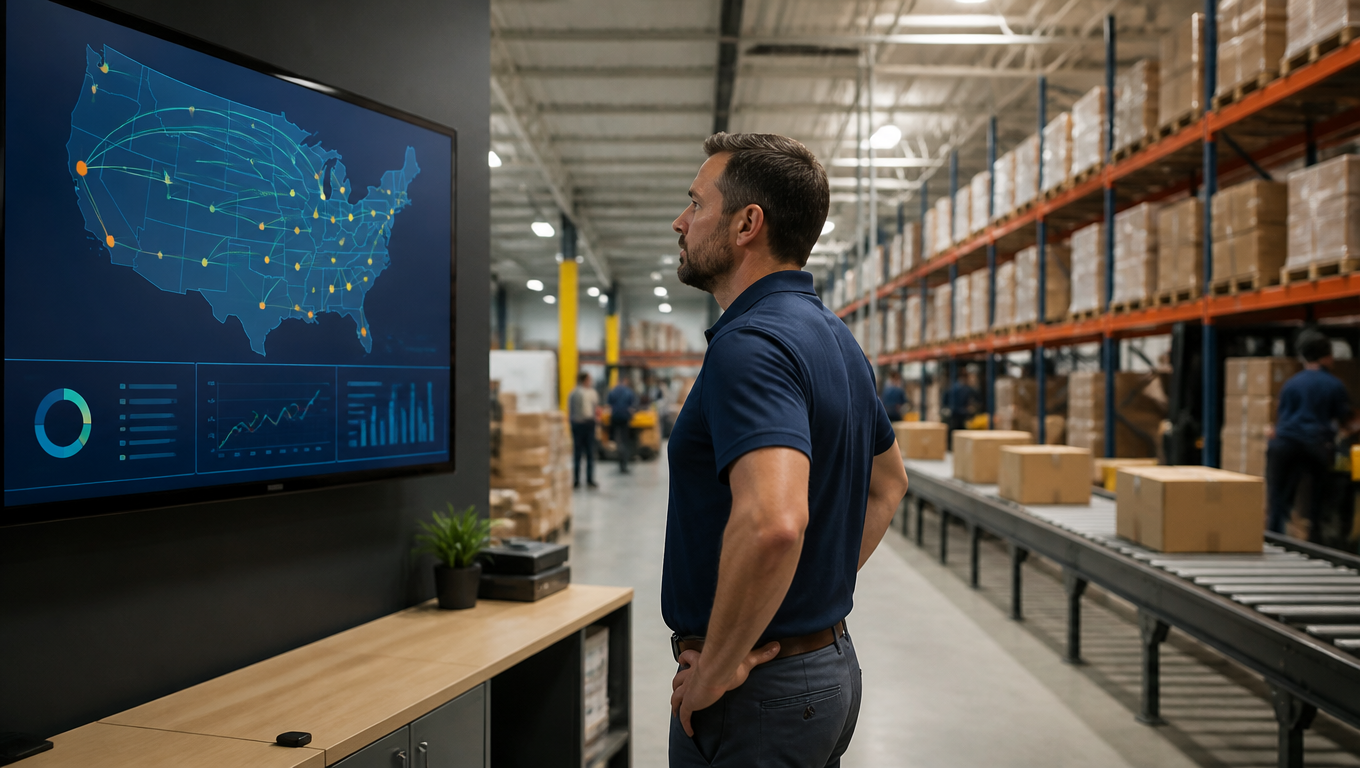
Warehouse operations manager reviews a shipping automation dashboard and parcel routes on a large display.
The real cost is not on the rate card; it is in the hours nobody measures

Where the 50+ Hours Actually Go

Here is the monthly ledger for two typical operations: a 3PL warehouse moving about 500 orders a day, and a multi-channel seller shipping about 1,500 orders a month. The hours cover only the manual, repeatable part of the work, and they are deliberately conservative.

Use the Shipping API workflow overview to define which system actions are included in the time measurement. The 3PL automation-priority guide helps select the workflow to improve before comparing automation options.

Manual task Warehouse lane (hrs/mo) Seller lane (hrs/mo)
Order entry / channel sync 12 8
Label creation & portal data entry 10 6
Rate comparison / carrier selection 8 6
Tracking backfill into storefronts - 8
Exception tracking (lost / delayed) 10 -
WISMO replies - 12
Return label generation (RMA) - 6
Cross-border paperwork (invoice, HS) - 10
Freight bill audit & reconciliation 12 -
Total 52 50

Both columns clear 50 hours. Spread across a 22-working-day month, that is more than two hours every single day, or roughly a third of a full-time employee's month. And unlike freight cost, which you negotiate once, this is recurring labor that shows up month after month, at every volume.

The rest of this guide walks through the ledger lane by lane. First the warehouse scenario, then the seller scenario, with what automation actually looks like in each. The second half turns practical: a 2026 buyer's checklist, and a 30-day rollout path you can start next Monday.
Warehouse Scenario: The 3PL / Fulfillment Monthly Ledger

For a 3PL or fulfillment warehouse, the biggest single sink is order entry. Orders arrive by email, in spreadsheets, or as half-parsed EDI files from a dozen different customers. Each one is a copy-paste session: find the order, transcribe the address, hope the ZIP code is right. At 500 orders a day that is roughly 12 hours a month, before a single label is printed.

Label creation and portal data entry run another 10 hours. Every shipment means logging into the carrier's portal, re-entering the address, choosing the service, and buying the label. Add per-shipment rate comparison at 8 hours a month and you get the ritual most warehouses know by heart: open two or three carrier tabs, compare, pick the cheapest, and repeat five hundred times.

Then come the two jobs nobody budgets for. Exception tracking, following up on lost, delayed, and undeliverable parcels across carrier portals and customer emails, runs about 10 hours a month. Freight bill audit is the quiet one: reconciling invoices against what the carriers quoted, catching DIM weight errors and zone mistakes, around 12 hours a month.

None of these numbers is dramatic on its own. Together they are 52 hours a month, and every hour reclaimed goes straight back to work that actually matters: picking, customer service, and reconciliation.

Workers pack and scan boxes at a busy sunlit warehouse dock.
Reclaimed hours go back to what actually matters: picking, customer service, and reconciliation

Warehouse Scenario: What Automation Looks Like in Practice

Automation here is a four-piece pipeline, and it is simpler than it sounds. Orders come in through API or EDI connections instead of inboxes. Address validation scrubs them before they reach a label. A rules engine routes each order to the right carrier and service. Anything that does not fit the rules drops into an exception queue for a human, instead of silently shipping wrong.

The freight audit piece deserves special mention, because it is the closest thing shipping has to found money. Audit tooling compares every invoice line against the quoted rate and the shipment's actual dimensions and zone, then flags mismatches automatically. Late deliveries and carrier billing errors that used to slip past now surface as credit requests, which for a mid-size warehouse can be thousands of dollars a year.

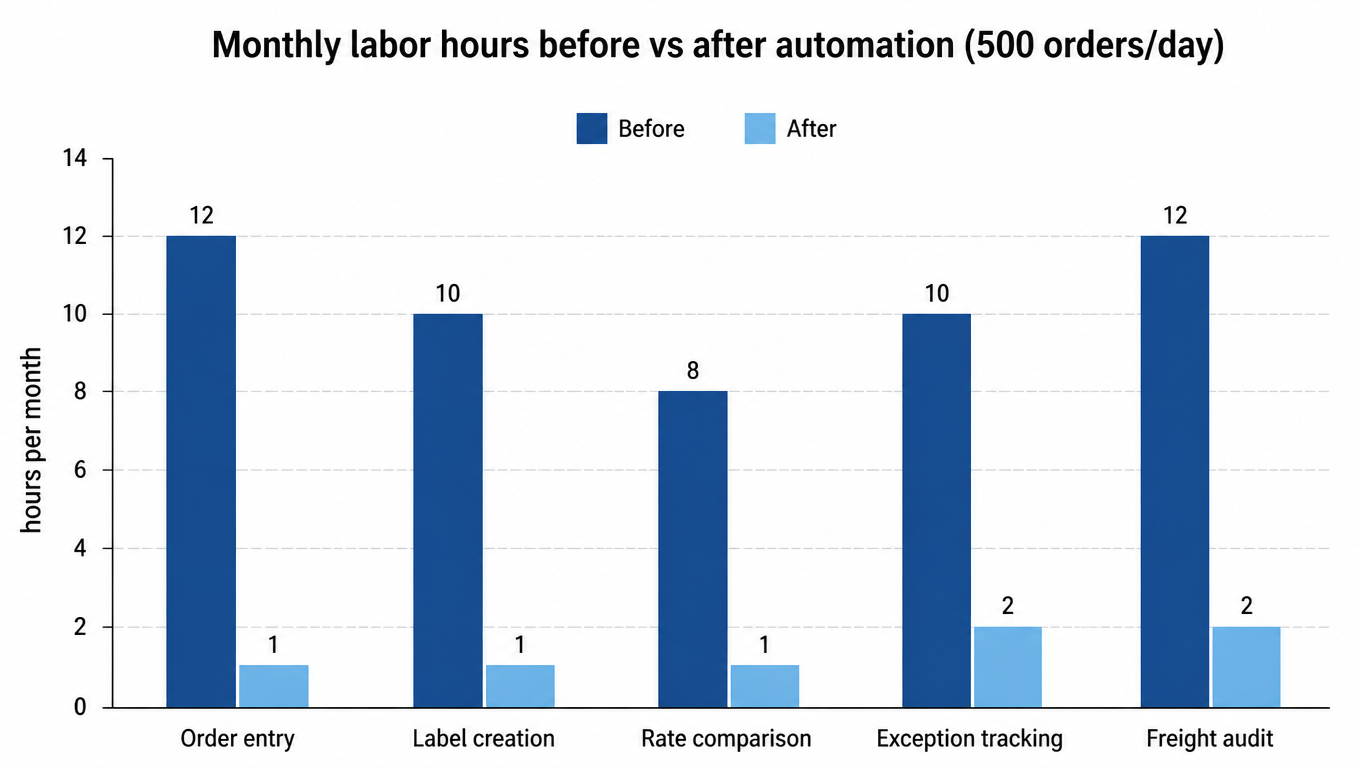
Applied to the ledger above, at 500 orders a day, the math looks like this. Order entry drops from 12 hours to about 1, because staff only touch genuine exceptions. Label creation goes from 10 to 1, generated in batches through the carrier API. Rate comparison falls from 8 hours to 1, a weekly skim of the routing report instead of five hundred manual picks. Exception tracking goes from 10 to 2, and freight audit from 12 to 2. Total: 52 hours a month down to about 7.

Bar chart of monthly labor hours before vs after automation: order entry 12 to 1, label creation 10 to 1, rate comparison 8 to 1, exception tracking 10 to 2, freight audit 12 to 2
Monthly labor hours before vs after automation (estimated at 500 orders per day)

The share only improves with scale. At 800 orders a day, the same operation routinely clears 50 hours a month in reclaimed labor, because the fixed setup cost is spread over more shipments.

Seller Scenario: The DTC / Shopify Monthly Ledger

On the seller side, the ledger starts with the store, not the dock. If you sell on Shopify plus a marketplace or a standalone site, every order is a reconciliation chore: make sure it synced, pick the carrier, buy the label, and copy the tracking number back into each channel. That sync and data-entry work runs about 8 hours a month; carrier selection adds 6 more.

Tracking backfill is the task sellers hate most, and with good reason. Copy the tracking number from the carrier portal, paste it into Shopify, paste it into the marketplace, paste it into the email. At 1,500 orders a month that is roughly 8 hours of pure copy-paste. Then the consequences arrive: customers who cannot see tracking write in. WISMO, "where is my order", emails run about 12 hours a month.

Cross-border sellers carry a second hidden ledger. Commercial invoices, HS codes, and customs forms have to be generated per shipment, and one wrong digit means the parcel sits in customs while the buyer asks where it is. That paperwork runs about 10 hours a month, plus the redo time when it fails. Return labels, generated by hand through the carrier portal, add another 6.

Add it up and the seller lane is 50 hours a month. Multi-channel sellers see the same numbers stack per channel: each extra storefront multiplies the sync, backfill, and WISMO line items rather than adding to them.

Seller Scenario: What Automation Looks Like in Practice

The core of seller-side automation is the same rules engine the warehouse uses, pointed at your store. A rule like "under 1 kg to the US, use USPS; over 1 kg, use UPS; declared value over $500, add insurance" replaces the six minutes of thinking and clicking per order with zero manual picks. The label and tracking number come back through the API automatically.

Tracking backfill disappears because it is replaced by the integration itself: the tracking number flows into the storefront and the marketplace the moment the label prints. Proactive notifications do the WISMO work for you. When the buyer gets a tracking email before they think to ask, the support inbox stops filling with the same question.

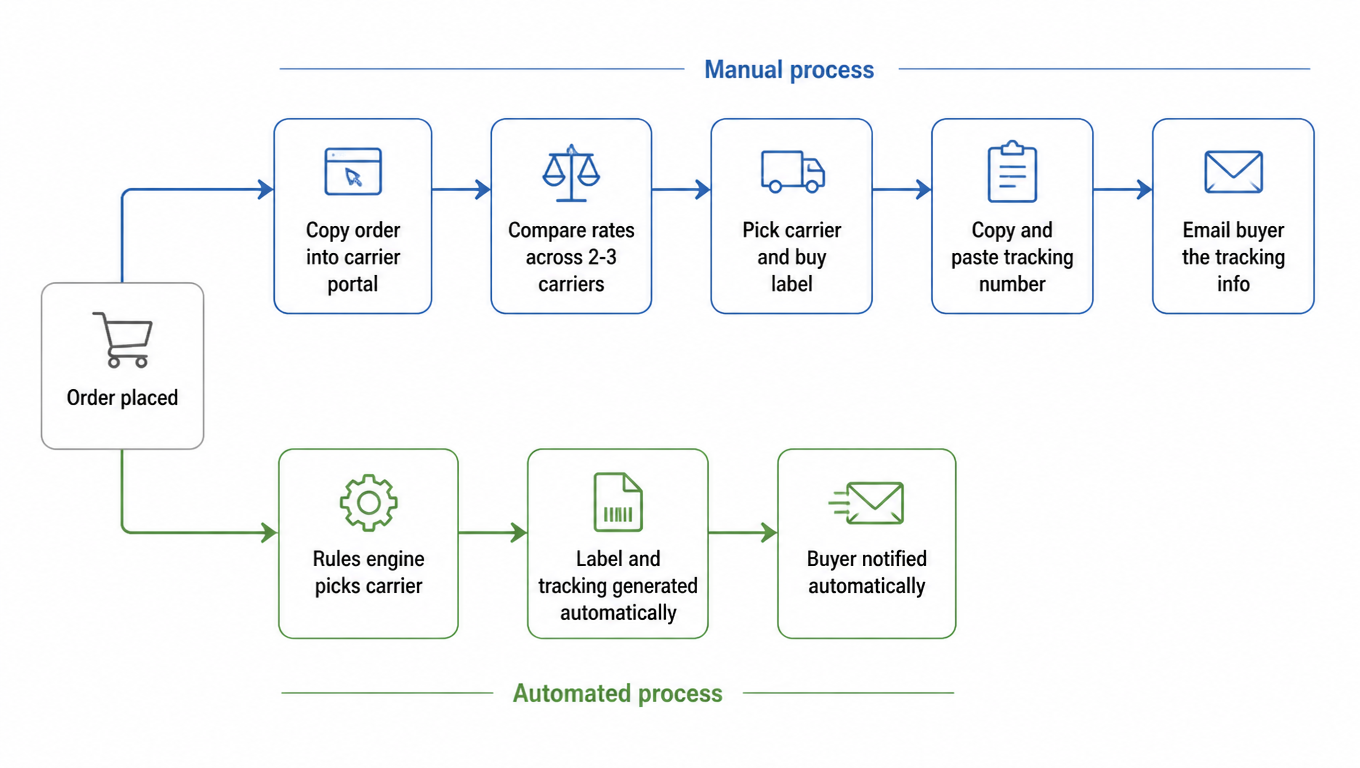
Returns get the same treatment. An RMA request triggers an auto-generated return label with the correct carrier and address, instead of a staff member rebuilding it in the carrier portal every time. The diagram below shows how one order moves from placement to dispatch in both worlds.

Flow diagram: the manual path copies the order into the carrier portal, compares rates across 2-3 carriers, picks a carrier and buys a label, copies and pastes the tracking number, then emails the buyer; the automated path has the rules engine pick the carrier, generate the label and tracking automatically, and notify the buyer automatically
The manual path touches six screens; the automated path touches zero

The manual path touches six screens and invites a mistake at every step. The automated path touches zero. That is the entire pitch, and it is also why the 50-hour ledger shrinks so fast once the rules are in place.

Small ecommerce founder packs orders at a home workbench beside a compact label printer.
The moment the rules are in place is the moment the 50-hour ledger starts shrinking

2026 Buyer's Checklist: A Pragmatic Shortlist

Once you start looking at shipping software, every vendor shows you the same feature table. The trick is knowing which rows matter for your operation. This eight-point checklist covers the rows that actually move the ledger:

  • Integration depth: does it connect to your WMS, ecommerce storefronts, and marketplaces natively, or through fragile CSV exports?
  • Multi-carrier routing: real rate shopping across carriers and services, not a single pre-negotiated contract.
  • Rules engine: can you express your routing logic (weight, destination, declared value) without vendor support?
  • Batch capabilities: label generation, tracking backfill, and status sync for hundreds of orders at once.
  • Exception handling: a visible queue for orders that break the rules, with re-routing from inside the tool.
  • Cross-border docs and compliance: commercial invoices, HS code lookup, and duty handling for international lanes.
  • API and headless capability: can your developers push and pull orders, labels, and tracking programmatically?
  • Pricing model: per-label, per-order, or platform fee, and what happens to the cost as volume grows.

Three pitfalls cost more than any licensing fee. Choosing by feature table, where you pay for rows you will never use and skip the one that matters. Choosing by cheapest price, which usually means the thinnest integrations and the most manual glue. And buying without configuring rules, the most common one of all: the software is installed, the routing logic was never set up, and the team keeps doing everything by hand.

If you want a full weighted scoring framework to rank vendors against your own operation, the companion guide How to Compare Shipping Software walks through it step by step.

A 30-Day Rollout Path (Pick Your Lane)

Automation lands in weeks, not quarters, if you keep the scope tight. For warehouse operators: week 1, wire order ingestion and address validation, and measure the error rate on incoming orders. Week 2, build the first routing rules for your top lanes and turn on batch label generation. Weeks 3 and 4, stand up the exception queue and connect freight audit, tracking hours per thousand orders at each step.

Sellers get the same treatment in their own lane. Week 1, connect the store and sync orders automatically. Week 2, write routing rules for the top three lanes. Week 3, turn on automatic tracking backfill and buyer notifications, and watch the WISMO share of incoming support tickets. Week 4, automate return labels. Each stage has one number attached: error rate, hours per thousand orders, or WISMO share, and none of them takes more than a few hours to set up.

The final point is the one that outlasts the software. Automation is a compounding habit: every rule you write removes a decision that used to cost your team time, and the ledger never adds it back. Start with the lane that matches your operation, keep the metrics visible, and the 50 hours a month story writes itself. For a deeper dive on where to start in a warehouse specifically, see What Should a 3PL Automate First?

FAQ

Yes, on deliberately conservative numbers. Every row in the ledger is manual, repeatable work: order entry, label creation, rate comparison, tracking backfill, WISMO, cross-border paperwork, and freight audit. A 500-order-per-day warehouse comes to 52 hours a month by conservative estimates and drops to about 7 with automation; a 1,500-order-per-month seller comes to 50. The number only improves with volume.
Start with order ingestion and address validation. They are configuration-level changes that touch every order and have the cleanest ROI. Warehouses wire order ingestion and address validation first, then routing rules and freight audit; sellers connect order sync first, then routing rules, tracking backfill, and proactive notifications. Track one metric per stage, and if a metric does not move, dig into the fix.
Yes, it is the closest thing shipping has to found money. Industry audits find errors on 3 to 7 percent of freight invoices, and operations that never audit overpay 3 to 5 percent of annual freight spend. Audit tooling compares every invoice line against the quoted rate and the shipment's actual dimensions and zone automatically, then flags mismatches. For a mid-size warehouse, thousands of dollars a year in recoveries is normal, with almost no labor.
Follow the 30-day path: week 1 for order ingestion (warehouse) or store sync (seller), week 2 for routing rules, week 3 for the exception queue and freight audit (warehouse) or tracking backfill and notifications (seller), week 4 to finish. Each stage takes a few hours to set up, and the hour metrics start moving within the first month.
Not picking the wrong vendor, but buying without configuring rules: the software is installed, the routing logic was never set up, and the team keeps doing everything by hand. Feature-table selection and lowest-price selection come next. Run the eight-point checklist (integration depth, multi-carrier routing, rules engine, batch, exception handling, cross-border docs, API, pricing model) and score vendors against your own operation.