Returns Management

How to Evaluate Returns Software: Portal, Label, Carrier, 3PL, and API Requirements

Every returns software demo opens the same way: a clean, branded portal where a shopper picks a reason, prints a label, and gets a refund in seconds. The demo is almost always good, because the portal is the surface the vendor polished. The failures live in the plumbing underneath: how labels are generated, which carriers get the volume, how the 3PL learns a box is coming, and how deep the API really goes. This article gives you a five-dimension evaluation framework, Portal, Label, Carrier, 3PL, and API, plus the different weights sellers and 3PLs should apply, a red-flag checklist, and the RFI questions to send before you sign. Returns are seasonal and lumpy; evaluate against that reality, not against the demo.

This is part of our returns-management coverage. For the complete end-to-end returns workflow, from initiation and labels to drop-off and disposition, start with the complete Amazon FBM returns guide; this article focuses on one job: evaluating returns software cleanly across all five dimensions.

Returns manager compares three return labels at a desk covered with documents.
Returns software evaluation grades the pipes: label economics, carrier routing, 3PL handoff, and API depth, not the demo portal

Why Returns Software Evaluations Go Wrong

If you evaluate on the demo alone, you are grading the one part of the product least likely to break. The portal rarely breaks; what breaks is everything else: a label that will not print, a route with no first scan, a warehouse that never receives the RMA, an API that rate-limits at peak. The starting point is moving your attention from the surface to the pipes, where most of the difference between tools actually lives.

Returns are a cost center and a brand moment at the same time. The NRF expects 19.3% of online sales to be returned in 2025, roughly $850 billion in merchandise.[^4] Every returned order costs you a label, restocking labor, and the margin on a sale that may never come back. A smooth exchange, by contrast, keeps the revenue in-house and often lifts loyalty. That tension is why most evaluations go wrong: they grade the surface (portal UX, refund speed) and never check the pipes (label economics, carrier routing, 3PL handoff, integration depth). You end up with a tool that looks great to your customers and quietly leaks money to your operations team.

It also helps to know which category of tool you are looking at, because each type makes different trade-offs. Platform-native apps (Shopify app store and similar) install in minutes but inherit the platform's constraints. Standalone return platforms such as Loop, ReturnGO, and AfterShip Returns offer deeper policy and carrier control at a higher price.[^1][^5][^2] 3PL-provided portals come bundled with fulfillment but tie your returns to one warehouse's stack. The right answer depends on your workflow, which is where you should start.
Map Your Workflow Before You Look at Vendors

Before you sit through a single demo, write down your baseline numbers: return rate, average order value, monthly RMA volume, top return reasons, restockability rate, carrier contracts, and what your 3PL requires for inbound returns. Then map the journey a return actually takes today. Where does it enter (portal, email, phone)? Who touches it at each step, and which systems need the data (storefront, accounting, WMS, carrier)? A tool that cannot see this workflow cannot fix it.

The starting point differs by role. A seller cares about shopper experience, cost per return, and refund speed, because those drive repeat purchases and margin. A 3PL cares about multi-client isolation, batch label printing, WMS integration, and client-specific carrier accounts, because a returns tool that only serves one client's portal becomes a second system of record for every other client. Know which side of the table you sit on before you weigh the five dimensions.

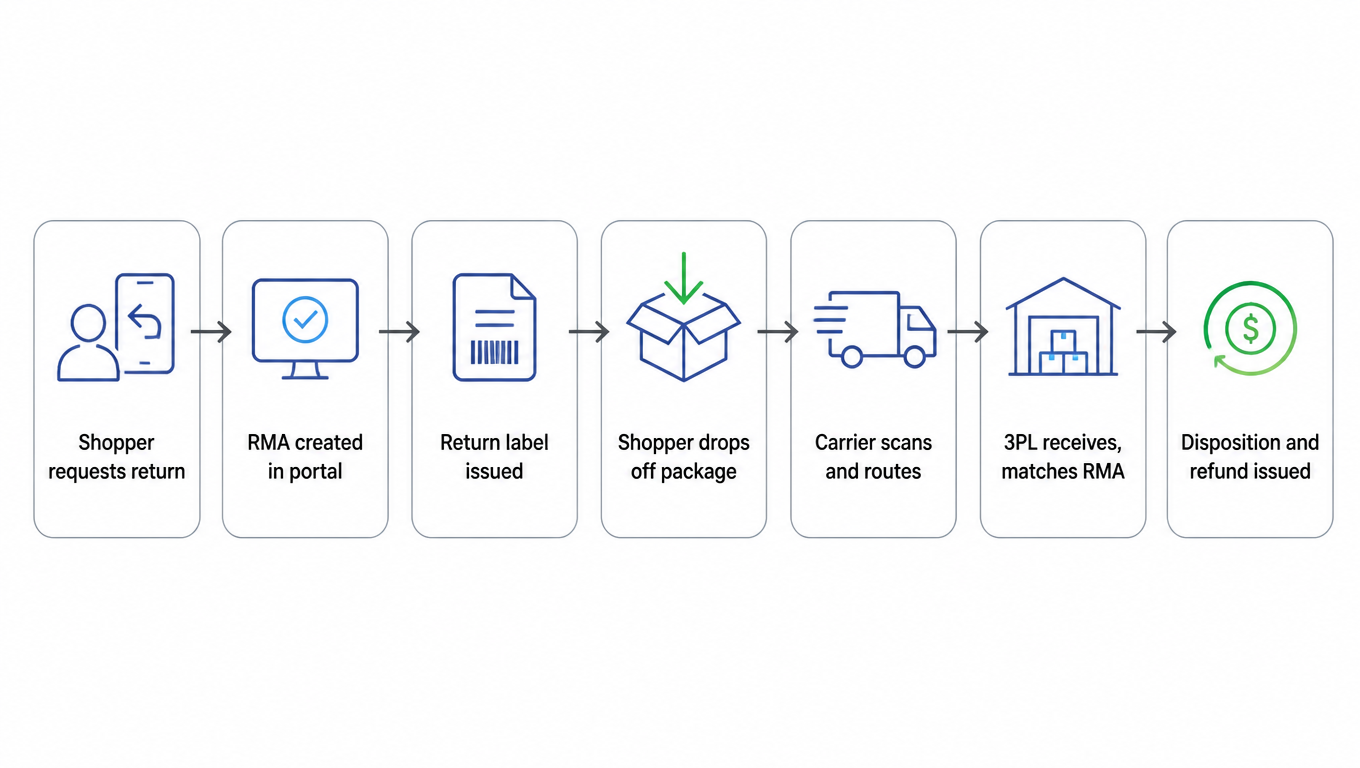
Sketching the workflow also exposes where data breaks today, which is usually the best question to ask a vendor in the demo: "can your tool carry this box from RMA to disposition without a human touching it?" The journey below is the standard returns flow; compare it against yours and mark every step that needs a human today.

Returns journey flowchart: shopper requests a return, RMA created in the portal, return label issued, shopper drops off the package, carrier scans and routes, 3PL receives and matches the RMA, then disposition and refund
The standard returns journey: from portal RMA to disposition and refund, with a data handoff at every stop

Portal Requirements

The portal is the shopper-facing half of the product, and it has three jobs: explain the policy, capture the reason, and get the box moving. In the demo, look for branded experience (your logo, your tone, no third-party chrome), policy rules that the software actually enforces (return window, restocking fee, exchange-first logic), and drop-off options that match how your customers actually shop. Refund timing matters too: does the refund trigger on scan, on receipt, or on inspection?

Pay close attention to exchange and store-credit flows, because they are where the software earns its keep. A well-built portal offers exchange-first and store-credit-first paths that keep revenue in-house, and it prices the label against the new order instead of eating it. If the vendor demos only straight refunds, that is a tell: the tool is a refund machine, not a retention machine.

Test the policy edges in the demo, not just the happy path. What happens with a final-sale item, a damaged item, or a missing item? Can the portal issue partial refunds and apply restocking fees automatically? Can the shopper see RMA status without emailing you? Then check the pitfall that catches most buyers: a beautiful portal with a human-run back end. If policy enforcement, refunds, and disposition all require a staff member to click through, the portal is a form, not a system.

Label Requirements

Labels are where return software makes or loses money, and the first question is who pays. Prepaid labels bill the label to you at issuance; postpaid labels let the carrier bill the shopper or you later. Prepaid is friendlier and drives higher return completion rates, but it front-loads cost, so make sure the tool can deduct the label fee (and a restocking fee) from the refund automatically. If deduction is manual, you will stop doing it.

Format matters more than it looks. Your warehouse wants 4x6 thermal labels, your shoppers want a printable PDF or a QR code they can show at a drop-off counter, and your drop-off network needs codes it can scan without a printer. A tool that only prints letter-size PDFs forces your 3PL to re-key labels, which is where "free" returns start costing real labor. Also check whether the tool consolidates multiple RMA items into one box with one label, and whether it can produce international return labels with the customs paperwork that cross-border returns need. Underneath the labels sits a data model for orders, shipments, packages, and labels; the order and label data model explains that structure.

The label section is full of quiet fees. Watch for hidden label markups (retail rates instead of your negotiated rates), labels that cannot be reprinted after expiry, and labels that expire before the shopper actually ships. Confirm the labels run on your negotiated rates, and compare the quote against the final charge, which is what the rate quote vs final charge checklist does. A good label module tells you the true cost per return before you commit to a vendor.

Carrier Requirements

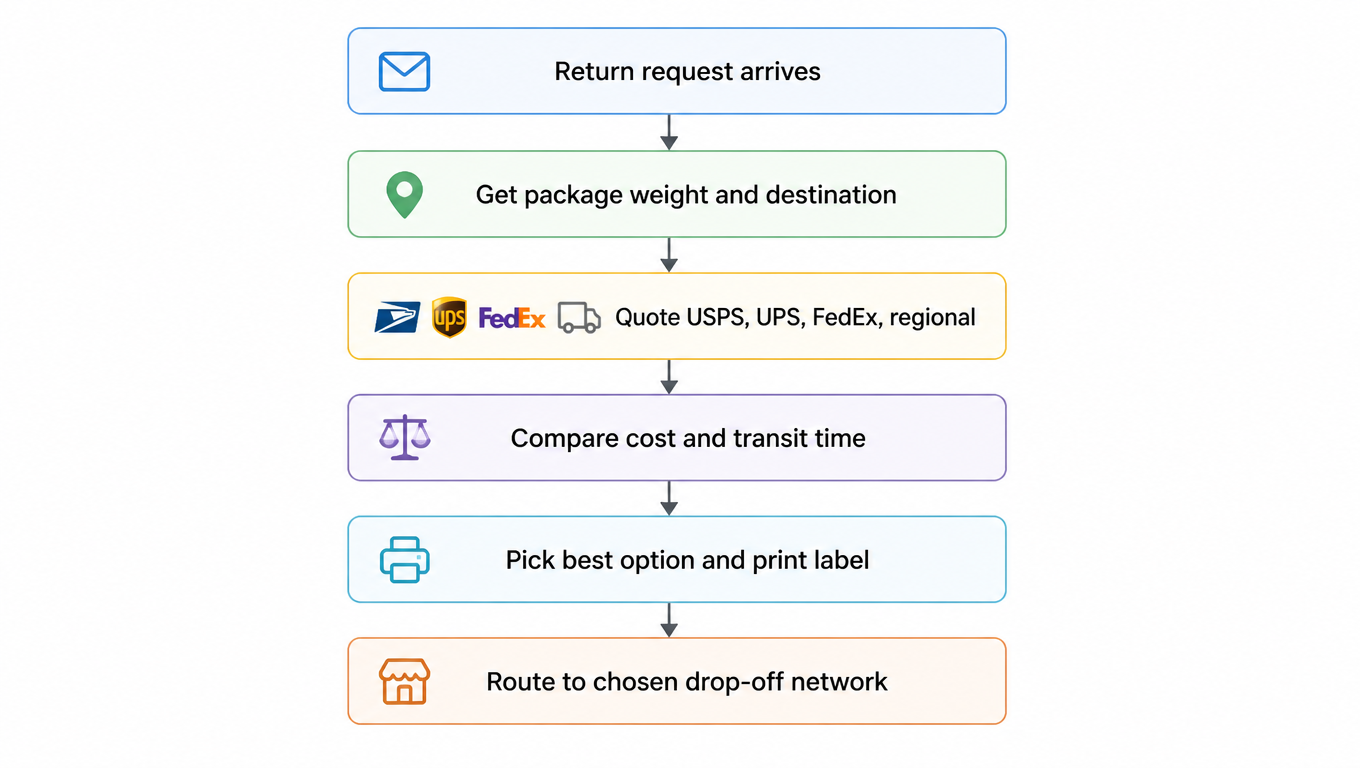
A returns tool is only as good as the carriers behind it. For US domestic returns, coverage should span USPS, UPS, FedEx, and the regional carriers that now serve the last mile, because none of them wins every lane. The differentiator is dynamic routing: does the tool rate shop at return time, comparing cost and transit time for each package, or does it lock every return onto one carrier's rate card? Dynamic routing typically cuts label spend by letting cheap, slow options absorb low-urgency returns. To see how zones and surcharges shape your lanes, see the shipping zones and carrier coverage guide.

Drop-off network density is the shopper-facing half of the carrier question. USPS pickup and post offices, UPS Store locations, FedEx drop points, and the returns counters run by Happy Returns and regional networks all change how far your customer walks.[^3] A dense network lifts return completion; a thin one quietly converts would-be returns into chargebacks and negative reviews. Also confirm that negotiated rates actually flow through to your labels, and ask how dimensional weight surprises are handled, since a 3 lb box can bill like a 10 lb box if the tool does not optimize boxing.

This is also where a channel-neutral shipping layer earns its place. EasyShippingX is a channel-neutral shipping layer: it compares US domestic carrier options side by side and executes through the Portal, Excel, or API, without tying your returns to a single carrier or a single platform's native stack. That matters in a returns evaluation because returns volume is seasonal and lumpy; the tool that can move labels between carriers as rates and capacity shift is the one that keeps your cost per return flat.

Dynamic routing flowchart: return request arrives, get package weight and destination, quote USPS, UPS, FedEx, and regional carriers, compare cost and transit time, pick the best option and print the label, route to the chosen drop-off network
Dynamic routing: rate shop at return time and pick the carrier on cost and transit

The pitfalls here are one-carrier lock-in (the "free" label that quietly resets to retail), weekend and holiday pickup gaps, and rate sheets that look negotiated in the demo and revert to retail once you sign. Ask the vendor to show you a rate quote against your actual carrier contracts before you commit.

3PL Requirements

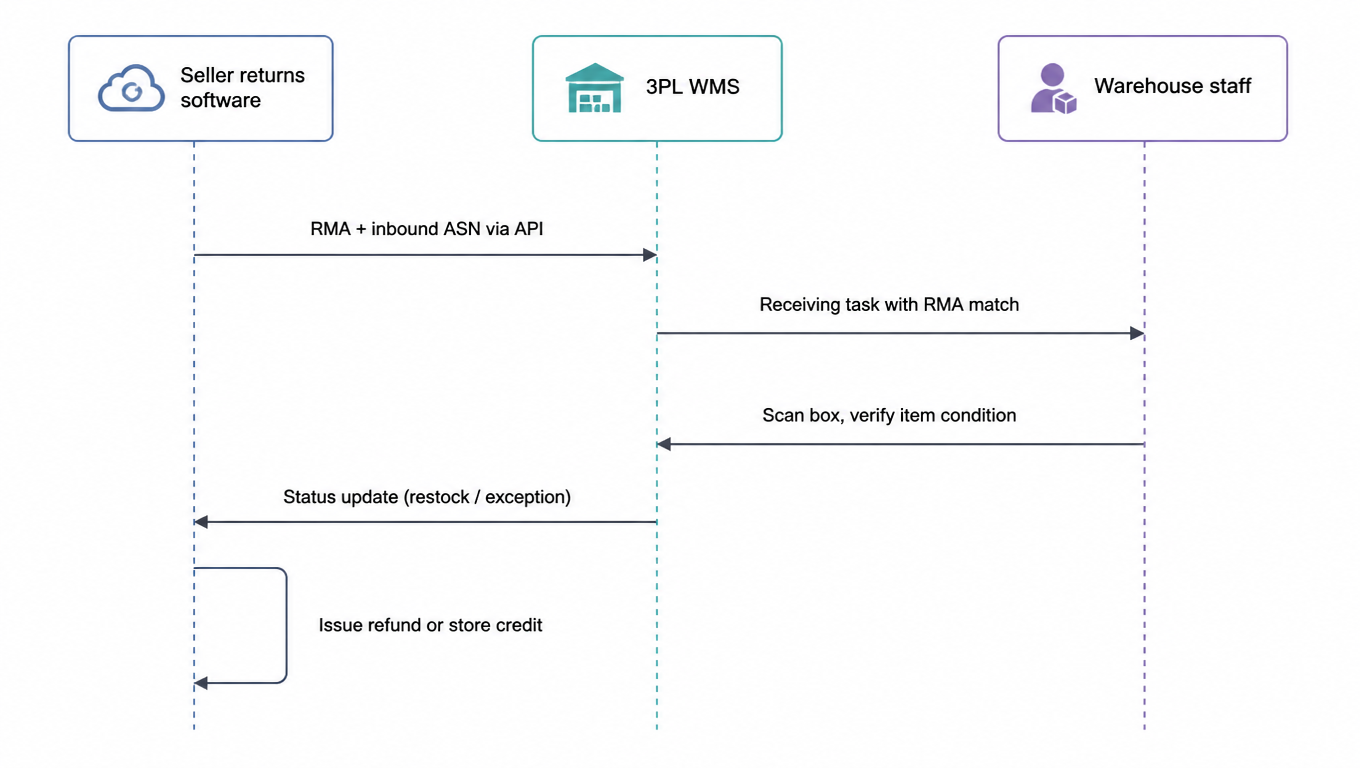
On the seller side, the question is whether the tool hands off cleanly to your 3PL. That means RMA data pushed to the warehouse, an inbound ASN so receiving knows a box is coming, an RMA number printed on the label so the box can be matched on arrival, and disposition rules the software enforces per SKU: restock, refurbish, donate, or return to vendor. If disposition is a dropdown a warehouse worker eyeballs, your "restockable" inventory will quietly become dead stock.

On the 3PL side, the requirements are steeper. Multi-client isolation is non-negotiable: each client's returns must land in its own portal, its own queue, and its own reporting, with client-specific carrier accounts so label costs flow back to the right P&L. Batch label printing matters when a single daily dump of returns arrives as fifty boxes. And the tool must integrate with the WMS, not sit beside it, or receiving becomes a re-keying exercise.

Inbound receiving is where returns software either earns or burns labor. The receiving workflow should be: scan the box, match the RMA, verify the item and condition, and route to the disposition the seller configured. Exception cases (wrong item returned, damaged item, empty box) need a defined path, not a gray area. Finally, settle the ownership question in writing: who owns the carrier account and rate card, and how does label cost flow from the carrier back to the client's invoice?

RMA handoff sequence diagram: seller returns software pushes RMA and inbound ASN to the 3PL WMS via API, the WMS creates a receiving task with RMA match, warehouse staff scans the box and verifies item and condition, the WMS reports restock or exception status, and the seller software issues a refund or store credit
The RMA handoff: API data flow between seller returns software and the 3PL WMS, from receiving and verification to disposition and refund

API Requirements

The API is the difference between a tool you operate and a tool that operates you. Map the systems that must talk to the returns software: storefront, ERP, OMS, WMS, and accounting. For each, ask whether the integration is bidirectional and real-time or a scheduled CSV export. Status changes should arrive by webhook the moment they happen, so your refunds, inventory, and accounting agree without a nightly reconciliation.

Rate shopping and label generation should be callable by API, not just clickable in the portal. That matters when returns flow through your own systems, your 3PL, or a custom checkout flow. Before you trust it, check the developer experience: is there a sandbox, are the docs current, and does the vendor answer support tickets in days or hours? For what the API should look like on the 3PL side, the 3PL multi-carrier shipping API guide has the full checklist.

The classic pitfall is "has an API" standing in for "API is good enough". A public endpoint that rate limits at 10 calls a minute cannot handle your returns at peak. Check which endpoints exist (RMA creation, label, rate, status), the rate limits, webhook reliability and retry behavior, and whether the API is versioned with deprecation notices. If the vendor cannot tell you their webhook failure rate, they have never measured it.

Build a Weighted Scorecard

By now you have five dimensions: Portal, Label, Carrier, 3PL, and API. Weight them by role before you score anything, or the prettiest portal will win by default. A seller should lean on Portal and Label (customer experience and cost per return), while a 3PL should lean on Label and 3PL (batch operations and multi-client isolation). The weights below are a defensible starting point, not a law.

DimensionSeller weight3PL weight
Portal25%15%
Label20%25%
Carrier20%20%
3PL20%25%
API15%15%

Run every vendor through a red-flag checklist before you spend demo time: hidden fees (label markup, per-return charges missing from the pricing page), no sandbox or public docs, single-carrier dependency, a human-run back end behind a pretty portal, no disposition rules, and no webhooks (nightly CSV only). Any one of these is grounds for a follow-up question; two or more is a reason to drop the vendor.

Finally, send each shortlisted vendor the same RFI questions before the demo: How are final-sale, damaged, and missing items handled in the portal, and can partial refunds and store credit be issued automatically? Do you issue 4x6 thermal labels and QR drop-off codes, and can one box consolidate multiple RMA items? Which carriers are on your rate card, do you rate shop at return time, and are negotiated rates passed through or marked up? Does the tool send RMA and ASN data to a 3PL and enforce per-SKU disposition rules? And what is in the sandbox, what are the rate limits, and which webhooks exist? The vendor that answers these cleanly is the one worth your returns. For the carrier-side comparison and contracts, run the parcel carrier RFP process.

FAQ

It depends on your volume and how much exchanges are worth to you. A portal earns its keep through exchange-first and store-credit paths that keep revenue in-house; at low volume, with customers happy to take straight refunds, a labels-only tool can work. Once returns scale, the labor of handling policies, deductions, and disposition by hand will catch up with whatever you saved on the subscription.
Check four things: whether RMA data is pushed to the warehouse, whether an inbound ASN tells receiving a box is coming, whether the label carries the RMA number so boxes match on arrival, and whether per-SKU disposition rules are enforced. If receiving depends on manually re-keying labels and order numbers, the tool is not integrated; it just sits next to your 3PL.
It means the tool rate shops at return time, comparing cost and transit time across carriers for each package, instead of locking every return onto one rate card. Cheap, slow options absorb low-urgency returns; expensive, fast ones serve shoppers who need the speed. Before you sign, ask the vendor to quote against your actual carrier contracts.
Label markups (retail instead of your negotiated rates), per-return charges missing from the pricing page, labels that cannot be reprinted after expiry, and labels that expire before the shopper ships. Plus one more: whether the label fee (and restocking fee) is deducted from the refund automatically, because if it is manual you will stop doing it, and "free" returns become actually free.
Status changes must arrive by webhook in real time, not via nightly CSV; rate shopping and label generation must be callable by API; there must be a sandbox with current docs; rate limits must match your peak; and the API should be versioned with deprecation notices. The test is simple: if the vendor cannot tell you their webhook failure rate, they have never measured it.