Ecommerce Shipping Guide

Order vs. Shipment vs. Package vs. Label: A Shipping Data Model for OMS, WMS, and 3PL APIs

Every integration between an OMS, a WMS, a 3PL, and a carrier eventually bumps into the same vocabulary problem. One system calls it an "order", another calls it a "shipment", a third insists on "package", and the carrier wants a "label" with a tracking number. The terms look interchangeable, and when they are treated as interchangeable, bugs follow: duplicate fulfillments, lost tracking numbers, reconciliation that never balances.

Four progressively smaller corrugated boxes nest inside one another on a warehouse bench.
Four entities nested like a matryoshka: orders hold fulfillments, fulfillments hold packages, packages carry labels

One Order, Four Entities: A Worked Shipping Run

Take a hypothetical example order so the abstractions have somewhere to live. In this example, a customer buys three items in a single checkout: two ceramic mugs and one cotton t-shirt, and the order total is $170.11. Inventory sits in two warehouses, so the OMS decides the mugs ship from the east coast warehouse and the t-shirt ships from the west coast warehouse.

  • 09:14 Order created, id SHOP-1001, status placed
  • 09:20 OMS splits the order into two fulfillments, one per warehouse
  • 13:52 East warehouse packs the two mugs into one box, package P1
  • 14:05 East buys a DHL label for P1, gets the first tracking number, fulfillment flips to shipped
  • 15:02 In this example, the customer adds declared-value insurance; a $6.20 adjustment is recorded against the east fulfillment
  • 16:30 West warehouse packs the t-shirt, package P2, buys a USPS label
  • 16:44 West label is voided for an address correction; a reversal is recorded and a replacement label is purchased
  • Day 3 P1 clears customs and hands off to USPS for the last mile; a second tracking number joins P1
  • Day 5 Both packages delivered; the order closes as fully fulfilled

Watch what just happened. One order produced two fulfillments (one per warehouse), two packages (one per box), and three tracking numbers in total, because P1 travelled two legs under two carriers. The tracking numbers hang off the packages, not off the order. If you stored "the tracking number" in a column on the order row, which of the three would you write down?

That question is the thesis of this article: 1 Order → N Fulfillments → N Packages → N Labels, with tracking belonging to packages. Everything that follows is about making that hierarchy safe to build on: preventing duplicate shipments, never losing a tracking number, and being able to trace every dollar back to the order and the client.

The Four Entities and a Vendor-Neutral Relationship Tree

Four entities, four distinct jobs. Confusing any two of them is where integrations rot.

  • Order: the commercial promise. What the customer agreed to buy and pay for. Lives in the OMS or ERP. Has line items, totals, and a customer.
  • Fulfillment (a.k.a. shipment): the fulfillment action. Who fulfills what, when. This is the seam between the commercial world and the logistics world. One order splits into N fulfillments, typically by warehouse or by fulfillment provider.
  • Package: the physical container. The actual box that leaves the building, with weight and dimensions. This is what carriers scan and move.
  • Label: the carrier ticket. The right to ship one package, carrying the label number and the tracking number. It is a financial instrument as much as a document, which is why voiding one has to touch money, not just state.

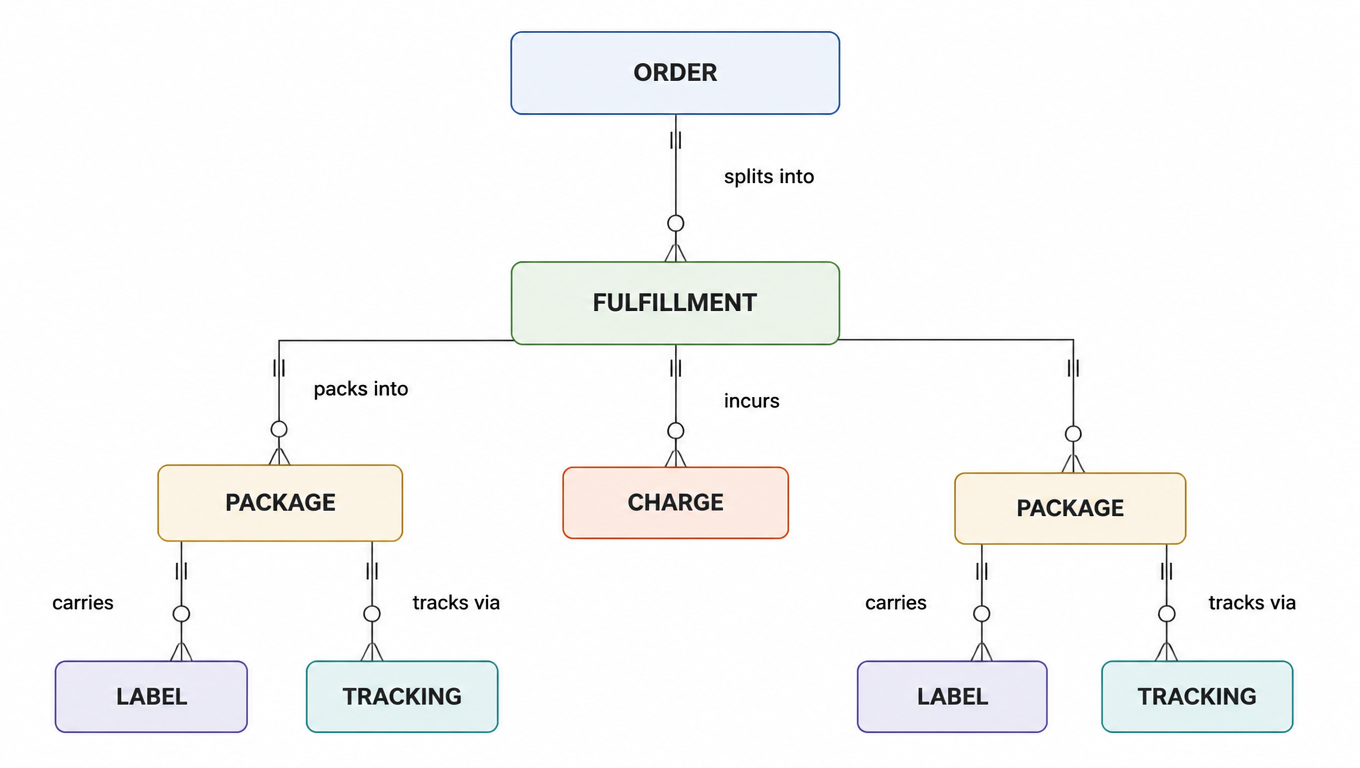
The relationship tree, kept vendor-neutral:

Order
└── Fulfillment / Shipment
    ├── Package
    │   ├── Label
    │   └── Tracking Number
    └── Charges / Adjustments / Reversals
Entity diagram: orders split into fulfillments, which produce parcels and costs; parcels connect to labels and tracking.
Order → Fulfillment → Package → Label / Tracking, plus charges hanging off the fulfillment

Two relationships in this tree deserve emphasis because they are the ones everyone flattens away. First, one fulfillment can produce several packages: a three-box order is one fulfillment, not three. Second, one package can carry several tracking numbers: a package that flies DHL to the border and then rides USPS to the door has two legs, each with its own carrier and tracking number. Both facts are invisible if you model "order → tracking" directly.

Why call the second-level node "Fulfillment" instead of "Shipment"? Because platforms disagree: Shopify calls it a fulfillment, Amazon calls an FBA batch a shipment, and most WMSes call every dispatch a shipment. The tree has to stay vendor-neutral, so the node is the fulfillment/shipment concept regardless of the name a given platform uses. Your adapter maps the platform's name onto this node and stops there; the rest of the tree never changes. For a deeper look at why order status, shipment status, and tracking status drift apart, see the sister guide on order status vs. shipment status vs. tracking status.

Core Fields and State Machines

Every entity needs a small, stable set of fields. Here is the minimum we recommend, with one table per entity.

Entity Field Purpose
orderidcanonical UUID
orderexternal_referenceplatform order number (SHOP-1001) for joins
ordercustomer_idowner of the commercial promise
orderline_itemswhat was promised
ordertotalswhat was charged, in order currency
orderstatuslifecycle of the promise
fulfillmentidcanonical UUID
fulfillmentorder_idback-reference to the promise
fulfillmentwarehouse_idwho is fulfilling
fulfillmentstatuslifecycle of the action
fulfillmentidempotency_keyprevents duplicate fulfillments
fulfillmentcreated_atwhen the action started
packageidcanonical UUID
packagefulfillment_idwhich action produced it
packageweight, dimensionswhat the carrier bills on
packagetrackingarray of segments, one per leg
packagestatuslifecycle of the box
labelidcanonical UUID
labelpackage_idwhich box it authorizes
labelcarrierwhich carrier issued it
labellabel_format, label_urlwhere the PDF lives
labelstatuspurchased / reprinted / voided
labelcostamount + currency, for billing
chargeidcanonical UUID
chargefulfillment_idwhich action incurred it
chargecharge_typeshipping / adjustment / reversal
chargeamount, currencysigned money movement
chargereasonwhy, for reconciliation
chargeapplied_tooptional link back to the label or package

Two string fields on this list are chronically confused. idempotency_key prevents duplicate submissions of the same intent: retry the request, reuse the key, get the same entity back. external_reference joins to an external system's identifier. One is about your retry safety, the other about your join keys. Both deserve a real column, and neither should be repurposed as the other.

State machines, kept deliberately small:

Order:        placed → partially_fulfilled → fulfilled → closed
              placed → canceled

Fulfillment:  pending → processing → shipped → delivered
              pending → canceled
              shipped → exception

Package:      created → labeled → in_transit → delivered
              in_transit → exception

Label:        purchased → reprinted* → voided
              *reprint does not change identity; void is terminal

Three rules keep these machines honest. Order status is derived from its fulfillments: partially_fulfilled when some but not all fulfillments have shipped, fulfilled only when every non-canceled fulfillment has shipped. Package status is the source of truth for what the tracking page shows; do not let a fulfillment's status drift away from its packages. And a label's reprinted state is not a new entity, just a note that the PDF was fetched again, while voided is terminal and always paired with a reversal charge (more on that in the design decisions below).

A Worked JSON Model

Conventions first, because examples read badly when every system uses its own. Field names are snake_case. All canonical ids are UUIDs. All timestamps are ISO 8601 UTC. Everything nests exactly like the relationship tree, which is what makes the data self-consistent: tracking lives under package, charges live under fulfillment, and every fulfillment carries order_id back to the commercial promise.

Here is the complete order, trimmed for readability:

{
  "order": {
    "id": "9f2c1d4e-6a3b-4c8d-9e0f-1a2b3c4d5e6f",
    "external_reference": "SHOP-1001",
    "status": "fulfilled",
    "fulfillments": [
      {
        "id": "1a2b3c4d-5e6f-4a7b-8c9d-0e1f2a3b4c5d",
        "warehouse_id": "wh_east",
        "status": "shipped",
        "packages": [
          {
            "id": "3c4d5e6f-7a8b-4c9d-0e1f-2a3b4c5d6e7f",
            "weight_kg": 2.4,
            "tracking": [
              { "carrier": "DHL", "carrier_tracking_id": "DHL1234567890", "status": "delivered_to_last_mile" },
              { "carrier": "USPS", "carrier_tracking_id": "9400111899223198765432", "status": "in_transit" }
            ],
            "labels": [
              { "id": "5e6f7a8b-9c0d-4e1f-2a3b-4c5d6e7f8091", "carrier": "DHL", "status": "purchased", "cost": { "amount": 18.40, "currency": "USD" } }
            ]
          }
        ],
        "charges": [
          { "id": "7a8b9c0d-1e2f-4a3b-4c5d-6e7f8091a2b3", "charge_type": "shipping", "amount": 18.40 },
          { "id": "8b9c0d1e-2f3a-4b4c-5d6e-7f8091a2b3c4", "charge_type": "adjustment", "amount": 6.20, "reason": "declared_value_insurance" }
        ]
      },
      {
        "id": "2b3c4d5e-6f7a-4b8c-9d0e-1f2a3b4c5d6e",
        "warehouse_id": "wh_west",
        "status": "shipped",
        "packages": [
          {
            "id": "4d5e6f7a-8b9c-4d0e-1f2a-3b4c5d6e7f80",
            "weight_kg": 0.9,
            "tracking": [
              { "carrier": "USPS", "carrier_tracking_id": "9400111899223198765433", "status": "delivered" }
            ],
            "labels": [
              { "id": "6f7a8b9c-0d1e-4f2a-3b4c-5d6e7f8091a2", "carrier": "USPS", "status": "voided", "cost": { "amount": 12.85, "currency": "USD" } },
              { "id": "0e1f2a3b-4c5d-4e6f-8a90-1b2c3d4e5f60", "carrier": "USPS", "status": "purchased", "cost": { "amount": 13.40, "currency": "USD" } }
            ]
          }
        ],
        "charges": [
          { "id": "8f9a0b1c-2d3e-4f4a-5b6c-7d8e9f0a1b2c", "charge_type": "shipping", "amount": 12.85 },
          { "id": "9c0d1e2f-3a4b-4c5d-6e7f-8091a2b3c4d5", "charge_type": "reversal", "amount": -12.85, "reason": "voided_label" },
          { "id": "0d1e2f3a-4b5c-4d6e-7f80-91a2b3c4d5e6f", "charge_type": "shipping", "amount": 13.40 }
        ]
      }
    ]
  }
}

A package with multi-segment tracking, the shape that keeps multi-carrier transports honest:

{
  "id": "3c4d5e6f-7a8b-4c9d-0e1f-2a3b4c5d6e7f",
  "fulfillment_id": "1a2b3c4d-5e6f-4a7b-8c9d-0e1f2a3b4c5d",
  "status": "in_transit",
  "weight_kg": 2.4,
  "dimensions_cm": { "length": 30, "width": 20, "height": 12 },
  "tracking": [
    { "segment": 1, "carrier": "DHL", "carrier_tracking_id": "DHL1234567890", "status": "delivered_to_last_mile" },
    { "segment": 2, "carrier": "USPS", "carrier_tracking_id": "9400111899223198765432", "status": "in_transit" }
  ],
  "created_at": "2026-08-21T13:52:18Z"
}

A label, carrying its cost because that is what billing will need:

{
  "id": "5e6f7a8b-9c0d-4e1f-2a3b-4c5d6e7f8091",
  "package_id": "3c4d5e6f-7a8b-4c9d-0e1f-2a3b4c5d6e7f",
  "carrier": "DHL",
  "label_format": "PDF",
  "label_url": "https://labels.example.com/5e6f7a8b-9c0d-4e1f-2a3b-4c5d6e7f8091.pdf",
  "status": "purchased",
  "cost": { "amount": 18.40, "currency": "USD" },
  "purchased_at": "2026-08-21T14:05:37Z"
}

And the money trail under a fulfillment: one shipping charge, one adjustment, later a reversal. Adjustments correct a prior amount (positive or negative). Reversals mirror a charge exactly and are recorded as negative amounts, never by mutating the original row:

{
  "charges": [
    {
      "id": "7a8b9c0d-1e2f-4a3b-4c5d-6e7f8091a2b3",
      "fulfillment_id": "1a2b3c4d-5e6f-4a7b-8c9d-0e1f2a3b4c5d",
      "charge_type": "shipping",
      "amount": 18.40,
      "currency": "USD",
      "description": "DHL express label for package 3c4d5e6f",
      "created_at": "2026-08-21T14:05:37Z"
    },
    {
      "id": "8b9c0d1e-2f3a-4b4c-5d6e-7f8091a2b3c4",
      "fulfillment_id": "1a2b3c4d-5e6f-4a7b-8c9d-0e1f2a3b4c5d",
      "charge_type": "adjustment",
      "amount": 6.20,
      "currency": "USD",
      "reason": "declared_value_insurance",
      "description": "Additional declared-value insurance added after purchase",
      "created_at": "2026-08-21T15:02:11Z"
    }
  ]
}

Five Cross-Cutting Design Decisions

Field names and state machines are the easy twenty percent. The other eighty percent is decisions that cut across entities: where retries are made safe, how a label dies, how a package tracks across carriers, how money rolls up, and which ids each layer of your product keeps. Get these five right and the model survives real traffic: splits, multi-leg carriers, void storms, and monthly billing reconciliation.

Where Idempotency Lives

Idempotency is needed at exactly three layers, and each layer needs its own key:

  • Order creation: dedupe double-submits from checkout or webhooks.
  • Fulfillment creation: prevent double shipping when a WMS retries.
  • Label purchase: prevent double billing when a carrier call times out.

The pattern is the same everywhere. The caller generates a UUID and sends it as idempotency_key. The server dedupes on the pair (key, entity_type): the same key can create an order and a label, because they are different entity types. The key expires after a bounded window, typically 24 to 48 hours[^5], after which a new intent needs a new key. On any retry, reuse the same key; the server returns the previously created entity instead of creating a second one.

Putting the key at the wrong layer is where the money leaks. Retry the order POST without a key and you get a double order. Retry the label POST without a key and the carrier charges you twice for one box. Retry a fulfillment without a key and the WMS physically ships the same goods twice. The fulfillment key is the one teams forget most often, because a fulfillment is created inside a larger workflow and looks like an internal step. It is not: it is the step that moves real boxes. For retry strategy and peak-season load testing, see our guide to load-testing a shipping API.

Label Reprint and Void

A label has exactly three states and two of them are boring. purchased is the happy state. reprinted is the same label, same id, same charge, fetched again because the printer jammed; it changes nothing in your data model beyond a status flag and an audit row. voided is the interesting one, because it is terminal and it touches money.

Voiding a label means three things happen, ideally in one transactional API call:

  1. The carrier is told the label is dead, so it cannot be tendered.
  2. The label's status moves to voided, a terminal state.
  3. A reversal charge is written that mirrors the original charge amount as negative.

The only path that creates a brand-new label id is void-replace: void the old label, confirm the reversal, then purchase a new one. The ordering matters. Never let two labels with different numbers be valid for the same package at the same time, because a warehouse scanner will happily slap whichever label is newest onto the box, and the carrier will reject the pair. Void first, then purchase.

POST /v1/labels/6f7a8b9c-0d1e-4f2a-3b4c-5d6e7f8091a2/void
{
  "reason": "address_correction",
  "idempotency_key": "d1e2f3a4-5b6c-4d7e-8f90-1a2b3c4d5e6f"
}

200 OK
{
  "label": {
    "id": "6f7a8b9c-0d1e-4f2a-3b4c-5d6e7f8091a2",
    "status": "voided",
    "voided_at": "2026-08-21T16:44:02Z"
  },
  "reversal": {
    "id": "9c0d1e2f-3a4b-4c5d-6e7f-8091a2b3c4d5",
    "fulfillment_id": "2b3c4d5e-6f7a-4b8c-9d0e-1f2a3b4c5d6e",
    "charge_type": "reversal",
    "amount": -12.85,
    "currency": "USD",
    "reason": "voided_label",
    "label_id": "6f7a8b9c-0d1e-4f2a-3b4c-5d6e7f8091a2"
  }
}

Notice the void call carries its own idempotency key. Voiding is a side-effectful operation too: a retried void request must return the same result, not throw a "label already voided" error that the client cannot distinguish from a real failure.

Multi-Carrier Tracking

Tracking hangs on the package, not on the fulfillment and certainly not on the order. A package can travel several legs, and each leg is its own (carrier, tracking number) pair with its own event stream. The international package in our example has two: DHL for the export leg, USPS for the last mile. If tracking were a single column on the order, this package would already have broken your schema. For keeping one shipment identity across carriers, see our cross-border multi-carrier tracking guide.

  • Aggregate events per package, then roll up. Carrier scans append to package.tracking[segment].events. The fulfillment status derives from the worst state across its packages, and the order status derives from its fulfillments. Roll-up goes bottom-up; never let a carrier webhook write directly to order status.
  • Treat (carrier, tracking_number) as the unique key, and dedupe. When one tracking number is polled by multiple systems, or when a regional carrier hands off to a national one that reuses the same number, you get duplicate events. Dedupe by (carrier, tracking_number, event_code, timestamp) before appending, or your delivered-count reports will be quietly wrong.

The composite key matters more than it looks. Tracking numbers are not globally unique. "9400111899..." means nothing by itself; "USPS 9400111899223198765432" means exactly one package. Any join on tracking number alone is a bug waiting for a collision.

Getting Billing Back to the Order and Client

Charges live under the fulfillment, which gives you a deterministic roll-up path: any dollar can be traced fulfillment_id → order_id → customer_id. The east fulfillment's $18.40 label and $6.20 insurance adjustment roll up to order SHOP-1001 and to customer cus_38d2. The west fulfillment's $12.85 charge, its -$12.85 reversal, and its $13.40 replacement roll up the same way. Every dollar has a home, and no dollar has two. For the full methodology, see our shipping reconciliation guide.

The ledger rule is simple and absolute: never mutate an existing charge. If a label is voided, you write a reversal row; you do not delete or edit the original charge. If a carrier surcharge arrives a week later, you write an adjustment row. This is what makes reconciliation possible, because the ledger is append-only and every row carries a reason.

Reconciliation then reduces to one invariant:

order shipping cost = sum(charges) + sum(adjustments) + sum(reversals) across its fulfillments

For our order: east (18.40 + 6.20) plus west (12.85 - 12.85 + 13.40) equals 38.00, and that number must match what the carrier invoices for the two packages. When it does not, the difference points at a specific fulfillment and a specific charge row, which is the whole point of attaching money to the fulfillment rather than to the order or to the customer directly. Client-level billing is a roll-up of these rows, not a separate ledger.

Which IDs the Portal Keeps vs. Which the API Keeps

Every layer of your product should store the ids it actually uses, and the two layers should meet at a documented join key. Confusing the two is how support tickets start with "the tracking number you gave me is not the one on the package".

Concern Portal (human-facing) API / system of record
Order identityplatform order number, e.g. SHOP-1001canonical order UUID
Fulfillmentfulfillment display codefulfillment UUID
Package"Parcel 1 of 2"package UUID
Trackingdisplay tracking number(s)canonical tracking value + carrier raw id
Labellabel number printed on the ticketlabel UUID + carrier label id
Billinginvoice line itemscharge / adjustment / reversal UUIDs

The portal stores what a human can read, quote, and paste: the platform order number, the tracking number as the carrier prints it, the label number on the ticket. The API and system of record store the canonical UUIDs plus the carrier's raw ids, because those are stable across reprints, platform migrations, and carrier name changes. For the portal-first vs API-first decision, see portal first or API first onboarding.

The join key convention is the contract between the two: canonical_id ↔ external_reference ↔ portal display id, held in one mapping table, never inferred. Do not make the portal's display id the primary key, and do not make the UUID the only way a human finds an order. When someone calls support with "my order 1001", the mapping table is what turns that into a canonical id in one query.

Map the reference model to existing fields and operating ownership

The relationship tree, states, and JSON on this page are logical references, not an exact response schema for any provider. For OMS, ERP, WMS, Portal, or API, record actual fields, storage, owning system, and verification method, then map them to order, shipment, parcel, and label. Matching field names do not prove matching price states or entity meanings.

Mapping objectWhat to retainAcceptance evidence
Client, facility, and orderSource-system reference, access scope, origin facility, and order promise.The test order resolves across source/execution systems without crossing client/facility boundaries.
Shipment and parcelSplit relationships, parcel identity, measured weight/dimensions, service, and handoff state.Multiple parcels still resolve to the order, with individual outcomes explained.
Label and trackingOriginal label, void/replacement links, carrier/tracking identity, and event source.Old events do not overwrite replacement-label state, and reprinting differs from repurchasing.
Quote and chargeIdentity and cutoff for quotes, purchases, adjustments, credits, and client billing.Amounts resolve to parcel, label, order, and client, with pending credits shown separately.

Use the split-order example as a fixture with clearly marked test data for service choice, label creation, lookup, void/replacement, and charge review. A successful void request does not prove a received refund. Keep it open with an owner when eligibility or status evidence is unavailable. See shipping reconciliation for the charge workflow.

Continue to WMS-shipping failure-path acceptance once the relationships are mapped. Link scenario inputs, observed outcomes, recovery, and ownership to this mapping rather than treating a successful response as full acceptance.

State Flow: A Sequence Walkthrough

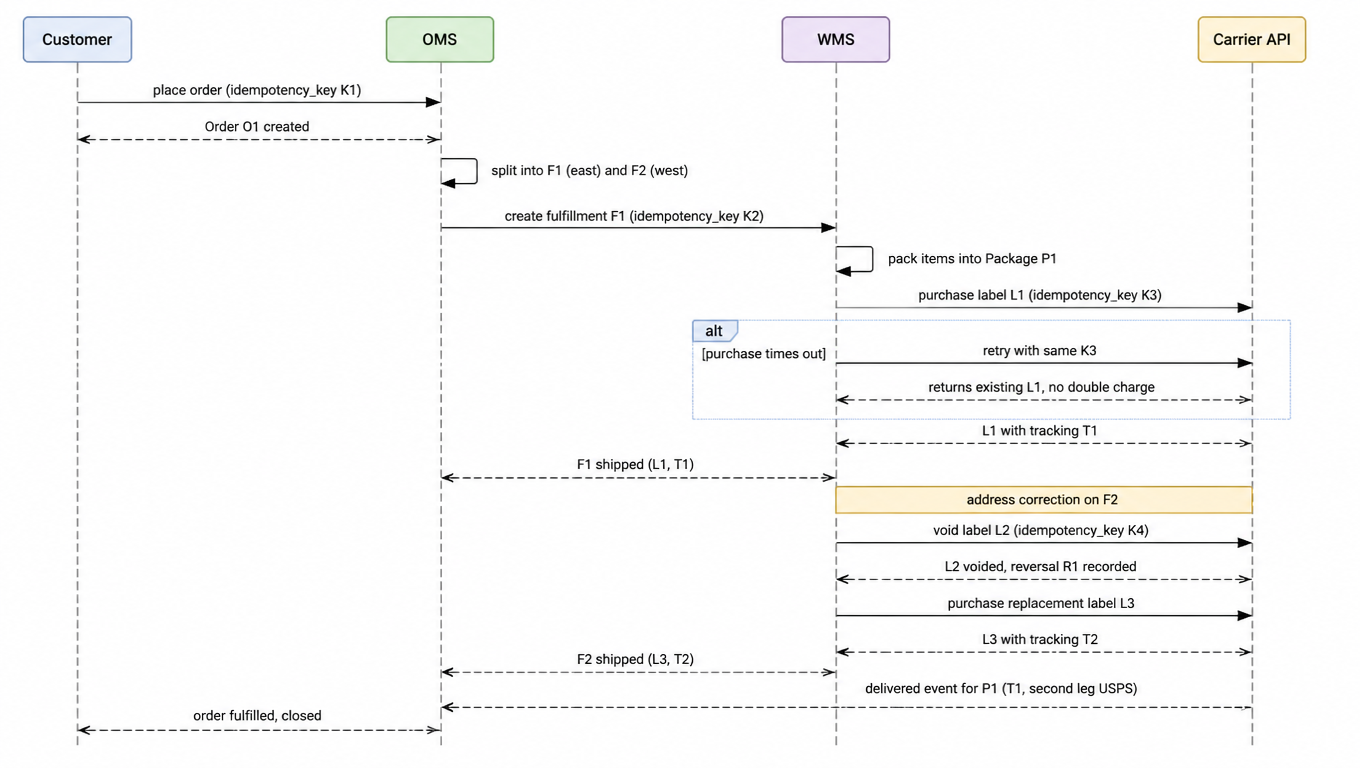
Here is the whole journey as a sequence diagram, from customer to OMS to WMS to carrier, with the retry, void, and multi-carrier moments marked where they actually happen:

Sequence diagram of order splitting, packing, label purchase, idempotent retries, void reversals and tracking events.
The full handshake from Customer to OMS to WMS to Carrier, with retry, void, and second-leg tracking

Three moments in this timeline are where the earlier decisions pay rent. The alt branch is the idempotency key earning its keep: the purchase request timed out, the retry used the same key, and the carrier returned the existing label instead of charging twice. The void branch is the reversal rule in action: the label dies, the money is mirrored, and the replacement purchase is a clean new label id. And the final delivered event carries the package's second-leg tracking, which only works because the model stored tracking on the package, not on the order.

Mapping Quick Reference: Shopify, Amazon SP-API, WooCommerce, Etsy

The vendor-neutral model is your middle layer. Each platform gets one adapter that maps its concepts onto the tree, always in the same direction: platform → neutral model. Never platform → platform. When you add a fifth platform, you write one adapter, not four new pairwise integrations.

Our entity Canonical meaning Canonical fields Join key
ordercommercial promiseid, external_reference, customer_id, line_items, totals, statusid ↔ external_reference
fulfillmentfulfillment actionid, order_id, warehouse_id, idempotency_key, statusid ↔ platform fulfillment id
packagephysical containerid, fulfillment_id, weight, dimensions, tracking[], statusid ↔ platform package id
labelcarrier ticketid, package_id, carrier, status, costid ↔ carrier label id
chargemoney movementid, fulfillment_id, charge_type, amount, currencyid ↔ platform charge id

Shopify

Our entity Shopify concept Field mapping Notes
orderOrderorder.id、order.namename is the human order number, e.g. "#1001"
fulfillmentFulfillment / FulfillmentOrderfulfillment.id、fulfillment_order.location_idtracking fields live on Fulfillment[^1]
packagenonesynthesize from line_items + fulfillmentadapter groups items into packages
labelnone in core APIvia Shopify Shipping or carrier appsstore label_url in fulfillment metafields
trackingFulfillment tracking_number, tracking_company, tracking_urls + FulfillmentEventmap onto package.tracking[]one fulfillment can carry several tracking numbers

Amazon SP-API

Our entity SP-API concept Field mapping Notes
orderOrders API: OrderAmazonOrderId
fulfillmentFBA: Fulfillment Shipment; MFN: Merchant Fulfillment ShipmentshipmentIdtwo different APIs for two fulfillment modes[^3]
packageFBA: FulfillmentShipmentPackage; MFN: package-level tracking on ShipmentpackageId
labelMFN: Merchant Fulfillment ShippingLabel; FBA: shipment labellabelDownloadURLlabel purchase is its own API call (buyShipping)[^2]
trackingFBA: package tracking; MFN: trackingIdtrackingNumber、trackingId

WooCommerce

Our entity WooCommerce concept Field mapping Notes
orderOrder (WC_Order)order.id、order.number
fulfillmentnoneorder status transitions, processing → completedadapter treats a status change as a fulfillment
packagenonesynthesize
labelnoneplugins or external label servicestore label_url in order meta
trackingShipment Tracking plugin: tracking_number, tracking_provider, tracking_link on order metamap onto package.tracking[]plugin attaches meta per order, not per package[^6]

Etsy

Our entity Etsy concept Field mapping Notes
orderReceipt (Shop_Receipt)receipt_idEtsy calls orders receipts
fulfillmentReceipt Shipmentshipment_idcarrier + tracking on the shipment
packagenonesynthesize, group transactions into packagesno package dimension in the API
labelvia Etsy shipping / partner integrationsno public label-purchase entityadapter treats label purchase as external
trackingReceipt Shipment: tracking_code, tracking_companymap onto package.tracking[]carrier + tracking posted via createReceiptShipment[^4]

Notice the pattern in the gaps. WooCommerce has no native label entity and Etsy has no package dimension, but the adapter does not collapse the tree to fit; it synthesizes the missing entity so every layer below it keeps working. That is the whole reason to hold the line on a four-entity model even when a platform makes you work for it.

Common Pitfalls and Modeling Decisions

A few failure modes show up in every integration review. Here they are, with the modeling decision that prevents each one.

  • The one-order-equals-one-package assumption. Written into a schema as a single tracking_number column on the order, it breaks the first time an order splits across warehouses or ships in three boxes. Decision: model fulfillment and package as real entities, and let tracking live on the package.
  • Tracking number as the order's unique key. Multi-package orders have several tracking numbers, and multi-leg packages have several per package. Using tracking as a join key collides or, worse, silently picks one. Decision: (carrier, tracking_number) is the only key that is ever unique, and it identifies a package leg, not an order.
  • Missing fulfillment idempotency. The WMS retries, the retry creates a second fulfillment, and the same goods ship twice. Decision: every fulfillment creation carries a caller-generated idempotency key, deduped server-side on (key, entity_type).
  • Charges not attached to a fulfillment. Label costs float on the order or on a carrier account, and at month end nobody can explain the invoice. Decision: every charge, adjustment, and reversal carries a fulfillment_id, and the ledger is append-only.
  • Platform gaps treated as platform facts. WooCommerce has no native label, Etsy has no package dimension, Shopify's core API has no label entity either. Teams that collapse their model to the weakest platform lose tracking and billing fidelity on every other platform. Decision: keep the neutral four-entity tree and synthesize the missing layer in the adapter.

If you take nothing else from this article, take the checklist that comes out of it. Use it as a review gate for any OMS, WMS, or 3PL integration:

  1. Does every order split into one or more fulfillments, and does each fulfillment know its warehouse?
  2. Does every fulfillment creation carry an idempotency key?
  3. Is tracking stored per package, as (carrier, tracking_number) segments?
  4. Do charges, adjustments, and reversals all carry a fulfillment_id, with no charge ever mutated?
  5. Can you trace any dollar from carrier invoice to fulfillment to order to client?
  6. Does a label void always write a reversal before a new label is purchased for the same package?

Four entities, five decisions, one checklist. That is the whole skeleton of an order-to-label data model that survives splits, multi-leg carriers, void storms, and the monthly billing reconciliation. Build on it once, and every new platform, warehouse, and carrier becomes an adapter instead of a redesign. Before you start, run your integration through our API readiness checklist.

Want to integrate multiple carriers on this model?

EasyShippingX's Shipping API operates in the carrier execution layer (rates, labels, tracking) and keeps orders, fulfillments, packages, labels, and charges on one reconcilable chain: idempotency keys prevent double charges, voids auto-write reversals, tracking is segmented per package, and billing rolls up to the order and client. The four entities, five decisions, and one checklist are exactly the infrastructure that turns "order to label" into an auditable data model. See pricing or book a demo.

FAQ

An order is the commercial promise (what the customer agreed to buy and pay for), a fulfillment/shipment is the fulfillment action (who fulfills what, when), a package is the physical container (the box carriers actually scan), and a label is the carrier ticket (the right to ship one package, carrying the tracking number). One order can split into multiple fulfillments, one fulfillment can produce multiple packages, one package can carry multiple tracking numbers, and one label authorizes exactly one package.
Three layers need it, each with its own key: order creation (dedupe checkout/webhook double-submits), fulfillment creation (prevent double shipping when the WMS retries), and label purchase (prevent double billing when a carrier call times out). The fulfillment key is the one most often forgotten, because a fulfillment looks like an internal step, but it is exactly the step that moves real boxes.
Because one order can have multiple packages and one package can have multiple legs: a split shipment has two packages, and an international package that flies DHL then rides USPS has two tracking numbers. Tracking numbers are not globally unique; only the (carrier, tracking_number) composite key is. Put tracking on the order and the schema breaks the first time an order splits or a package hands off.
Track void request, eligibility, refund decision, and received credit separately; a void does not guarantee a received reversal. Retain the original charge and linkage, apply received credit once, and verify replacement-purchase conditions for the service.
Do not flatten the neutral model to the weakest platform. The adapter synthesizes the missing entity: Shopify gets packages synthesized from line_items + fulfillment with label_url in metafields; WooCommerce gets status transitions mapped to fulfillments and tracking meta mapped onto package segments. The middle layer stays at four entities, so a fifth platform is just one more adapter.
The portal keeps what humans can read, quote, and paste: platform order numbers, carrier-printed tracking numbers, label numbers on tickets. The API and system of record keep canonical UUIDs plus the carrier's raw ids. The two layers meet in a mapping table keyed canonical_id ↔ external_reference ↔ portal display id, never inferred and never with the display id as primary key.
Can this page’s JSON be used directly as a provider request?

Do not assume so. It is a logical reference; map fields, states, permissions, and charge meanings to the current provider version/account, then validate them.