Ecommerce Shipping Guide

RMA vs. Return Shipment vs. Return Label vs. Refund: A Reverse-Logistics Data Model

A buyer's message arrives: "I sent the return back last week, where is my refund?" Underneath that one anxious sentence sit four completely different objects. Most support teams, spreadsheets, and returns apps quietly collapse them into one blob they call "the return." That collapse is where refunds leak, tickets loop, and CSAT dies.

Here is the clean way to see it. An RMA is permission. A return label is the instrument that lets a box travel. A return shipment is the physical movement of that box. A refund is the money moving back. Each one has its own ID, its own owner, its own status, and its own lifecycle. This guide walks one order through all four lifecycles, explains why the distinction pays, and closes with a minimal data model you can copy.

Written for U.S. DTC sellers, operations leads at 3PLs and warehouses, and anyone integrating returns into an OMS, WMS, or returns app. EasyShippingX is a channel-neutral shipping layer that compares US domestic carrier options and executes through Portal, Excel, or API; a return label prints at the same rate logic as any outbound label.

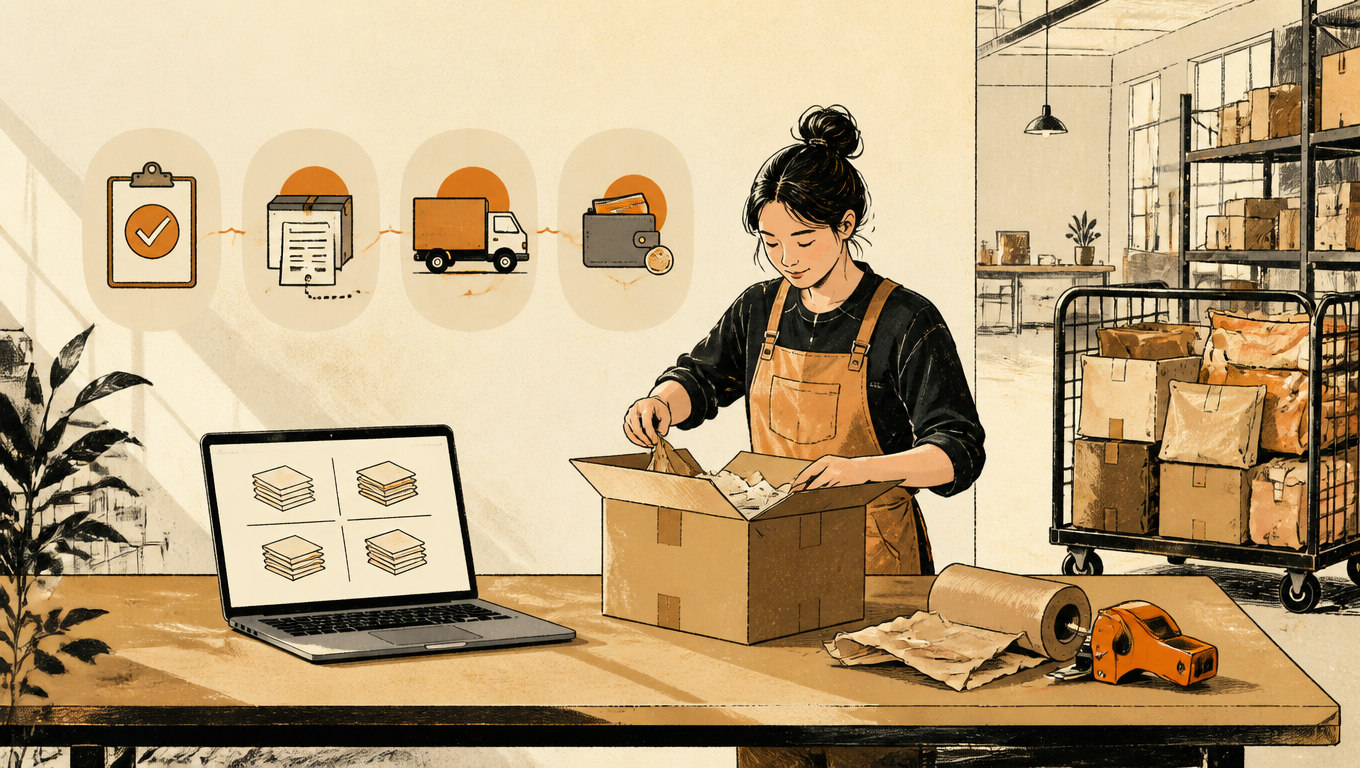
Seller opens a returned parcel beside a laptop and four separate stacks of records at a small returns desk.
Permission, instrument, movement, money: keep them apart and returns stop being a black box

The Four Entities (and the Mix-Up That Costs You)

The message arrives on a Tuesday: "I sent the return back last week, where is my refund?" Underneath that one anxious sentence sit four completely different objects, and most support teams, spreadsheets, and returns apps quietly collapse them into one blob they call "the return." That collapse is where refunds leak, tickets loop, and CSAT dies.

An RMA is permission. A return label is the instrument that lets a box travel. A return shipment is the physical movement of that box. A refund is the money moving back. Each has its own ID, owner, status, and lifecycle. They start in sequence, but after the buyer hands the box to the carrier they drift apart and live independently, and you need to track each one separately from then on.

ObjectWhat it isWhat it is notTypical status flow
RMA (authorization)The seller record of whether a return is allowed, what is allowed back, and for how longNot the movement of goods or moneyrequested → approved → expired / voided
Return label (instrument)The prepaid label that makes the physical return possibleNot the return itselfissued → used / expired / voided
Return shipment (movement)The box traveling back, tracked by carrier scan eventsNot the refundlabel_created → in_transit → delivered / exception
Refund (money)The money moving backNot "the return"pending → processing → issued / failed

Equally useful is what each one is not. An RMA is not the authorization to ship (it is the authorization). A label is not the shipment. A shipment that delivers is not a refund. And an issued refund is not money in the bank. One object moves boxes, one moves money, and the other two exist to authorize and record. The moment you remember which object is responsible for which promise, reverse logistics stops being a black box.
RMA: The Permission

The Return Merchandise Authorization is the seller-issued record that defines whether a return is allowed, what is allowed back, and for how long the offer stands. When a buyer submits a return request, your system either approves it and mints an RMA number (think RMA-1042), or rejects it with a reason. That number is the key every later object points back to. It is the paper trail that says "we agreed this order could come back."

The RMA has a short, unforgiving lifecycle: requested, approved, expired, or voided. The state that matters operationally is the approval window. If your policy says a buyer has fourteen days from approval to ship the item back, then the RMA carries an expiry, and the warehouse dock checks it. An expired RMA arriving at receiving gets rejected or kicked into a manual-review pile, which costs you labor and the buyer's patience. Most sellers never look at this state until a box shows up with no valid authorization.

What does the RMA own? The return reason code, the expected condition of the item (new, open box, used), and the restocking rules that will apply. What it never does is move goods or move money. The RMA is a promise and a policy, nothing more. In a well-built data model it is the record of record for the whole event: if you are ever asked "did we agree to this return?", the RMA row is where you look.

Return Label: The Instrument

The return label is a prepaid shipping label that makes the physical return possible. Somebody has to generate it: the marketplace auto-generates one at RMA approval, the warehouse prints one and stuffs it in the box, or the merchant emails a label pulled from their own carrier account. Whichever path you use, the label is a shipping label like any other. The same carrier account, rate table, and format you use for outbound can issue the way back.

Carrier mechanics matter here. USPS return labels ship as printable PDFs or as QR codes the buyer scans at the counter or drop-off locker: Label Broker & Label Delivery (USPS). UPS Customer Return Services and FedEx Returns run similar return services where the buyer prints, or shows a code and gets a label from the driver. Watch dimensional weight on return labels: an oversize or overweight box that was fine going out can trigger a surprise adjustment on the way back, because the buyer rarely packs as well as you do.

The label's own lifecycle is the shortest of the four: issued, then used or expired. And here is the trap: an issued label means nothing until a carrier scans it. Buyers change their minds, miss the window, or toss the email. A large share of issued return labels are never scanned at allReturn labels: types, costs and best practices (ClaimLane). If your report says "returns processed" but it actually counts labels issued, you are measuring intentions, not returns.

Return Shipment: The Physical Movement

The return shipment is the box itself moving back, and unlike the label, it is owned by the carrier. Its status comes from carrier scan events, not from your intentions: Label Created, Picked Up, In Transit, Out for Delivery, Delivered. This is the only one of the four objects that can answer the question "where is my stuff?", and the only honest source for that answer is the carrier's tracking feed mirrored into your system.

That is why the scan is the moment of truth, not the label and not the buyer's word. Label issued is not returned. The box is returned when the carrier says Delivered to your receiving dock. Even then, reality is fuzzy at the edges: a Delivered scan can land at a doorstep or a dock door minutes before someone actually opens the parcel, so sophisticated operations add their own receiving scan when the item is inspected and checked against the RMA. Until then, treat Delivered as "in our possession, not yet accepted."

Exceptions live in this object too. Undeliverable addresses, refused packages, and return-to-origin loops are all events on the return shipment. When a buyer asks "where is it?" and your system cannot answer from shipment events, whatever the support agent invents instead is a guess. Track the shipment as its own object and the guess disappears.

Refund: The Money

The refund is the financial reversal, and it has a state machine of its own that runs on payment-processor time, not on warehouse time: pending, processing, issued. It does not care whether the box is in transit, at the dock, or already restocked, except through whatever policy you choose to connect them. Issued is still not the end: after the refund is issued, the money actually lands in the buyer's account days later through the processor and the card networks.

A refund is also not the only financial outcome, and mixing them up breaks your accounting. A refund sends money back. Store credit keeps the money and promises future goods. An exchange keeps the money and triggers a new outbound order. Partial refunds and restocking fees are refunds with adjustments. Each outcome touches different objects (a credit line, a new order) and each needs its own record, or your P&L will quietly disagree with your support team.

The policy question is about sequence, not objects. Refund on the delivered scan means the money leaves only when evidence says the box is back, which protects you but slows goodwill. Refund before return, sometimes called return-on-receipt or refund-first, spends goodwill to buy speed and opens the door to abuse. Whatever you choose, the refund object should record which shipment event authorized it, so a chargeback or an angry email can be answered with a timestamp, not a shrug.

One Order, Four Objects (a Walkthrough)

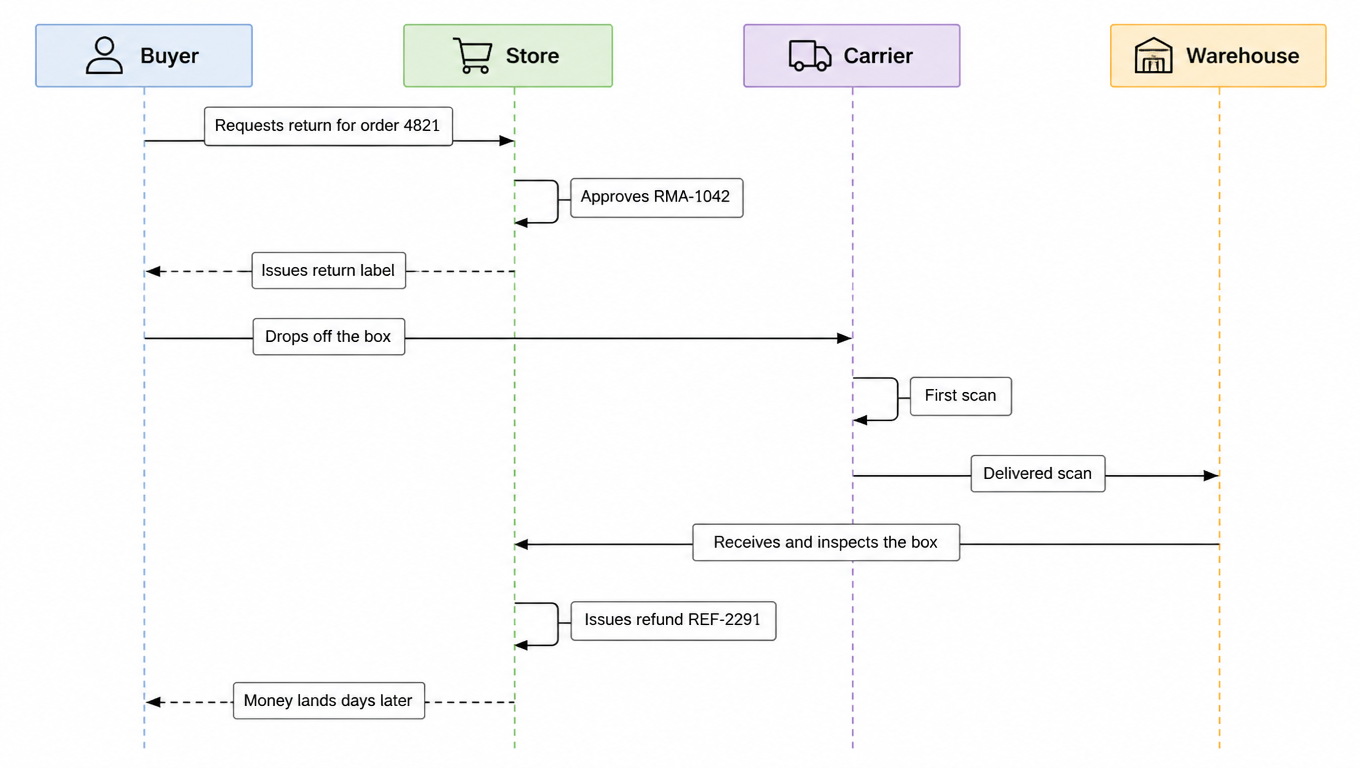
Watch one return travel through all four objects and the seams become obvious. Buyer Maya opens a return request for order 4821, a lamp that arrived with a cracked shade. Your system approves it and mints RMA-1042, valid for fourteen days, reason code damaged. An email goes out with a USPS return label whose number starts with 9400. Maya drops the box at a locker; the carrier's first scan lights up the return shipment object. Nine days later the carrier scans Delivered at your warehouse. Receiving opens the box, confirms the crack, and the system issues refund REF-2291 for the item price. Three days after that, the money shows up on Maya's card.

Return sequence from request and RMA approval through label, drop-off, scans, inspection and refund REF-2291.
Maya's return: four lifecycles start in sequence, then each runs its own course

Now break the chain at each seam and watch how different the failures look:

Where the chain brokeWhat it looks likeWho owns itThe fix
Maya never submits the requestThe problem is in your return portal, and no object exists yetReturns UX / websiteFix the entry point, not the process
The RMA expires while Maya hesitatesThe dock will reject the boxPolicy and remindersSet the window, send expiry reminders
The label is issued but never scannedMaya changed her mind, and the "return" was never realBuyer behaviorDo not count it as a return; void or reissue on expiry
The carrier loses the box in transitThe shipment object shows itThe carrierFile a claim, not a refund debate
The refund sits in processing for a weekThe shipment is fine, and the processor is stuckThe payment processorTalk to the processor, not the warehouse

Five failures, five owners, five fixes. One blob called "returns" cannot tell you which one you are looking at.

Why the Distinction Pays

Start with exposure. Refunding before the return arrives means the box may never come back, and every pre-return refund is an unsecured loan to a stranger with a shipping label. Sellers who refund on the delivered scan cap that risk at the cost of a slower experience. The trade-off is real and policy is yours to set, but you can only make it deliberately if the refund object knows which shipment event released it. Refund on evidence, not on promises, and the fraud hole closes while the goodwill dial stays in your hand.

Support vocabulary is the cheapest fix in this entire article. "We issued your label" is not "we refunded you." "Delivered to our warehouse" is not "your refund is on the way." When agents and self-service pages use the object names correctly, buyers stop re-asking and tickets stop looping. Most angry return emails are really two different objects being confused: the buyer thinks the money is moving because a box moved, or the agent promises a refund because a label went out.

Anomalies become locatable. An expired RMA, a label that was never scanned, a shipment lost in transit, and a refund stuck in the processor look identical in a generic returns report and totally different once you track four objects. Each one has a distinct owner (policy, marketing, the carrier, the processor) and a distinct fix. You stop debugging "returns are broken" and start fixing the one stage that is actually red.

And that gives you four metrics that isolate the broken stage instead of one vague number:

  • RMA approval rate: tells you if your return policy is sane and your rejection workflow is tuned.
  • Label-to-scan rate: tells you how many authorized returns actually ship.
  • Transit time: from first scan to delivered, tells you about the carrier leg.
  • Refund time: from delivered to money issued, tells you about your own operations. This is the number your buyers feel, and it stays invisible until you separate it from the other three.

A Minimal Data Model You Can Copy

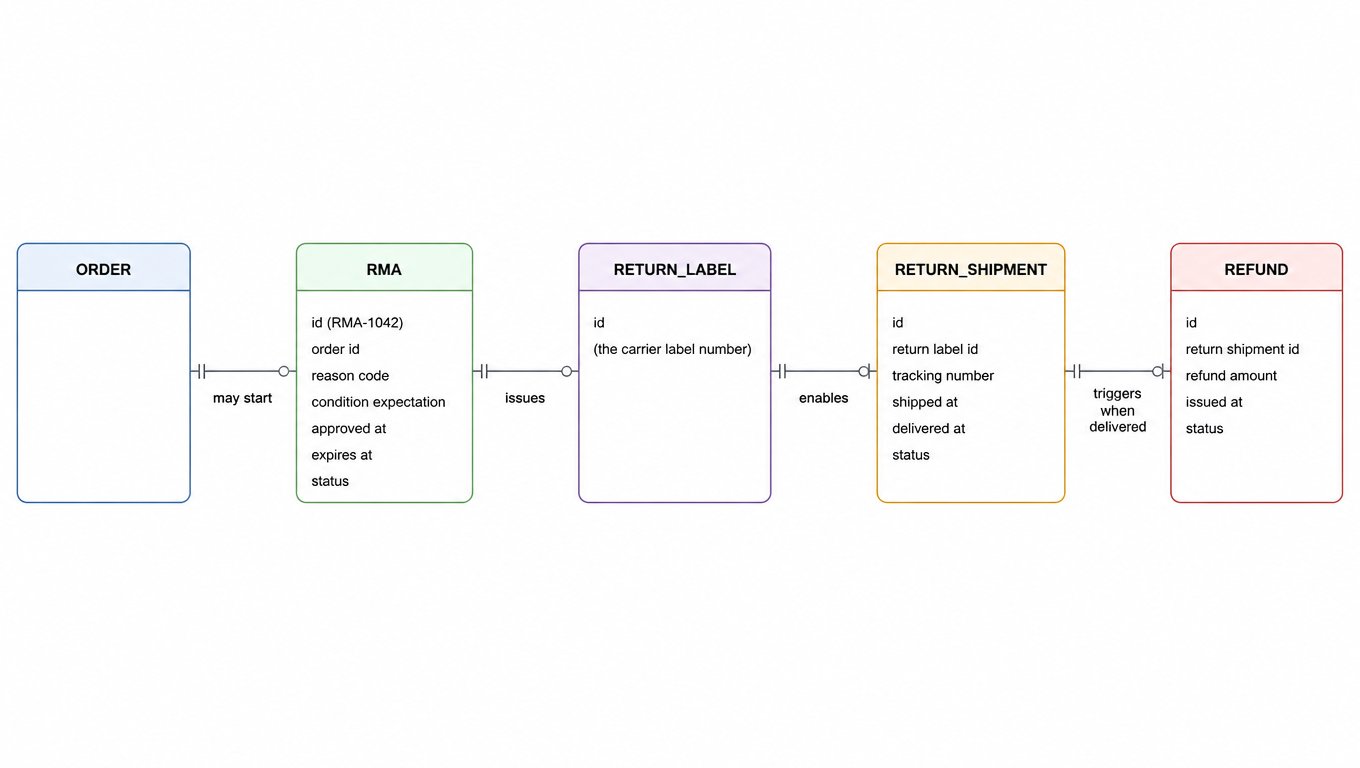
The data model is four objects hanging off the order, each one a row with its own ID, a foreign key back to the order (and forward to the next object), a closed-set status, and the few fields that make that object's promise auditable. You do not need a warehouse-management system to start. A spreadsheet with one tab per object, or a returns app that exposes these fields, is enough to see the seams.

Entity diagram linking ORDER, RMA, RETURN_LABEL, RETURN_SHIPMENT and REFUND.
Four tables under the order; every forward link is an audit trail

Minimal field lists, modeled on the walkthrough above:

  • RMA: id (RMA-1042), order_id, reason_code, condition_expectation, approved_at, expires_at, status. Status enum: requested, approved, expired, voided, rejected.
  • RETURN_LABEL: id (the carrier label number), rma_id, carrier, label_url, issued_at, expires_at, status. Status enum: issued, scanned, expired, voided.
  • RETURN_SHIPMENT: id (carrier tracking number), label_id, carrier, events, status. Status enum derived from the latest carrier event: label_created, picked_up, in_transit, out_for_delivery, delivered, exception.
  • REFUND: id (REF-2291), shipment_id, order_id, amount, method, authorized_by (which event), issued_at, status. Status enum: pending, processing, issued, failed.

The foreign keys matter more than the field count. Each forward link (order to RMA, RMA to label, label to shipment, shipment to refund) is the audit trail. When a buyer asks a question or an accountant asks a question, you follow the links and you have the answer. When a link is missing, the system tells you which object never got created, which is exactly the failure map from the walkthrough.

Map it to the tools you already run and resist overbuilding. On Shopify, a return request maps to the RMA, the label you email is the return label, and the refund you issue is the refund object. On Amazon FBM, the RMA you create in Seller Central and the prepaid label Amazon generates are two objects even though one screen shows them together. In a warehouse WMS, receiving creates the acceptance record that closes the loop against the RMA. The labels are different in every platform, but the four objects are the same, and modeling them the same way lets one dashboard, one support script, and one set of metrics cover every channel.

Conclusion

Keep the four objects apart and the whole machine gets legible. Permission, instrument, movement, and money each have their own ID, owner, and lifecycle, and each failure mode attaches to exactly one of them. Watch the seams between them, because that is where boxes and refunds go missing. And when in doubt, refund on evidence, not on promises. Your fraud rate, your ticket queue, and your buyers will all thank you. To place this inside the wider fulfillment picture, continue with the ecommerce shipping solutions overview.

FAQ

No. An RMA is the seller-issued authorization that records whether a return is allowed, what may come back, and for how long. A return label is the prepaid shipping instrument that makes the physical return happen. The RMA comes first, and one RMA can lead to several labels or none at all.
It is a policy choice, not a system limitation. Refunding on the delivered scan keeps exposure lowest but feels slower. Refunding first spends goodwill to buy speed and opens the door to abuse. Whatever you choose, record which shipment event authorized the refund so every dispute can be answered with a timestamp.
Ask which object moved. Most of these tickets confuse two objects: an issued label is not a shipped box, and a delivered box is not an issued refund. Have support check the RMA status, whether the label was ever scanned, the return shipment's carrier events, and the refund status separately, and the picture usually clears immediately.
Track all four lifecycles: the RMA (requested, approved, expired, voided, rejected), the return label (issued, scanned, expired, voided), the return shipment (derived from the latest carrier event: label created, in transit, delivered, exception), and the refund (pending, processing, issued, failed), plus the foreign keys linking them, or you cannot see where the chain broke.
Yes. Labels carry a validity window set by the carrier or platform, and buyer hesitation can outlast it. The important habit is to stop counting issued labels as returns: a meaningful share of issued return labels are never scanned at all. Track the label-to-scan rate, bucket expired labels separately, and decide whether to void or reissue.

Related pages

A return label prices on the same carrier rate logic as an outbound label. Compare before you print: the shipping rate calculator compares US domestic carrier quotes by package, weight, and ZIP; see the pricing page for volume-based rate tiers.