USPS Guide

What Does "USPS Tracking Not Available" Actually Mean?

You type in your tracking number, hit search, and the screen shows "Tracking Not Available." For most people, the first thought is: did my package get lost? Was it seized by customs? Did the seller even ship it?

Here is the short answer: in the vast majority of cases, your package is fine and moving through the network. The system just does not have tracking info to show right now. This article walks through every common reason "Tracking Not Available" appears, and gives recipients, sellers, and 3PL warehouses a concrete playbook for each.

Buyer checks a Tracking Not Available message on a phone while sitting on a sofa.
Tracking Not Available is not a lost package; most of the time the parcel just has not been scanned yet

First, the bottom line: Tracking Not Available ≠ a lost package

"Tracking Not Available" is a status message, not an incident alert. What it actually means: at this moment, the USPS system has no tracking event to display.

That breaks down into two situations. First, the tracking number cannot be found in the system at all, as if it does not exist. Second, the number is found, but there are no new scans, so the page only shows old information. Neither of these means the package is missing.

USPS tracking depends on scans at each point along the route. From pickup to delivery, a package usually goes through a pickup scan, sorting center scans, transfer scans, and carrier scans. If any single scan is missing, tracking stalls in place, or even shows Not Available. The package itself might be bouncing around in a truck, or sitting on a conveyor belt at a sorting center, just waiting for its turn to be scanned.

So keep the most important sentence of this article in mind: as long as you are still within the promised delivery window, Tracking Not Available means nothing is wrong. It is a normal part of shipping, not a warning sign.
Why Tracking Not Available shows up

The reasons fall into eight categories, covering everything from label creation to last-mile delivery.

  1. The tracking number is not active yet. The tracking number is generated when the order is placed, but the package may not have been handed to the post office yet. Naturally, the USPS system has no record. This usually happens in the first day or two after ordering, and it is completely normal.
  2. The service does not include end-to-end tracking. Not every USPS service does[1]. Some economy services and some international surface options only have partial tracking: no scan at every stop, just an entry scan and a delivery scan. Packages like these show Not Available for most of their journey.
  3. Waiting for the first scan. The package just entered the shipping network, and the first pickup or sorting scan has not happened yet. Between label generation and the first scan, a few hours to a day or two can pass.
  4. International segments do not sync. International small parcels have tracking on the domestic leg, but there is an information gap between leaving the origin country and entering the USPS network. A package on a plane generates no scans. This gap is usually two to three days, sometimes up to a week.
  5. System sync delays. USPS's own site and third-party tracking tools (like 17TRACK or AfterShip) do not always agree. A third-party tool may show Not Available while USPS.com already has updates, or the other way around. Treat USPS.com as the source of truth.
  6. Wrong lookup. A wrong number of digits, a character lost in copy-paste, or the wrong tracking tool will all show Not Available. USPS.com itself occasionally glitches too; checking again half an hour later usually fixes it.
  7. Counterfeit postage seized. This is a newer situation worth taking seriously. USPS has stepped up inspections for counterfeit postage. If a package is flagged as using fake stamps or a fake label, it can be intercepted, held, or even destroyed[2]. Tracking for a seized package stops updating, and the buyer's side may sit on the last scan for a long time. If your package fits the pattern of a cheap shipping method plus no updates for a long stretch, and you have received USPS notices about postage issues, understand it may be held for investigation while you go through normal channels, and get the seller involved promptly.
  8. Unmanifested. The label was generated, but the package was never scanned into the carrier's system, or the third-party platform never synced the shipping manifest to USPS. This is common with third-party logistics platforms. No record in the system does not mean the package is lost; it means it has not formally entered the USPS system yet.

The recipient's playbook: how to check, when to worry, how to contact the seller

If you are the recipient, following this rhythm will keep you out of trouble in almost every case.

Check the right way. Treat USPS.com and the official app as the source of truth. Third-party aggregation tools are convenient, but their data lags; treat them as reference only. When you look up a number, make sure it is complete, with no stray spaces or extra characters.

How often should tracking update? 48 hours without a new scan is normal, and weekends and holidays are slower. For cross-border packages, a gap of several days is normal too. Do not declare the package lost just because nothing updated for two days.

When should you actually contact the seller? Three signals: it is past the promised delivery window; tracking says Delivered but you do not have the package; or tracking shows an exception event (Returned, Undeliverable, etc.). Outside these three, wait.

How to contact the seller effectively. Give everything in one message: order number, tracking number, order date, a screenshot of the current status, and how many days you have waited. Complete information lets the seller investigate fast instead of going back and forth.

The seller's playbook: tell buyers first, manage expectations, handle exceptions

The seller is the only bridge between the buyer and the carrier, so expectation management has to come before problems do.

Notify right after shipping. Send the tracking number and a lookup link in the shipping notification, with a line like "Tracking info can take 24 to 48 hours to update, that is normal."

Put the update rhythm on the product page. In the product description and shipping info, state up front which carrier you use, how often tracking updates, and roughly how long until full tracking shows for international orders. Buyers who know the expectations before ordering ask far fewer follow-ups.

Prepare an FAQ. Write standard answers to "What does Tracking Not Available mean?", "Why has it not updated in two days?", and "Is my package lost?" Your support team can copy-paste these, keeping the tone consistent and replies fast.

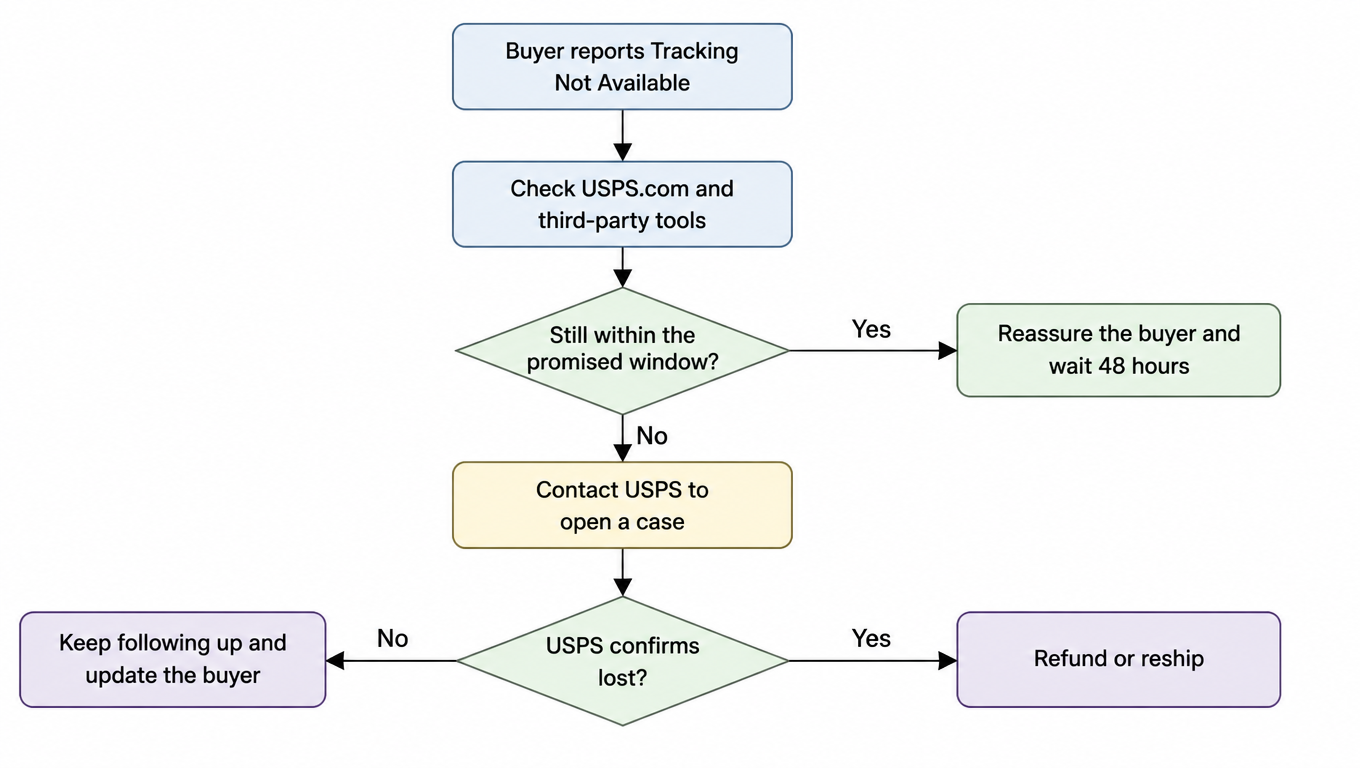
Define the exception process. A clear escalation path:

Exception handling flowchart for sellers: buyer reports Tracking Not Available, check USPS.com and third-party tools, decide if still within the promised window, reassure and wait 48 hours or open a USPS case, refund or reship if confirmed lost
Check official channels first, then the carrier, refund last

The principle behind the whole flow is simple: check official channels first, then contact the carrier, and only then consider a refund or reshipment. Refunds are the last resort, not the first step.

The warehouse playbook: pick the right service, sync tracking numbers, handle exceptions

The 3PL warehouse sits in the middle of the chain: orders come in from sellers upstream, last-mile carriers go out downstream. Your actions directly determine how much tracking the buyer gets to see.

Prefer last-mile carriers with end-to-end tracking. Tracking coverage varies a lot between last-mile carriers. USPS Priority Mail and similar services have scans from pickup to delivery; some economy services only have partial tracking. For categories where the experience matters, use end-to-end tracking channels and let the channel absorb the cost, not the buyer.

Sync tracking numbers correctly at outbound. One wrong digit, or an order matched to the wrong tracking number, and the buyer either sees someone else's package or nothing at all. At outbound, verify the tracking number to order mapping before syncing to the seller's system.

Manage tracking numbers in bulk. When integrating via API, watch for duplicates and ordering to avoid mismatches on bulk uploads. Add an automatic check: number length, format, and order correspondence.

Agree on an SLA for exception parcels with sellers. What counts as an exception, how fast it gets investigated, when it escalates, and who contacts USPS: all of this should be written down before you start working together. Clear agreements mean a clear process when exceptions happen, instead of finger-pointing.

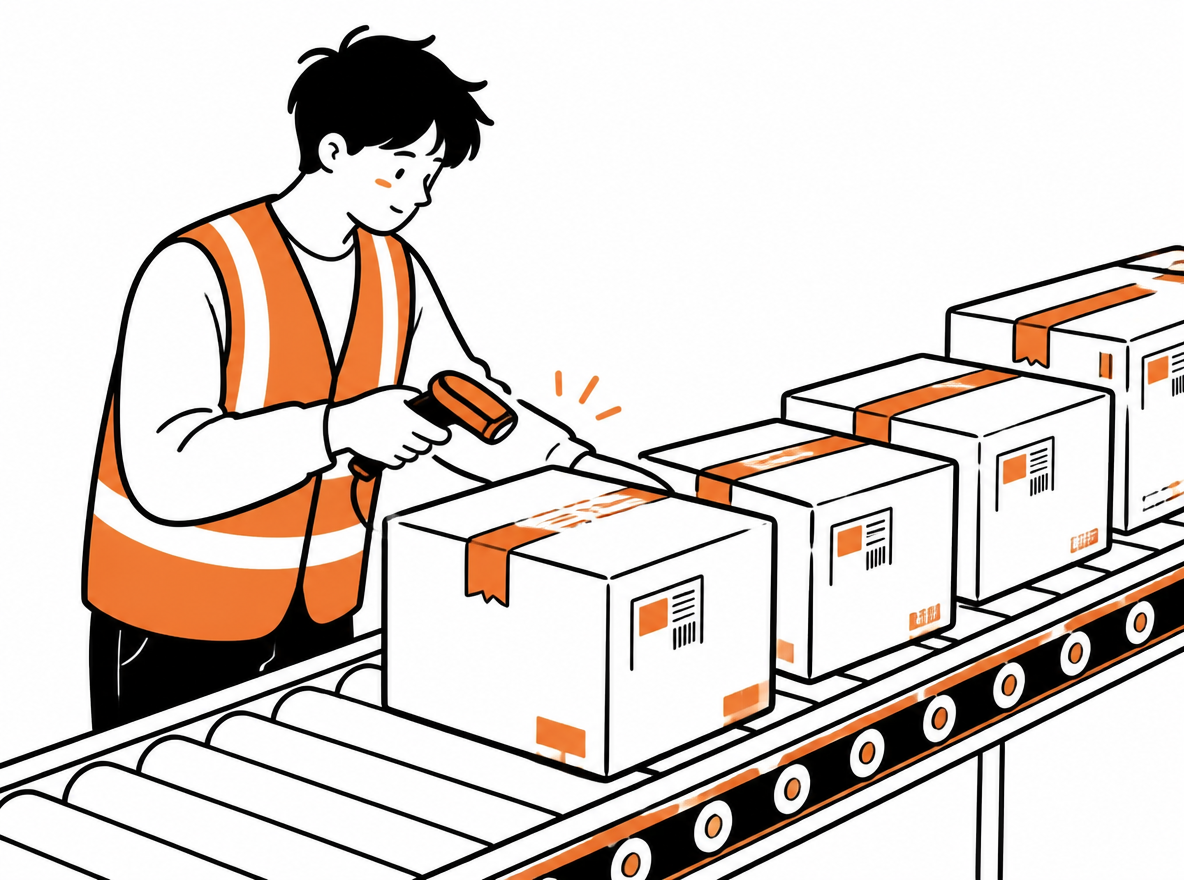
Warehouse worker scans labels on parcels queued for handoff to a last-mile carrier.
Verifying the tracking number to order mapping at outbound is the first step to correct buyer-visible tracking

Cross-border close-up: ePacket / international small parcels + USPS last mile

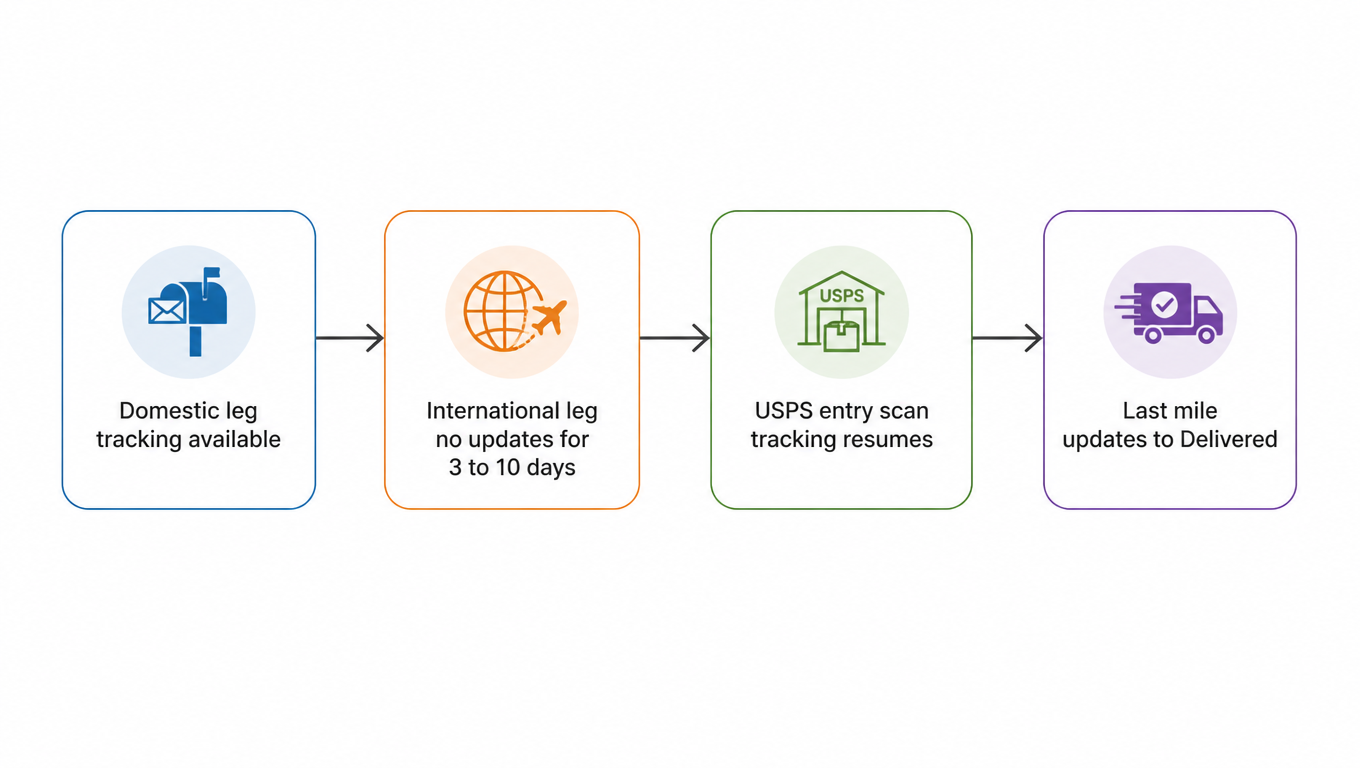
Cross-border parcels are where Tracking Not Available happens most, because the journey is cut into three legs:

Cross-border journey diagram: domestic leg with tracking, international leg with no updates for 3 to 10 days, USPS entry scan resumes tracking, last mile updates to Delivered
Almost no scans happen on planes and ships, which is the root of cross-border gaps

Domestic leg: the package is in the domestic logistics network and tracking is normal. International leg: the package is on a plane or ship, and there are almost no scans on this stretch, an information vacuum. USPS last mile: the package enters the US network, tracking resumes after the entry scan, and continues until delivery completes.

ePacket is a classic "partial tracking" service[3]: tracking on the domestic leg, then USPS handles last-mile delivery in the US with visible end scans. Buyers checking on the origin post's channel will not see the US-leg information; they have to switch to USPS.com or a third-party aggregator to see the final updates. This is exactly why cross-border parcels show "tracking at home, Not Available once it hits the US."

What sellers should do in advance. When shipping cross-border orders, state it in the notification: "Tracking updates once the package arrives in the US; there may be 3 to 10 days with no information in between." The heads-up means buyers will not pepper you with questions during the gap.

When you actually should worry

Most of the time Tracking Not Available is a false alarm, but a few situations deserve real attention:

Past the expected delivery time AND 7 to 10 days with no scan. Note that both conditions have to be true at once. Just being over time without an exception, or just having a gap without being over time, is not enough to declare a problem.

Shows Delivered but the buyer did not receive it. This usually is not a tracking problem, it is a delivery problem: wrong address, a neighbor accepted it, or it was left at the door and taken.

Shows an exception event. Statuses like Returned or Undeliverable mean the package genuinely has a problem and needs human intervention.

What to do then. The recipient contacts the seller, the seller opens a missing mail search case on USPS.com[4], and USPS starts an investigation. If the investigation comes up empty, apply for a refund or reshipment per platform rules. Keep records throughout, for any later claims.

Wrapping up: one sentence + a practical checklist

Tracking Not Available is normal, not an accident. It is just an information notice, and the vast majority of packages are on their way.

  1. Recipient checklist. Check on USPS.com; 48 hours without an update is normal; only contact the seller in the three cases: past the delivery window, Delivered but not received, or an exception event shows.
  2. Seller checklist. Send the tracking number and lookup link right after shipping; put the tracking update rhythm on the product page; keep a Tracking Not Available FAQ ready; define the exception flow of "check official channels first, then the carrier, refund last."
  3. Warehouse checklist. Prefer end-to-end tracking last-mile carriers; verify the tracking number to order mapping at outbound; prevent bulk number mismatches; agree on an exception-parcel SLA with sellers.

Next time you see Tracking Not Available, take a breath, then walk the checklist. Chances are, your package just has not been scanned yet.

FAQ

No. In the vast majority of cases the package is moving through the network normally; the system just has no tracking event to display. As long as you are within the promised delivery window, Tracking Not Available is normal. Only when the expected delivery date has passed AND there has been no scan for 7 to 10 days should you contact the seller.
48 hours without a new scan is normal, and weekends and holidays are slower. For cross-border parcels, a gap of 3 to 10 days on the international leg is normal too, because packages on a plane or ship generate no scans. A real exception signal requires both a passed delivery window and a long scan gap.
ePacket is a partial tracking service: it has tracking on the domestic leg, then USPS handles the US last mile. It is normal for the origin post's channel to show nothing for the US leg; switch to USPS.com or a third-party aggregator (like 17TRACK or AfterShip) to see the final updates.

Tired of answering "why can't I see tracking?" dozens of times a day?

EasyShippingX bakes end-to-end tracking carrier selection, automatic tracking number sync, and buyer notification templates into your shipping flow, so every cross-border parcel ships with clear tracking expectations from the start.