USPS Shipping Guide

USPS Tracking Status Explained: What Every Scan Event Really Means

Three sentences matter more than memorizing any status name. First, USPS tracking is not GPS: the page does not show a live coordinate of where the package is right now, only a chain of dated scan events. Second, no new scan does not mean no movement: a package riding in a trailer for twelve hours, or queued at a processing center, produces nothing. Third, read tracking as a pattern, not as its latest line: a long stretch with no events at all is more worth investigating than any single scary-looking status.

This guide is written for two audiences at once. For everyday shippers and buyers, it translates each common status into plain English and answers one question: where is the package, should I worry, and what do I do next. For ecommerce sellers, 3PLs, and overseas warehouse operators, it adds the operational layer: label created is not carrier acceptance, the first carrier scan is the fulfillment proof, and Delivered is not the end of the story. Official USPS sources carry the facts, and experience-based guidance is labeled as experience, never dressed up as an official promise.

Postal carrier hands a barcoded parcel to a recipient on a neighborhood street.
One label, one chain of scans: the whole journey from creation to delivery

From Label to Delivered: The Life of a USPS Package

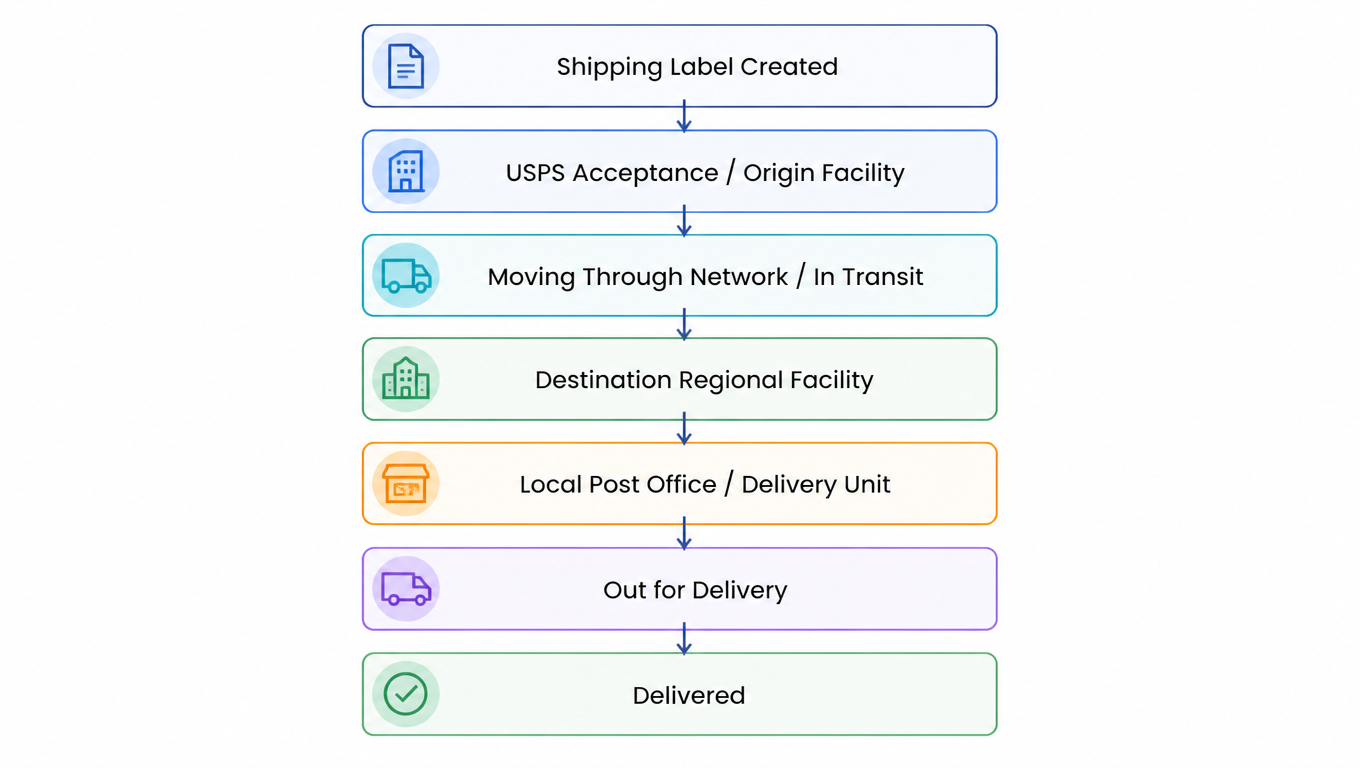
A domestic USPS package normally passes through these stages in order, from handoff to delivery. Treat the chain as a map: for any status you see, you can locate where the package sits on it, what should have happened before, and what should come next.

USPS parcel lifecycle from Shipping Label Created through acceptance, processing, transit and local delivery to Delivered.
The happy path: every status has a seat on this chain

Three points on the map are easy to misread. First, the journey does not start with "shipped" but with "label created", and between label creation and USPS actually possessing the item there can be hours or days. Second, the middle of the chain is full of seemingly repetitive Arrived / Departed pairs; those are handoffs between processing centers, not detours. Third, near the end, "Arrived at Post Office" and "Out for Delivery" mean the package is in the last mile, which is where most delivery problems actually live, not in the trunk line.

To judge whether a status is normal, always ask two questions first: is it in the right place on the chain, and is the dwell time reasonable? Right place with a long dwell time usually means slow, not lost. A status that does not fit the chain, like a new Arrived event after Delivered, is what deserves suspicion.

Shipping Label Created and Acceptance: "Label Created" Is Not "Package Received"

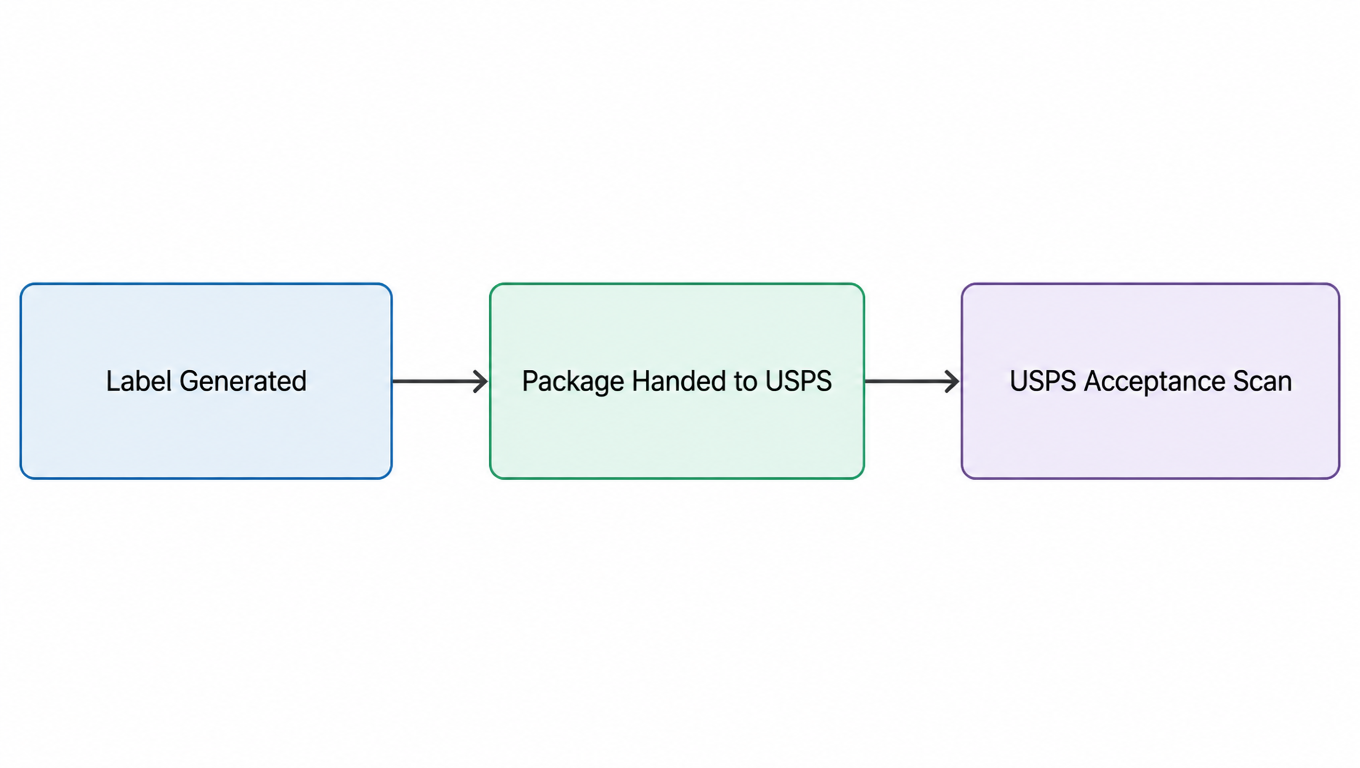
Shipping Label Created, USPS Awaiting Item is one of the most misread statuses because it looks like USPS has taken over, when it really only means "a paid label record exists in the system". At this point the package may still be in the seller's warehouse, on its way to the post office, handed over but not yet scanned, or sitting with a third-party consolidator that has not completed its USPS handoff. Before answering a customer's "has it shipped?", separate the three facts: the label was generated, the package was handed to the carrier, and the carrier scanned it. Only a first physical USPS scan confirms the carrier actually holds the item.

Three distinct events: label generated, parcel handed to USPS and USPS acceptance.
Label generated, package handed over, carrier acceptance: three different facts

Acceptance appears in three common phrasings: Accepted, USPS in Possession of Item, and the most misread one, Shipment Received, Package Acceptance Pending. The third is typical of bulk drop-offs: a seller or 3PL submits an entire batch of labels at once with a SCAN Form or manifest, the post office can start processing without scanning each piece, so the system first records "this piece is in this batch" and the individual scan follows. Usually there is nothing to worry about; but if hours pass with no physical scan at all, a missed scan is more likely than a lost package.

For sellers on Amazon, eBay, Walmart, Etsy, and Shopify, the first carrier scan is the core proof in fulfillment monitoring: it shows the warehouse actually handed the parcel over in time, and it is the dividing line between seller performance and WISMO (where is my order) tickets. When tracking sits on Awaiting Item too long, the first instinct should not be to blame the post office but to check the warehouse: was the label printed but never applied, is the parcel still in the pick area, or is a consolidator holding volume?

Moving Through the Network: Arrived / Departed, Regional Facilities, and In Transit

Arrived at USPS Facility / Regional Facility and Departed USPS Facility / Regional Facility record the package being scanned into or out of a processing node. To read them, know the three facility types: the local post office and Delivery Unit (last mile), the Regional Facility (collection and distribution for one area), and the Network Distribution Center (long-haul trunk line). Packages move between nodes as handoffs, which is what those Arrived / Departed pairs are.

"Regional" causes endless confusion. Arrived at USPS Regional Destination Facility means the package reached the processing center for the destination area, so delivery is close; it is not "still halfway". The typical end chain from there is: destination regional facility, regional processing, the local post office, then Out for Delivery. Arrived at Post Office (also written Arrival at Unit or Delivery Unit) means the package is at the post office that serves the delivery address and will usually go out on the next scheduled route.

Moving Through Network and In Transit to Next Facility mean the package is moving between two nodes. The key insight: these updates can come from a real scan, or they can be derived updates the system generates from historical patterns. Not every line on a tracking page means a worker just scanned the barcode again. So "In Transit" by itself does not prove the package was physically scanned right now; it means the system believes the item is still moving and nothing has interrupted that assumption.

In Transit, Arriving On Time and In Transit, Arriving Late are the system's estimate of timing. Arriving Late is not an error: it just means delivery may fall outside the original window, a day or two late is common, and it is not a sign of loss. The line worth watching is not the phrase "Arriving Late" but whether any new event follows it for a long time.

Out for Delivery and Delivered: What Actually Happens in the Last Mile

Out for Delivery means the package is on today's route, but it does not guarantee delivery the same day. A long route, weather, or an absent recipient can bring it back to the post office for another attempt. What follows is either Delivered or a delivery exception: Delivery Attempted, No Access, Business Closed, Animal Interference, Weather Delay. If Out for Delivery has no follow-up after a full day, do not assume loss; first check whether a Notice Left was left behind.

The common Delivered suffixes describe where the package was left: In/At Mailbox, Front Door/Porch, Parcel Locker, or Left with Individual. The most dispute-prone one is Delivered to Agent for Final Delivery: the agent is not necessarily the recipient. It can be a mailroom, a front desk, a building manager, a campus mail center, or an authorized receiving point. Do not declare the package lost when you see Agent; first have the buyer ask the property office, front desk, or mailroom.

Delivered but the buyer says it never arrived: work the list in order. Check the mailbox, doorstep, parcel locker, mailroom, and garage, and ask household members and neighbors. Then read the exact delivery location on the tracking page. If it is still missing, contact the local post office. At the official level, file a Service Request or Help Request first, open a Missing Mail Search if eligible, and only then file a claim. Do not skip steps, because each one is the prerequisite for the next.

Exceptions: Failed Delivery, Address Problems, Returns, and Missent

Read every exception status with the same three questions: what does it mean, is the package lost, and what should I do? The categories are covered quickly here, with the full status map in the reference table in the next section.

Failed-delivery events almost always mean "the carrier arrived but could not leave it": Notice Left means an attempt failed and a notice (usually PS Form 3849) was left, with the package held for pickup or redelivery; No Authorized Recipient Available means no one was there to sign; No Access to Delivery Location means the carrier could not get in (locked gate, blocked road); Business Closed means a commercial address was shut; Receptacle Blocked means the mailbox was obstructed; Animal Interference means an animal made the approach unsafe. Short of repeated No Access attempts ending in a return, this category is almost never "lost". The action: follow the notice to pick the package up or schedule redelivery from the tracking page.

Address exceptions are the biggest source of returns and delays: Insufficient Address means the address is incomplete and USPS usually allows one correction attempt before returning; No Such Number, Addressee Unknown, and Vacant mean the address does not exist, the person is unknown, or the property is empty; Forwarded means the item was redirected per a forward request, and Unable to Forward means it could not be (no forward on file, or address type not eligible), so it returns. For sellers, this category is almost always an upstream address-data problem: validate at checkout instead of repairing after the return.

Return to Sender is not a single event but an outcome, with common causes including Insufficient Address, Addressee Unknown, Refused (recipient declined), Unclaimed (not picked up in time), Vacant, No Such Number, and Unable to Forward. It means the package is traveling back. When it arrives, read the cause: fix the address data if it was wrong, and treat a refusal as a returns-process case rather than reshipping to the same address. One more high-frequency word in misrouting is Missent: it means the package was sorted onto the wrong direction (for example a New York parcel sent to Pennsylvania first). USPS detects it and reroutes, which can make the trail look like a detour or even a return to origin before it leaves again. Missent is not loss; it usually adds a day or two, unless no follow-up scan appears for a long time.

Other special statuses you will meet: Available for Pickup means the package waits at the post office for pickup with the notice or ID; Held at Post Office means it is being held by request or after a failed attempt; Reminder to Schedule Redelivery is the system prompting you to book a new attempt; Intercepted means the shipper used USPS Package Intercept to reroute or return an item, which usually carries a fee and is not guaranteed; Processing Exception, Weather Delay, and Transportation Delay are temporary processing or transport delays that usually resolve on their own.

USPS Tracking Status Reference Table

The table below maps the most common statuses in lifecycle order. Each row answers the same four questions: what tracking shows, what it means in plain English, which stage the package is in, and whether to worry plus what to do.

Tracking showsPlain-English meaningPackage stageWhat to do
Shipping Label Created, USPS Awaiting ItemA label exists; USPS has not confirmed possessionPre-handoffShort: wait; long dwell: check warehouse and consolidator first
Accepted / USPS in Possession of ItemUSPS scanned and accepted the itemAcceptanceSellers: log the first carrier scan time
Shipment Received, Package Acceptance PendingBatch manifest received; per-piece scan pendingBulk drop-offWait for the piece scan; long gap suggests a missed scan
Arrived at USPS (Regional) FacilityReached a processing or distribution nodeNetwork processingNormal; wait
Departed USPS (Regional) FacilityLeft the node for the next oneIn transit between nodesNormal; only watch if nothing follows
Moving Through Network / In Transit to Next FacilitySystem believes the item is moving (may be a derived update)In transitWait; not proof of a physical scan
In Transit, Arriving On Time / LateSystem timing estimate; Late just means possibly delayedTransit timingA day or two late is common; investigate only on a long silence
Arrived at USPS Regional Destination FacilityReached the destination-area center; close to deliveryDestination processingDelivery is near; wait for the next event
Arrived at Post Office / Arrival at UnitAt the post office serving the addressLast-mile originDelivery today or next business day
Out for DeliveryOn today's route; same-day delivery not guaranteedFinal mileWatch for the follow-up; check for Notice Left if silent
Delivery Attempted / Notice LeftAttempt failed, notice left, package heldDelivery exceptionPick up per the notice or schedule redelivery
Delivered, In/At Mailbox / Front Door / Parcel Locker / Left with IndividualDelivered, with the location recordedDeliveredCheck the recorded spot; escalate only if truly missing
Delivered to Agent for Final DeliveryLeft with an agent for final delivery; agent is not the recipientAgent handoffAsk the property office, front desk, or mailroom first
Available for Pickup / Held at Post OfficePackage held at the post office for pickupPickupPick up with notice/ID; mind the hold period
Insufficient AddressAddress incomplete; possibly one correction chanceAddress exceptionProvide the missing info or it returns
No Such Number / Addressee Unknown / VacantAddress or recipient cannot be verifiedAddress exceptionVerify the order address; fix upstream data
Forwarded / Unable to ForwardRedirected / cannot redirect, returningForwardingExpect delivery to the new address or a return
Refused / UnclaimedDeclined or never picked upPre-returnHandle as a return; do not reship to the same address
Return to SenderPackage is traveling backReturn legRead the cause and coordinate with the sender
MissentSorted the wrong way; being reroutedMisroutingNo action; usually adds a day or two
InterceptedAn intercept request is in progress (fee, not guaranteed)InterceptFollow the intercept outcome and new destination
Processing / Weather / Transportation DelayTemporary processing or transport delayDelayUsually resolves; check if it stretches for days
Tracking Not AvailableNo record found; see the troubleshooting sectionData layerCheck the number and timing; do not confuse with Label Created

Troubleshooting: Stale Tracking, "Not Available", and How Long to Wait

Tracking Not Available is not the same as "no record at all". It usually means: the number was typed wrong (USPS tracking numbers are 22 digits); the label data has not reached the USPS system yet, which is the most common case in the first hours after label creation; or the lookup service temporarily cannot return data. Shipping Label Created, by contrast, proves the data arrived, so do not confuse the two. Also note that USPS officially keeps tracking detail available for a limited period (per the official pages, commonly cited as about 120 days [^1]); an expired history does not mean the package never existed.

The most common reasons tracking stalls, roughly in order of frequency: a missed scan (between trunk legs or sorting steps), a long-haul leg (a trailer can run over a day to the next node), processing backlog, weather, peak-season volume, a reroute after missorting, and a missed delivery scan. "In Transit silent for three days" and "Out for Delivery silent for a day" mean very different things: the former is usually just slow, the latter usually deserves a call to the post office. Use the table below to judge.

SituationLikely meaningAction
Label just created, stuck on Awaiting ItemHandoff not yet confirmedWait; confirm the handoff point with the warehouse or consolidator
Awaiting Item for an unusually long timeHandoff or missed-scan issueContact the sender and investigate
A recent In Transit event existsUsually normalWait
An unusually long scan gapPossible delayMonitor and escalate past your threshold
Arrived at the local post officeNear deliveryWait for the next event
No follow-up after Out for DeliveryDelivery exception; possibly a noticeCheck for a notice / call the post office
Delivered but the package is missingPossible misplacement or theftRun the delivered-missing checklist; open a search or claim if needed
Return to SenderAddress or delivery problem caused a returnRead the cause and coordinate with the sender

The timing guidance above is operational experience, not a USPS official promise. At the official level, USPS offers actions for overdue items: file a Service Request or Help Request first, start a Missing Mail Search if eligible, and submit a claim within the required window before it expires [^2]. Keep the two clocks separate: how long to wait is your team's SLA decision, while when a search or claim is possible is governed by the USPS pages.

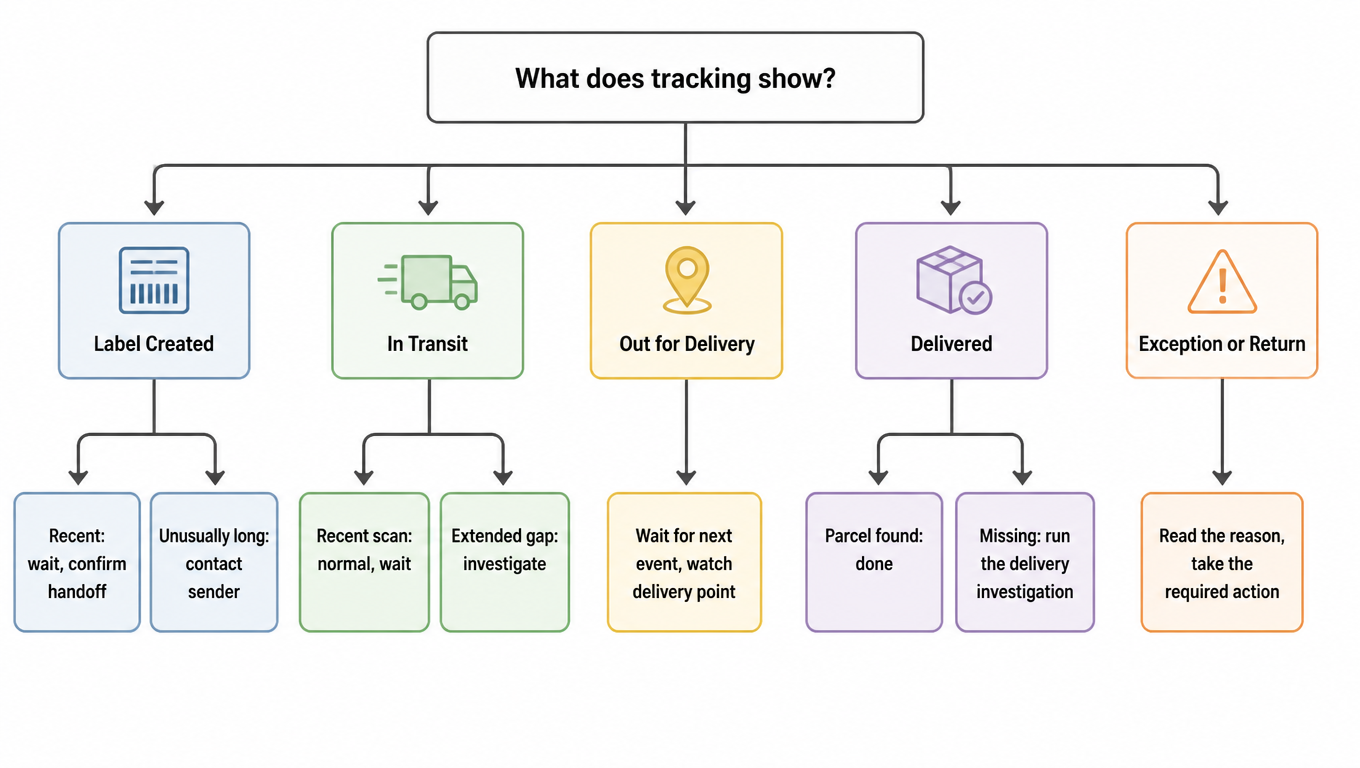
USPS tracking decision tree covering Label Created, In Transit, Out for Delivery, Delivered and Exception statuses.
Locate the stage first, then act: one tree for the common cases

Everything above compresses into one line: locate the stage on the chain, then measure the dwell time. Right stage and merely slow means wait; wrong stage or overdue means escalate through the official flow. For "Delivered but the buyer says it never arrived", the highest-leverage step is usually not opening a search but pulling the exact delivery location from tracking and having the buyer check that spot first.

For Sellers and 3PLs: Turning Tracking into an Operational Signal

For sellers and 3PLs, tracking's real value is not "a link to send the customer" but an early signal of fulfillment quality. The first metric to watch is Time to First Carrier Scan: the gap from label creation to the first physical USPS scan. It measures whether the warehouse actually handed the parcel over on schedule, and it drives your WISMO ticket volume. A long stay on Awaiting Item is a first signal of a missed shipment, a lost parcel, or a consolidator holding volume, not of a slow post office. Why order status, shipment status, and tracking status disagree is its own topic, covered in Order vs. Shipment vs. Tracking Status.

The second thing to watch is stuck-shipment detection: set a "no update for more than X hours" alert threshold per service and network stage, then escalate in order: internal alert, customer notification, carrier investigation. The threshold should never be one shared number across all channels: the baseline for a same-metro parcel and a coast-to-coast parcel are different, and peak season calls for looser limits. The value of X comes from your own historical percentiles, not from carrier promises. For consolidation and cross-border flows, Tracking Not Available and missing records have an extra layer of causes, explained in What "USPS Tracking Not Available" Actually Means.

The third thing to watch is an exception-scan queue: events like Delivered to Agent, Notice Left, Return to Sender, and Missent should flow into a queue automatically instead of waiting for the buyer to ask. They are the main source of refund disputes and reshipment cost, and each type needs a standard action: Agent means ask the property first, Notice Left triggers a redelivery reminder, Return to Sender freezes reshipment and re-checks the address. For how a 3PL keeps labels, tracking, and returns running through an outage, see the USPS API Outage Playbook; for the broader USPS network and commercial options, see the USPS carrier overview.

EasyShippingX is a channel-neutral shipping layer: it is not an agent for any single carrier. Instead it compares US domestic carrier options in one place, Portal, Excel, or API, prices on real billable weight, and executes labels. This guide helps you read USPS's status language; when you want to know whether the same parcel is cheaper with USPS or another carrier, run the comparison in the shipping rate calculator or review the plans and pricing.

FAQ

Not by itself. The status only means a paid label exists; the package may still be in the warehouse, en route to the post office, handed over but unscanned, or with a consolidator. Only a first physical USPS scan (Accepted or a facility scan) confirms the carrier holds it. For a long dwell, check the warehouse and handoff first, not the post office.
No. Arriving Late is the system estimating delivery may fall outside the original window, and a day or two late is common. What deserves attention is a long silence after that status; escalate only then.
Work the list in order: read the exact delivery location on tracking (mailbox, doorstep, locker, mailroom) and have the buyer check that spot plus ask household and neighbors; then contact the local post office; only if still missing, follow the official flow: Service Request or Help Request, then Missing Mail Search, then a claim, with each step a prerequisite for the next. Most "delivered but missing" cases end up at a property office, front desk, or neighbor, not actually lost.
The package was handed to an agent for final delivery. The agent is not necessarily the recipient: it can be a mailroom, a front desk, a building manager, a campus mail center, or an authorized receiving point. Have the buyer ask the property office, front desk, or mailroom first; the parcel is usually sitting there waiting for the final leg or pickup.
Missent means the package was sorted onto the wrong direction (for example a New York parcel sent to Pennsylvania first). USPS detects it and reroutes, which can make the trail look like a detour or even a return to origin before it leaves again. It is not a loss; it usually adds a day or two and needs no action from the seller, unless no follow-up scan appears for a long time.
Locate the stage first: a full day of silence after Out for Delivery is worth a call to the local post office; days of silence in In Transit with a sensible location is usually just slow. The official actions follow the USPS pages: Service Request or Help Request, then Missing Mail Search, then a claim, each with its own triggers and windows that can expire. How long you wait is your SLA decision; whether a search or claim is possible is governed by the official pages.