Logistics Guide

USPS API Outage Playbook: How 3PLs Keep Labels, Tracking, and Returns Moving

Every label a 3PL prints is a promise. The rate quote says what the customer pays, the label says the parcel will move, the manifest says the carrier accepted it, and the tracking number says everyone can watch. When the USPS Web Tools API blips, all of those promises come into question at once, and the failure shows up not in an API console but on the warehouse floor: orders stuck at label generation, parcels staged without labels, and customers asking why their shipment has gone silent.

This playbook fills the gap between two questions we have covered elsewhere. The Shipping Problem Diagnostic Framework answers whose fault it is, the carrier, the warehouse, or the software. Shipment Exception Management answers what to do with a parcel that is already in motion and went wrong. Neither covers the messy middle: the upstream carrier API is temporarily unavailable, and the warehouse still has to keep shipping without breaking transaction integrity.

So here is the operating manual for that middle. It is built on six phases: Detect, Classify, Contain, Continue, Recover, and Reconcile. Along the way you will use four exits over and over: wait, retry, handle manually, and switch carrier. The goal is not to be clever. The goal is to keep throughput moving, keep labels unique, and make sure the billing and tracking story reconciles when the API comes back.

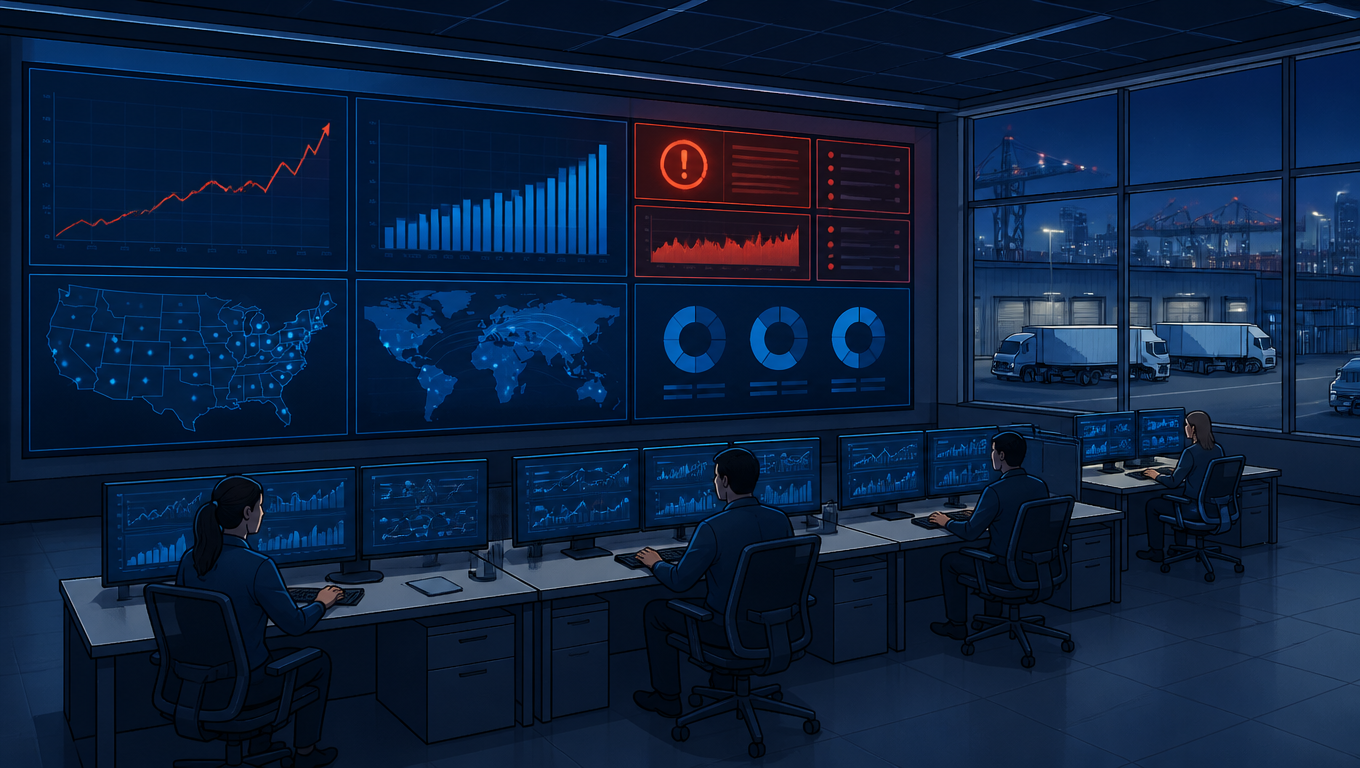
Operations team monitors carrier API status as parcels queue on a fulfillment conveyor.
Outages show up on the warehouse floor before they show up in a console

The Six-Phase Framework at a Glance

The six phases map to the six questions an operations team actually asks during an outage. Detect: is this the carrier, or is this us? Classify: which of our flows are hurt, and how badly? Contain: what do we stop doing right now so we do not make things worse? Continue: how do we keep the warehouse moving without the normal API? Recover: how do we drain the backlog safely when the API returns? Reconcile: how do we prove that every label, every manifest, and every invoice lines up?

Map the affected steps against the Shipping API workflow overview before deciding which work to hold or move. Apply the controlled rollout method when validating a temporary execution path and the return to normal processing.

The four decision exits appear where the team's judgment lives. Wait is the default answer when the outage is narrow or short. Retry is the answer when failures are transient and idempotency makes it safe. Manual handling is the answer when throughput matters more than automation. Switch carrier is the answer when the outage looks long and a backup lane is ready. The diagram below shows where each exit sits in the chain.
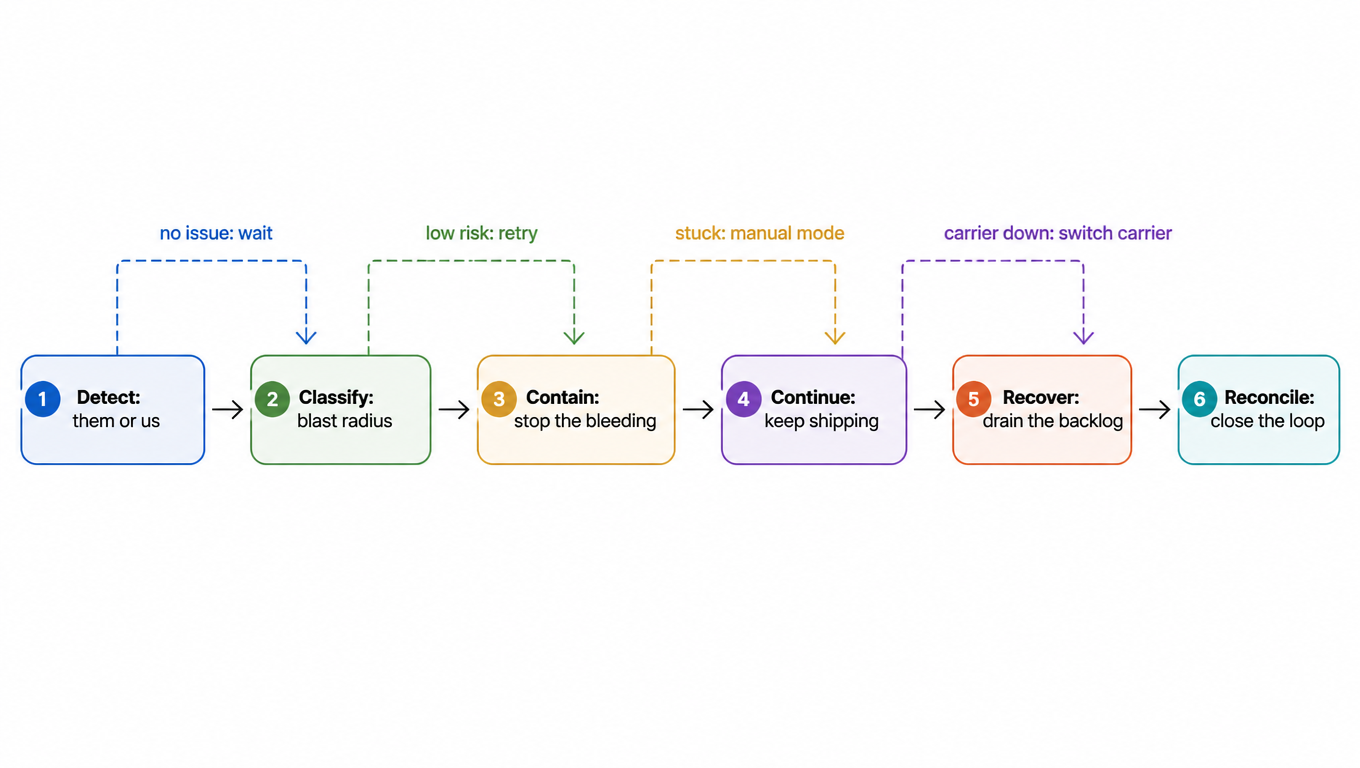
Flowchart of the six phases: Detect, Classify, Contain, Continue, Recover, Reconcile, with the wait, retry, manual mode and switch-carrier exits marked between stages
Six phases, a chain with escape hatches

Read the diagram as a chain with escapes. Most incidents never leave the first two boxes: you detect a timeout, you classify it as low risk, and you wait or retry your way through. The expensive exits, manual handling and carrier switching, are reserved for the incidents where waiting would stall the warehouse.
Detect: Is It Them or Us?

The first phase is also where teams waste the most time, because the default assumption during any API failure is that the carrier is down. That assumption is wrong surprisingly often. The same symptoms an outage produces, a bad credential, a broken integration, or a misconfigured firewall can produce too, and the fix is completely different. Detecting the difference takes sixty seconds if your logs are in order.

Start with the shape of the failure. Timeouts and connection resets that hit every endpoint at once usually mean the carrier side. HTTP 500s and 503s mean the carrier's application or load balancer is struggling[^1]. HTTP 429 means rate limiting, which is often triggered by your own retry storm rather than by the carrier being down[^2]. Authentication failures, 401s and invalid-credential errors, are almost never an outage; the credential rotated, expired, or was revoked. A single endpoint failing while others stay healthy points to a partial carrier problem, or to your own integration bug in that specific call. Latency that creeps up over minutes and then tips into timeouts is the classic overload signature.

SymptomLikely causeFirst check
Timeouts and resets across all endpointsCarrier outage or network pathCarrier status page, then your own logs
500 / 503 on many endpointsCarrier application overloadStatus page, then your retry policy
429 rate limitingYour request volume, often self-inflictedYour retry loop and concurrency
401 / auth errorsCredential rotated or expiredCredential store and token renewal
One endpoint failing onlyPartial carrier issue or your code bugThat call's logs and error codes

The confirmation protocol: check the carrier's status page and Web Tools advisories[^3], but do not stop there, because status pages lag reality by minutes. Then check your own request logs for response codes, latency, and the error distribution across endpoints. If failures are uniform across all endpoints and across both test and production environments, it is the carrier. If they are scoped to one endpoint or one credential, it is you. One more rule: record the start time and the first observed error code somewhere shared, an ITSM ticket or an incident channel. Every later phase, from customer comms to the post-incident review, needs that timestamp.

Classify: Endpoint-by-Endpoint Blast Radius

Once you know it is probably the carrier, decide how much damage each affected endpoint can do. The six endpoints in a typical 3PL flow, rate, auth, label, manifest or SCAN, tracking, and return label, have very different blast radii. Blast radius here means two things: how much of your throughput depends on this endpoint, and how badly a bad retry can hurt you financially.

Rates are low risk. A rate quote is a promise that can be recomputed, cached, or replaced by a fallback rate, and it should never block checkout or order entry. Auth is medium risk but usually self-inflicted, as we saw in Detect. Tracking is medium risk: parcels already have labels and are in motion, so a tracking outage degrades the customer experience but threatens no transactions. Return labels are medium risk: they can be deferred, or issued through the portal or the backup carrier, without breaking a shipping commitment. Manifest and SCAN are medium-high: labels are already issued, so the physical risk is low, but the carrier-handoff record is missing, which threatens pickup and billing reconciliation. Labels are high risk: each create-label call is a financial commitment, and a retry after a lost response can mint a duplicate label that later has to be voided, refunded, and audited.

EndpointTypical failuresRiskDefault action
Ratetimeout, 429, bad rate dataLowCache last good rates, fall back to comparison rates, never block checkout
Auth401, token expiryMediumCheck credentials first, not an outage assumption
Labeltimeout, 5xx, response lostHighCircuit-break fast, retry with idempotency only, else manual
Manifest / SCANtimeout, 5xxMedium-highKeep labels, defer manifest, reconcile at pickup
Trackingtimeout, 5xxMediumDegrade gracefully, show carrier status unavailable, no retry storm
Return labeltimeout, 5xxMediumDefer, or issue via portal or backup carrier

The rule of thumb that drives the whole playbook: the closer an endpoint is to creating a financial or shipping commitment, the more careful its retries must be. Rates and tracking are read-mostly, so you can be generous with retries. Labels and manifests are write-mostly, so you must be stingy.

Contain: Stop the Bleeding, Protect Integrity

Containment is where you stop doing the things that make the outage worse. The first step is a circuit breaker: after N consecutive failures on an endpoint, stop calling it and open a fail-fast window. Inside that window every request fails immediately without touching the network, and the breaker half-opens on a schedule to test whether the carrier recovered[^4]. Add exponential backoff with jitter to every retry, so retries do not synchronize into waves that look like an attack[^5]. One hard rule: no infinite retry loops. A budget of three attempts with backoff is usually enough; after that the failure goes to a queue or to a human.

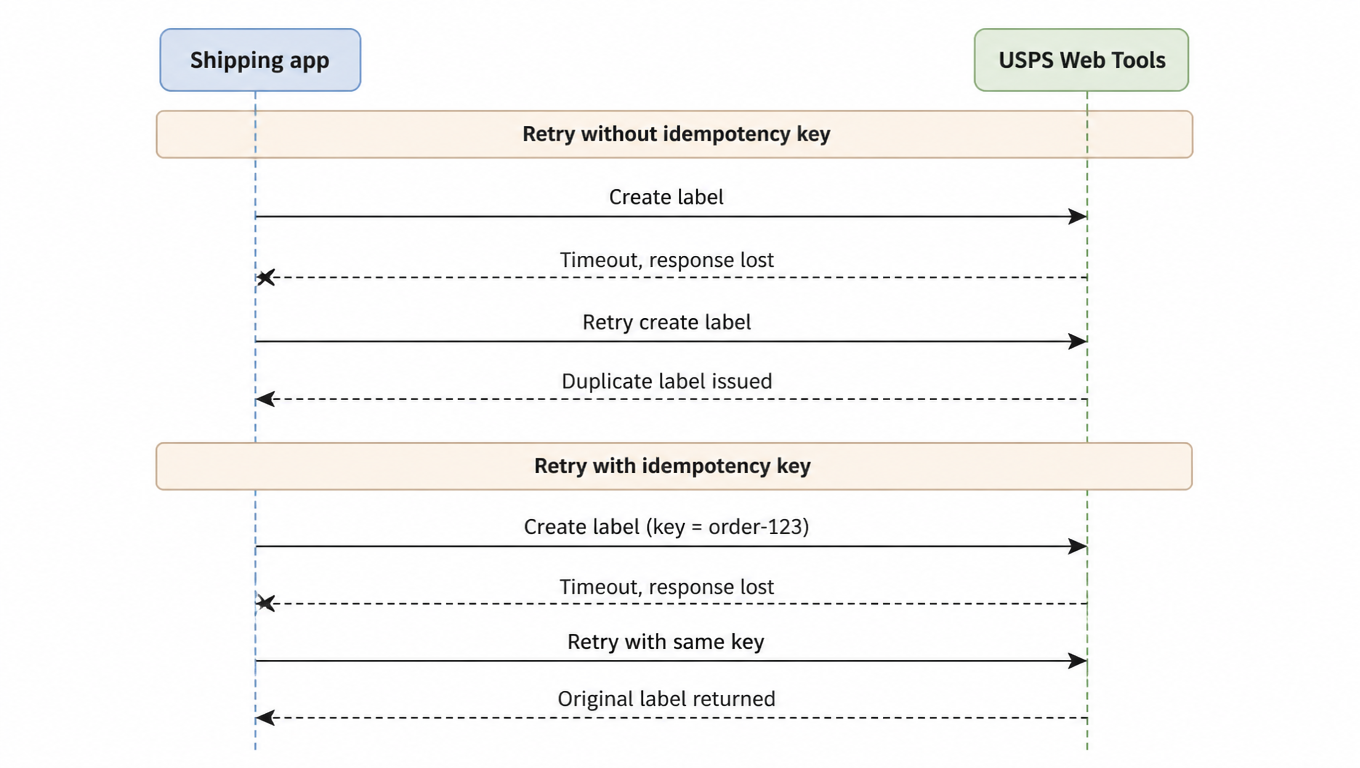
The classic integrity trap is the duplicate label. A create-label request times out, but the carrier actually processed it. The client retries blindly, and now two labels exist for one order, two shipping charges, and one parcel that cannot wear both labels. The sequence below shows the difference idempotency makes.

Sequence diagram of idempotent retry: a blind retry mints a duplicate label, a same-key retry returns the original label
A retry with an idempotency key returns the original label instead of minting a new one

Every create-label call should carry an idempotency key derived from the order or the parcel, for example the order ID plus a suffix[^6]. When the carrier supports it, a retry with the same key returns the original label instead of minting a new one. When it does not, keep your own request ledger: write the request to durable storage before sending, and on timeout reconcile the ledger against the carrier's label list before retrying. That check, did this label actually get created, is the difference between a duplicate and a non-event.

Queue management is the second containment lever. Cap the retry queue: when the pending count passes a threshold, stop enqueueing and park the failure with a status like pending-carrier-api. Parking is not failure; it is a conscious decision to hold work and alert a human instead of piling up. Finally, communicate. A standing template for internal incident updates, what is down, what we are doing, when we next update, saves chaos, and customer-facing SLA notifications should go out early and honestly: the carrier API is experiencing delays and your shipment will be delayed beats silence, and it costs nothing when the outage turns out to be short.

Continue: Keep the Warehouse Moving in Degraded Mode

Once the bleeding is contained, the question is throughput: how do we keep picking, packing, and shipping while the label API is dark? The first answer is the portal. Most multi-carrier platforms, including the EasyShippingX Portal, can create labels through a browser against whatever carriers are healthy. Manual label entry is slow, so use it selectively: low-volume, high-value, or time-critical parcels get manual labels; everything else waits in the parked queue. Put guardrails on the manual lane: only trained staff, a separate queue so manual labels are auditable, and a hard cap on how many manual labels per hour you will tolerate before switching lanes entirely.

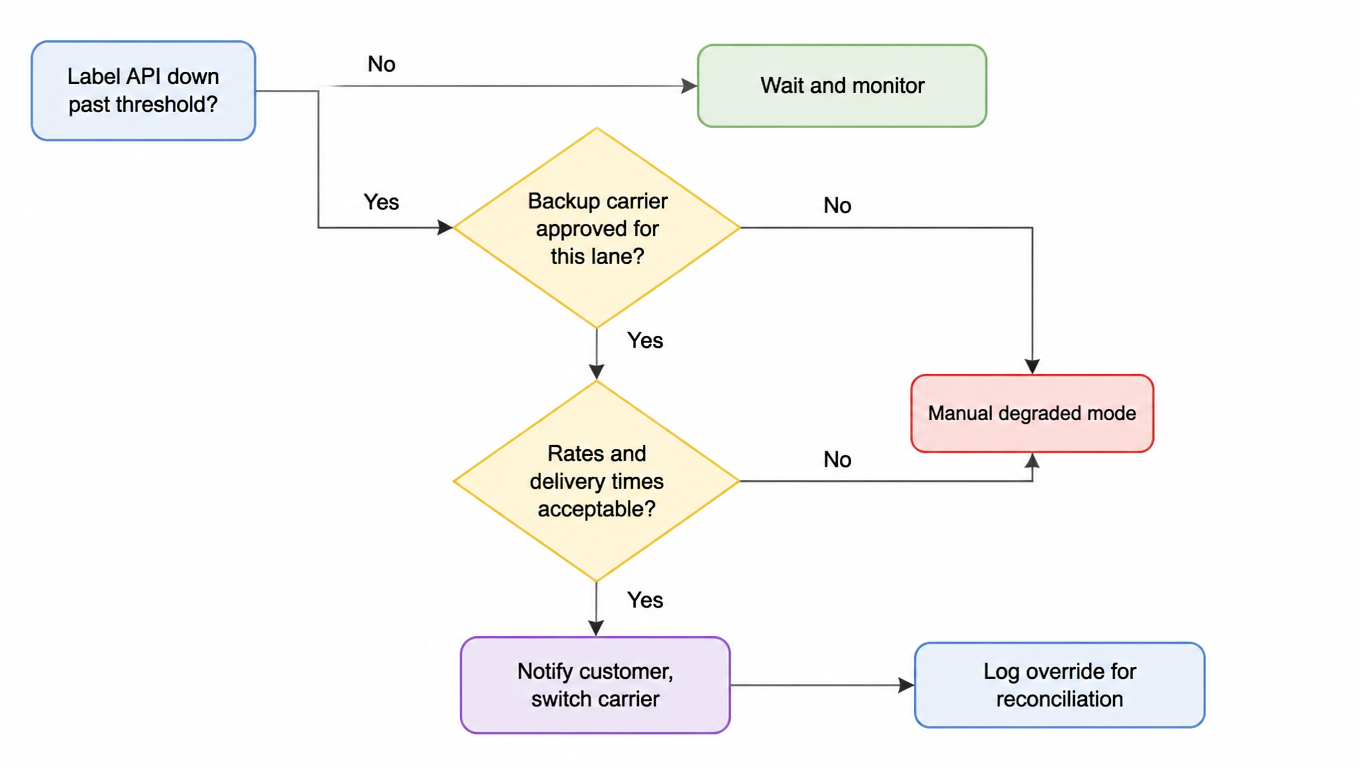
The second answer is the backup carrier. A multi-carrier setup earns its keep in exactly this moment. EasyShippingX supports switching labels, rates, and tracking across carriers, so the emergency lane is a configuration decision, not a rebuild. Enable it on explicit triggers: the label API has been down past your threshold, 30 to 60 minutes is a sane starting point, the backlog has passed a second threshold, and the backup carrier's rates and delivery-time estimates are acceptable for the affected destinations. Before you switch, tell the customer: a carrier change can change delivery dates, tracking URLs, and sometimes cost, and a surprise tracking link is worse than a heads-up.

Decision flowchart for switching to a backup carrier: past threshold, carrier approved for the lane, and acceptable rates and delivery times gate the switch, otherwise manual degraded mode
Switching to a backup carrier is a series of explicit judgments, not a toggle

On the physical side, the warehouse needs a degraded workflow that does not depend on the API. A staging area for parked parcels keeps them out of the live flow and prevents double-picking. Pick-without-label is viable when a parcel can be picked, packed, and held at a label-print station that backfills labels when the API returns; it fails only if the parcel ships without a label. Which brings us to the don'ts: never ship parcels with un-audited manual labels, and never ship without tracking. A parcel that leaves the building without a tracking number is a claim and a chargeback waiting to happen, and it poisons the reconciliation phase no matter how short the outage was.

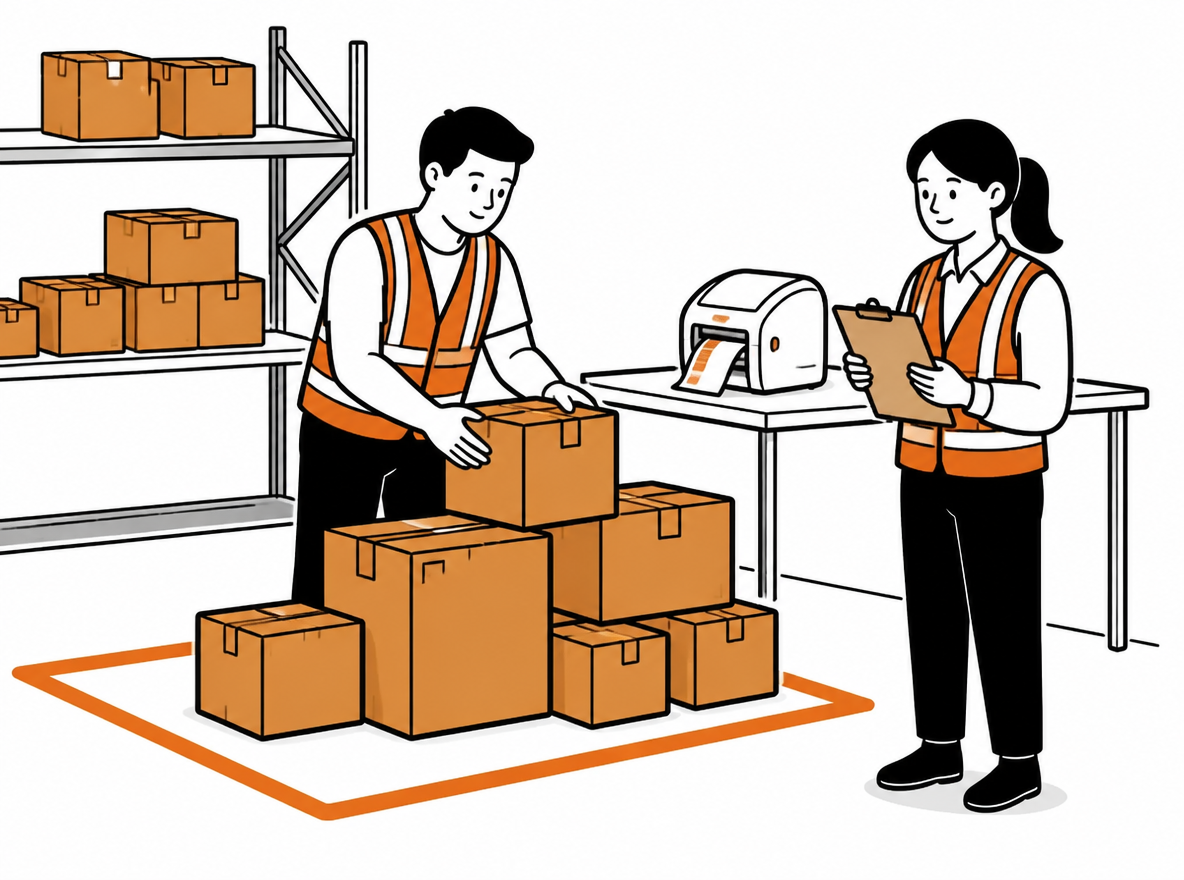
Warehouse worker places picked parcels in a marked holding area beside a recovery workstation.
A degraded-mode staging area: parcels parked out of the live flow, waiting for backfilled labels

Recover: Safe Replay of the Backlog

When the API comes back, the instinct is to slam the backlog through as fast as possible. Resist it. The carrier is fragile right after an outage, and a thundering herd of 3PLs all draining at once is exactly what triggers a second outage[^7]. Recover is throttled by design: drain the parked queue at a concurrency below normal, half is a good start, watch error rates, and step the throttle up only when the error rate stays flat.

Replay also needs a rate-recheck step. During the outage, some parcels may have been quoted with fallback or cached rates, and the customer may have been billed on those. Before creating labels from those quotes, recheck the rate against the live API: if the live rate differs, decide deliberately whether to eat the difference or re-bill, but never let a label silently carry a rate the customer never approved.

Finally, sweep for duplicates. Containment prevented most of them, but the manual lane and the pick-without-label flow can still produce strays. List the labels created during the incident window, cross-check them against the order ledger, and void the duplicates promptly. Voided labels are cheap; forgotten duplicates become chargebacks and reconciliation pain months later.

Reconcile: Close the Loop

Reconciliation is the phase everyone skips and the one that makes the next incident cheaper. Three reconciliations matter. First, labels versus manifest: every label issued during the incident must appear on a manifest or SCAN record, and every manifest line must trace back to a label. Second, tracking: parcels shipped during the degraded window that never got scanned need a manual chase, because a parcel that shows label created forever is a silent customer complaint. Third, billing: the carrier invoice for the incident window must match the labels you actually created, including the voids, so refunds for duplicates and adjustments for the manual lane land in the right month.

The post-incident review should tune the playbook's numbers, not just narrate what happened. Were the circuit-breaker thresholds right? Was the manual-label cap too generous? Did the backup-carrier switch fire too early or too late? Update the thresholds, the decision table, and the notification templates, and keep rerunning the review until the numbers feel boring.

Track three metrics across incidents so you can see whether the playbook is working: MTTR[^8], how long from first error to recovery; backlog drain time, how long the parked queue took to clear; and on-time rate impact, how many parcels missed their promised delivery because of the incident. Trended over a few incidents, these three numbers tell you whether your emergency architecture is actually getting better.

Where EasyShippingX Fits + A Checklist You Can Steal

EasyShippingX's role in this playbook is deliberately modest. It is a multi-carrier platform, so it provides the lanes this playbook depends on: rate comparison to fall back on when USPS pricing is unavailable, the ability to switch labels and tracking to a backup carrier when a trigger fires, and a Portal/API dual channel so the manual degraded mode runs on the same data as the automated flow. It does not auto-monitor USPS health, and it does not auto-failover; those decisions are yours, made with the Detect and Classify phases of this playbook. Any product that claims otherwise is selling you something you cannot audit.

The checklist below is the whole playbook on one page. Print it, put it next to the incident channel, and fill in the timestamps as you go.

  1. Detect: record the first error time and code; check the carrier status page and your logs; decide them or us.
  2. Classify: mark each affected endpoint (rate, auth, label, manifest, tracking, return); note risk and default action.
  3. Contain: trip the circuit breaker; retry with backoff and idempotency; cap and park the queue; send internal and customer notifications.
  4. Continue: route select parcels to manual labels; evaluate the backup-carrier triggers; set up staging and pick-without-label.
  5. Recover: drain the backlog at half throttle; recheck fallback rates before label creation; void duplicates.
  6. Reconcile: match labels to manifest to billing; chase unscanned parcels; run the post-incident review and tune thresholds.

For the surrounding decisions, this playbook sits between our other guides. The Shipping Problem Diagnostic Framework tells you how to tell carrier, warehouse, and software apart. Shipment Exception Management handles parcels already in motion. Multi-Carrier Strategy is the long-term structure that makes switching lanes possible. And Low-Risk Shipping Rollout is how you introduce new lanes and new carriers without breaking the operation you have. Read this one when the API is dark, and read the others before it happens.

FAQ

Look at the failure shape. Timeouts and resets across all endpoints, or 500/503s on many endpoints, usually mean the carrier; 429 rate limiting is usually your own retry storm; 401 auth failures are almost always a credential problem, not an outage. Check the carrier status page, then your own logs for response codes, latency, and error distribution. Uniform failures across all endpoints in test and production mean the carrier; failures scoped to one endpoint or one credential mean you.
When a create-label request times out, the carrier may have actually processed it; a blind retry mints a second label and a second charge. The fix is idempotency: every create-label call carries a key derived from the order, and when the carrier supports it, a same-key retry returns the original label. When it does not, keep your own request ledger and reconcile it against the carrier's label list before retrying.
When three triggers line up: the label API has been down past your threshold (30 to 60 minutes is a sane starting point), the backlog has crossed a second threshold, and the backup carrier's rates and delivery times are acceptable for the affected destinations. Tell the customer before you switch, because delivery dates and tracking links will change. Until those triggers fire, hold with portal or manual degraded mode instead of switching.
The diagnostic framework answers whose fault it is, exception management handles parcels already in motion, and this playbook fills the middle: how to keep warehouse throughput moving without breaking transaction integrity while an upstream carrier API is temporarily unavailable. The six-phase framework (Detect, Classify, Contain, Continue, Recover, Reconcile) is built for exactly that scenario.

Ready to put this incident playbook into your shipping workflow?

EasyShippingX bakes multi-carrier comparison, intelligent routing, and freight verification into your shipping flow, so "USPS is down" becomes a line in your playbook instead of an incident.