
3PL Guide

How Fulfillment Centers Can Add New Carrier Services Without Increasing Operational Complexity

For a fulfillment center, carriers are the product. The rates you negotiate, the transit times you promise, and the delivery experience your customers feel all run through the carriers you ship with. Yet in most warehouses, adding one more carrier is treated like a major systems project. Labels, rates, tracking, exceptions, each one is tangled into the daily routine, and every new carrier threatens to double the mess.

This article is about why that doesn't have to be true. Read from the buyer's side, it explains what multi-carrier capability actually means for your clients. Read from the operator's side, it walks through how a modern shipping platform keeps multiple carriers running under one workflow, and how you can bring a new carrier online without blowing up your operations.

A bright modern fulfillment center floor with packers at workstations, cardboard boxes moving on conveyors, and shipping labels printing at the packing stations
Carriers are the product: multi-carrier capability as a single workflow

1. Why "Adding One Carrier" Is a Big Project in Most Warehouses

The friction starts at the label printer. In a typical warehouse, shipping is hard-wired to a single carrier: the picking flow assumes one label template, the packing stations assume one set of printer settings, and the manifest process assumes one portal. Adding a second carrier means reworking each of those assumptions, and usually re-training everyone who touches them.

Place the additional service within the multi-carrier strategy overview so that its role and fallback are explicit. The carrier handoff checklist connects that plan to segregation, manifests, and first-scan evidence on the dock.

Rates are the second source of pain. Most teams keep rate tables in spreadsheets or inside the carrier's own portal, which means manual re-entry whenever a tariff changes, version drift across the team, and no single source of truth when an invoice needs checking.[^23] The more carriers you add, the more tables you maintain, and the more likely one of them is quietly out of date.

Customer service compounds the problem. Each carrier runs its own tracking portal, so answering a simple "where is my order" question means logging into several systems, reconciling different status vocabularies, and pasting whatever the slowest portal says. Add a carrier and you add another login, another vocabulary, another place for errors.

The net effect is predictable: every new carrier multiplies operational overhead, so warehouses stick with one or two carriers even when better options exist. The complexity tax, not the carrier, is what locks them in.
2. Buyer's View: What Multi-Carrier Capability Actually Means

If you are a brand or marketplace seller, the practical question is what a multi-carrier warehouse can do for you that a single-carrier one cannot. The first answer is money. Regional delivery networks, the USPS, UPS, and FedEx alternatives in the US market, regularly undercut the national carriers on last-mile cost, especially on lightweight parcels in their home regions[^1], and a warehouse that can route to them can pass those savings to you.

The second answer is speed. No single carrier wins every lane. By mixing carriers by zone, weight, and destination, a multi-carrier operation can put each parcel on the network that is actually fastest for that route, instead of paying a single-carrier premium or accepting a slower standard option.

The third answer is resilience. Carriers hit capacity, they suffer service interruptions, and they raise rates.[^2] When one network stumbles, a warehouse with a second (or third) carrier keeps your orders moving while your competitors wait it out. That redundancy has a price when you do not have it: you are locked into one carrier's rate increases and service levels, with no leverage and no fallback.

3. Solution 1: A Unified Shipping Layer

The first thing a platform like easyshippingx changes is the surface the team works on. Instead of one workbench per carrier, there is a single shipping screen that prints labels for every carrier in the account. Warehouse staff log in once, and the carrier behind any given label is an implementation detail, not a separate workflow.

Under that surface sits label abstraction. The system holds carrier-agnostic shipment data: recipient, weight, dimensions, service level, declared value. At the edge, when a label is actually generated, it renders in the specific format the chosen carrier expects. The warehouse team never hand-maps one carrier's address file to another's; the platform does that translation once, in code, for every carrier.

Batch printing is where the time savings show up. Orders destined for different carriers can be processed in a single run, with the platform splitting them correctly, without re-keying anything between systems. The result is one workflow, learned once, that covers every carrier in the building.

4. Solution 2: Built-In Rate Tables + a Rules Engine

Rates are the reason most warehouses hesitate to add carriers, so the second capability targets them directly. Rate tables come bundled with the platform and stay current, which means no spreadsheet, no manual re-entry, and no version drift. When a carrier updates its tariffs, the table updates, and every quote the system produces reflects it.

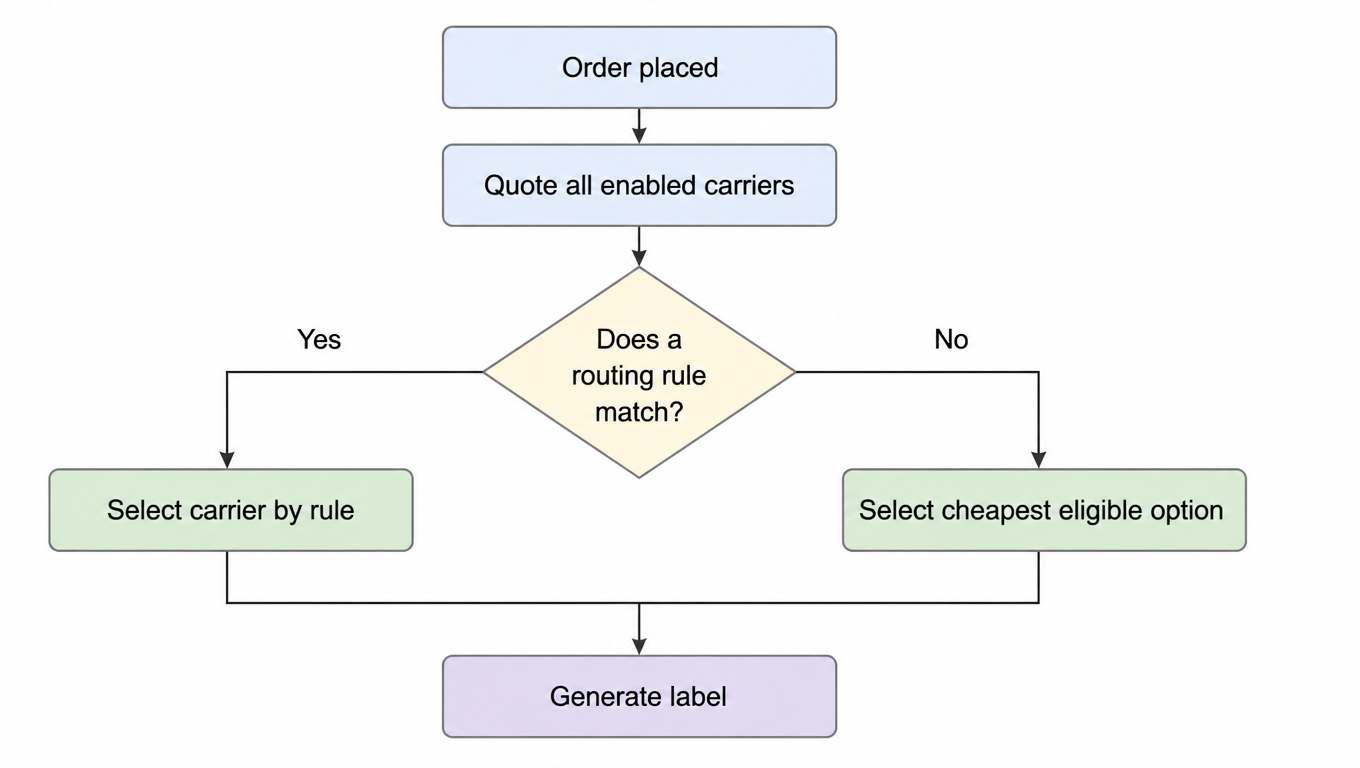
For any given shipment, the system quotes all enabled carriers and shows the trade-off: price, transit time, and coverage for the destination zone.[^24] The operator sees the options at a glance and can make an informed call, or let the system make it for them.

That is what the rules engine is for. The warehouse defines routing rules by zone, weight, service level, customer preference, or SLA, and the system applies them automatically, shipment by shipment. A heavy pallet for a West Coast account can route to one network while a lightweight envelope for the same account routes to another, with no one at the packing station making that decision by hand.

Flowchart: order placed, quote all enabled carriers, pick carrier by routing rule if a rule matches, otherwise pick cheapest eligible option, then generate label
Rules first, with a fallback to the cheapest eligible option when no rule matches

Crucially, humans stay in control. Rules are visible, editable, and auditable, and a packing supervisor can always override a selection. The engine removes the repetitive decisions, not the judgment.

5. Solution 3: Unified Tracking and a Customer-Service Workbench

The third capability fixes the customer-service side. Instead of one tracking portal per carrier, the platform offers a single query surface that covers all of them. A support agent types the tracking number once and gets an answer, no matter which network carried the parcel.

Statuses from different carriers are normalized into one timeline, so the customer hears one consistent answer instead of five different vocabularies. "Out for delivery" means the same thing whether the parcel is on a USPS truck or a regional courier's van, because the agent reads the same field either way.

Exceptions are triaged from the same screen: delays, address issues, and failed delivery attempts all land in one work queue, and the team can act on them without hopping systems. Fewer tools means fewer handoffs, which means fewer mistakes, and support cost per order drops measurably. That is the quietest but most durable win in the whole stack.

6. Rolling Out a New Carrier: A Four-Step Playbook

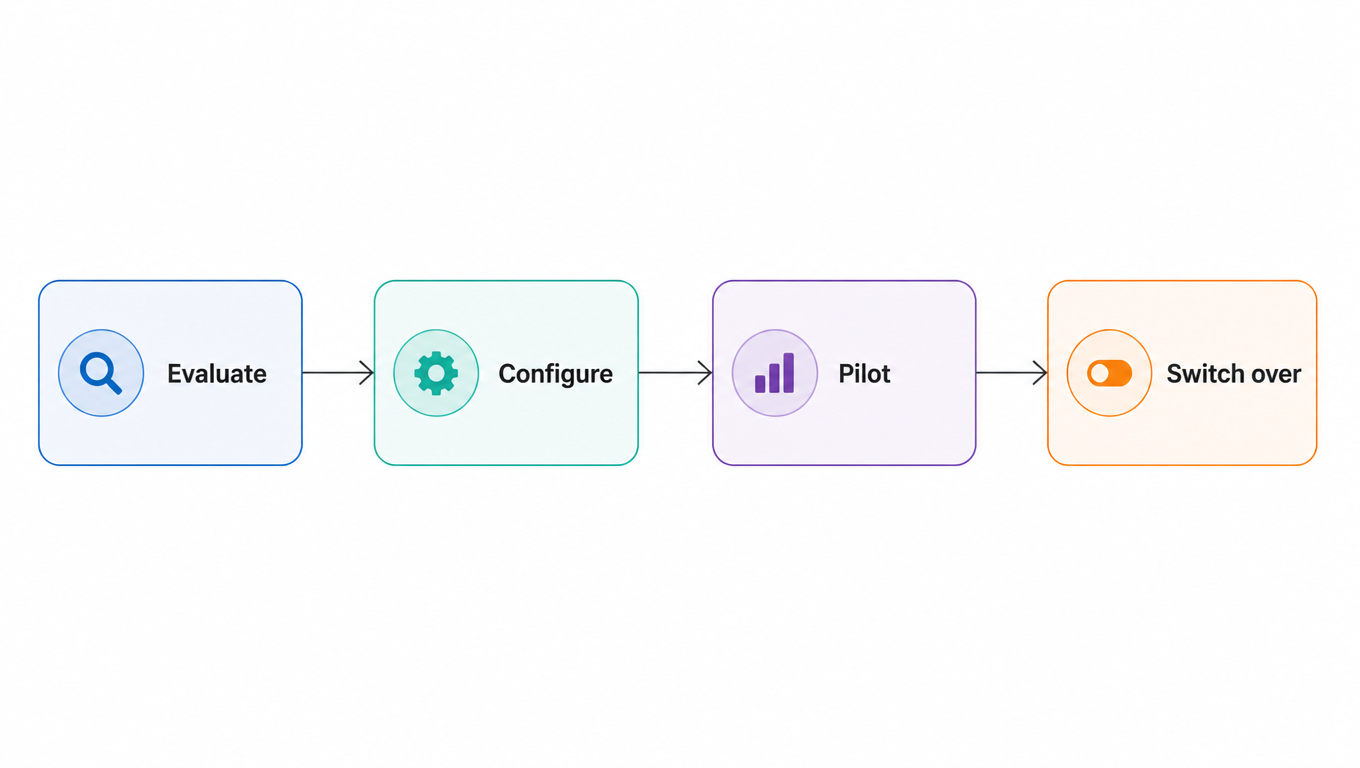
Adding a carrier on a modern platform is a process, but a short and controlled one. Step one is evaluation. Score the candidate on coverage, rates, SLA, and integration quality, and check whether its service levels genuinely improve the mix you already have. The scoring sheet is the same one you used for your existing carriers, so the comparison stays honest.

Step two is configuration. In the platform, you add the carrier, import its rate table, and define the routing rules that will govern when it gets used. Because the rules are data, not code, this step takes hours rather than weeks, and it is reversible at any time.

Step three is the pilot. Route a small, defined share of matching orders through the new carrier and watch the exception rate, the transit performance, and the support queue for a set period. A grayscale rollout means the new carrier proves itself on real volume before it earns your full trust.

Flowchart: evaluate, configure, pilot, then switch over, in sequence
Four steps: evaluate, configure, pilot, switch over

Step four is the switch-over. Promote the routing rules to full production, monitor the KPIs you set in step one, and keep the rollback path open. Because the old carrier was never removed, reverting is a rules change, not a project. A carrier that underperforms in production can be throttled back to pilot volume in minutes.

7. What the Warehouse and Its Customers Each Get

For the warehouse, the payoff is structural. One platform replaces one platform per carrier, staff learn one workflow, and a new carrier goes from decision to production in days, not quarters. The fear that "adding a carrier means adding complexity" stops being true, because the complexity was never in the carrier. It was in the glue between the carrier and the operation, and that glue is now a platform feature.

For customers, the payoff is concrete: lower shipping cost, faster transit, and one consistent support experience regardless of which network carried the parcel. A warehouse that can add carriers freely can negotiate harder, route smarter, and pass the results along.

And the effect compounds. Every additional carrier raises optionality and resilience, while the operational cost of carrying it stays flat. That is the real answer to the question in the title: the way to add carrier services without increasing operational complexity is to move the complexity out of the operation and into the platform.

FAQ

On a modern shipping platform, a new carrier is a configuration change: import its rate table, define routing rules, pilot on a slice of volume, then switch over. Labels, rates, tracking, and exceptions all stay in the same interface, so the team's workflow does not change. The platform absorbs the complexity instead of passing it to operations.
Rules are explicitly defined by zone, weight, service level, customer preference, or SLA, and they stay visible, editable, and auditable; when no rule matches, the system picks the cheapest eligible option. A packing supervisor can always override a selection. The engine removes repetitive decisions, not judgment.
Four steps: evaluate, configure the rate table and routing rules, pilot on a small share of volume, then switch over. Because rules are data rather than code, configuration typically takes hours, the path from decision to production is measured in days, and every step is reversible; an underperforming carrier can be throttled back to pilot volume in minutes.
Lower shipping cost (each lane routes to the cheapest qualified carrier), faster transit (each parcel rides the fastest network for that route), more resilience (orders keep moving when one carrier stumbles), and a consistent tracking and support experience no matter which network carried the parcel.

Ready to route every parcel to the right carrier automatically?

EasyShippingX gives you one shipping screen, built-in rate tables, and a rules engine: adding a carrier changes configuration, not your operations. Your own-account rates pass through, USPS, UPS, FedEx, and regional networks are ready to configure, and your support team handles tracking and exceptions for every carrier from one workbench.