Amazon FBM Seller Performance

How Shipping Affects Amazon Buy Box, VTR, and Account Health

If you sell on Amazon and fulfill orders yourself (FBM), shipping is not a cost line on your P&L. It is an input to three scorecards Amazon runs on your account at all times: the Buy Box, your Valid Tracking Rate (VTR), and your Account Health rating. The logistics choices you make today, the carriers you pick, the promises you set, and the way you handle exceptions feed directly into those scorecards. For FBM sellers, shipping is the cheapest, fastest lever you have on account health. This article explains exactly how it works, then gives you an action list you can run this week.

Organized ecommerce packing station with queued parcels and a laptop showing charts and status panels.
Every shipment you make writes into Amazon's scorecards

The Three Metrics Decoded

The Buy Box is the "Add to Cart" box on a product detail page, the default purchase path for most shoppers. For most listings, industry estimates put Buy Box purchases at well over 80% of sales[^1]. When you win the Buy Box, your offer is the one buyers see and buy; when you lose it, you are relegated to a "See All Buying Options" link that few people click. FBA listings receive the Buy Box almost automatically because Amazon controls fulfillment and can guarantee the delivery promise itself. FBM sellers have to earn it through the two levers Amazon can evaluate: landed price and shipping performance.

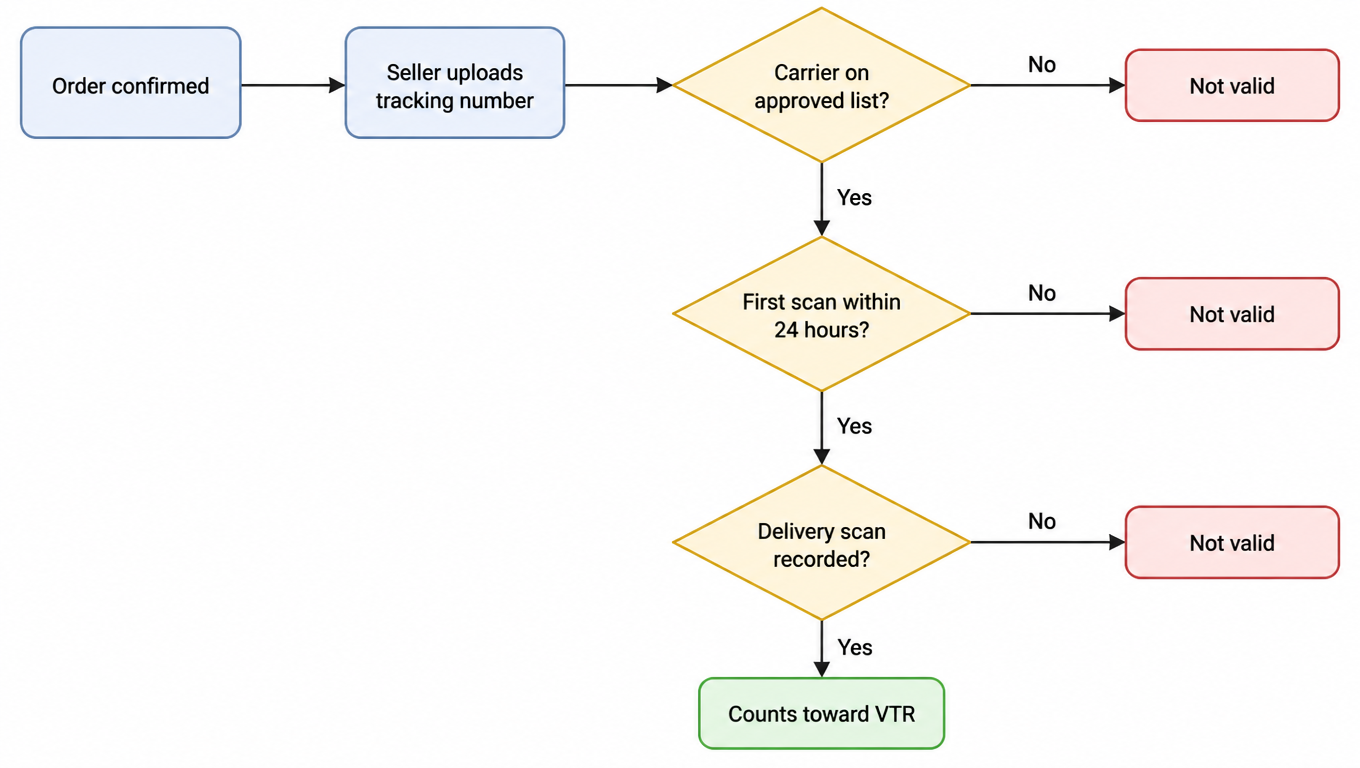
Valid Tracking Rate is a pure shipping measurement. Amazon computes it as the number of shipments with valid tracking divided by the number of confirmed shipments, over a rolling 30-day window. The standard is 95% or higher[^2]. A tracking number counts as valid only when it comes from a carrier on Amazon's approved list, is uploaded with the shipment confirmation, receives a first carrier scan within 24 hours of pickup, and records a delivery scan[^3]. Miss any of those conditions and the shipment falls out of the valid bucket, even if the package arrived on time.

Account Health is the umbrella scorecard, and inside it sit three operational metrics that shipping touches directly. Order Defect Rate (ODR) is negative feedback, A-to-Z claims, and chargebacks divided by total orders over a rolling window, and the target is under 1%[^4]. Late Shipment Rate (LSR) is the share of orders confirmed after their promised ship date, and the target is under 4%[^5]. Pre-fulfillment cancellation rate is the share of orders you cancel before shipping, and the target is under 2.5%[^6]. Breach a threshold and Amazon warns you; repeat breaches escalate to suspension risk.

Here is the point worth pausing on: every one of these formulas contains a shipping input. The Buy Box weighs your delivery promise and landing price. VTR is shipping measured directly. ODR, LSR, and cancellation rate all trace back to delivery failures. Fix shipping and you move three scorecards at once; neglect it and you lose all three together.
Why Shipping Decides the Buy Box

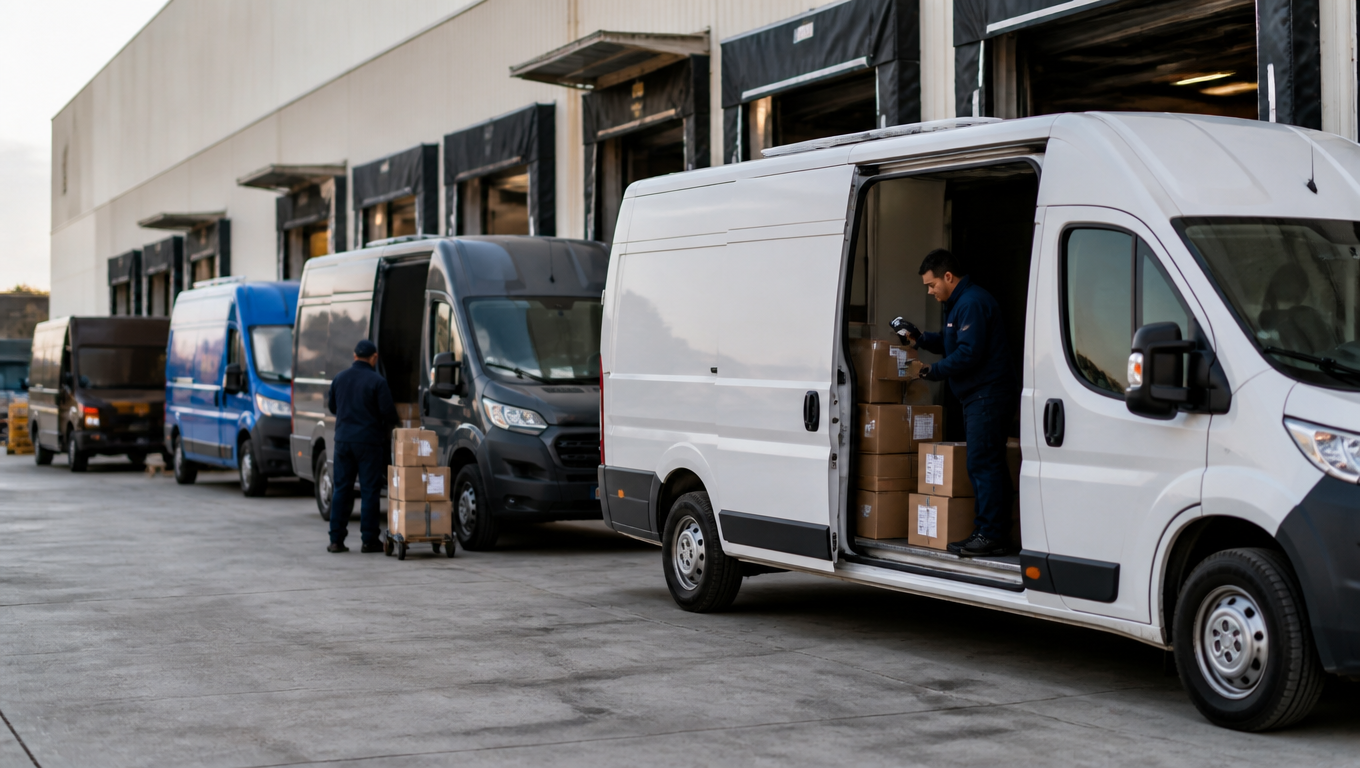
Buy Box allocation is not a pure lowest-price auction. Amazon evaluates the offer the buyer will actually experience, which combines the landing price (item price plus shipping) with the delivery promise: how fast the package will arrive and how reliably the seller delivers on that claim[^7]. A slightly more expensive offer with faster, more reliable delivery regularly beats a cheaper offer with a weak promise. This is why FBM sellers with good fulfillment can win the Buy Box against lower-priced competitors who ship slowly or unreliably.

As an FBM seller you control the shipping inputs directly: handling time, transit time, and your on-time delivery record. Every carrier selection and every shipping template you configure is a signal Amazon reads. The geography matters too. A warehouse, or a carrier network, positioned close to where your buyers live shortens the delivery promise you can honestly set. Ship to a region you serve slowly and the promise stretches, the price advantage you need to compensate grows, and the box gets harder to hold.

Consistency compounds. Amazon allocates the Buy Box over rolling performance windows, so a sustained run of on-time deliveries shifts your share upward week by week, while a single bad month can cost you the box outright. Recovery is slower than the loss: rebuilding a delivery track record takes longer than destroying one. Sellers who treat shipping as a Buy Box input, rather than a cost to minimize, are the ones who hold the box through peak season.

Why Shipping Decides Your VTR

VTR is a 30-day ratio. Say you confirmed 100 shipments last month and 96 of them carried tracking that satisfied Amazon's validity rules. Your VTR is 96%, comfortably above the 95% standard. Now say one carrier failed to scan reliably and only 92 qualified. You are below threshold on a month of otherwise normal operations. The margin is thinner than most sellers realize, and it evaporates in exactly the failure modes that bad shipping produces.

What counts as "valid" deserves precision. The tracking number must be from a carrier on Amazon's approved list, which covers the major national carriers and a long list of regional ones. It must be uploaded at shipment confirmation, not after drop-off. The carrier must produce a first scan within 24 hours of pickup, and for most carriers a delivery scan as well. Some service levels, particularly the budget tiers of certain carriers, scan less consistently than others, which is a silent VTR killer: the package arrives, the buyer is happy, and your VTR still drops because the scans never happened.

Falling below 95% is not a gentle nudge. Amazon can suppress the affected ASINs, restrict your selling privileges for the categories involved, and escalate toward suspension for chronic breaches. Because VTR is computed per category and over the full rolling window, one weak carrier lane can drag down an entire catalog. The flowchart below shows the decision path Amazon applies to every shipment.

Flowchart: after an order is confirmed the seller uploads a tracking number, then Amazon checks whether the carrier is on the approved list, whether a first scan happened within 24 hours, and whether a delivery scan was recorded; any failed check means not valid, and only all-pass shipments count toward VTR
All four conditions must pass for a shipment to count toward VTR

Why Shipping Decides Account Health

Order Defect Rate is where delivery failures become account damage. A late or lost package turns into an A-to-Z claim, a chargeback, or a negative feedback entry, and each of those counts as a defect against you. Divide defects by orders over the rolling window and you get ODR, which must stay under 1%. For a small seller that means roughly one defect per hundred orders, and on a slow month, one bad shipment can be the whole defect budget.

Late Shipment Rate is measured against the ship date you promised, and it is brutal in exactly the way shipping is brutal. One week of missed carrier pickups, a carrier that does not scan on time, or a handling-time setting that does not match your real operation, and you can blow through the 4% target in days. Pre-fulfillment cancellation rate behaves the same way: when promised delivery dates slip, buyers cancel before you ship, and those cancellations count against you even though the package never left.

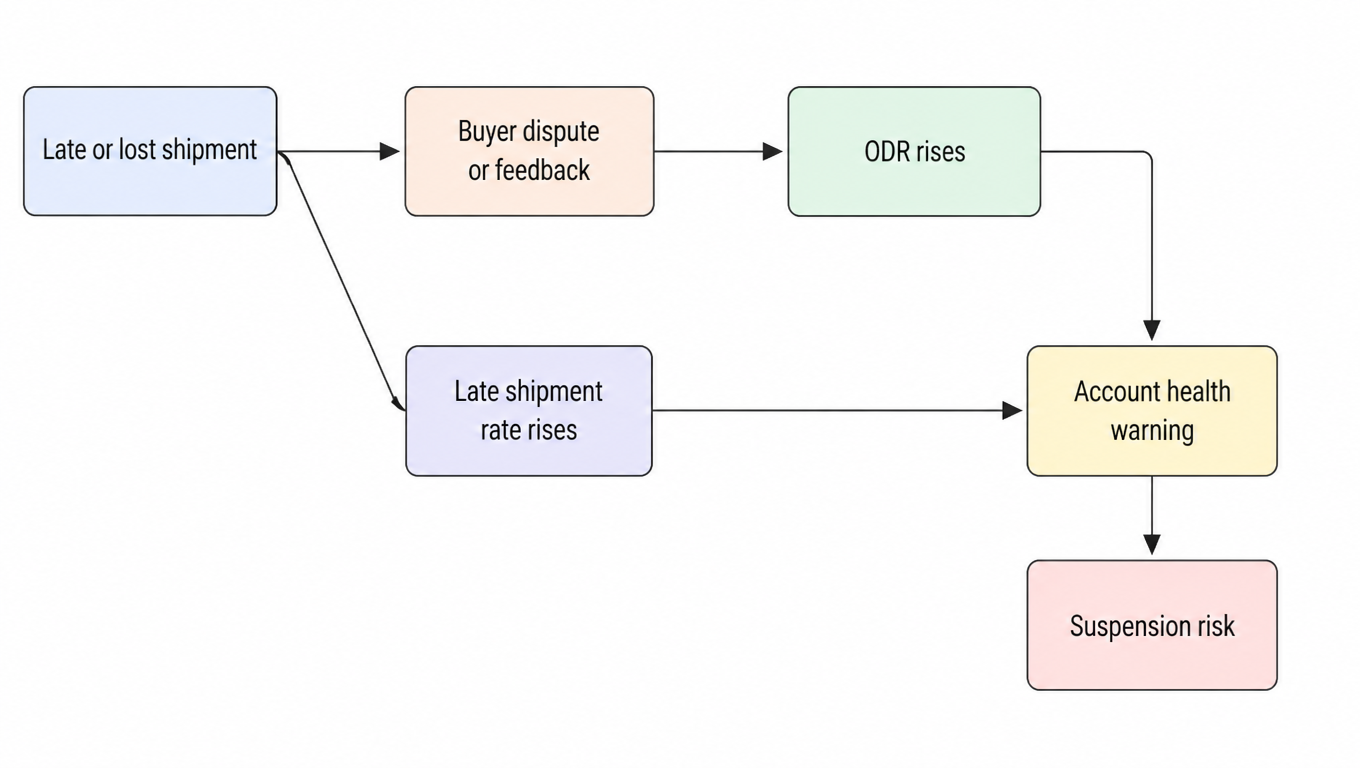
The account health hit is multiplicative, not additive. A single logistics failure can push ODR, LSR, and cancellation rate at the same time, as the chain below shows. The same late shipment that triggers an A-to-Z claim also inflates your late shipment rate, and the buyer who gives up waiting cancels the next order. One failure, three defects.

Flowchart: a late or lost shipment leads to a buyer dispute or negative feedback (raising ODR) and a rising late shipment rate at the same time; both feed an account health warning that escalates to suspension risk
One logistics failure pushes three metrics at once

The damage also lingers. ODR is measured over a longer rolling window, which means a bad month stains the next one or two even after you fix the underlying shipping problem. This is why sellers who react only when Amazon warns are always chasing their tail, and why the actions in the next sections are worth doing before the metrics break, not after.

Action: Shipping Speed and Delivery Promises

Set your handling time honestly, not aspirationally. A 2-day handling promise you miss half the time is worse than a 3-day promise you hit every time, because the missed promise feeds LSR, VTR, and your on-time record all at once. Build in buffer for carrier pickup cutoffs, weekends, and holiday surges, and review the setting whenever your operation changes.

Map carrier coverage against the ZIP codes you actually ship to. Most sellers discover the problem regionally: deliveries to certain areas run late scan after late scan while the rest of the country performs fine. Pull your shipping reports, cluster the late deliveries by ZIP or region, and either switch carriers for those lanes or extend the promise for them. Repeated late scans in the same region show up in both Buy Box allocation and LSR, so this one review pays twice.

Use shipping templates per ASIN or per product line instead of one global setting. A heavy, fragile item needs a different carrier and promise than a small envelope, and a product selling into a remote zone needs buffer built into its promise. Match each template to the real speed of the carrier you assign, then re-review templates seasonally, because carrier transit times shift with network load.

Action: Tracking and Exception Handling

Upload tracking at shipment confirmation, not after drop-off. The 24-hour first-scan clock starts at carrier pickup, not at your upload, so every hour between confirmation and upload is time you are giving away on the VTR validity check. Use Amazon's buy shipping services, or an integrated shipper that auto-uploads tracking at label creation, and the problem largely disappears.

Monitor VTR inside Shipping Settings and treat rejects as a signal, not noise. Amazon tells you which shipments failed the validity check and why. If the rejects cluster around one carrier or one service level, that carrier's scan coverage is the problem, and you should re-weight it in your carrier mix. If they cluster around your upload timing, fix the integration.

Build an exception playbook before you need it. When a scan goes silent, message the buyer proactively with a new estimated arrival date before they message you. When a package is confirmed lost in transit, refund or reship within a day, and pick between the two by order value and customer history: cheap, low-margin items get refunded; high-value or repeat customers get a reship and a goodwill note. The goal is to resolve the problem so fast the buyer never files a claim.

Defend against A-to-Z claims by making them unnecessary. Reply to buyer messages quickly, refund promptly when you are at fault, and when a claim does arrive, respond within the window and refund if the facts are against you. A claim resolved in the buyer's favor before Amazon rules is typically closed without counting against your ODR[^8], so the fastest resolution is almost always the cheapest one.

Action: Carrier Selection and Cost Balance

Every carrier choice is a three-way trade: speed, price, and VTR safety. The national carriers, USPS, UPS, and FedEx, deliver the strongest scan coverage, which protects VTR, but they price accordingly. USPS Ground Advantage offers broad coverage and reliable scans at a good price for light parcels. UPS and FedEx ground are the safest bets for heavy, far, or time-sensitive orders. Regional carriers undercut on price in dense corridors, but their scan coverage varies by network, and a cheap rate that costs you VTR points is not cheap.

Run a deliberate multi-carrier strategy instead of a default carrier. Light parcels under a pound go USPS. Heavy and far shipments go UPS or FedEx ground. Dense metro corridors can go to a vetted regional carrier with documented scan performance. Rebalance the mix by season, because peak volume changes what each network can actually deliver on time.

This is where a 3PL or fulfillment partner earns its fee. A warehouse positioned near demand centers shortens the delivery promise you can honestly set, which helps the Buy Box. Integrated shipping software from a good 3PL auto-uploads tracking and produces consistent scans, which protects VTR. But vet the partner on the same metrics Amazon uses: ask for their on-time percentage, scan coverage, and exception rate by lane before you sign, and put service levels on the VTR-relevant inputs, upload timing and scan coverage, into the contract.

Benchmark before you commit. Run test shipments through any candidate carrier or 3PL to the ZIP codes you actually serve, compare their scan behavior and transit times against your current setup, and check their published on-time data. The metrics that matter to Amazon are the same ones you should demand from everyone who touches your packages.

Putting It Together: The Monthly Logistics Health Review

Start a monthly logistics health review. One sheet, five numbers: VTR, ODR, late shipment rate, Buy Box share per key ASIN, and carrier on-time percentage per lane. Pull them on the same day every month, and you will see the shipping-to-account-health connection in your own data long before Amazon warns you.

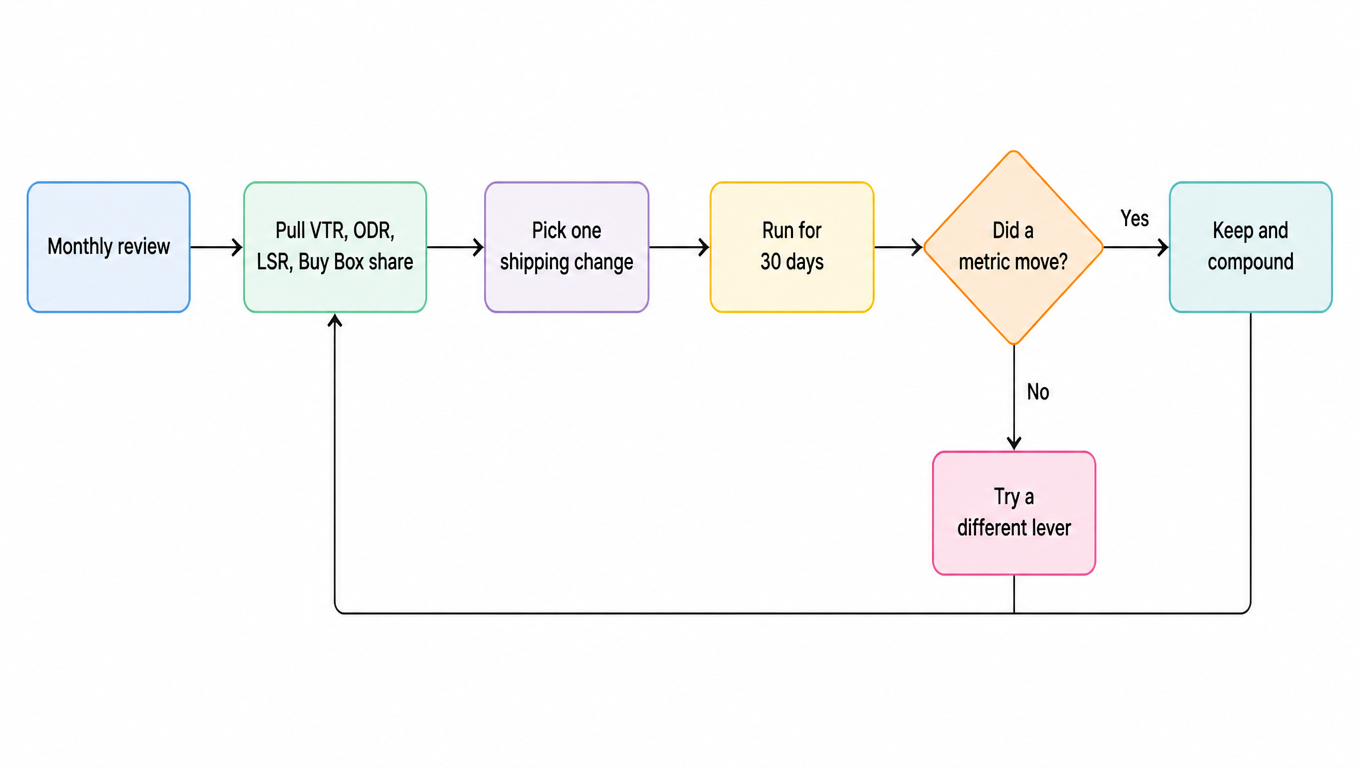
Change one thing at a time and give it a 30-day window. The loop below is deliberately slow: pick one shipping lever, run it for a month, and read the metrics again. If something moved, keep it and compound; if nothing moved, try a different lever. Shipping changes need time to show up in rolling windows, so the discipline is patience, not churn.

Flowchart: the monthly review pulls VTR, ODR, late shipment rate, and Buy Box share, picks one shipping change, runs it for 30 days, then checks whether a metric moved; if yes, keep and compound, if no, try a different lever, and the loop repeats
One lever a month, and let the metrics decide

Know your escalation points. A warning from Amazon means fix the metric inside the next review cycle. Listing suppression or a category restriction means act the same week. And when your own operation cannot move the numbers, whether because you lack regional warehousing, reliable carrier lanes, or scan-quality infrastructure, that is the moment to bring in a fulfillment partner with the data to prove they can.

The takeaway is simple: treat shipping as an input to account health, not a cost line to shave. Every dollar saved on shipping that costs you a VTR point, a late shipment, or a defect is borrowed from your account health at compound interest. The sellers who win the Buy Box, hold a 98% VTR, and sleep through account health reviews are the ones who make shipping decisions like the scorecard is watching. Because it always is.

FAQ

VTR is the most direct: it is a shipping metric by definition, the margin around the 95% threshold is thin, and one carrier lane with weak scan coverage can drag a normal month below the line. All three account health metrics (ODR, late shipment rate, cancellation rate) also trace back to delivery failures, and one logistics incident can push them up at the same time. The Buy Box has more buffer because the delivery promise is only one allocation factor, but sustained lateness still costs you the box.
Four conditions must all hold: the tracking number comes from a carrier on Amazon's approved list, it is uploaded at shipment confirmation, the carrier produces a first scan within 24 hours of pickup, and for most carriers a delivery scan is recorded as well. Miss any one and the shipment does not count toward VTR, even if the package actually arrived on time.
Yes. Budget service tiers often scan less consistently, which drops your VTR, and take longer in transit, which produces late deliveries, negative feedback, and A-to-Z claims that raise your ODR. A few dollars of saved freight is not worth a VTR point or a defect. Compare total cost: freight plus performance risk is the real cost per shipment.
Yes, but vet them on the right metrics. A warehouse near demand centers shortens the delivery promise, which helps the Buy Box; integrated shipping software auto-uploads tracking and produces consistent scans, which protects VTR. Before you sign, ask for their on-time percentage, scan coverage, and exception rate by lane, and put the VTR-relevant inputs (upload timing, scan coverage) into the contract's service levels.
Monthly: on the same day each month pull five numbers (VTR, ODR, late shipment rate, Buy Box share per key ASIN, and carrier on-time percentage per lane), pick one shipping lever, run it for 30 days, and read the metrics again. Change one thing at a time, give the rolling window time to respond, compound what works, and switch levers when nothing moves.