Shipping Diagnostics

Is Your Shipping Problem Caused by the Carrier, Warehouse, or Software? A Diagnostic Framework

Every shipping incident starts the same way: a customer asks where their order is, you open the tracking page, the package looks stalled, and somebody has to be at fault. Most teams skip the diagnosis and go straight to blame. This article gives you a two-step framework for investigating the source of an incident, using data you already have.

The three suspects are the software, the warehouse, and the carrier. The software layer owns everything digital around the order: address validation, rates, labels, tracking numbers, and data handoffs between systems. The warehouse layer owns everything physical before handoff: picking, packing, scanning, cutoffs, and inventory. The carrier layer owns everything after handoff: pickup, transit, delivery, and exceptions. Almost every shipping problem has a fingerprint in exactly one of them, and the framework shows you how to read it.

What you get at the end: a timeline method that finds the broken timestamp, three layer-specific checklists, three hypothetical diagnostic examples, and the monitoring habits that keep incidents rare.

Magnifying glass over a parcel on a warehouse conveyor, with a delivery route map behind it.
The first rule of diagnosis: never guess, let the timestamps point

Why Shipping Problems Get Misdiagnosed

The first reason shipping problems get misdiagnosed is the blame triangle. The customer sees a late package and blames the store. The store looks at the tracking page, sees the package "with carrier," and blames the carrier. The carrier checks its own scans, sees a pickup that happened late or a label that was generated wrong, and blames the warehouse or the software. Every party has clean data showing its own step was fine, and every party has an incentive to point outward, because nobody wants the refund to come out of their margin.

The second reason is the classic playbook: refund the customer, apologize, blame the carrier, wait for the next incident, repeat. A refund keeps the customer for this one order, but the root cause is untouched, so the same failure resurfaces next week. The playbook never fixes anything because it never locates the breakpoint; it just pays for the symptom and moves on.

The cost of misdiagnosis compounds quickly. Each incident costs a refund plus support hours spread across email, chat, and escalation. A percentage of affected customers leave a bad review or churn entirely. For a brand doing a few thousand orders a month, a late rate of even 2 percent means dozens of incidents every week, and each one re-litigates the same blame triangle. Worse, misdiagnosis delays the real fix: a problem that a one-day software configuration change would solve quietly runs for months.

This is also why "just switch carriers" usually fails. If the breakpoint lives in the software layer, like a label generator that mangles tracking numbers, or in the warehouse, like a pack team that skips scans, the new carrier inherits the exact same broken inputs. The tracking page changes color, the problem does not. You only fixed the label on the box, not the machine that makes the label.
The Framework in Two Steps

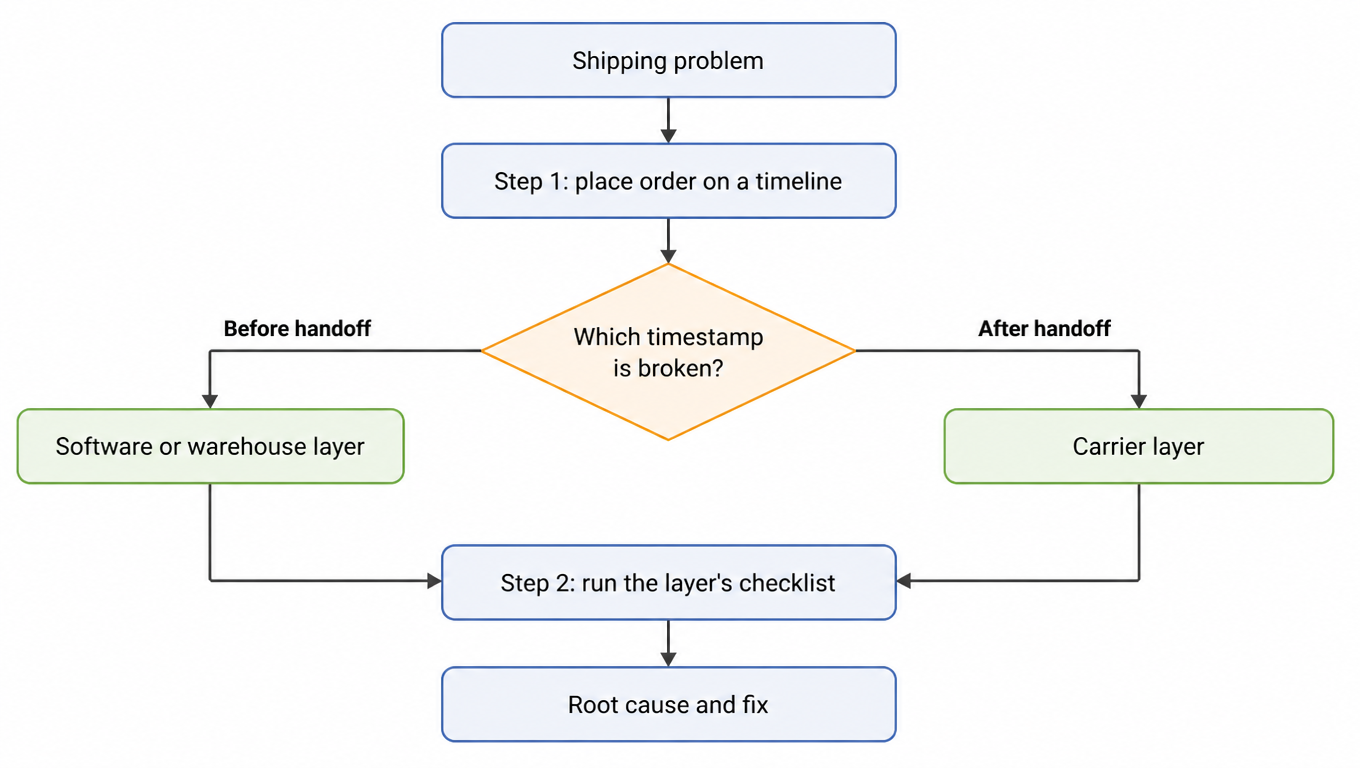
Treat a shipping problem the way a network engineer treats an outage: first locate the segment, then repair the device. Step 1 narrows the problem to one of three layers by placing the affected order on a timeline and finding the broken timestamp. Step 2 runs that layer's self-check checklist to isolate the root cause. Two steps, no guessing.

The three layers are simple. The software layer owns everything digital: the order, the address validation, the rate quote, the label, the tracking number, and the data handoffs between systems. The warehouse layer owns everything physical before the carrier: picking, packing, scanning discipline, cutoff handling, and inventory allocation. The carrier layer owns everything after handoff: pickup, transit scans, delivery, and exceptions. Almost every shipping problem has a fingerprint in exactly one of them.

One rule governs the whole framework: never guess. Pull the order's actual data from every source you have, the OMS, the WMS, the carrier API, the public tracking page, and let the timestamps point. Guessing turns a thirty-minute diagnosis into a month of experiments, and experiments are what your competitors' customers are already paying for.

Two-step framework flow: place the order on a timeline, split by whether the broken timestamp is before or after handoff into software/warehouse or carrier, run the layer's checklist, reach root cause and fix
The layer the breakpoint sits in decides which layer you check

Step 1: Find the Breakpoint on the Timeline

Every order has six meaningful timestamps: placed, packed, handed to carrier, scanned at origin, in transit, and delivered. Each one has a clear owner. "Placed" belongs to the software. "Packed" and "handed to carrier" belong to the warehouse. "Scanned at origin," "in transit," and "delivered" belong to the carrier.

A healthy timeline is a chain of timestamps with small, predictable gaps. A broken timeline shows a gap where a timestamp never arrives, or arrives far later than it should. Two rules of thumb do most of the work. First, a timestamp that never arrives points to the party that should have produced it: no origin scan means the carrier never scanned the package, no handoff scan means the warehouse never recorded the handoff. Second, a timestamp that arrives late points to whoever was responsible for the stretch between the last two timestamps: if the handoff to origin scan normally takes four hours and took twenty-six, the carrier's pickup and early network handling are the suspect segment.

Where do you get the data? The OMS gives you order and label timestamps. The WMS gives you pack and handoff scans. The carrier API and the public tracking page give you pickup, transit, and delivery events. The key move is to compare the same order across sources, because discrepancies are the fingerprint. If the carrier API shows a package physically accepted but the WMS says it was never packed, you have already found the layer.

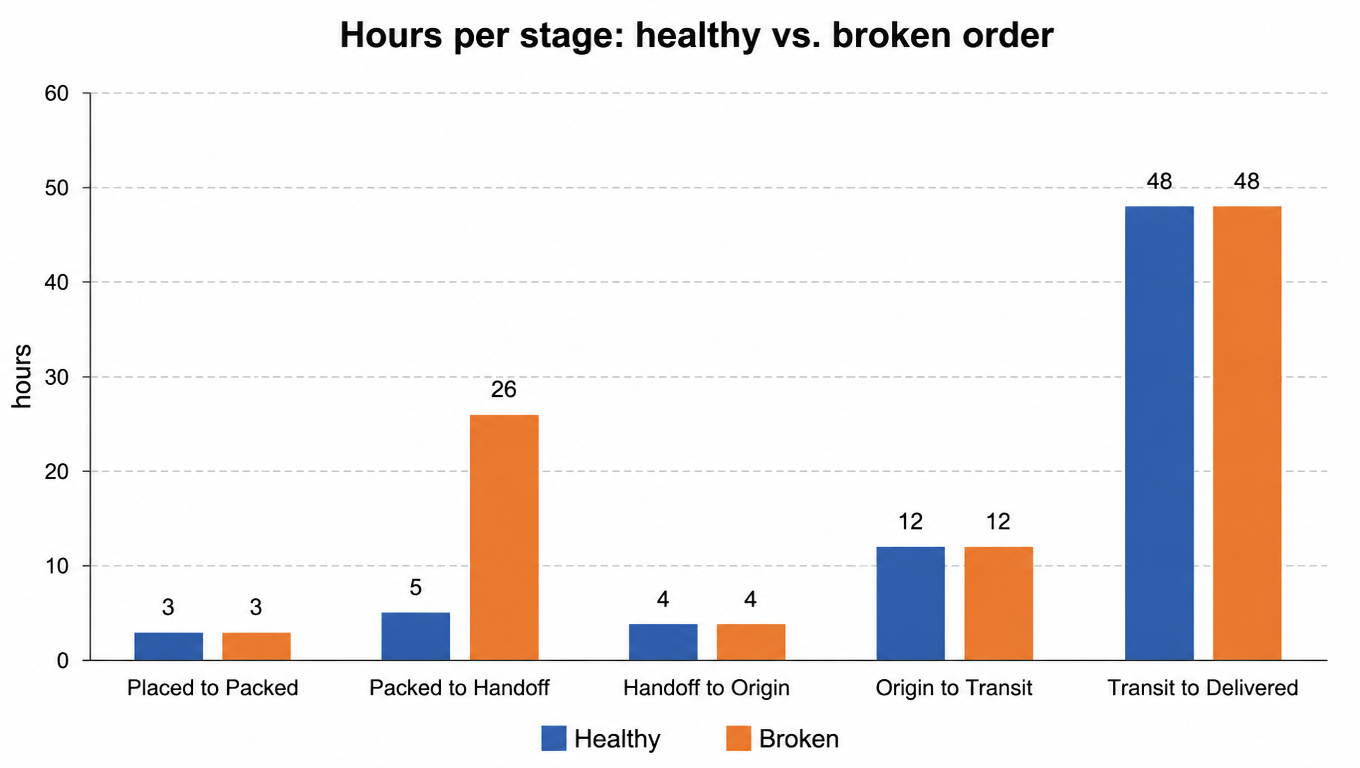
Illustrative timing inputs, not a service promise or industry benchmark: placed to packed in 3 hours, packed to handoff in 5 hours, handoff to origin scan in 4 hours, origin to transit in 12 hours, and transit to delivered in 48 hours. Now compare a broken order from the same lane. Placed to packed is still 3 hours, but packed to handoff took 26 hours instead of 5. The breakpoint sits between the warehouse and the carrier, which narrows the suspect pool to two layers before you have even read a single exception code.

Bar chart of hours per stage for a healthy vs broken order: the broken order stretches packed-to-handoff from 5 to 26 hours while every other stage matches
Same lane, one stretch stretched; the breakpoint lives in that stretch

One caution: never diagnose from a single order. Pull ten to twenty affected orders and look for the same breakpoint across all of them. A single outlier is noise, a repeated pattern is a bug. If the gap appears at the same timestamp on most of the sample, that timestamp is your breakpoint.

Step 2: Isolate the Layer: Software

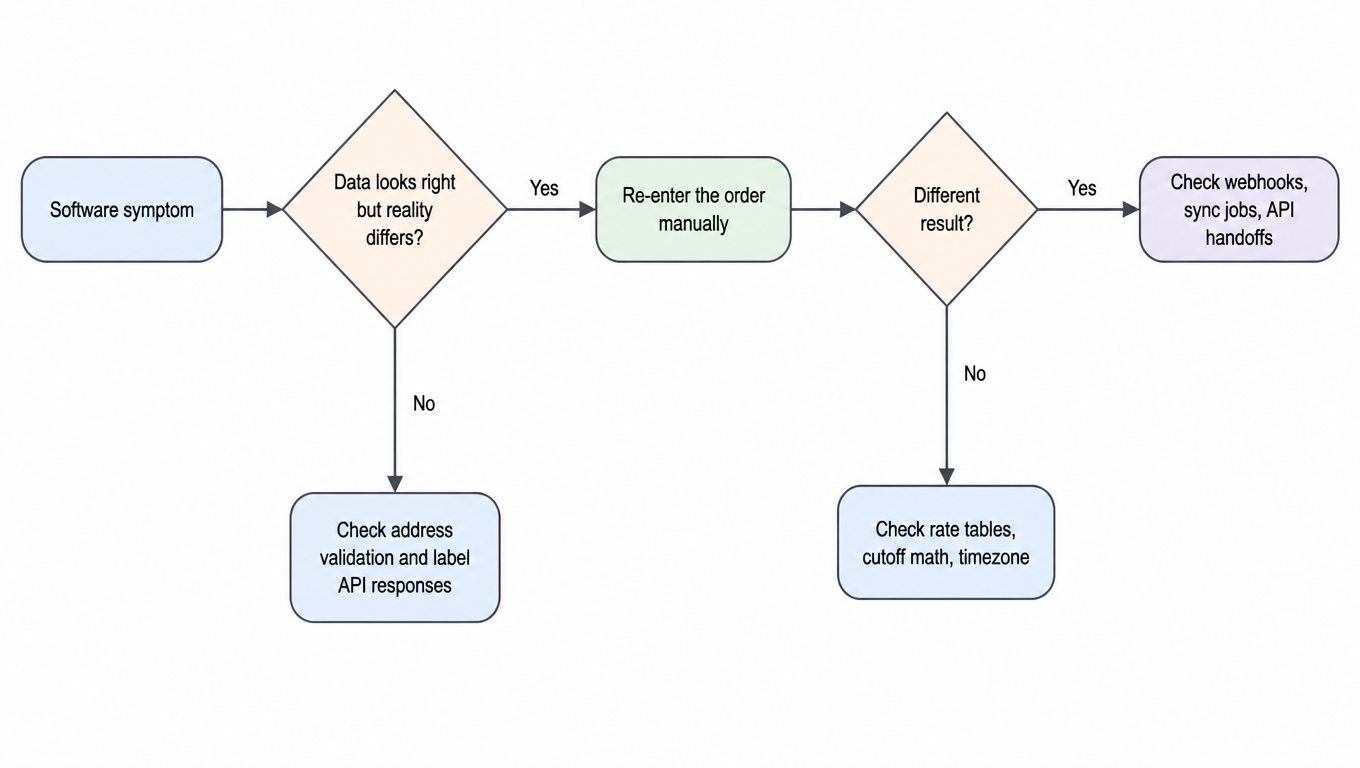
The software layer owns address validation at checkout, rate quotes, label generation, tracking number assignment and the sync to the carrier API, and the webhooks that tell the warehouse what to pack. Software failures are the sneakiest class because the package itself is fine; the data around it is wrong.

The common failures repeat across brands. Stale rate tables produce labels whose rates differ from the quote and the invoice. Cutoff-time math computed in the wrong timezone batches orders a full day late even though the warehouse packed them on time. Label regeneration loops create duplicate labels and one gets cancelled, killing the tracking number. Silent webhook failures mean the warehouse is never told an order exists, so the package sits until the customer asks. And tracking numbers that never reach the carrier API leave you with a label that exists in your system and no record in the carrier's.

How do you tell it is software? Two signals. First, the data looks right but reality does not match: the order, label, and rate all look normal in your dashboard, yet the carrier has no record of the package. Second, the same order behaves differently when re-entered manually. If you type the order into the carrier's portal by hand and everything works, the software layer is your suspect, because you just bypassed it.

Run this checklist for any order whose breakpoint landed before handoff:

  • Compare the rate on the label against the current rate table and the final invoice. A mismatch points to stale tables.
  • Re-enter one affected order manually in the carrier portal. Different behavior means your software pipeline is the problem.
  • Check label generation timestamps against the configured cutoff, converted to the warehouse's timezone, not your headquarters timezone.
  • Confirm the tracking number reached the carrier API by looking up the order by reference in the carrier portal.
  • Check webhook and sync logs for silent failures around the affected orders.
Software layer decision tree: if data looks right but reality differs, re-enter manually; different result means check webhooks and sync jobs, same result means check rate tables, cutoff math, timezone; otherwise check address validation and label API responses
Manual re-entry is the cheapest probe for the software layer

Step 2: Isolate the Layer: Warehouse

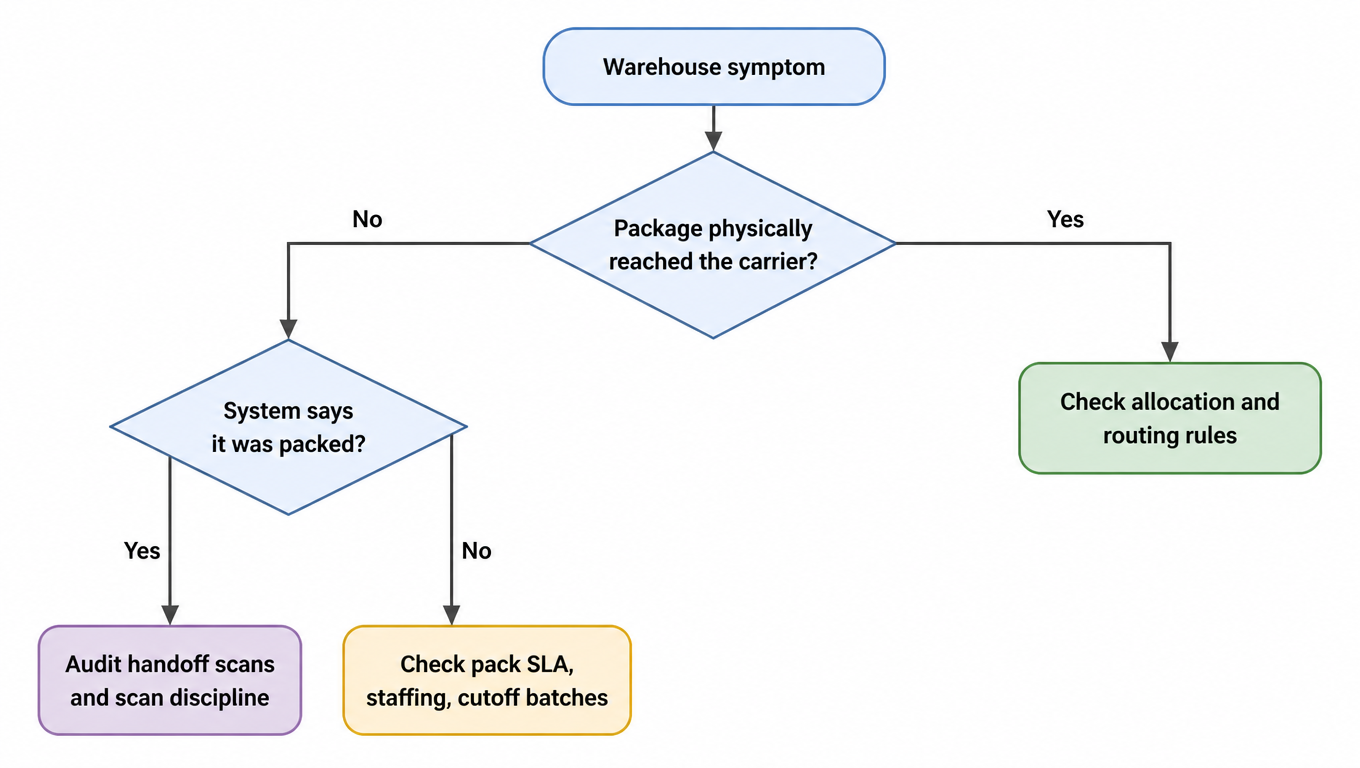
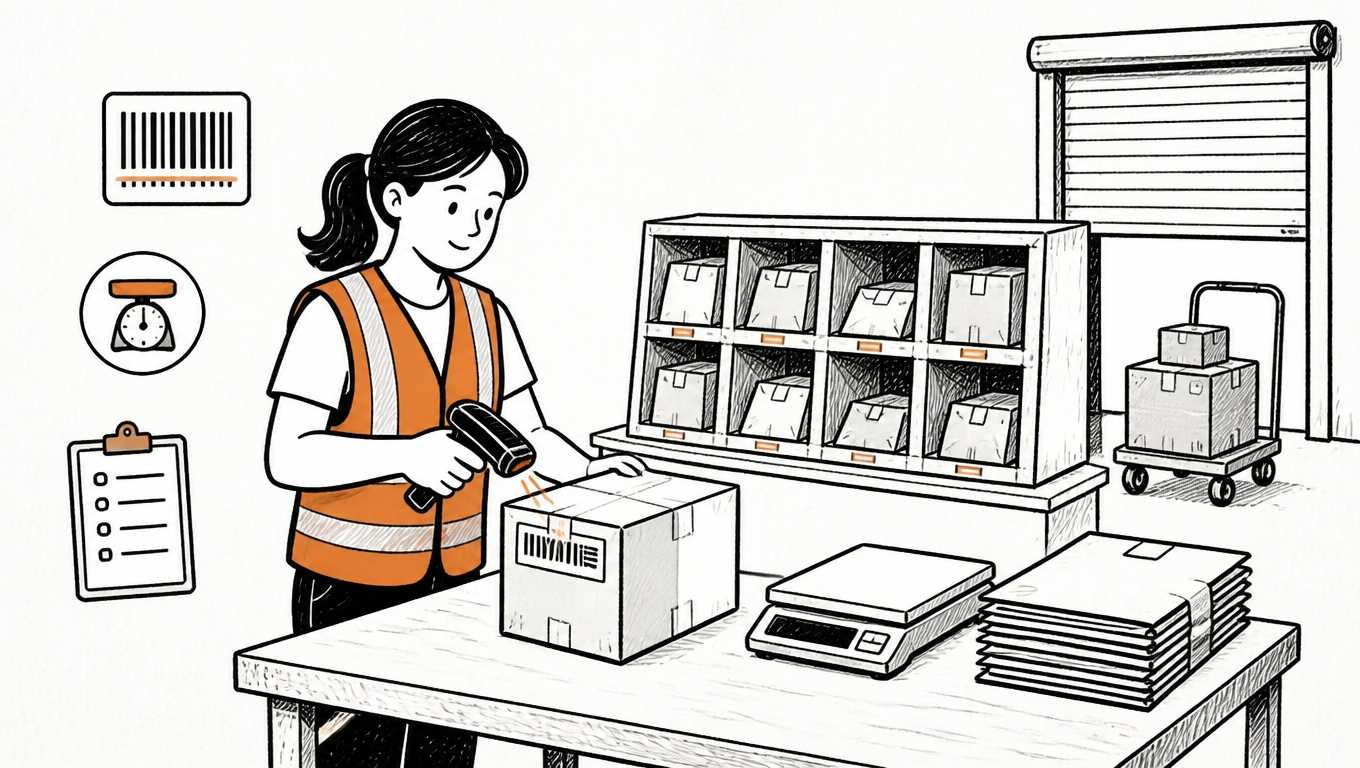
The warehouse layer owns picking, packing, scanning discipline, cutoff handling, inventory allocation, and multi-warehouse routing. Warehouse failures usually present as carrier failures, because the customer sees a late package or dark tracking and never sees the pack line. That is exactly why this layer gets misdiagnosed the most.

The common failures are recognizable once you know them. Missed scans break the tracking chain: the package travels fine, but the system never records the handoff, so the carrier API shows a gap that looks like the carrier's fault. Pack-after-cutoff batches miss the day's pickup and add a full day of transit. Allocation bugs route orders to a warehouse that does not hold the inventory, adding a cross-ship that nobody budgeted for. And staffing gaps at peak stretch the pack SLA without any single visible error.

How do you tell it is the warehouse? Physical reality contradicts the system. The carrier API shows a package accepted at the origin hub, but the WMS says it was never packed; that contradiction can only come from the warehouse layer. Second, failures cluster: the same breakpoint on the same shift, the same pack station, or the same batch of barcodes. A cluster is a process problem, not bad luck.

Run this checklist for any order whose breakpoint landed at or before handoff:

  • Does a pack timestamp exist for every affected order? Pull the scan-rate report for the shift in question.
  • Was the handoff scan recorded within your SLA of the pack timestamp? A healthy gap is a couple of hours.
  • Was the order allocated to the warehouse that actually holds the inventory? Check the allocation rules and the bin data.
  • Did the batch make the pickup? Compare the batch close time against the carrier's actual pickup time.
  • Do the failures cluster around a shift, a station, or a label batch? A cluster tells you where to look first.
Warehouse layer decision tree: if the package did not physically reach the carrier, audit handoff scans when the system says packed, check pack SLA and staffing when not; if it did reach the carrier, check allocation and routing rules
A contradiction between physical reality and the system is the warehouse layer's fingerprint

Step 2: Isolate the Layer: Carrier

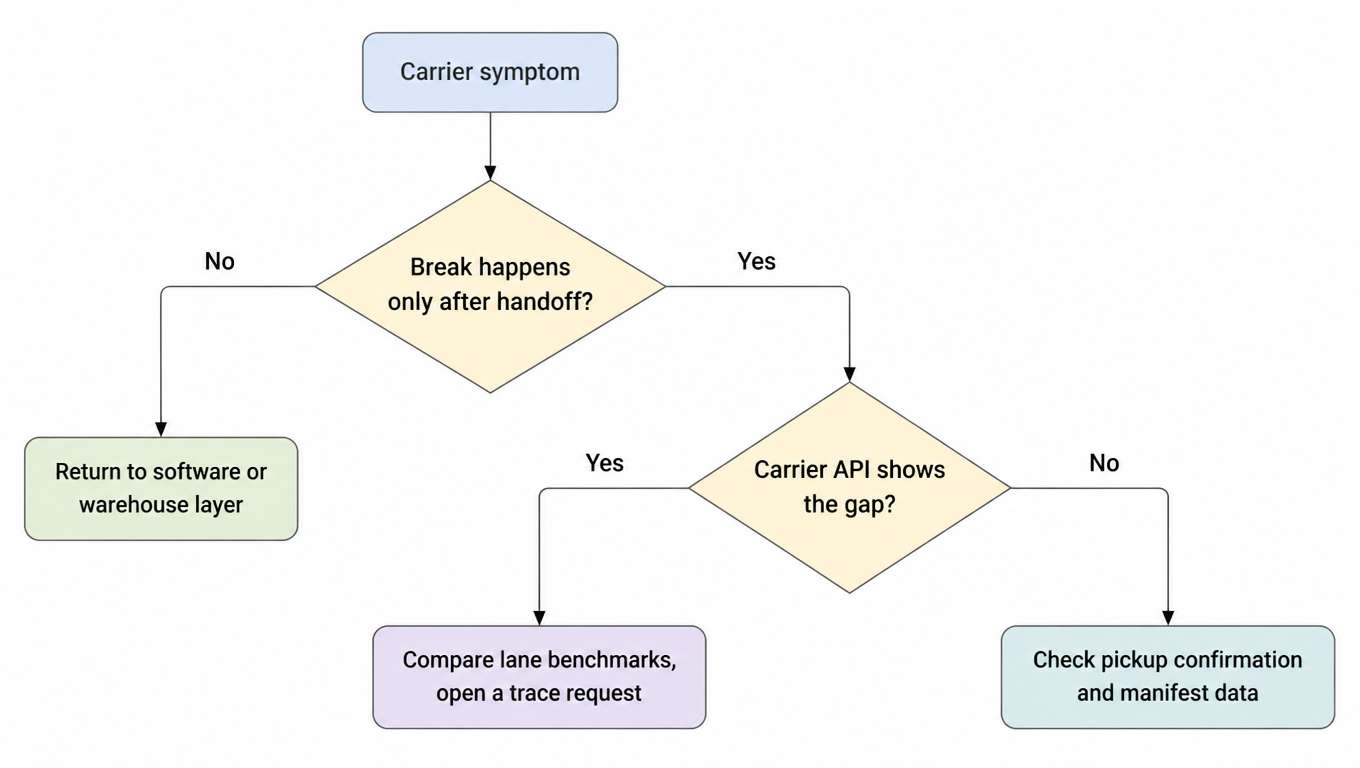
The carrier layer owns the pickup schedule, the service level versus the promised transit time, network events, delivery exceptions, damage, and loss. It is the last layer to blame and the first to be blamed, so you must prove it with data rather than assumption.

The common failures are the ones customer support already knows by heart. Skipped or late pickups that silently add a day. Service downgrades where a two-day promise ships ground. Weather and network disruptions that stall whole regions. Mis-scans that move a package to the wrong destination hub. And delivery to the wrong address, complete with a confident delivery photo of the wrong doorstep.

How do you tell it is the carrier? The timeline breaks only after handoff, and the carrier's own API shows the gap. If the package was scanned at origin and then nothing for thirty hours while the warehouse timestamps are all healthy, the carrier owns that stretch. A second check is cross-carrier comparison: run the same lane with a second carrier for a month. If both are slow, the problem is the lane or the service level you bought, not the specific carrier.

The data carriers expose is usually enough on its own: pickup confirmation, a scan event feed, exception codes, and the delivery photo. Pull all of them for the affected orders and line them up against your own timestamps before you call anyone.

Run this checklist for any order whose breakpoint landed after handoff:

  • Does a pickup confirmation exist for the affected batch? No confirmation, or a late one, points at the pickup process.
  • Where does the tracking chain stop, and does the carrier API show any scan after that point?
  • What does the exception code say? Weather, address issue, customs hold, and delivery exception each have different owners.
  • Is the service level printed on the label the one the customer was promised? A downgrade is a label problem, not a network problem.
  • How does this carrier's on-time performance on this lane compare with a second carrier's over the last month?
Carrier layer decision tree: if the break happens only after handoff and the carrier API shows the gap, compare lane benchmarks and open a trace; if the API shows no gap, check pickup confirmation and manifest data; if the break starts before handoff, return to the software or warehouse layer
For the carrier to be guilty, let its own API testify first

Three Illustrative Diagnoses

The company profiles, times, percentages, and outcomes below are teaching assumptions. They are not EasyShippingX customer records and do not establish a guaranteed resolution time.

The framework is easier to trust after you have watched it work. These three cases are hypothetical teaching examples, not verified customer incidents, and each one follows the same shape: symptom, timeline, layer, root cause, fix, lesson.

Illustrative case 1: the delay that looked like the carrier's fault.A DTC brand's on-time delivery dropped from 96 percent to 81 percent over three weeks. The timeline showed pack timestamps within SLA across the board, but packed to handoff stretched from 5 hours to 26. The layer was the software, because the breakpoint sat between the pack scan and the manifest. The root cause was a cutoff bug: the shipping software's cutoff field was configured as 4:00 PM but stored and compared in UTC. For a Pacific-time warehouse, 4:00 PM UTC falls in the local morning; the exact offset depends on date and daylight saving, so by mid-morning every order fell into "tomorrow's batch" and waited a full day for a label. The fix was a one-line timezone correction, and on-time delivery recovered within a week. The lesson: cutoff math belongs to the software layer, and a timezone bug wears a carrier's uniform.

Illustrative case 2: tracking that went dark after pickup.A seller's tracking showed "picked up" and then nothing for 36 hours, before a delivery scan appeared. The timeline showed the origin scan present and the delivery scan present, with no handoff scan in between. The layer was the warehouse. The root cause: the brand had switched to a new label batch whose barcode format the WMS scanners could not read, so handoff scans were silently skipped. The carrier never matched the manifest, and its hub had to reprocess the batch by hand a day and a half later. The fix was a scanner firmware update, a one-time rescan, and an alert on any drop in the scan rate. The lesson: the handoff scan is the data contract between the warehouse and the carrier. When it breaks, tracking goes dark even though the carrier is blameless.

Illustrative case 3: the freight bill that jumped 22 percent.A brand saw its monthly freight bill spike while rates were unchanged. The timeline here is not about delay but about weight: the label weight and the billed weight differed by 1.8 times on the entire new product line. The layer was the warehouse, at the pack station. The root cause: the new product was lighter, but the pack team kept using the old oversized box, and the carrier's dimensioner re-measured dimensional weight at the hub. The label carried the actual weight; the invoice carried the dimensional weight. The fix was right-sizing the box, correcting the dimensions on the label, and adding a weekly label-versus-invoice weight variance report. The lesson: cost problems hide in the dimension data, not the rate sheet, and a variance report catches them weeks before invoice shock does.

From Diagnosis to Prevention: Build the Monitoring Habit

A framework you only run during incidents is a fire extinguisher. The last step is turning it into a habit so the incidents get rarer.

Start with a weekly SLA dashboard. Track three numbers: on-time rate, tracking gap rate (orders with no scan for more than 24 hours), and exception rate, each broken down by layer. Thirty minutes a week turns incidents into trends, and trends tell you where the next incident will come from before it arrives.

Set alerts that fire before customers complain: no pickup confirmation by the scheduled pickup time, no scan for 24 hours, a delivery exception on a high-value order. Alert on the exception first, refund later. Most customers only want to know that you noticed, and a proactive message beats a refund receipt every time.

Keep audit logs and change control next to the dashboard, because the fix that worked last month can silently regress. Someone reverts a configuration, a vendor updates an API, a warehouse manager changes a shift pattern, and the metric you fixed creeps back. When a number regresses, diff the changes first; the regression is usually a change you already made.

Know your escalation paths before you need them. For carrier issues, open a claim inside the carrier's filing window and attach your timeline evidence; the window closes fast. For software issues, reproduce the bug with the manual re-entry test and hand your vendor the exact order and timestamp. For warehouse issues, escalate through your 3PL account manager with the scan-rate report in hand, and renegotiate the SLA or move volume if discipline does not improve.

Finally, the mirror view for warehouse operators. When you are the accused party, run the same framework in reverse: pull your scan logs and handoff timestamps, and show exactly where your process ended and the carrier's began. Defend with data: on-time pack rate, scan rate, and manifest matching. The framework works in both directions, and the data decides, not the loudest voice.

The next time an order is late, do not ask "which carrier." Ask "which timestamp." The timestamp points to the layer, and the layer points to the fix.

FAQ

Place the order on a timeline. Each of the six timestamps (placed, packed, handed to carrier, origin scan, in transit, delivered) has an owner. A timestamp that never arrives points at the party that should have produced it; a timestamp that arrives late points at whoever was responsible for the stretch between the two timestamps. Then run that layer's checklist. The breakpoint is a fingerprint, not an opinion.
Because the breakpoint may not live in the carrier. If a label generator mangles tracking numbers or the pack team skips scans, the new carrier inherits the exact same broken inputs. Run the timeline method first: if the broken timestamp sits before handoff, the fix is in your software or warehouse, and no carrier change will help.
No. Tracking gaps have three common owners: a missed handoff scan in the warehouse (the package travels fine but the system never records the handoff), a silent sync failure in the software (the tracking number never reached the carrier API), or a real network gap at the carrier. Cross-check the WMS scan log, the carrier API, and your label timestamps before assigning blame.
Ten to twenty affected orders, never one. A single outlier is noise; a repeated pattern is a bug. If the same gap appears at the same timestamp across most of the sample, that timestamp is your breakpoint and the fix becomes obvious.
Incident diagnosis is reactive; monitoring is the habit. Run a weekly SLA dashboard tracking on-time rate, tracking-gap rate, and exception rate by layer, and set alerts that fire before customers complain: no pickup confirmation by pickup time, no scan for 24 hours, a delivery exception on a high-value order. Thirty minutes a week turns incidents into trends.
Technically yes, but diagnosis must separate “the system accepted an event” from “the operation followed policy.” A signature-released parcel can be scanned after it is left at an authorized location; no face-to-face handoff is required. A scan made before the actual drop or away from the destination is premature or improper. USPS requires stop-the-clock scans at the delivery point, and the USPS Office of Inspector General has documented improper delivery-unit scans. Rule out time-zone display, notification lag, and household receipt, then obtain the raw event type, device time, scan geolocation, photo or signature, and route record. One “delivered” line on the public page is a clue, not a complete handoff record.
Because manifest closeout, batch acceptance, and item-level physical handoff are different events. A shipping system may mark a label manifested after end-of-day closeout or electronic transmission. With USPS, one SCAN Form master barcode links many labels, and its scan creates an acceptance event for each linked label, according to the USPS SCAN Forms documentation. A carton omitted from the cage, left at a pack station, or linked by mistake can therefore have the batch event without physical induction. Reconcile four logs: manifest version and label list, the last item-level warehouse scan, cage or trailer loading and pickup receipt, and the carrier's later item-level origin or facility scan. That last event is usually the strongest evidence of entry into the physical network.
Build a minute-level timeline containing both carrier and premises events. A scan at the delivery unit or wrong address, a different doorway in the photo, a mismatched signer, and continuous doorbell video showing no driver support a phantom scan or misdelivery. Theft after delivery is supported when the image matches the address and parcel, the scan time and place cohere, and video or access logs first show the driver depositing it and then another person removing it. Photo, signature, and geolocation are not independently conclusive; also check notification latency, device time zone, shared mailroom receipt, and household pickup. If the chain lacks proof of the drop or removal, code the root cause as undetermined and keep investigating.