Workflow illustration, not a customer case or an actual quote.
This guide is for eCommerce, warehouse, and 3PL teams that create USPS labels and review charges. It does not reproduce a rate table that will soon expire. It shows how to identify the price basis, eligible service, zone, billable weight, and additional fees behind a USPS amount. It also gives you a reproducible audit chain: lock the price basis and account, screen service eligibility, read the zone, derive billable weight from sealed measurements, then reconcile the quote, label charge, and final transaction under one shipment key and classify every variance by cause.
First identify the pricing stage you are comparing
Amount
What it answers
What it does not replace
Planning estimate
Expected cost for budgeting or checkout
A purchasable current account rate
Current quote
Available services and current price for supplied inputs
Final charge after physical verification
Label charge
Amount paid or reserved when the label is purchased
Net amount after adjustments, refunds, or reversals
Final charge
Reconciled amount after known adjustments post
A guarantee for future similar shipments
If these four amounts share one column, any conclusion about an expensive rate is unreliable. Add stage, timestamp, account, and source before comparing.
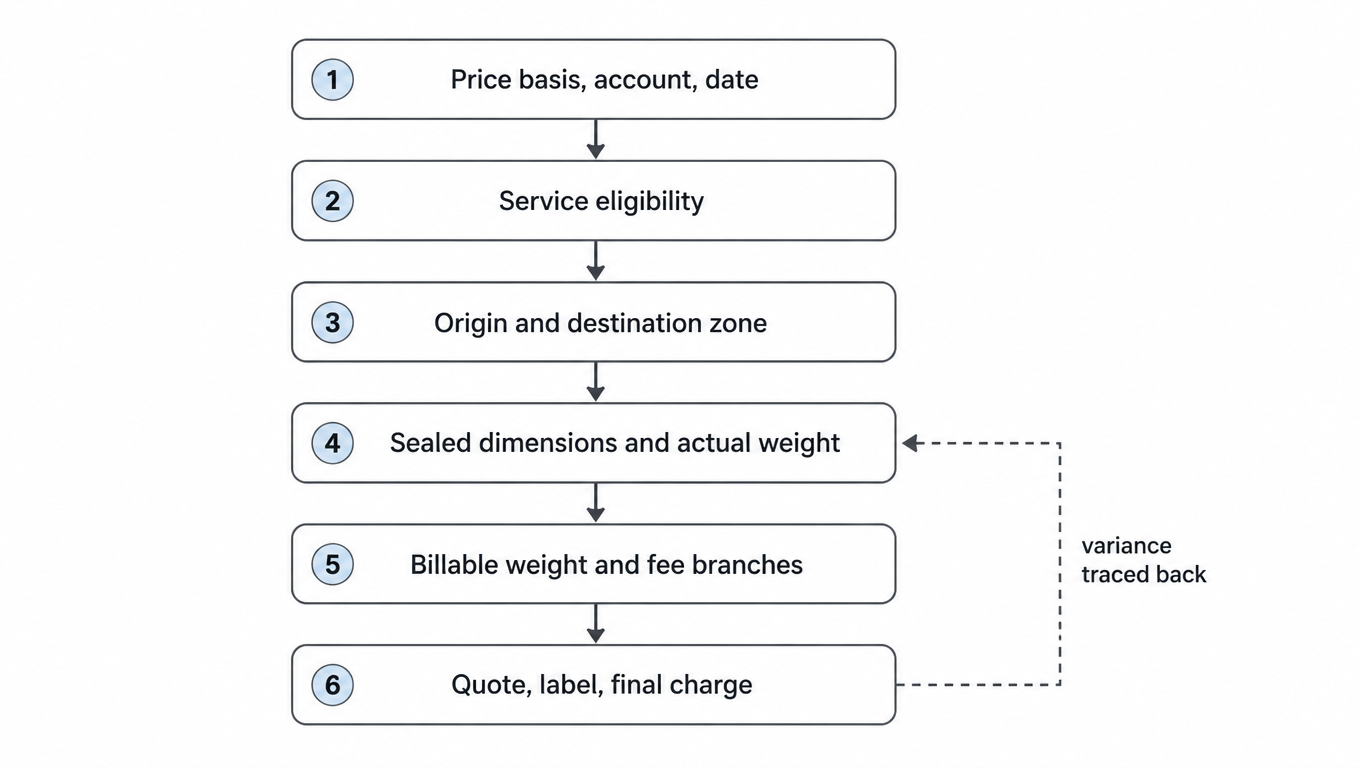
USPS rate-input decision flow
Read the six inputs in order. A later amount cannot be reproduced while an earlier input is still open. The dashed edge is the fallback: when a final amount differs from the quote because of dimensions, weight, or packaging specification, fix the measurement instead of layering a correction factor onto the new figure.
Determine eligibility and billing basis before reading the current quote; do not project a new shipment from an old unit price.
The row below indexes the six inputs, so you can check whether an audit skipped a step.
1
2
3
4
5
6
Price basis and account
Service eligibility
Origin and destination zone
Actual dimensions and weight
Billing method and extra fees
Current quote and reconciliation
The pricing-input capture contract: which fields each shipment must keep
An audit stays reproducible because of the fields you keep, not because you memorized a formula. The table below is the capture contract this audit uses. Every field belongs on the shipment key rather than only in a quote-response log. The cost of a missing field usually shows up months later, when it can no longer be traced.
Field
Where it comes from
What happens when it is missing
Internal shipment key
Order, warehouse, or OMS system
Quote, label, and final bill cannot be joined, so variance can only be seen as a total
Price basis and account
Purchase path and account master data
The quote cannot be reproduced, and published prices, account prices, and historical bills end up in one column
Quote timestamp
Quote response
You cannot tell which price version was in effect at the time
Price effective date and version
Official price list and internal cache version
After a price change you cannot explain why the same input returns a different amount
Service and purchase path
Quote response and booking record
A cheaper but ineligible service can be substituted without anyone noticing
Origin ZIP Code
Ship-from warehouse master data
The zone is read incorrectly and the whole shipment is systematically off
Destination ZIP Code and state
Order address, including any correction result
The zone cannot be determined, or it needs manual entry
Sealed outer dimensions
Measurement at the pack station
Neither the dimensional-weight branch nor the cubic branch can be computed
Actual weight
Calibrated scale and tare record
Billable weight falls back to dimensional weight, overstating light bulky parcels
Packaging specification and version
Packaging specification library
After a box change nobody knows why the quote moved
Billable weight and billing branch
Calculation result or quote response
You cannot tell whether the shipment used weight-and-zone, cubic, or flat-rate billing
Charge components (code and amount)
Quote response and final bill
Only a total is visible, so variance cannot be classified or assigned
One key must run through quote, label purchase, and settlement; otherwise reconciliation leans on fuzzy tracking-number matching.
Keep a snapshot of the previous price version at cutover and record which version each shipment used.
Writing fields once at quote time is not enough; merge the final bill back onto the same key so a variance has something to compare against.
Step 1: lock the price basis, account, and effective date
The same parcel can read a different price basis through a different purchase path. Record whether the quote came from a USPS tool, an approved provider, or another authorized path, along with account identifier, quote time, effective date, and currency. Compare like with like; do not blend published prices, account prices, and historical invoices.
Use the USPS official price list and online price calculator for current pricing. The price list states its effective date, so internal rate caches should be versioned and switched on that date.
Step 2: filter for service eligibility before comparing price
A candidate service must fit destination, packaging, weight and size limits, contents rules, evidence requirements, and the customer promise. A lower-priced but ineligible service is not an option. Hazardous, alcohol, restricted, or special-document shipments need their own compliance path rather than a generic rate calculation.
Record excluded services and reasons so a missing option is not mistaken for an integration failure.
Store delivery promise separately from price so routing does not default to the lowest amount.
Flat-rate packaging, cubic pricing, and weight-based pricing are separate eligibility branches rather than discounts applied afterward.
Record every excluded service
When a service is screened out without a recorded reason, operations read the missing option as an integration failure, and support cannot explain to a customer why the service changed. Each exclusion record needs at least the shipment key, the candidate service, an exclusion reason code, the decision time, and the decision owner.
Exclusion reason
Input to record
Next action
Above a weight or size limit
Measured dimensions, actual weight, the service limit
Move to a smaller packaging specification or another eligibility branch
Packaging is not official flat-rate packaging
Box source and packaging type
Buy the official packaging or return to weight-and-zone billing
Restricted contents or extra documentation
Contents category and required documents
Route to the matching compliance process instead of booking from a generic calculator
Destination or service not supported
Destination ZIP Code and service coverage
Switch service or carrier and tell the customer before booking
The purchase path has no access to that service
Account, purchase path, and service code
Change purchase path or request access, and record the quote difference
Step 3: determine zone from origin and destination ZIP Codes
USPS states that package pricing uses zones and directs business shippers to its zone chart or business calculator. A zone is an origin-to-destination relationship, not a permanent property of the destination ZIP Code. Warehouse changes, return-origin changes, or an incorrect origin ZIP Code can change the zone and amount.
Do not add a warehouse only because many orders travel far. Model inventory availability, fulfillment fees, split-inventory risk, service promise, and final USPS charges on real orders before deciding whether total cost improves.
Verify the zone against the current zone chart or business calculator, and store the query time and source version with the shipment. A zone calculator is useful for a quick comparison, but the official basis above still decides. When one destination ZIP Code reads two different zones, check the origin ZIP Code for a data-entry error before touching any price.
Origin is master data, not a constant
Every ship-from warehouse, return address, and drop-ship lane needs its own origin ZIP Code and zone basis. Treating the zone as a property of the destination is the most common source of error in this audit.
Origin change
Blast radius
What to do first
Warehouse move or a new node
Zone and amount for everything that warehouse ships
Recompute a sample of real orders before cutover and compare the old and new zone mix
Returns shipped from a returns address
Replacement, repair, or restock shipments
Give the returns warehouse its own origin ZIP Code instead of reusing the outbound one
A 3PL ships from several origins
The same order may ship from different nodes
Bind the quote to the actual node instead of a platform-average zone
Supplier drop-ship
Shipments that start where the supplier is
Keep a separate price and zone basis rather than blending it into the own-warehouse bill
Step 4: calculate billable weight from the final package
Measure the sealed parcel at its widest external points and record actual weight, timestamp, device, and unit. Do not use bare product weight, supplier specifications, or an empty box before cushioning. Multi-item orders, seasonal kits, and packaging substitutions need a new measurement.
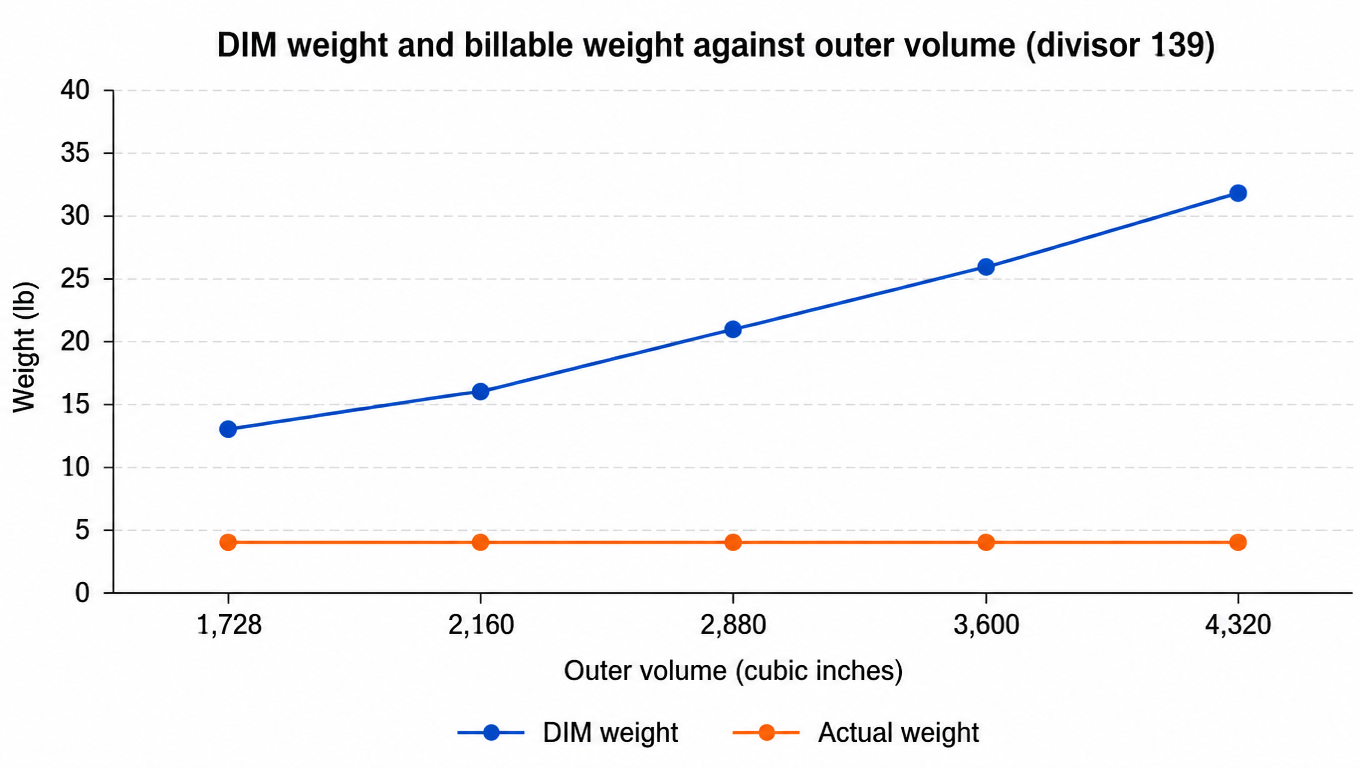
The current USPS Domestic Mail Manual states that, for rectangular Ground Advantage Commercial and Priority Mail Commercial parcels in the applicable zones and service conditions, dimensional weight applies above one cubic foot. Round each external dimension up to a whole inch, divide the resulting volume by 139, round up to a whole pound, and compare it with actual weight. Nonrectangular parcels use an adjusted calculation and should not reuse the rectangular formula unchanged.
If actual weight is 4 lb and the service and zone meet the DIM rule, the quote branch uses 16 lb. This demonstrates the calculation; it is not a fixed postage quote.
Measurement reliability: device, rounding direction, and re-measure triggers
One formula returns one result only when the inputs and the rounding direction are consistent. In practice three mistakes dominate: weighing without taring, measuring an empty box, and mixing the rounding direction used for dimensional weight with the one used for cubic pricing.
Measured item
Rule
Common error
Actual weight
Weigh the sealed parcel on a calibrated scale and record the tare and the timestamp
Reusing a supplier specification or bare product weight
Outer dimensions
Measure the widest external points after sealing, including cushioning and protrusions
Measuring an empty box or using the box supplier's nominal size
Dimensional-weight rounding
Round each dimension up to a whole inch, then round the result up to a whole pound
Rounding dimensions down or rounding the result to nearest
Cubic tier rounding
Round each dimension down to the nearest quarter inch, then move the tier up
Using one rounding direction for both cubic and dimensional weight
Units and conversion
Default to inches and pounds; convert metric input once, store it, and record the source
Mixing metric and imperial in one field so the value cannot be recomputed later
Re-measure triggers: a new box specification, a new void fill, a multi-item kit, a seasonal gift set, a supplier packaging change, or a manual order edit.
The packaging specification library should record, per specification: measured outer dimensions, empty-box tare, applicable services, last verification date, and verifier.
The floor picks and packs only from the specification; a specification change goes through change control rather than an ad-hoc box swap.
The table below converts volume into dimensional weight with the same formula, so the size of the effect is visible. The last column is billable weight when actual weight is 4 lb: above one cubic foot, dimensional weight drives the billable figure. This table only demonstrates the calculation; whether dimensional weight triggers still depends on service, zone, and parcel type.
Outer volume (cubic inches)
Equivalent (cubic feet)
Dimensional weight (lb)
Billable weight (lb)
1,728
1.00
13
13
2,160
1.25
16
16
2,880
1.67
21
21
3,600
2.08
26
26
4,320
2.50
32
32
Dimensional weight rises with outer volume while actual weight stays at 4 lb; the gap between the two lines is the billable weight that packaging creates.
Step 5: evaluate the billing method and additional fees separately
Branch
Inputs to verify
Common error
Weight-and-zone pricing
Service, zone, billable weight, and price basis
Reusing a historical unit price from another account
Cubic pricing
Current service, packaging, size, weight, and purchase-path eligibility
Applying old rules or another service’s eligibility
Flat-rate packaging
Official packaging, service, weight, and contents eligibility
Treating a similar custom box as official packaging
Additional fees
Length, volume, shape, handling characteristics, and selected extras
Saving base postage without charge components
Cubic pricing requires an eligibility branch before tier calculation
Under current DMM 283, eligible Ground Advantage Commercial cubic parcels can be up to 1.00 cubic foot across ten tiers from 0.10 to 1.00. Under DMM 223, Priority Mail Commercial cubic parcels can be up to 0.50 cubic foot across five tiers. Both currently require no more than 20 lb, a longest dimension no more than 22 inches, and exclude rolls and tubes. Because eligibility can change, store service and rule version rather than one permanent cubic flag.
Cubic feetC = L¼↓ × W¼↓ × H¼↓ ÷ 1,728
Round each maximum external dimension down to the nearest quarter inch before multiplying. Do not reuse the DIM rule’s upward rounding.
Cubic tierTier = ⌈10 × C⌉ ÷ 10
Round up to the next 0.10 tier and reject values above the current service maximum.
Volume determines only the tier. Purchasability and savings still depend on service, account, zone, contents, and the current all-in quote.
Select only among eligible branchesQselected = min{Qweight-zone, Qcubic, Qflat-rate}
Each Q must be a purchasable all-in quote from the same account and time that satisfies delivery-promise and contents rules. An ineligible branch does not enter the set.
USPS says nonstandard fees can depend on length, volume, and other characteristics. Do not hard-code fee names as permanent rules. Save charge code, amount, source version, and triggering input so differences can be explained after a price update.
Charge-code dictionary: every charge needs a home
Reconciliation needs more than an amount: it needs the charge class, the trigger, and the classification decision. Build a charge-code dictionary that sorts every charge into one of three buckets: avoidable (measurement or process can fix it), accepted (it happens under the rules and belongs in the quote model), or disputed (evidence shows the charge does not match the rules). A charge with no classification should not be closed.
Avoidable when the method is consistent, otherwise accepted
Both measurement records and the device identifier
Selected extras, named from the official list
Whether it was selected at booking
Accepted, once you confirm it was selected
Booking record and charge detail
Address correction or return charge
Address validity and the return reason
Avoidable when validation runs before booking
Validation result and order-edit history
Void and refund
Void time and refund status
Accepted, but confirm it posted
Void record and refund evidence
Price-version cutover: what to do on the effective date
A price update is not the problem. Not being able to tell which version a shipment used is. Treat the cutover like a release: run in parallel first, switch, then look back.
Stage
What to do
Done when
Before the effective date
Load the new price and rule version without activating it, snapshot the old version, and run a batch of real orders through both
Both versions can price the same shipment side by side
On the effective date
Switch the cached version, record the time and the operator, recompute a sample, and avoid changing routing rules the same day
Every sampled difference from the old version has an explanation
The week after
Compare quotes with final charges on real shipments and confirm no cross-version shipment was priced wrong
Variance traces to a version or an input rather than staying unexplained
If the system only exposes the current price, no one can explain how last month's amount was produced. Recording the price version on the shipment is what makes the audit possible at all.
Step 6: calibrate estimates against final charges
Retain the estimate snapshot, quote response, purchased label, void or refund record, and final charge for each shipment. Classify the cause instead of recording only one total variance.
Quote to labelVQ→L = Chargelabel − Quote
First check changes in request inputs, returned service, purchase time, and account.
Label to finalVL→F = Chargefinal − Chargelabel
First check carrier measurements, charge codes, refunds, and reversals.
If the identity does not reconcile, inspect voids, duplicate charges, pending refunds, or shipment-link errors before blaming the rate.
Variance cause
Evidence
Next step
Dimension or weight mismatch
Warehouse and carrier measurement records
Calibrate device, packaging spec, or data entry
Price-version mismatch
Quote time and effective date
Fix cache cutover and version tagging
Service or eligibility change
Request inputs, returned service, and purchase record
Correct service filtering or manual procedure
Additional fee or adjustment
Charge code, triggering input, and final record
Classify as avoidable, accepted, or disputed
Turn parcel variances into process metrics
Avoidable-adjustment rate equals settled parcels with an avoidable adjustment divided by all settled parcels; avoidable cost impact equals the sum of avoidable adjustment amounts. Segment both by warehouse, packaging specification, service, and cause. Amount alone scales with volume, while rate alone can hide high-cost errors.
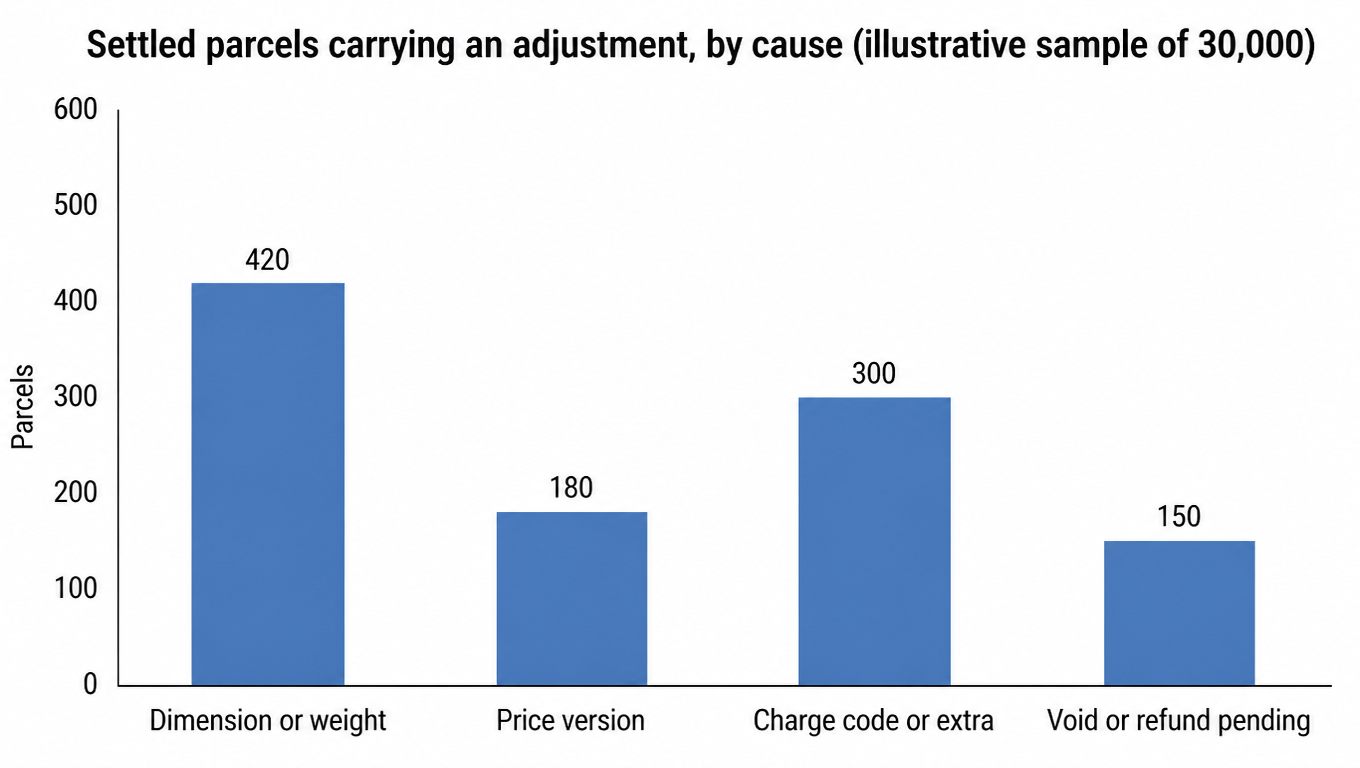
Group by cause before deciding what to fix first
The sample below only demonstrates the classification method: 30,000 settled parcels in one billing period, of which 1,050 carry an adjustment (3.5%). A real distribution depends on your own measurement practice, price-version management, and refund process. Every figure here is a placeholder assumption, not a quote and not an industry benchmark.
Cause
Assumed parcels
Share of adjustments
Default classification
Fix first
Dimension or weight mismatch
420
40%
Avoidable
Measurement practice and the packaging library
Charge code or extra service
300
29%
Mixed
Booking options and the charge dictionary
Price-version mismatch
180
17%
Avoidable
Cache cutover and version tagging
Void or refund not yet posted
150
14%
Accepted, subject to posting check
Refund status write-back and the aging queue
Splitting one adjustment pool by cause makes the first fix obvious; an ungrouped total only says the month had more adjustments.
A worked audit without hard-coded prices
Measure the sealed parcel at 18 × 12 × 10 inches and 4 lb, retaining device, time, and warehouse. Its volume is 2,160 cubic inches, above one cubic foot.
If the selected service, zone, and parcel type meet the current DIM rule, recompute a 16 lb billable weight. Otherwise return to the billing branch that actually applies.
Request all eligible all-in branches from the same account and quote time, retaining service, zone, billing method, base postage, and fee components. Do not insert a historical price from another account.
After purchase, calculate quote-to-label and label-to-final variance separately. Trace any final-charge change through measurements, price version, charge codes, and refunds. Attribute it to carrier review or adjustment only after inputs and versions reconcile.
Write the classification back into the packaging library and the measurement process. If the variance came from dimensions or weight, fix measurement and specification before talking about price; if it came from a price version, fix the cache cutover. When one cause repeats for two weeks, treat it as a process defect rather than a parcel-level exception.
Audit rhythm: what to do at which frequency
An audit is not a one-off project. Put the actions on a fixed rhythm so the month-end reconciliation peak does not swallow them.
Frequency
Action
Output
Owner (a role, not a team)
Escalation trigger
Per shipment
Confirm inputs are complete, eligibility screened, zone bound to the node
Quote trace
Label operator or the system
Stop booking when a key input is missing
Daily
Review the previous day's quote-to-label variance
Exception list
Warehouse shift lead
The same packaging specification is off two days in a row
Weekly
Group adjustments by cause and refresh the avoidable rate
Classified report
Logistics operations
The avoidable rate rises period over period
Each price effective date
Recompute a sample and record the version cutover
Cutover record
System owner
A sampled difference cannot be explained
Quarterly
Re-verify the packaging library against carrier measurement records
Specification and measurement calibration record
Warehouse manager
A specification no longer matches what is packed
Definitions and method
Denominator: every rate divides by settled parcels, not by attempts or successes, or shipments that failed midway drop out of the average.
Amount basis: the final amount comes from a reconcilable settlement record including adjustments and refunds; a quote is a reference point, not the final cost.
Time basis: quote, measurement, and cutover timestamps all carry a time zone so reconciliation across sites or systems does not land a day apart.
Example status: the counts and shares in this guide are placeholder assumptions for demonstration, not quotes, industry averages, or promised savings.
Retention and review: set the field-retention window from the official terms and your own policy so it at least covers the current reconciliation and dispute cycle, and re-verify the packaging library quarterly.
Because prices have effective dates and can vary by service, zone, packaging, account, and purchase path. The current USPS price list and live calculator are more reliable.
Current DMM 283 and DMM 223 use 139 for the applicable commercial parcels they list. Triggering still depends on service, zone, volume, and parcel type, so verify the relevant DMM and current quote before purchase.
No. Confirm current service and purchase-path eligibility, then compare purchasable quotes using the same account and shipment inputs.
Confirm the same shipment, account, and price version first, then check dimensions, weight, zone, service, charge components, and refund or adjustment records.
Under current DMM 283 and DMM 223, the applicable commercial parcels they list enter dimensional-weight calculation above one cubic foot. Whether it triggers still depends on service, zone, and parcel type, so verify the relevant DMM and the current quote before purchase.
Three causes dominate: a different price version around an effective date, a different purchase path or account, and changed request inputs such as dimensions, weight, ZIP Code, or service. Fix those three before comparing amounts.
The pack station measures the sealed parcel and records the device and time; the system stores the packaging specification, the price version, and the computed result so it can be recomputed. If either side is missing, the quote cannot be reproduced.
No. When the variance comes from dimensions or weight, a system change only computes the wrong input faster. Fix measurement and the packaging specification first, then add system-side validation and alerts.
The cache does not switch with the effective date, or it switches without recording a version on the shipment, so two halves of one batch used different prices and cannot be told apart. Run a parallel calculation, record the cutover time and operator, and sample again in the following week.
Long enough to cover the current reconciliation and dispute cycle, with the exact window set by the official terms and your own retention policy; keep price-version and packaging-specification change history longer.
Compare current USPS prices with real inputs
Confirm eligibility, dimensions, weight, and price basis, then connect the quote to final-charge reconciliation.