Batch picking collects items for several orders in one walk through the aisles, then separates them into per-order containers before packing. What it saves is walking. What it widens is the surface where a parcel can end up carrying another order's label.
Twelve orders on one cart sounds like a productivity win until you stand at the pack station with a printed sheet of twelve labels and no reliable way to tell which box belongs to which order. The pick itself is rarely the problem. The problem is that batching moves items away from the order they belong to, and every step after the pick has to put that identity back.
The real job in a small warehouse is not a faster pick. It is a numbering chain and a verification gate strong enough that a tired picker at five in the afternoon cannot put the right item in the wrong box. What follows covers which orders belong together, how to split a batch, how to reuse codes without dragging yesterday's item into today's parcel, what to check before a label is printed, and how to measure whether batching actually bought you anything.
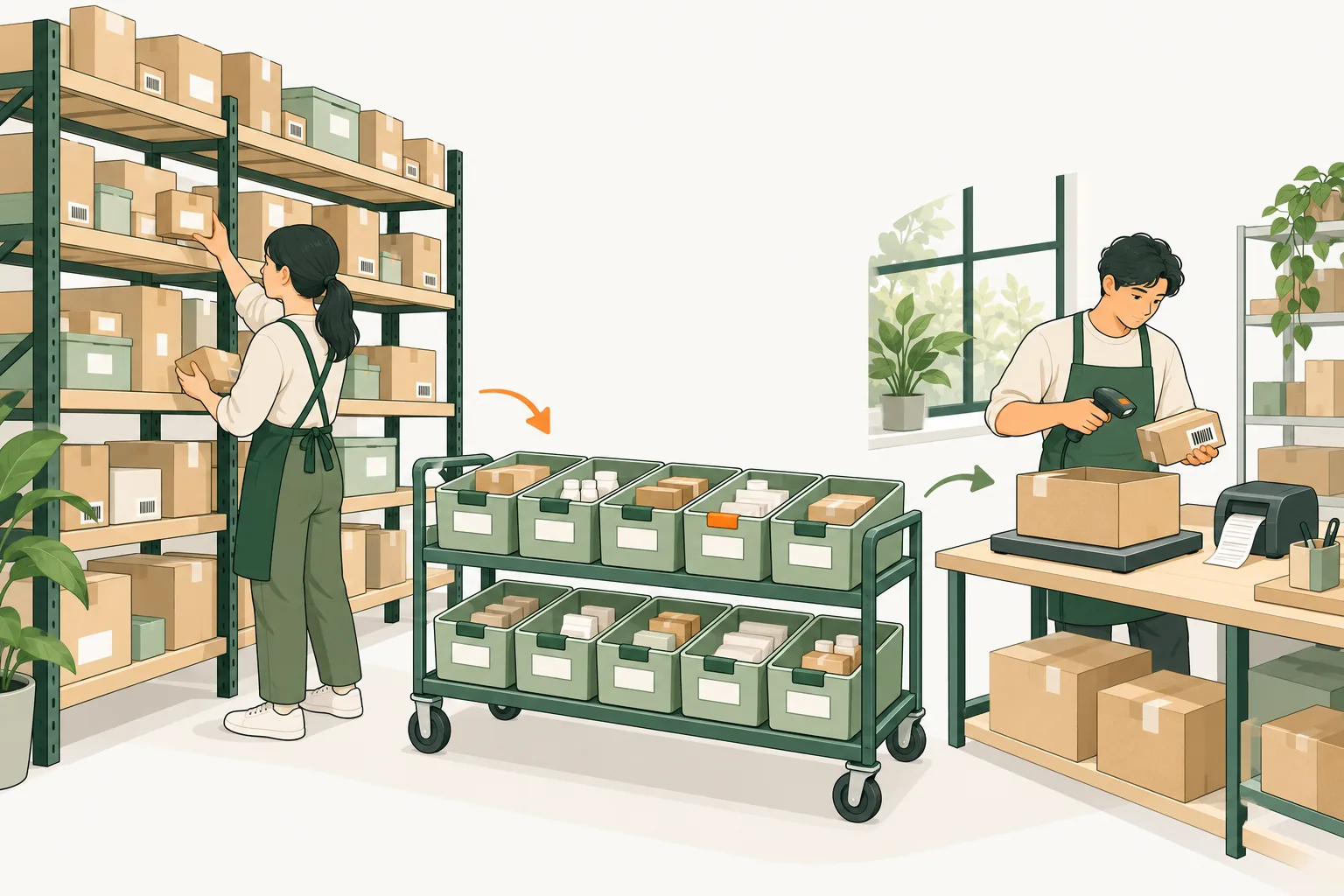
Items can share the journey from shelf to pack bench; each order still needs its own identity
1. Which orders belong in the same batch
Batching pays only when several orders want the same shelf. The trade is simple: one walk instead of twelve, in exchange for a sort step and a wider error surface. Everything below is about maximizing the shared walk and shrinking the error surface.
Shared SKUs. Count pick lines and distinct locations separately. If twelve orders need 34 units from 14 locations, a single pass is obviously right. If they need 34 units from 30 locations, you are walking almost as far and gaining almost nothing.
Aisle distance and slotting. Orders that live in the same two aisles batch well. An order for a bulky item three aisles away drags the whole cart with it. Keep a batch inside one zone unless your layout is tiny.
Volume against cart capacity. One order has to fit one tote slot, or the batch has to be split. Measure the worst order in the candidate set, not the average one.
Cut-off time and carrier pickup. Never mix a 2 p.m. express promise with an order that can wait for the 6 p.m. ground truck. Batching across a cut-off means the fast order waits for the slow one.
Ownership and traceability. A 3PL must never put two clients' inventory in adjacent slots of one batch without a hard boundary, because the failure mode is not a wrong item, it is a wrong client's parcel. Lots, serials, expiry dates and FIFO rules belong in the exclusion list too: if the picker has to make a lot decision at the shelf, that order should not be in a batch.
Then exclude outright the orders that punish batching:
Serialized or high-value single units, where a swap is unrecoverable.
Kits and subscription boxes, which need several units of several SKUs and a build step.
Hazmat, liquids and anything with packaging rules that differ from the batch.
Orders with a short pick, because the missing line is a decision, not a pick.
A quick test before you release a batch: if the ratio of pick lines to distinct locations is below about 1.5, the cart will spend most of its time walking, so narrow the batch or pick those orders singly. The mechanics of the pick itself are covered in pick and pack fulfillment; this guide stays on keeping identity intact from shelf to label.
2. Two ways to split a batch
Once orders are grouped, you still have to decide where the units get separated. There are two practical answers in a small warehouse, and they fail in different places.
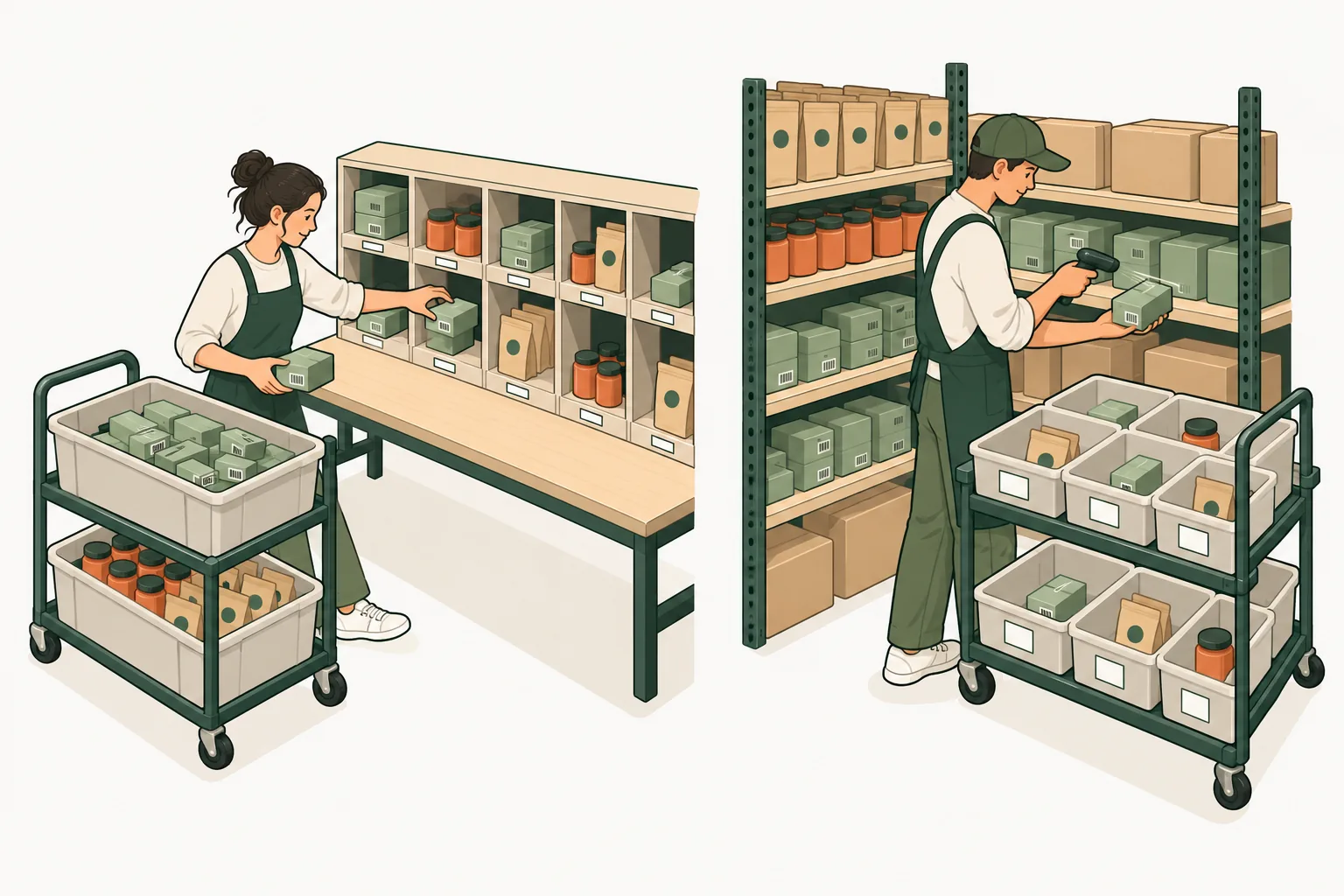
Pick then sort. The picker takes items for all twelve orders in one pass and drops them into a small number of bulk totes, often one tote per SKU group, then sorts the units into per-order containers at a sort station or a put wall. This is the classic batch picking pattern: one trip, then a dedicated separation step.
One order per tote, also called cluster picking. The cart carries a tote or slot for each order. At the shelf the picker scans the slot, then the item, and drops the unit straight into that order's container, so nothing needs sorting later. Cluster picking is batch picking that moves the sort to the pick face.
Left: pick together, then separate at the sort station. Right: one order per tote, separated at the shelf
Here is the same twelve-order batch through both methods, with the assumptions written down so you can redo them against your own layout.
Stage
Single-order picking
Batch, pick then sort
Batch, one order per tote
Trips through the aisles
12
1
1
Approximate walking
1,800 m
210 m
210 m
Item scans
34
34
68 (slot plus item)
Separate sort step
None
34 units into 12 orders
None
Main error surface
At the shelf
At the sort station
At the shelf, caught by the slot scan
Fits best when
Few orders, scattered SKUs
Narrow SKU mix, deep quantities
Small orders, many cart slots
Pick then sort is faster per unit when SKUs repeat heavily, because the picker handles each unit once at the shelf and sortation is a separate, simpler motion. Its weakness is the sort station: an item that lands in the wrong order container has no scan to catch it unless you add one. One order per tote removes the sort step and the "right item, wrong order" class of error, at the price of two scans per unit and a cart with enough slots for every order in the batch.
The practical rule for a small warehouse: if a cart can carry the whole batch, put one order per slot, because the verification comes free with the scan. If the batch is deeper than the cart, pick then sort, and treat the sort station as a controlled checkpoint with its own scan.
Batch picking vs wave picking, in one paragraph
Batch picking groups orders by what they need from the shelves, and separation into per-order containers happens after the walk, or at the pick face in cluster picking. Wave picking groups orders by when they must be released: a wave is defined by cut-off, carrier pickup, zone or shift, and each order keeps its own container from the start, so a wave is often several batches scheduled together. In plain terms, batch picking answers "which orders can I collect in one walk", wave picking answers "which orders must move now". A small warehouse usually needs batch logic inside a wave structure: one wave per pickup, one or two batches per wave.
3. Build a numbering chain that survives a shift change
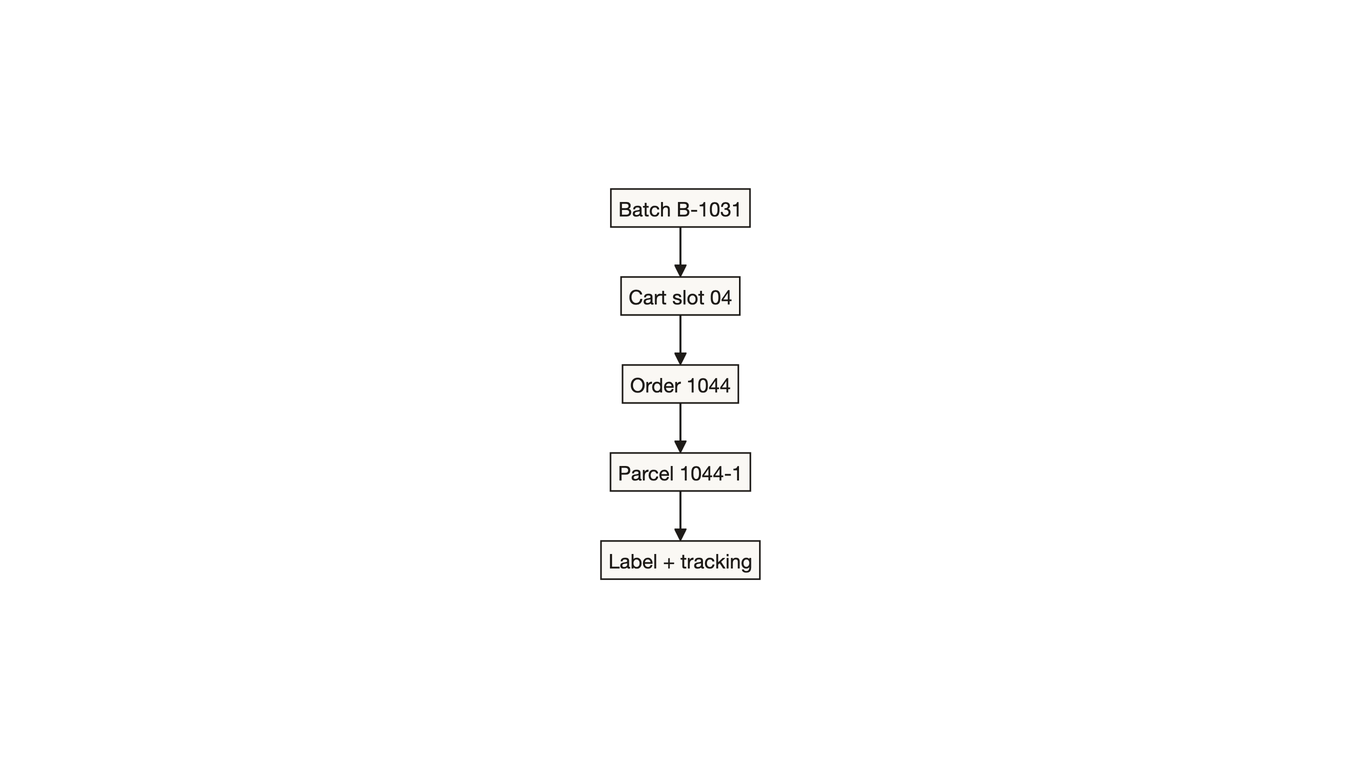
The chain has five links, and every one of them has to be machine-readable as well as human-readable.
Break any link and the failure shows up at the pack bench as a box that does not match an order
The rules that keep the chain intact:
One slot, one order, at one time. A slot is either empty or assigned to exactly one order. Never two small orders sharing a slot to save space, because that is where "right item, wrong order" begins.
Every scan writes four fields. Batch id, slot id, SKU and quantity, plus who and when. A pick log without the slot id cannot answer the only question that matters after a bad parcel: which container did this unit go into.
Codes are short and printed twice. Something like B-1031-04 (batch 1031, slot 04), readable at arm's length, once on the slot card and once on the tote. If a picker has to look at a screen to know which container is which, the code is doing no work.
Reuse requires a close. Slot numbers and batch numbers can repeat tomorrow, but only after a close-out that scans every slot empty and reconciles picked quantity against expected quantity. A batch cannot close with an open short pick, because the next shift will treat that slot as free.
The order id travels with the parcel, not with the tote. Totes go back to the rack; the order identity lives in the scan history and on the packing slip. This is the same identity problem that shows up when you build an order, shipment, package and label data model: the box, not the container it arrived in, is what the customer receives.
The failure this prevents is boring and expensive: a picker leaves one unit behind in slot 04, the batch closes anyway, the next batch assigns slot 04 to a new order, and the leftover unit gets scanned into the wrong parcel before anyone notices. The fix is not vigilance. It is a close-out step that refuses to release slots until every one has been scanned empty, and a nightly reconciliation of units picked against units packed.
4. Verify at packing, then match the label
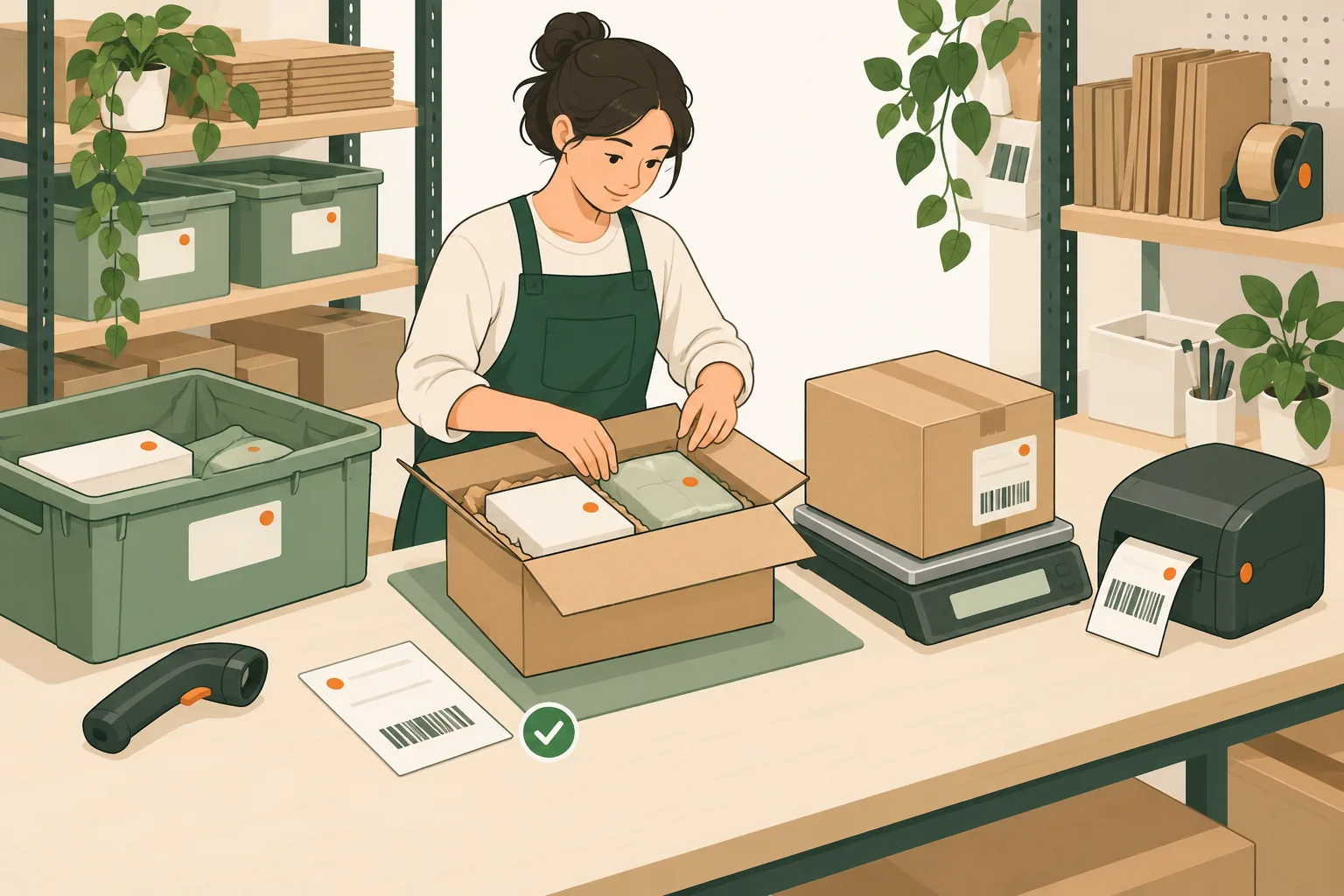
The pack station is the last place where an error is still cheap. Four checks, in this order, catch nearly everything.
Identity. Scan the order barcode on the packing slip, not the tote. The system shows the expected SKUs and quantities for that order.
Contents. Scan each unit. A quantity mismatch or an unexpected SKU blocks the station. This is the check most warehouses already run, and it catches missing items but not swaps of identical-looking SKUs.
Physical. Put the parcel on the scale and compare it to the expected weight band, roughly plus or minus 5 percent of item plus packaging weight. Weight is the only cheap check that catches two units where there should be one, or the wrong variant of a visually identical product. It also catches the packing error nobody logs: the right item in the wrong box size, which later bills as dimensional weight, since carriers divide cubic size by a divisor of 139 on daily rates and charge the larger of actual and dimensional weight; see UPS on shipping dimensions and weight.
Label. Print the label only after the box is sealed and weighed, from the order record, never from a pre-printed sheet. A label carries the order reference and the parcel sequence, so a two-box order prints 1 of 2 and 2 of 2 as separate labels. Once the first three checks pass, the label is the least interesting step in the process, which is exactly what you want.
Check the order and items, seal and weigh the box, then print the label for that parcel
Here is the twelve-order batch carried through to the label decision. The units sum to 34, matching the earlier example.
Order
Units
Tote slot
Parcels
Label action
1041
3
T01
1
Print after weigh
1042
4
T02
1
Print after weigh
1043
2
T03
1
Print after weigh
1044
1
T04
1
Print after weigh
1045
5
T05
2
Two labels, 1 of 2 and 2 of 2
1046
2
T06
1
Hold, short pick on one line
1047
3
T07
1
Print after weigh
1048
2
T08
1
Print after weigh
1049
4
T09
1
Print after weigh, weight band check
1050
1
T10
1
Manual pack, oversize item
1051
3
T11
1
Print after weigh
1052
4
T12
1
Print after weigh
The three exceptions that break the chain
Short pick. Do not close the order and do not ship whatever happens to be in the tote. Move it to a hold state with a reason, then decide from your promise: ship complete later, or split the shipment and tell the customer. A silent partial shipment turns a warehouse problem into a support ticket and a refund.
Split package. One order, two boxes, means two parcels from the moment the second box is chosen. Give each its own parcel id and its own label, and keep both under the same order. What you must never do is print one label and attach it to one of two boxes, or reuse the same tracking number for both.
Label reprint and void. Reprinting is a printer problem, not an identity problem: the same label id comes back, the same tracking number, and the order record is unchanged. Voiding is different, because it touches money. Void first, confirm the reversal, then buy the replacement label, so two live labels never exist for one parcel at the same time. If the wrong label is already on a sealed box, void it before the parcel leaves the building where possible; once it is tendered, the recovery path is an intercept or a reship, and both cost more than the reprint.
Getting the verified order and parcel data to the label step
The label step only stays reliable if the data reaching it is the data the pack station just verified. This is where a small warehouse usually has a gap: the pick and pack are tracked on paper or in a WMS, and the label is bought in a separate tool by retyping the order.
EasyShippingX handles that handoff in three modes. For a batch verified on the packing bench, the export from your order system goes in through Excel upload, one row per parcel, with the order reference, weight, dimensions and service. For a warehouse already running a WMS, the same data goes in through the shipping API, so the label request carries the order reference and parcel sequence the pack station just confirmed, and the response writes the tracking number back to that same parcel record. For one-off shipments the portal covers it by hand. What matters is not the channel but the rule: the label request is generated from the verified parcel record, and the label response is written back to the same record, so the chain from batch code to tracking number never depends on someone reading a number off a screen.
5. Measure the whole loop, not just picks per hour
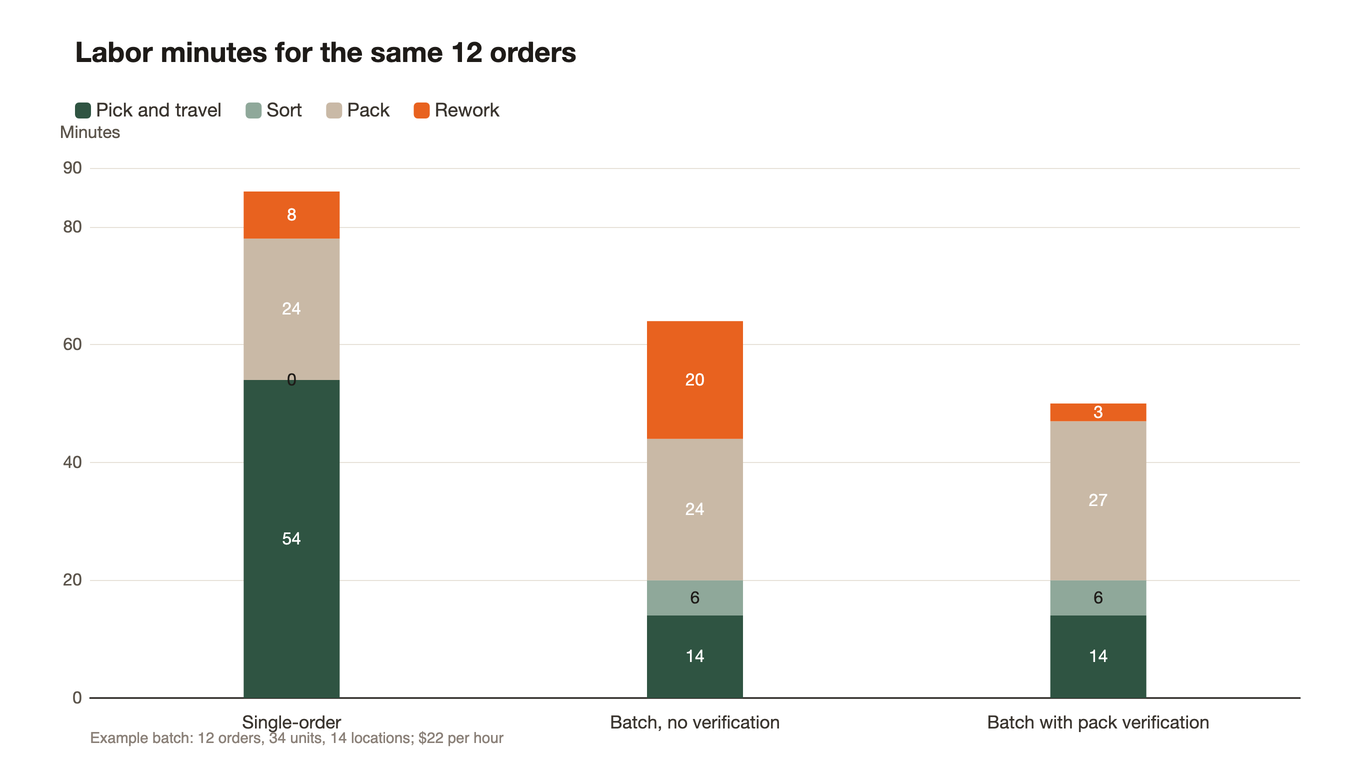
Picks per hour is the metric that makes batching look good, because it stops counting at the shelf. The number that decides whether batching worked is labor minutes per correctly delivered order, including the sort, the pack and the rework.
Stage (same 12 orders)
Single-order
Batch, no verification
Batch with pack verification
Pick and travel
54 min
14 min
14 min
Sort
0 min
6 min
6 min
Pack
24 min
24 min
27 min
Rework
8 min (1 order)
20 min (2 to 3 orders)
3 min (0 to 1 order)
Total
86
64
50
Orders per labor hour
8.4
11.3
14.4
Labor cost per correct order ($22/hour)
$2.63
$2.35
$1.53
The middle bar is the honest one: some of the walking saved comes back as rework
The middle column is the honest one. Batch picking without a verification gate saved 40 minutes of walking and gave back 12 minutes of it in rework, and rework minutes are the ones most warehouses never record, which is why batching sometimes gets blamed for problems it actually caused. Add a per-order scan and weigh step at 15 seconds per order, 3 minutes across the batch, which is exactly the gap between the last two pack columns, and the rework collapses.
Mispick cost estimates vary widely by product value and whether the customer churns, but published figures cluster between $30 and $75 per incident once reshipping, returns processing and the refund are counted, as in Omniful's analysis of order accuracy cost, with one survey of 300 supply chain professionals putting the typical number near $30 (Vndly's picking error data). At $30 an error and a 2 percent error rate, 500 orders a month carry about $300 of avoidable cost, which is more than the labor saved by skipping the weigh step.
Log four numbers per batch, every batch, for at least two weeks before you change anything:
Pick minutes, from batch release to the last scan.
Sort minutes per batch, and units sorted per minute.
Pack minutes per order, including label and seal.
Rework minutes and rework count, with the reason code: wrong item, wrong quantity, wrong label, damaged in pack.
Then compute two ratios weekly: orders per total labor hour, and rework minutes per 100 orders. If pick minutes fall and rework climbs, you moved cost rather than removed it. If both fall, the batch design is working and you can widen the batch size. In the end those sort and pack minutes have to land in the same reconciliation as your postage, and the billing reconciliation checklist separates bought-but-unused from shipped-but-unscanned.
Questions small warehouses ask first
As many as the cart can carry with one tote slot per order, capped by the picker's ability to keep slots straight without looking things up. In a small warehouse that is usually 8 to 15 small orders. Raise the number only when the extra orders share locations with the existing batch, and lower it when several orders need multiple tote slots or when the batch crosses a cut-off.
Batch picking groups orders by what they need from the shelves, so one walk serves many orders and the units are separated afterwards or at the pick face. Wave picking groups orders by when they must move, using cut-off time, carrier pickup or zone as the boundary, and each order keeps its own container throughout. Batch picking is a way to pick; wave picking is a way to schedule.
Print labels after the box is sealed and weighed, from the order record, one box at a time. Scan the order barcode before printing, and verify the parcel sequence for multi-box orders. Never print a sheet of labels in advance of the boxes, and never let two live labels exist for one parcel: void before reprinting.
Not necessarily. What batching actually requires is a slot-level scan log, a batch close-out that will not release a slot until it is scanned empty, and a pack step that can block a mismatched order. A spreadsheet can hold the structure, but it cannot block anything, so the checks depend on the person. Many small operations start with one order per tote on the cart and a scanner tied to their order system, and add software when order count makes the manual checks fail.
Links verified October 24, 2026. The labor and cost figures in this guide are an arithmetic example for walking through the method, not a benchmark, so redo them with your own slot data and labor rate.
How do verified batches become correct labels?
Send us one real batch: order references, unit counts, packed weights and dimensions, destination ZIPs and services. We will run it through both the Excel upload and the API path, to show which one carries the pack bench's verified result unchanged into the label, and how the tracking number writes back to the same parcel record. EasyShippingX is a channel-neutral shipping layer: one consistent way to compare US domestic carrier options and execute through a portal, a spreadsheet, or an API.