
Workflow Guide

Why Excel bulk upload remains a practical shipping onboarding path

Illustration of an order file moving through validation into labels
Workflow illustration, not a customer case and not an actual quote.

Not every team should move directly into API integration. For many warehouse teams, sellers, and 3PL operations, Excel bulk upload is the practical bridge between manual shipping and fully systemized workflows. It improves batch efficiency while creating a lower-risk path between portal-only operations and full API onboarding.

This page follows the file itself, from the moment order data leaves the upstream system until the last row of the batch reaches a terminal state: the template contract, the spreadsheet behaviours that quietly corrupt shipping fields, preflight checks, row states and idempotency, error classes and retry rules, batch close, file permissions and retention, and a hypothetical batch that puts numbers on the usual failures. For channel choice, see portal versus API onboarding; for the production line after parcels are packed, see warehouse shipping operations.

When bulk upload is a better fit than an API

  • Order volume has outgrown manual entry, but not yet justified a full API project
  • Warehouse teams want to standardize fields and workflow before system integration
  • A team needs a quick pilot for a new carrier setup
  • Technical resources are limited, but operations still need batch efficiency
Observed signalBetter pathWhy
Order data exports cleanly from one system, but fields and exception rules are still movingFile-based batch uploadChanging a header is cheaper than changing an interface; fix the field contract first
Waiting for the file, generating it, and uploading it have become the cutoff riskPlatform-side generation or an APIThe bottleneck moved from headcount to link count
Real-time inventory, promise, cancellation, or customer-state synchronization is requiredAn APIA file is a snapshot and cannot express real-time state
One to a few batches a day of a few hundred to a few thousand rowsFile-based batch uploadExisting channels are sufficient, and a human can still see the whole file

In these cases, Excel bulk upload is not a backward approach. It is often the most suitable option for the current team structure. The key is to keep upload fields aligned with portal and eventual API fields so future expansion does not require reworking the workflow from scratch.

Compare the file workflow with the same steps in the Shipping API workflow overview. Use the shipping data-model guide to keep the identifiers stable if the operation later adds an API entry point.
Treat the upload template as a versioned data contract

Reliable bulk upload is not filling every spreadsheet cell; it is an agreement between the file producer and the shipping system about every field. The template should define version, field name, data type, unit, required conditions, allowed enums, defaults, maximum length, examples, error codes, and owner.

  • The version appears in the file name, the header notes, and the template document; the receiving side checks it and rejects the whole batch on a mismatch
  • A published header is never renamed or redefined in place; fields are added, and any retirement carries an explicit last-accepted date
  • Every version has an effective date, an owner, and a change log
  • Changes are announced to every file producer in advance, with at least one batch of transition time
Field groupMinimum requirementCommon failure
IdentityBatch ID, client or facility, unique row key, and external order IDThe same order is uploaded twice, or results cannot be joined back to the source
Address and contactStructured address, country or region, postal code, name, and required contactShifted columns, numeric-format changes, or truncated address data
ParcelPiece count, actual weight, dimensions, units, packaging, and content attributesUnit confusion, missing dimensions, or catalog weight replacing packed weight
Service and controlsService code, signature or insurance options, references, and authorization fieldsFree text cannot be mapped, or the account is not authorized for a service
Units and codesExplicit unit columns, ISO country and region codes, and service codes from the system enum1.5 is read as 15 downstream, or the service code is free text and eligibility cannot be checked
Result and billingTracking, label, charge, currency, error, void, and final state return to the unique row keyA label succeeds but cannot be located in exports or finance

Four things should never live in free text: the service code, the boundaries between address fields, the unit of measure, and the exception reason. They must be enums or structured fields, or measurement, retry, and ownership assignment have nothing to attach to.

How spreadsheets quietly corrupt shipping data

Most bulk upload incidents are not outages. The file is quietly rewritten while someone opens it, sorts it, or saves it as CSV. The table below lists the usual suspects and how each one surfaces downstream.

TrapHow it surfacesRule
Leading zeros dropped (postal codes, locations, client numbers)A five-digit postal code becomes four digits, and address validation and zone logic follow it downThe column must be written as text with zeros padded at the source; reformatting a cell later does not restore zeros that were already removed (Microsoft support)
IDs longer than 15 significant digits get alteredTrailing digits of an order or reference number turn into zeros and no longer match upstreamTreat long numbers as text throughout: a spreadsheet keeps only 15 significant digits (Microsoft support)
Long numbers display in scientific notationThe sheet shows 1.23457E+11 and the export cannot restore itPin the column type to text and check the digit count after export
Text and numbers mixed in one column01234 and 1234 no longer join and duplicate checks stop workingKeep the whole key column in one type and strip whitespace and invisible characters before comparing
Dates reordered by locale or stored as serial numbers2026-10-04 becomes 04/10/2026, or turns into 46242Emit ISO 8601 text from the source system and never hand-type dates in the sheet
Decimal and thousands separators follow the locale1.5 kg is read as 15 kg and weight-based outcomes driftUse an explicit unit column with a fixed decimal separator, or write integers in the smallest unit
Formulas and lookup results left in cellsPasting carries invisible characters, and values break in another environmentPaste as values before upload and never keep formula references
Merged cells, multi-row headers, hidden rowsColumns shift, row counts disagree, hidden rows never uploadKeep exactly one header row, no merged cells, and never generate the file by copying a filtered range
Full-width spaces, non-breaking spaces, curly quotesEnum matching fails and two values that look identical will not joinTrim and normalize to ASCII at the source
Encoding mismatchNon-Latin names or addresses become question marks or get truncatedUse UTF-8 throughout and validate encoding and byte length on the receiving side

How many rows one import can absorb is decided by the receiving side, not by how many orders you happen to have. UPS batch file shipping accepts up to 250 shipments in a single import through CSV or SSV (UPS batch file shipping); platform channels and self-built interfaces each set their own ceiling, so check before you schedule the work. Above the ceiling, split the file by batch ID and keep row keys unique across the whole batch so splitting cannot create duplicates. Keep the file and the proof separate as well: USPS uses electronic manifest files for high-volume parcel mailers to declare and pay postage (USPS Electronic Verification System), and those manifests are produced and validated by systems, not by hand-maintained spreadsheets.

Freeze field formats before chasing batch speed

These conventions look trivial, and they decide whether two systems can agree on a single row. Writing the table below into the template document is far cheaper than catching the same problems by eye in every batch.

Field classCanonical formWhy
Country and regionISO 3166-1 alpha-2Free-text variants of one country break zone and serviceability logic
State and provinceThe short code from the system enum, not the full nameFull names come in spellings and abbreviations; the short code comes in one form
Dates and timesISO 8601 text with a timezone offsetOtherwise the words before cutoff mean a different instant in each system
Weight and dimensionsA number plus an explicit unit column and a fixed number of decimalsA unit that lives in a convention rather than a field is the first thing to break when files get merged
MoneyInteger minor units, or a number plus a currency columnFloating decimals manufacture their own variances once you sum them
Service codeThe system enum value, not the everyday nameEveryday names change and grow aliases; enums do not
Phone and contactDigits only, with an explicit country codeBrackets and hyphens get treated as delimiters during parsing
Boolean flagsOne convention per batch, Y/N or 1/0, never bothMixing them makes not filled in indistinguishable from no

If the upstream system can only produce a different format, map it during generation instead of asking operators to rewrite the sheet by hand. The hand-edited part of a file is exactly the part that cannot be validated or measured.

Preflight checks that must pass before anyone uploads

Preflight is not about a file that looks fine. It is about every row knowing whether it is valid, repairable, or certain to fail before it leaves the generating step. The checklist does not need to be long, but every line needs a named owner.

CheckHow to run itWho fixes it
Headers match the locked versionCompare a header fingerprint, not the column names a human seesTemplate owner
Row count matches the batch order countHave the source emit source count, exported count, and de-duplicated countSource system
Required and conditionally required fieldsValidate per service, destination, and parcel typeSource system
Enum membership and serviceabilityThe code must be in the enum and available to that account and destinationAccount owner
Duplicates inside the fileGroup by row key and report any group larger than oneSource system
Duplicates against live ordersMatch against row keys that already have a live labelUpload operator
Address completenessStreet, city, region, postal code, and country present and mutually consistentOrder source
Parcel data sanityUnit column filled, weight and dimensions in a plausible range, piece count consistentWarehouse data owner
Length and illegal charactersCheck against each field's maximum length and allowed character setSource system
Rows per file against the channel ceilingCompare with the receiving ceiling and split by batch ID when exceededUpload operator

A batch that fails preflight should not reach the warehouse floor. The real cost of sending a bad batch into the line is not the error itself, it is the line stopping while someone repairs a spreadsheet.

Design a recoverable file lifecycle

What each of the six stages leaves behind decides whether a failure can be repaired row by row, or whether the whole batch has to be redone.

StageControl pointOutput
1. ProduceTemplate version, batch ID, creator, and creation time are fixedAn unambiguous pending file
2. PreflightColumns, types, units, requirements, enums, duplicates, and obvious business rulesAn uploadable file, or a row-numbered error list
3. Receive and validateChecksum, version, account authority, serviceability, and address and parcel rulesAccepted, rejected, or review state per row
4. ExecuteThe unique row key prevents duplicates and binds purchase to inputsA successful shipment or a stable error code
5. Repair and retryRepair only failed rows and retain the original key, attempt count, and reasonA retry batch that does not repeat successful rows
6. Export and closeResults, charges, labels, errors, voids, and operator are traceable to the row keyShared batch truth for operations, support, and finance

Row states, a unique row key, and idempotency

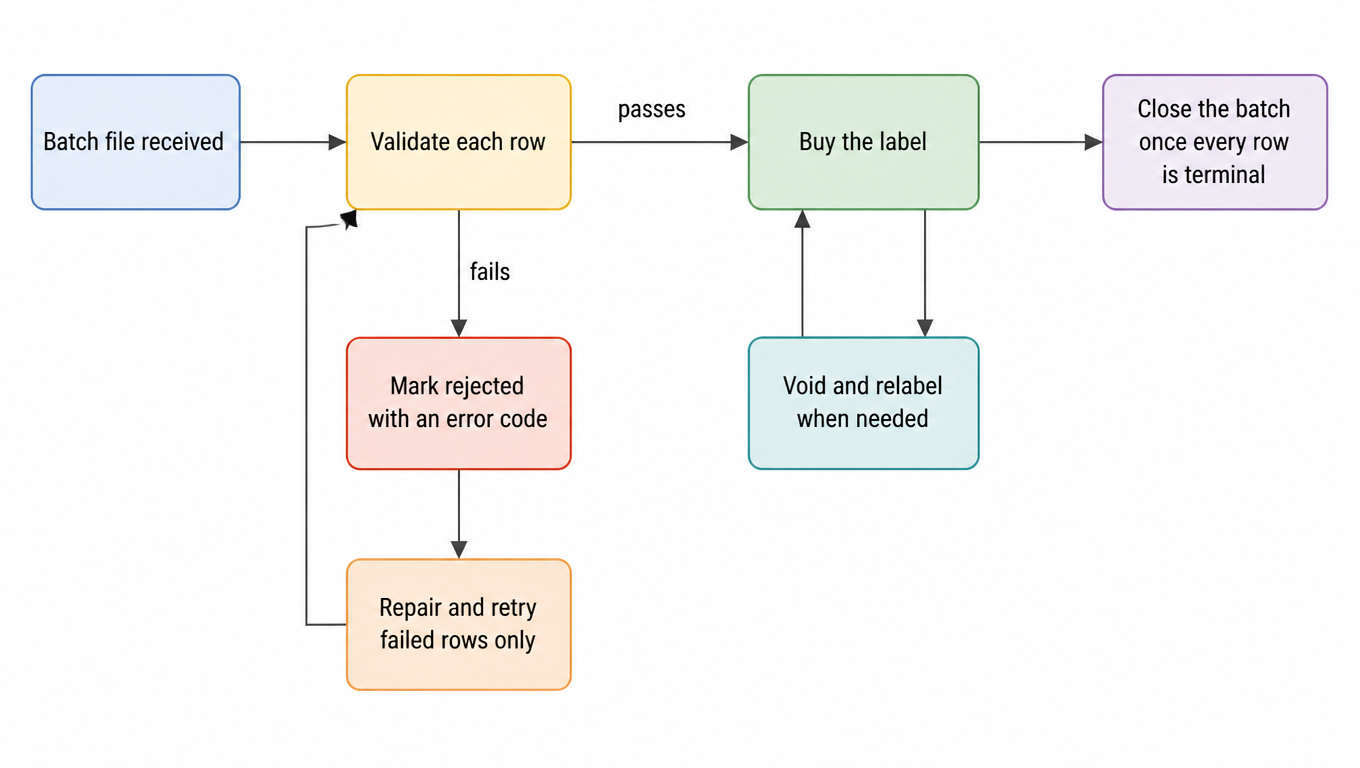
Row-state flow for bulk upload: receive the batch, validate each row, buy a label when it passes, mark and code it as rejected when it fails, repair and retry only failed rows, void and relabel when needed, close the batch once every row is terminal
Every row has one way out: labeled, voided, or explicitly rejected. Retry is a loop back into validation, and it only carries failed rows.

Every row ends in exactly one terminal state: labeled, voided, or explicitly rejected. A batch is not closed until the last row reaches a terminal state. Treating a partial success as done is the most expensive habit in reconciliation and support.

How to design the row key

  • An order-level key (client plus external order ID) fits one-order one-parcel flows
  • Order plus piece number fits multi-piece orders and stops the second piece looking like a duplicate
  • Returns and replacements need their own prefix and never share a key with a forward shipment
  • Never put a field that changes into the key: not status, not batch time, not address

Three legitimate answers when a key appears again

A batch ID identifies the file but cannot prevent duplicate orders by itself. When the same key appears again, the system should return the existing result, reject explicitly, or require an authorized replace or void action. A corrected-address repurchase must also link the original label, the void, and the replacement label.

Retry only the failed rows, and only append history

The key test for bulk upload is not whether the file imports. It is whether failures can be diagnosed and corrected quickly. Every attempt records a timestamp, an operator, the input version, and the error code. A corrected retry appends history; it never rewrites it. When the same row fails a third time it should go to a human rather than another automatic attempt.

Error classes and retry rules

ClassTypical exampleScopeRetry ruleOwner
StructuralUnknown version, missing columns, corrupt file, wrong encodingWhole batchNo retry; regenerate and upload as a new batchSource system
Authority and eligibilityAccount not enabled for the service, undeliverable destination, missing optionBatch or account groupNo retry; resolve authority or policy first, then decide whether to resubmitAccount owner
Row-level businessIncomplete address, oversize parcel, missing unit, enum mismatchSingle rowRepair and retry only those rows, keeping the original keyOrder source
Transient systemTimeout, throttling, brief downstream outageRow or batchRetry the same row with backoff and a hard attempt ceilingUpload operator
Data-quality warningAn address labels but can be standardized, a unit number merged into the street lineSingle rowNo retry; record it and feed the cleaning ruleOrder source

Error codes must be stable, attributable, and identical in meaning across batches. Free-text error messages give up both the statistics and the ability to route a class of errors to its owner.

Closing the batch: join the results back

When a batch ends, the export is not a headline count of labels. It is a result table that joins back to the source one row per row key. Miss a column and every later reconciliation turns into guesswork.

  • Row key and external order ID
  • Terminal state and error code
  • Tracking number and label reference
  • Charge and currency
  • Void flag and its link to the original shipment
  • Attempt count and timestamps
  • Operator

One test decides whether a batch is closed: the source order count equals the number of terminal rows, and every terminal row traces back to a row key. A batch whose totals do not agree is not closed, no matter how many successes the screen reports. For charge and void review within a period, see shipping reconciliation best practices and the shipping reconciliation guide.

A hypothetical 5,000-row Monday morning batch

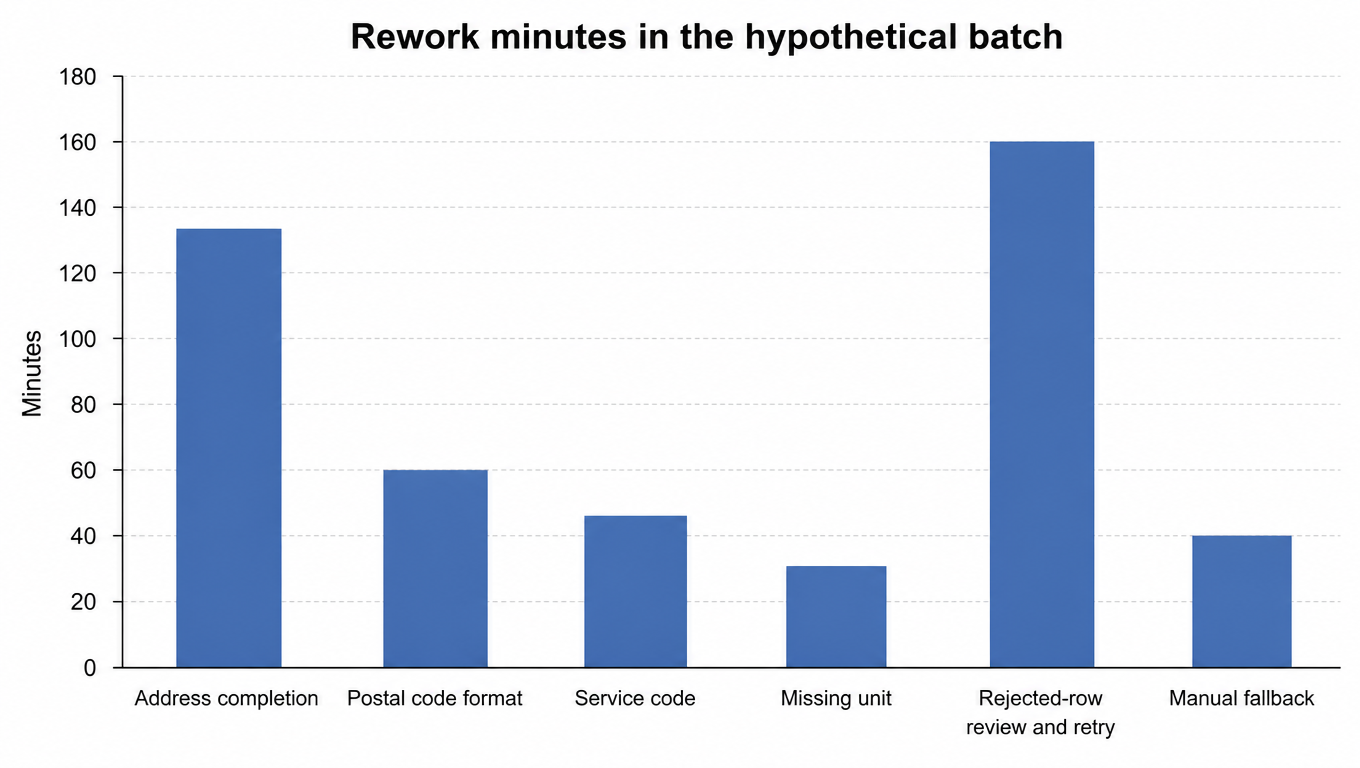
Bar chart of rework minutes in the hypothetical example: address completion 135, postal code format 60, service code 45, missing unit 30, rejected-row review and retry 160, manual fallback 40
Rework minutes in the hypothetical example: address and unit problems account for the whole preflight share, while rejected-row review and retry remains the largest single block.

The numbers below are a hypothetical example used to show how the arithmetic works. They are not industry averages and not any customer actual results.

Assume a Monday morning batch of 5,000 rows. Preflight stops 180 rows before the file leaves the generating step: 90 with a missing unit number or region, 40 with postal codes that lost their leading zeros, 30 with service codes outside the enum, and 20 with an empty weight unit. Repair averages 1.5 minutes per row, so 270 minutes. The remaining 4,820 rows upload, and 4,780 label on the first attempt, a first-pass rate of 95.6%. Forty rows are rejected at row level (22 destinations the service does not reach, 11 oversize parcels, 7 accounts not enabled), and review plus retry averages 4 minutes per row, so 160 minutes, with 2 rows ending in manual handling for another 40 minutes. The batch consumed roughly 470 minutes of rework, close to 8 person-hours, almost entirely concentrated in address completeness and units. Fixing two rules at the source beats adding a person on the floor.

Metrics worth watching

MetricNumerator over denominatorWhere to look first
First-pass label rateRows labeled on first upload over total rows uploadedAddress and unit rules at the source
Preflight catch rateRows stopped in preflight over total rows generatedUpstream data quality, not necessarily the template
Retry success rateRows that succeed on retry over rows retriedWhether the error classes are correct
Rework hours per batchRepair and retry time over batches closedWhichever cause sits at the top of the rework list
Batch close timeFile generation to last terminal row over batchesWhether the closing export is missing fields
Duplicate row rateDuplicate rows blocked by idempotency over total rows uploadedGeneration frequency or the manual add-on process
Manual interventions per 1,000 rowsInterventions over rows uploaded, times 1,000Whether a class of errors should have been stopped by preflight

All seven metrics are written as a numerator over a denominator for a reason: report a percentage without the denominator and two teams will produce contradictory numbers in the same week with nobody able to say who is right. Write the denominator down and the argument becomes a checkable fact.

Who can generate, who can upload, and where the file lives

RoleAllowed actionsWhere the file lives
GeneratorGenerate, validate, and export against the templateA controlled shared location
Upload operatorUpload, watch row states, and retry per the rulesOpen read-only and save no copies
Repair ownerCorrect rejected rows while keeping the original keyThe corrected file sits beside the original
Support read-onlyLook up by row key or tracking numberNo full-file download
FinanceRead charge, currency, and void fieldsPull by accounting period
External client in a 3PL settingUpload their own orders and see only their rowsA client-isolated location

The specifics: transfer files through controlled locations instead of creating ownerless copies in chat tools or personal email; keep recipient names, phone numbers, and full addresses out of file names; use dummy addresses for test batches; apply the same authorization and audit to exports as to uploads; and align retention with what operations, support, and finance actually need, deleting on schedule and recording the deletion.

A more reliable Excel rollout sequence

Unify fields before chasing speed

If the field model is still unstable, bulk upload only scales the mistakes. A safer approach is to stabilize the order ID, address data, service fields, and reconciliation fields before pushing into batch mode.

Then validate exception handling through pilot batches

The pilot batch should deliberately include these rows: destinations that cannot be reached, multi-piece orders, over-long addresses, parcels that need extra options such as signature or insurance, and one return or replacement void. Labeling successfully is not the test; being rejected and then repaired is.

Then ramp by share, not all at once

Run 10% of order volume for a week and compare first-pass rate and rework hours per batch; move to 50% once those numbers are stable, then to full volume. The problem with switching everything at once is that when something breaks you have no comparable baseline to reason from.

Finally decide whether API expansion is justified

Once fields are stable, batch execution is smooth, and exception loops are clear, a deeper API expansion becomes easier to justify. Until then, Excel is often the more suitable long transition layer.

Use observed friction to decide when to migrate to an API

  • File waiting, manual production, and upload now affect cutoff or the customer promise
  • Orders require real-time inventory, promise, cancellation, address, or customer-status synchronization
  • Duplicates, version conflicts, and manual merging have become the primary error sources
  • Fields and exception rules are stable and engineering can own idempotency, retry, monitoring, and rollback
Observed frictionFirst moveExample threshold
Morning generation and upload eat the pre-cutoff bufferMove generation earlier in the shift, or let the platform pull on a scheduleExample: less than 30 minutes of buffer before cutoff
Cutoffs missed while waiting for a fileSwitch to an interface or platform-side generationExample: more than twice a week
Duplicates or version conflicts are the leading error sourceFix row keys and idempotency first, then talk about an interfaceExample: duplicate row rate above 1%
Fields and exception rules have stabilizedMigration becomes worth evaluatingExample: a first-pass rate above 99% for four consecutive weeks

If the main problem is an unclear template or unrecoverable errors, an API will amplify the same problem faster. Complete the file contract and the exception loop first, then use the API readiness checklist to assess migration.

FAQ

No. For many teams still validating the workflow, it is the more suitable transition layer, provided the file contract and the exception loop are already fixed.
When order volume has outgrown manual entry but fields and exception rules are not yet stable, or when technical resources are limited. The deciding factors are how many batches you run per day and how stable the contract is, not team size.
Most incidents come from the file itself: leading zeros dropped, long IDs altered, unit columns lost, enum values spelled differently. Next come a missing exception loop and untraceable billing identifiers.
It depends on the receiving channel. UPS batch file shipping accepts up to 250 shipments in one import, and platform channels and self-built interfaces each set their own ceiling. Above the ceiling, split by batch ID while keeping row keys unique across the whole batch, so the split itself cannot create duplicates.
Three common causes: leading zeros are dropped as numbers, IDs longer than 15 significant digits lose their trailing values, and long numbers display in scientific notation. Writing them as text with padded digits at the source prevents all three, and reformatting later cannot restore what was already lost.
Structural problems such as an unknown version, missing columns, or a corrupt file should fail the whole batch; row-level business problems should block only that row and return a stable error code. The point is to choose one mode in advance so operators never have to guess which rows have already bought labels.
Deduplicate on a stable business row key rather than on the batch ID. When the same key appears again, the system should return the existing result, reject explicitly, or require an authorized replace or void action.
Move when file generation and upload themselves threaten the cutoff, when real-time state synchronization is needed, or when duplicates and version conflicts become the leading error sources. Before fields and exception rules are stable, an API just amplifies the problem faster.