Cross-Border Shipping Guide

Best Shopify Shipping Apps for Cross-Border in 2026: The 3PL Operator's Guide

This page is for Chinese cross-border operators and U.S. fulfillment warehouses evaluating cross-border flow, warehouse integration, and support ownership. For a general store-owner comparison, see the Shopify shipping software guide.

A shipping app comparison built specifically for Chinese-operated 3PLs. Separate recommendations for pure overseas warehouse operations vs dropshipping/dropship fulfillment, with a feature comparison table, pricing analysis, and selection criteria tailored to Chinese-speaking warehouse teams.

Editorial illustration: a cross-border warehouse operator comparing several shipping app shortlists

1. Why Cross-Border 3PLs Need a Different Kind of Shipping App

If you run a DTC brand shipping 30 orders a day, you open Shopify, click a few buttons, print labels, and you are done. ShipStation, Shippo, even Shopify's own shipping tools work fine. But if you run a 3PL warehouse with 15 clients, each doing 200+ cross-border orders a day, the game changes completely. You are not printing labels for yourself. You are printing labels for 15 different Shopify stores, each with its own carrier preferences, its own negotiated rates, its own customs requirements.

Use the 3PL shipping operating model to separate merchant requirements from warehouse execution responsibilities. The 3PL API procurement guide adds the multi-client checks needed when evaluating the shipping connection.

One client ships skincare to Korea (strict ingredient declarations), another ships electronics to Brazil (complex tariffs and certifications), another ships apparel to 40 countries via 4PX and YunExpress. A regular shipping app was not built for this. It was built for one merchant, one account, one set of rules. When you force a multi-client 3PL workflow through a single-merchant tool, you end up with spreadsheets, WeChat threads, and a lot of manual copying and pasting.

Cross-border 3PLs need a shipping app that understands three things at once: multiple clients, multiple carriers, and multiple countries. Without all three, you are duct-taping a workflow that should be automated.

The failure mode is quiet. A single-merchant tool does not throw an error, it consumes labor one order at a time: someone re-keys an address into a second carrier portal, someone screenshots a quote into a group chat, someone discovers at month end that two clients were billed off the same rate card. None of those actions looks like a mistake in isolation, which is why the cost of the wrong app shows up as payroll and dispute time instead of a red line on a report. This page exists to make that cost visible before you sign, and to give you a test you can run inside your own warehouse.

How to read this page: sections 3 and 4 are the scenario recommendations. Sections 5 through 12 are the evaluation method, covering how fee models actually work, how to test multi-client isolation, what Shopify access scopes mean, a 10-day evaluation plan, a parallel-run migration, and the six metrics to check after go-live. If you only have time for one section, read the fee-model section first, because teams that budget from the headline price almost always get the number wrong.
2. Two Archetypes: Pure Warehouse vs Dropshipping / Dropship Fulfillment

Before comparing apps, it helps to separate 3PL operations into two distinct models. They look similar from the outside (both involve warehouses, packages, and labels), but the software requirements are almost opposites.

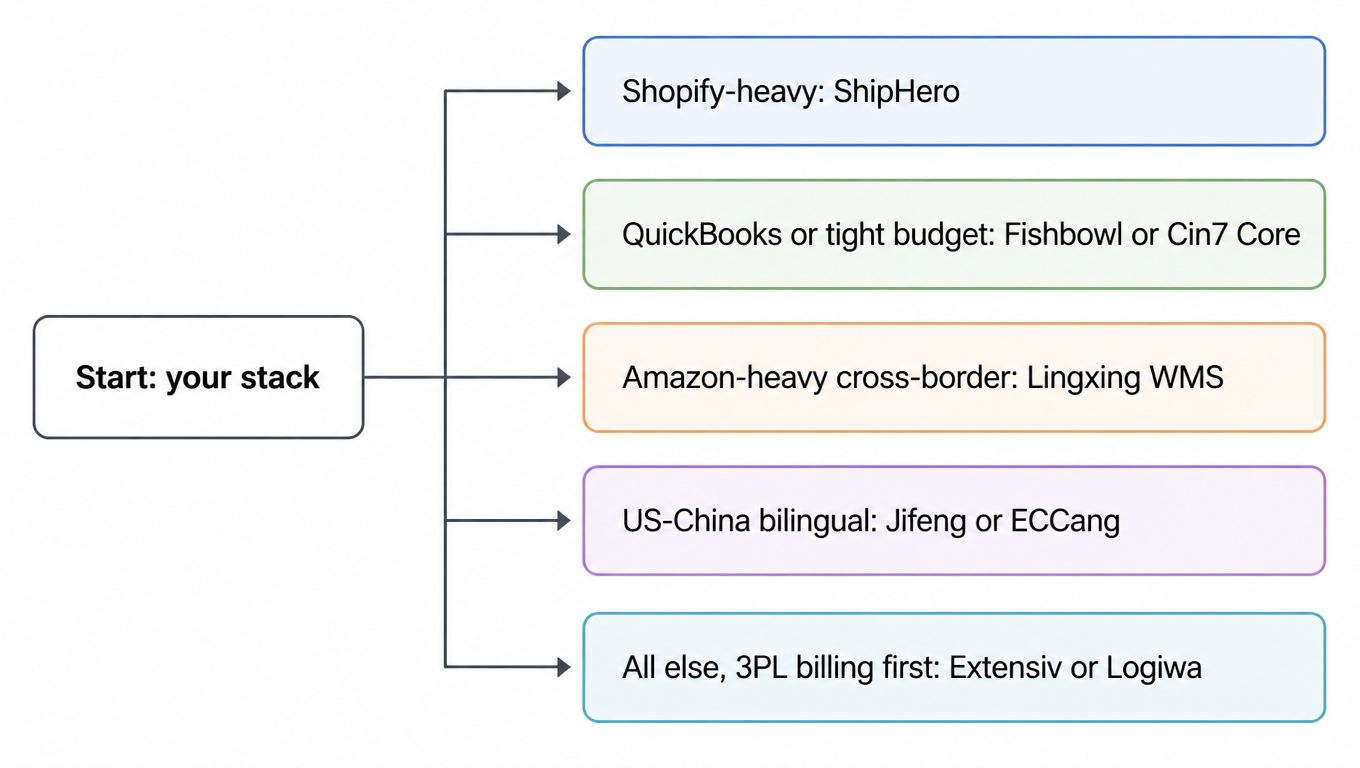
Is inventory outside the destination country? Yes No Dropshipping Dropshipping Fulfillment Overseas warehousing Pure Overseas Warehouse Core Needs Cross-border rate comparison Customs automation Multi-carrier routing Core Needs Multi-client management Batch label printing Inventory sync and client billing

Pure Overseas Warehouse

The merchant's inventory already sits in a US warehouse. The 3PL handles receiving, storage, pick-and-pack, and last-mile delivery. The international leg happened before the goods reached the warehouse. What the shipping app needs to do: manage inventory across multiple clients, sync orders from their Shopify stores, batch-print domestic labels (USPS, UPS, FedEx), and produce clean billing reports per client. Cross-border features matter only occasionally.

Dropshipping and Dropship Fulfillment

This is the more complex model. Goods originate in China (or another source country) and ship directly to end customers worldwide. The 3PL coordinates the entire cross-border journey: selecting the best carrier for each destination, comparing rates across 4PX, YunExpress, DHL, FedEx, and local last-mile partners, generating commercial invoices and customs declarations, tracking packages through multiple handoffs, and handling returns that cross borders. A shipping app for this model must speak cross-border natively.

If you are in the second camp, keep reading closely. Most shipping apps on the Shopify App Store were designed for archetype one, not archetype two. Using the wrong tool here means manually checking 15 carrier websites for every order, copying tracking numbers into WeChat, and hoping customs declarations come out right.

3. Scenario A: "Pure Overseas Warehouse": Best Picks

If your inventory lives in the US and your main job is pick, pack, and ship, these are the strongest options on the Shopify App Store.

Best Overall: ShipStation

ShipStation has been the default shipping app for US-based 3PLs for over a decade. Its multi-client architecture is mature: each client gets their own branded portal, their own shipping accounts, and their own pricing configuration. Automation rules are ShipStation's strongest feature: set conditions for auto-assigning carriers and flagging reviews. For a 3PL handling thousands of daily orders across 20 clients, this alone saves hours.

On the cross-border side, ShipStation supports international labels and basic customs forms, but it is not its strength. If your warehouse does 90% domestic and 10% international, ShipStation handles it fine. If cross-border is the main business, keep reading. One pricing point has to come first: the monthly fee is tied to your monthly shipment band, not to the plan name. At the volumes published on the official pricing page (checked 2026-10-04, monthly billing), Starter is $14.99 at 50 shipments, $29.99 at 100, and $39.99 at 500; Standard is $29.99, $59.99, and $89.99 at those same three bands; Premium is $349.99, $399.99, and $449.99. Seats scale with the plan too: Starter allows 3 users, Standard 10, Premium 15. An eight-person warehouse team therefore cannot run on Starter at any price.

Best for Tracking & Branding: AfterShip

AfterShip connects to over 1,300 carriers (see its published carrier list) and gives each client's customers a branded tracking page, which cuts WISMO tickets and disputes. Shipping features sit in the entry tier: Tracking Essentials starts at $11 per month, the annual view lists roughly 1,200 shipments per year inside that tier, and extra shipments are billed per piece at about $0.08 on Essentials (AfterShip pricing). One caveat for a 3PL: this is a shipment-quota tracking product, not a per-client billing system, so client-level cost allocation is still yours to build.

Honorable Mention: ShippingEasy

Clean and straightforward: for a small 3PL with 3-5 clients that just needs to print labels and track parcels without a learning curve, ShippingEasy is a practical choice, with a 30-day free trial. Pricing is banded by monthly volume: the free entry tier covers a very small monthly volume (G2 lists up to 50 shipments per month), the $19.99 per month tier covers roughly 200 shipments per month, and higher bands have to be confirmed on the official pricing page at the time you buy. Narrow bands mean you change tier as soon as volume grows, so confirm the post-change monthly fee and the overage rule before you commit.

4. Scenario B: "Dropshipping + Dropship Fulfillment": Best Picks

This is where the shipping app market gets thin. Most apps were built for merchants shipping their own products. Only a handful handle multi-client cross-border complexity.

Best Overall: easyshippingx

easyshippingx is purpose-built for Chinese-operated 3PLs running cross-border fulfillment. It is the only app on this list where multi-client management and cross-border logistics are both treated as first-class features. Each client operates in their own isolated workspace with independent carrier accounts and billing.

On the cross-border side, it integrates with DHL, FedEx, UPS, USPS, 4PX, YunExpress, and regional last-mile partners. The rate comparison engine pulls real-time quotes from all connected carriers. Customs documentation auto-populates. Critically, the entire interface and support are in Chinese, which for a warehouse team where English is a second language cuts training time and errors.

Pricing is volume-based with a free tier for small operations and paid tiers as shipment volume grows. Detailed pricing available directly from easyshippingx.

Best for DDP & Customs Automation: Easyship

Easyship works with over 550 couriers and goes deep on customs, duties, and tax automation, with a duty engine covering 220+ countries that pre-fills customs paperwork (see its tax and duty documentation). Its pricing model is free tier, paid tiers, plus a per-piece fee: the official plans page states that you can stay on the free plan and buy labels within the included limits, that paid tiers (Plus and Premier) come with a 14-day trial, and that linking your own courier account (LYOC) carries a small per-label fee; API calls beyond the included allowance are billed per call from $0.005. Third-party listings put the paid entry around $29 per month, with higher tiers near $99 (G2). If your clients are mostly DDP international and you have priced the per-piece fee into your billing, Easyship is excellent; multi-client isolation and Chinese-language support are not its strengths.

Budget Pick: Shippo

Developer-friendly: a clean REST API for teams that want API-level control, with international support covering basic label generation and address validation in 190+ countries. The fee model has moved on from what older reviews describe, though: the official pricing page shows a free Starter tier capped at 30 labels per month with a $0.05 charge per label bought through your own carrier account, and a Pro tier from $17 per month covering roughly 1-200 labels per month. It is still fundamentally a single-merchant tool: multi-client isolation, per-client billing, and a Chinese interface are all yours to build. Best for teams that treat labels as infrastructure and are willing to own that layer.

5. Read the Fee Model Before the Headline Price

The most common mistake in this comparison is putting one vendor's headlined entry price next to another's first paid tier and declaring a winner. Those numbers are not on the same basis. A platform's monthly fee usually hangs on three variables at once: your monthly volume band, how many seats you need, and whether labels are bought through the platform account or through your own carrier account (usually shortened to LYOC).

There are five fee models in this market. Work out which one you are looking at before you compare numbers:

  • Volume banded monthly plans (ShipStation, ShippingEasy): the plan name stays the same while the monthly fee jumps at each band, so price the crossover before you commit.
  • Free tier plus volume subscription (Shippo): the free tier caps monthly labels, paid tiers are priced by volume range, and labels bought through your own carrier account are charged separately.
  • Monthly fee plus per-shipment overage (AfterShip): the entry tier includes a monthly shipment quota, and every shipment past it is billed per piece, which is how a quota miscalculation turns into a quiet overage invoice.
  • Free tier, paid tiers, a per-piece fee when you link your own courier account, and API call overage (Easyship): postage, per-piece handling, and API calls are three different invoice lines.
  • Quoted by volume (easyshippingx): a free tier for small operations, then volume-based pricing that also reflects client count and route complexity.

The Same Plan Name Costs Different Amounts at Different Bands

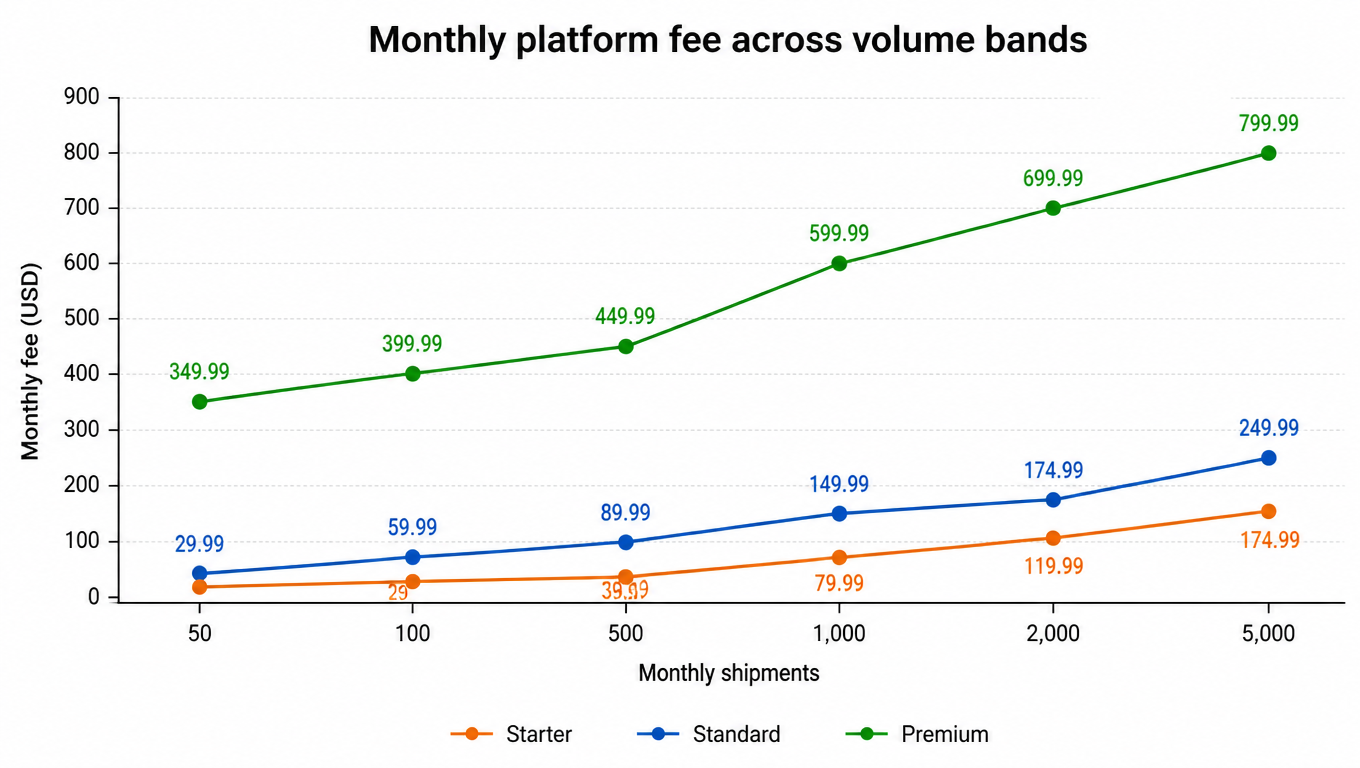
The table below uses the monthly prices published on ShipStation's official pricing page. When you look at it, answer one question only: which band does my own monthly volume fall into.

Plan \\ monthly shipments 50 100 500 1,000 2,000 5,000
Starter (3 seats) $14.99 $29.99 $39.99 $79.99 $119.99 $174.99
Standard (10 seats) $29.99 $59.99 $89.99 $149.99 $174.99 $249.99
Premium (15 seats) $349.99 $399.99 $449.99 $599.99 $699.99 $799.99

Prices read from ShipStation's official pricing page (monthly billing) on 2026-10-04; annual billing is usually lower, and the page advertises about 20% savings. Seats and volume bands move together.

Monthly platform fee across volume bands for the same three plan names

Put the table against a real volume and the conclusion changes. For example: a 3PL shipping 12,000 parcels a month sits between the 10,000 and 15,000 bands, where Standard is $449.99 and $649.99 and Premium is $1,099.99 and $1,349.99 on the official pricing page. Per label, that is roughly $0.04 to $0.05 on Standard. The question is not whether the fee looks expensive; it is how much labor and rework the fee buys back. The same arithmetic works in the other direction: moving one account from the 2,000 band ($174.99) to the 5,000 band ($249.99) raises the monthly fee by about 43% while cutting the per-label platform cost from about $0.09 to about $0.05.

Price your own case with this formula rather than with the plan name:

  • Monthly platform cost = banded monthly fee (chosen from your real monthly volume) + per-label fee × labels + seat add-ons + plug-in or API overage + one-time implementation.
  • Unit cost = monthly platform cost ÷ shipments actually sent. Decide up front whether the denominator is labels printed or deliveries completed, otherwise the two numbers will contradict each other.

One caveat on basis: every price on this page is a snapshot, read from the vendors' official pricing pages on 2026-10-04, using monthly billing and common volume bands. Annual billing is usually cheaper, and region, promotions, and the rules for what counts toward a band all vary: whether return labels count, how overage is calculated, and whether the band resets on a calendar month or a billing month. Re-check the live page before you sign, and put those three rules in writing.

6. Feature Comparison Table

Feature ShipStation AfterShip ShippingEasy easyshippingx Easyship Shippo
Fee model Volume banded Quota + overage Volume banded Quoted by volume Free + paid tiers + per piece Free + volume plans
Multi-client Strong Moderate Basic Strong Moderate API-only
Cross-border rates Limited Good Limited Strong Excellent Moderate
Customs/DDP Basic Basic Basic Good Excellent Basic
Chinese UI None None None Full None None
Batch labels Strong Good Good Strong Good API-based
Shopify integration Deep Deep Good Deep Deep Deep
Starting price $14.99/mo Free tier $19.99/mo Volume-based Free tier $0.05/label
Best for Domestic-heavy Tracking & brand Small 3PLs Chinese cross-border DDP & global Dev teams

Ratings based on publicly available feature documentation, Shopify App Store listings, and user reviews as of mid-2026.

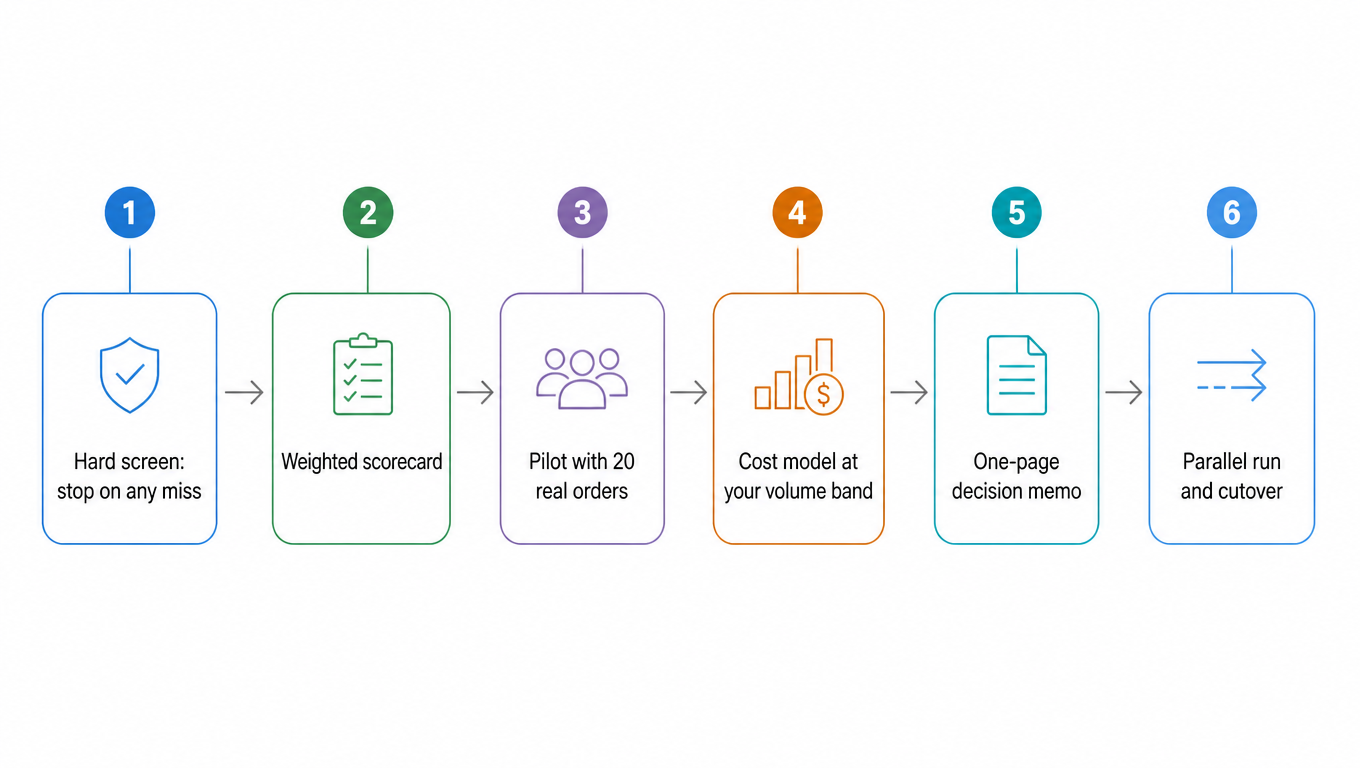
7. Run the Evaluation in Ten Working Days: Hard Screen, Scorecard, Real-Order Pilot

Two things ruin software evaluations: getting won over by a demo, and comparing your volumes against someone else's. The order below blocks both. Screen on hard requirements first, stopping the process on any miss (a lower price does not rescue a tool that cannot do the job), then score, then pilot with real orders, and only then talk about price.

Step 1: The Hard Screen (one miss stops the process)

  • Multi-client isolation is real: each client holds its own account, carrier accounts, rates, and invoices, not a folder inside one shared login.
  • It covers what your clients actually ship: every destination and service in use can produce a label, and quotes are compared per order rather than read off a fixed price list.
  • Labels and tracking write back to the storefront automatically, so nobody copies tracking numbers between two systems.
  • Support ownership is clear: who answers in Chinese and during which hours, who owns the diagnosis when something fails (the platform, the carrier, or your own network), and whether tickets carry a response target.

Step 2: Weighted Scoring (adjust the weights to your business)

Dimension Weight Evidence you need in order to score it
Isolation and permissions 25 Results of the isolation probes on two test clients (section 8)
Cross-border coverage and live rate comparison 20 Quotes produced from sample lanes your clients actually use
Storefront integration depth 15 Recorded tests of label and tracking write-back
Billing and reconciliation 15 A sample client-level invoice with its export fields
Chinese-language support and training 10 Tickets you actually filed during the trial, and the response times
Implementation and migration risk 10 A written migration checklist with owners
Vendor stability 5 Release cadence and the changelog for carrier additions

Step 3: Pilot With Real Orders (never demo data)

Take 20 real orders and deliberately include: a multi-item order, an over-long address, an order needing an added service, a return or reversal, a non-continental destination such as Alaska, Hawaii, Puerto Rico, or an APO address, two different clients shipping to the same ZIP, and one known unreachable ZIP. Acceptance rests on four results: first-pass label rate, tracking write-back time, correct client attribution on the billing side, and readable rejection reasons.

Step 4: Price the Decision at Your Own Band

Use the formula from section 5 to get the monthly and unit cost, then add the labor comparison: labels per hour before the switch (from your WMS or label records) against labels per hour during the pilot. Price only means something next to those two numbers.

Step 5: A One-Page Decision Memo

Write four lines: which hard requirements passed, the weighted score, the four pilot results, and the three-year cost (monthly fee times 36, plus per-label fees, plus implementation). Then two more lines: which two risks you accepted, and who reviews the decision and when.

Ten-day evaluation flow: hard screen, scorecard, pilot, cost model, decision memo

8. Two Things to Test Before You Install: Tenant Isolation and Shopify Access Scopes

Five Isolation Probes (run them with two dummy clients)

  • Log in as client A and check whether client B's orders or rate card are visible.
  • Switch back to client A and check whether quotes use A's rates or B's.
  • Export a report and verify the file contains only that client's data, spot-checking order ownership.
  • Change one user's permissions and see whether it alters what another client can see.
  • Deactivate or delete a client and check whether its data still surfaces in global search, exported invoices, or API responses.

Acceptance rule: every probe needs visible evidence, a screenshot or an export. A verbal confirmation from the sales team does not count. The five probes take about half a day and block the most expensive failure mode there is: one client billed on another client's rates.

How to Read a Shopify App's Permissions

An app requests a set of access scopes at install. By default an app can only read the last 60 days of orders, and reaching further back needs the separate read_all_orders scope (see the Shopify access scopes documentation). Fulfillment actions run through fulfillment orders, so an app holding read_orders without fulfillment scopes has to request merchant-managed or third-party fulfillment order access on top (see the fulfillment order migration documentation). Four questions to ask before the trial:

  • Is it asking for broad order-write scopes, or the narrower fulfillment scopes? The wider the scope, the larger the blast radius.
  • Connect a test store only. Walk the whole chain (authorization, fulfillment, write-back) on the test store before any real store is involved.
  • Export your data before you uninstall: orders, label IDs, invoice lines. Apps carry data-deletion obligations, and after uninstall you may not get those records back.
  • Log each app's version and permission-change dates, and grant no new permissions in the weeks before peak season.

9. Six Things to Check When a Chinese-Operated 3PL Evaluates a Shipping App

Chinese Interface and Chinese-Language Support

When a shipping label prints with an error or a customs form fails validation, the person fixing it should not have to translate the error message first. A fully Chinese interface reduces training time and cuts down on operational mistakes. Support that responds in Chinese during US business hours is a direct cost and error-rate factor.

Multi-Client Isolation

Each client must operate in their own sealed environment. Carrier accounts, negotiated rates, cost data, and order history cannot bleed into another client's view. A single billing error can destroy trust. Look for true multi-tenant architecture, not just multi-user login under one account.

Cross-Border Carrier Coverage

USPS and UPS are not enough. Clients need access to China-origin lines like 4PX and YunExpress, regional couriers for last-mile delivery, and express options like DHL and FedEx. The app should compare rates across all carriers per order.

Per-Client Financial Reporting

Every month-end you need to send each client a clear breakdown: total shipments, carrier per shipment, cost per shipment, total freight, surcharges. If the app can't generate this per client with a few clicks, you'll spend days reconciling spreadsheets.

Shopify Integration Depth

Orders should flow from Shopify to the shipping app automatically, not through CSV exports and manual imports. Tracking numbers should post back to Shopify and trigger notifications. The deeper the integration, the fewer people needed just to move data between systems.

Support Ownership and Escalation

This is the item teams skip most often: who owns the diagnosis when something breaks. Put three things in the contract: who answers tickets in Chinese and during which hours, whether a failure is investigated first by the platform, the service provider, or your own network team, and whether tickets carry a response target. File three real tickets during the trial (one on a label problem, one on a billing problem, one on tracking write-back) and record the actual response times. That beats any promise you hear on a call.

10. Migrating Off the Old Tool: Parallel Run and Cutover Criteria

Switching shipping software is not a login, it is a parallel run. The safe pattern is to put a slice of orders through the new tool and keep it running for one full reconciliation cycle, usually across one invoice, then judge on invoices and records rather than impressions. The criteria below are example thresholds; set your own against your volume and billing rhythm.

Three Hard Criteria During the Parallel Run

  • First-pass label rate: the share of labels that print correctly on the first attempt must not fall below the old workflow. Below it, the migration stops.
  • Tracking write-back: spot-check 20 orders to confirm the tracking number posts back automatically and triggers notification, with no manual copying step.
  • Billing attribution: client-level cost exported from the new tool matches a manual control total, and every variance can be explained line by line.

Six Things to Have Ready Before Cutover

  • Keep read-only access to the old system for at least 90 days so historical invoices and old tracking numbers stay reachable.
  • Confirm the old contract's expiry and cancellation terms instead of cutting over in the middle of an annual cycle.
  • Settle label format first (ZPL or PDF, and which stock size) and print a test batch of each.
  • Sequence the accounts: connect your own carrier accounts first, migrate pricing next, and open client views last.
  • Client communication template: label or packing-slip order changes, the returns address staying the same, and any change to the tracking link.
  • Rollback trigger and decision owner: who can call a stop, within what window, and what state you revert to.

Never move every client at once. Switch one client, then one order category, then the full book, leaving one reconciliation cycle between steps. The value is explainability: if something breaks, you know which step introduced it.

11. Eight Symptoms of a Shipping App That Does Not Fit

Each of these looks like an execution problem on its own. Together they describe a tool mismatch. Match your symptoms first, then decide whether to change the process or change the tool.

Symptom Underlying gap Workaround people reach for Correct move
Client invoices built by hand at month end No client-level cost attribution Overtime reconciliation Move to a tool with native multi-tenant billing
Two label workflows running side by side One shared pricing card across all clients Manual triage at the bench Per-client account and pricing configuration
Support answers where-is-my-order all day No write-back and no branded tracking page Copying tracking numbers by hand Automatic write-back plus a branded page
No substitute service available in peak week No live comparison across services Calling peers for help Per-order live comparison
Customs paperwork filled by hand No customs documentation automation Copying the previous shipment Field-level validation with generated documents
Onboarding a client stops the dock for two days No tenant provisioning flow Building accounts by hand Templated provisioning
Every new hire needs a week of training No Chinese interface and no written SOP Shadowing a senior operator Chinese interface plus a written SOP
One exception logged halfway in three systems No shared exception status Group-chat updates One exception ledger

12. Six Metrics to Review 60 Days After Go-Live

Write every metric as a numerator over a denominator. Metrics with a fuzzy denominator contradict each other within two months, because nobody remembers which basis was used last time.

  • First-pass label rate = labels printed correctly on the first attempt ÷ labels submitted.
  • Timely write-back rate = orders whose tracking posted back inside the agreed window ÷ orders shipped. You set the window, for example two hours.
  • Days to client invoice = days from the close of the billing period to the report being delivered.
  • Manual touch rate = orders edited by hand ÷ total orders.
  • Parcels per labor hour = parcels shipped in the window ÷ people on the line.
  • Platform cost per successful delivery = monthly platform fee ÷ deliveries completed that month. Do not use labels printed as the denominator.

For example, assuming a month with 12,000 labels printed, $1,200 of platform fees, and 600 failed deliveries: the platform cost per label is $0.10, and the cost per successful delivery is about $0.11. Record both, and state in the client invoice which one you bill on, or you and your client will reconcile against two different numbers.

13. The Bottom Line

Choosing a shipping app for a cross-border 3PL comes down to one question: how much of your volume crosses a border? If you are a pure overseas warehouse doing mostly US domestic fulfillment, ShipStation is the safe, battle-tested choice. Add AfterShip for branded tracking. ShippingEasy is the fallback for smaller teams.

If dropshipping and cross-border fulfillment are the core of your business, the calculus flips. easyshippingx is the strongest overall fit for Chinese-operated 3PLs: multi-client management, cross-border rate comparison, customs automation, and full Chinese language support in a single platform. Easyship is the alternative if DDP and global tax/duty automation are your competitive edge. Shippo makes sense only if you have development resources.

The common mistake is evaluating shipping apps the same way a single DTC merchant would. A 3PL is not a merchant with more orders. It is a fundamentally different operation, and it needs software that acknowledges that difference.

If the app also handles eBay overseas-warehouse orders, add marketplace rules, label origin, and ship-from consistency to the evaluation. Review the eBay overseas-warehouse guide before deciding which checks the shipping app should automate.

One last note: this page does not pick a vendor for you, it hands you a repeatable method. Run the same method on the next candidate, or on the same candidates next year, and the conclusion still holds up, instead of resting on which demo felt smoother.

Related Reading

FAQ

Multi-client isolation and Chinese language support are tied for first. If billing leaks across clients, trust is lost. If the team can't read the interface, errors multiply. These are table stakes, not nice-to-haves.
Not as a core requirement. If 90%+ of volume is domestic, ShipStation's domestic batch processing and multi-client management matter far more than cross-border features. Occasional international shipments can be handled manually without hurting efficiency.
They serve different needs. easyshippingx is an integrated "multi-client + cross-border" platform designed for Chinese 3PLs, with Chinese-first UI and volume-based pricing. Easyship is a global cross-border tool with best-in-class DDP calculation, but charges per-label, has lighter multi-client isolation, and no Chinese support. Your choice depends on client count and cross-border complexity.
Not as the only solution. Shippo's API is a good foundation, but multi-client isolation, billing reports, and Chinese UI must all be built from scratch. Unless your team size and business complexity justify building these from the ground up, a platform with native multi-client support like easyshippingx gets you operational faster and more reliably.
Every figure here was read from the vendors' official pricing pages on 2026-10-04, and all of them are snapshots. Annual versus monthly billing, region, and promotions all move the number. What stays stable is the fee model: banded by volume, quota plus overage, or a per-piece charge. Re-check the live page before you sign.
Yes, as soon as you bill clients for shipping. The test is not whether the interface can be filtered by client, it is whether invoices can be produced per client and whether rates stay separate. The five probes in section 8 answer it in half a day.
Twenty real orders, deliberately including a multi-item order, an over-long address, one needing an added service, a return or reversal, a non-continental destination, two clients shipping to the same ZIP, and one known unreachable ZIP. Then let it run for a full reconciliation cycle; one day proves nothing.
It will, if you move everyone at once. Switch one client, then one order category, and let the parallel run cover a full reconciliation cycle. Keep read-only access to the old system for at least 90 days and write the rollback trigger and decision owner down in advance, so any failure can be traced to the step that introduced it.
Interface language affects training time and error rates directly, but support ownership matters more: who answers in Chinese, during which hours, and who investigates a failure first. File three real tickets in the trial (one label problem, one billing, one tracking write-back) and log the response times. That is more reliable than a promise.