Warehouse Packing Guide

Packing Station Setup for Small Warehouses: Equipment, Layout, and Capacity

A packing station setup organizes the bench, supplies, equipment, and parcel flow so a team can verify items, pack, measure, label, and move each parcel to the correct outbound area. Design the inbound route, supply replenishment, outbound route, and exception space together. Equipment comes after those decisions.

This guide is for US DTC teams, small ecommerce warehouses, and growing 3PLs moving from one bench to several. Use the equipment checklist, layout illustrations, capacity example, and trial worksheet to build a station around your actual orders.

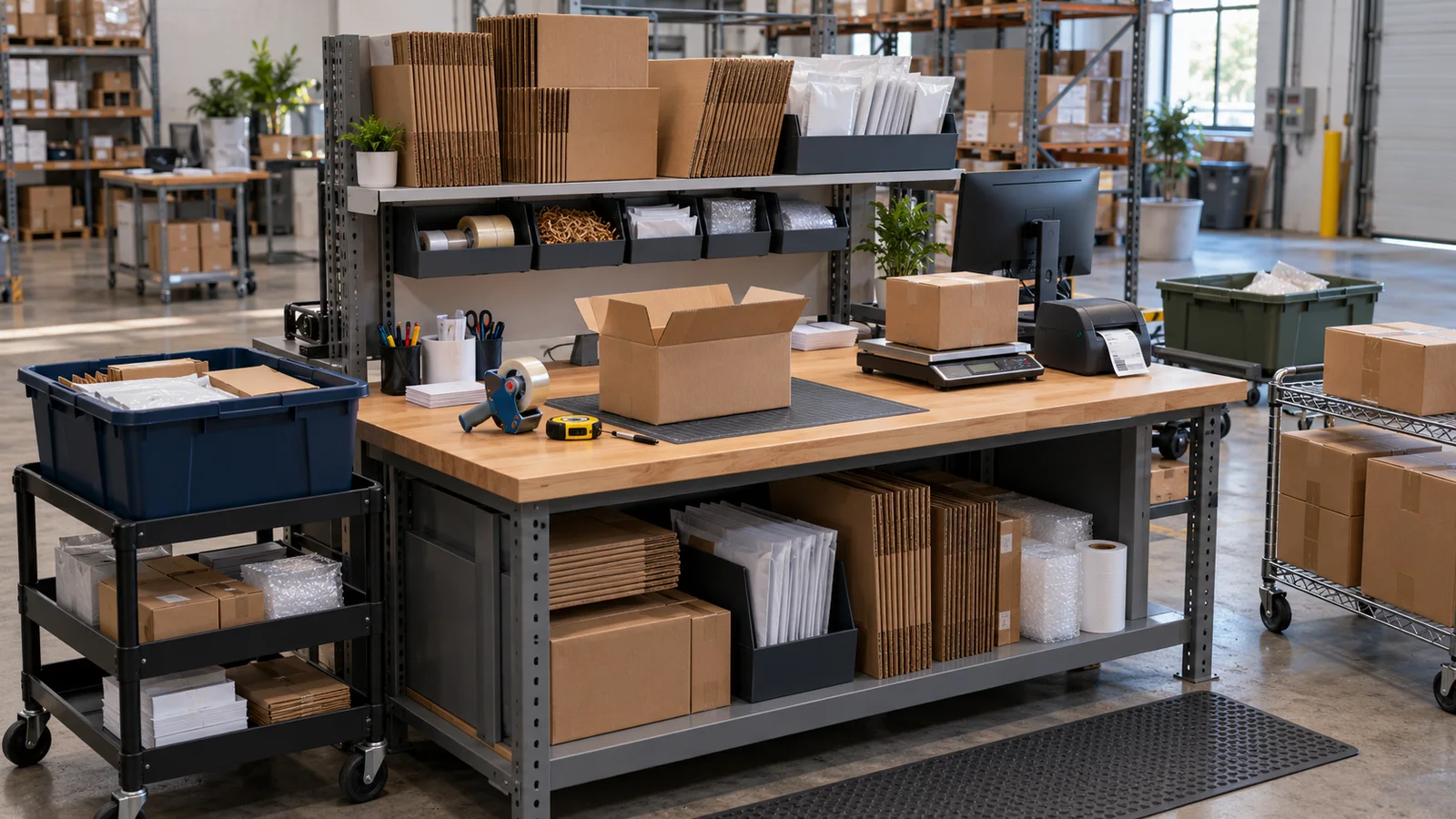
A small ecommerce warehouse packing bench with an incoming tote at left, supplies and a clear work area, a parcel scale and label printer at right, and a separate outgoing cart.
Keep frequently used equipment within reach of the active order and separate incoming work from packed parcels.

1. Start with the work, before buying equipment

Daily order count alone is a poor equipment specification. Apparel in mailers, fragile products, and multi-item gift boxes can require very different work at the same parcel volume. Count parcels separately from orders: a two-box order creates two parcel-handling cycles.

Pre-setup worksheet
InputWhat it determines
Normal and peak-day parcelsTotal demand and arrival pattern, including bursts
Units per order; common packagingVerification work, clear surface, and supply slots
Size, weight, and special handlingSupport, handling method, and protective steps
Packing windowUsable packing time rather than the full shift
Concurrent packersWork surfaces, shared devices, and crossing paths
Current slow stepsSeparate handling, searching, walking, and waiting
Clients and branded suppliesOwnership, separated supplies, and changeovers
Adjacent space and handoff cutoffInbound queues, staging capacity, and transfer frequency

Group orders by the work they require and walk through both routine and awkward examples. Peaks may arrive late in a burst rather than evenly through the day. If orders reach packing unsorted, address that upstream handoff with the batch-picking guide.

2. Minimum viable packing station equipment

A basic setup needs a reliable way to perform each task, not a new device for every task at every bench. Inventory what you already own, then test it with actual parcels, label files, and the working environment. “Defer” below means defer a purchase, not skip the task.

Basic equipment and purchase decisions
Equipment or materialPurposeSelection basisWhen a new purchase can wait
Stable workbenchInspect and packCombined loads; operator and task fitExisting bench is stable and suitable
Computer or compatible terminalAccess orders and shipment dataSoftware, browser, and print workflowExisting terminal passes the workflow test
Label-printing equipmentProduce usable shipping labelsLabel format, media, drivers, connectionExisting or shared printing is workable
Parcel scaleCapture packed weightRange, resolution, accuracy, platform sizeA suitable checked shared scale is available
Measuring toolMeasure exterior dimensionsParcel shapes, units, repeatabilityExisting measure works; automation can wait
Barcode scanner, conditionalInput order or item codesSymbologies, input mode, software checksManual checks work or software lacks support
Packs, fill, sealing toolsProtect and close the parcelProduct needs, common sizes, brand rulesStock common formats; defer rare variants
Supply storageAccess and replenish materialsFrequency, capacity, replenishment routeExisting shelving or bins can be assigned
Order totesKeep orders physically separatedTypical large order; clear identificationSuitable existing containers can be reused
Outbound and exception locationsSeparate released and held workClear boundaries, limits, ownershipExisting carts or shelving can be designated

Two packers can share a printer if the software permits that arrangement and queues, walking, and label mix-ups remain manageable. Identify jobs by station or assignment and match the label beside its parcel. Compare dedicated hardware and maintenance costs against observed disruption before buying a second device.

For a specific model, check current manufacturer specifications for operating systems, connections, load limits, and media, then run a real print test. Continue with the label-printer guide. Dimensioners, conveyors, cameras, and light-directed systems are upgrades to justify against a defined problem.

3. Arrange six locations around the active order

Example top-view layout: incoming orders move to the active work area, then weighing and labeling, then outbound; supplies sit beside the bench, exceptions are separate, and replenishment uses a dashed path.
Example layout, not to scale. Solid lines show parcel flow, dashed lines show replenishment, and a dotted branch leads to exceptions. This is not an ergonomic or fire-safety standard.

The top-view example shows relationships, not a mandatory orientation. An incoming order enters the clear work surface, then moves to weighing and labeling, then outbound. Frequent-use supplies sit beside the work, and exceptions branch away. Mirror or rotate the arrangement for handedness, parcel size, and the room.

  • Inbound: accept identified order containers; keep the next order waiting outside the active surface.
  • Active surface: allow space for the items and the package while opening, forming, and sealing it.
  • Frequent-use supplies: position materials by use and sequence; keep rare sizes in reserve and give tools a home.
  • Weighing and labeling: support the scale steadily, keep the parcel clear of surrounding objects, and leave the screen and label exit accessible.
  • Outbound: separate parcels as the next handoff requires, with visible staging limits and a transfer owner.
  • Exceptions: retain order identity, reason, and owner so shortages, damage, or address questions do not occupy the active surface.

Route reserve stock to supply slots without cutting across the operator or parcels. Set batch stock levels and a refill trigger; replenish from a side or rear access where practical. A multi-client 3PL needs written ownership and separate slots, not color alone. When staging approaches its limit, transfer parcels or adjust releases.

Illustrative before-and-after paths for the same mailer orders in the same space: frequently used mailers move from remote storage to the bench, while equipment and outbound positions stay fixed.
Illustration, not a measured result: the mailer orders, staffing, and footprint are held constant; only the frequent-use supply location changes.

The comparison holds mailer orders, staffing, and space constant, moving only frequent-use mailers beside the bench. Equipment and outbound stay fixed. It illustrates a shorter retrieval route, not measured savings. Record any additional refill work the smaller local supply creates.

Fit the station to the person, parcel, and task. OSHA identifies repetitive handling, bending, overhead reaching, and awkward postures as warehouse ergonomic risks. Trial representative parcels with the operator and adjust support, access, and handling. No universal bench height, reach distance, or safe lifting weight is specified here. Preserve required access and exit routes.

BOSTONtec discusses task, arrival, departure, and access priorities; ShipHero discusses supply replenishment. These are vendor design references, not independent evidence of a productivity gain.

4. Keep items, parcels, and labels matched

Give each active order a visible identity and physical boundary. Verify items and quantities before completing the pack. Use final weight including packaging, fill, and inserts, plus exterior dimensions with explicit units. Record each parcel separately for multi-box orders.

Match the printed label to the current parcel using its order link, recipient, and parcel sequence before attaching it. Control spare copies on a reprint. If parcel or address data changed, follow the purchasing channel’s correction process; printing again does not correct the transaction. Assign shortages, damage, and address issues to the exception owner.

Barcode input, SKU verification, scale capture, and automatic printing are separate capabilities. A scanner does not make software validate quantities, capture weight, or print automatically. ShipHero’s demonstration and transcript show its own workflow; ShipStation Connect bridges its account and local print hardware. Neither establishes another platform’s capabilities.

When measurements differ from a stored template, retain the current parcel record and follow the package-data audit guide for the wider correction workflow.

5. How many parcels can one station handle?

Define the clock before calculating capacity. Do not compare hands-on time with arrival-to-completion time. The simple model below assumes one person working serially with orders available. Measure whole-station throughput separately when tasks overlap across people.

Different clocks for the same parcel
Time categoryBoundary
Hands-onActive inspection, packing, weighing, and label matching
Routine walking and waitingRoutine supply retrieval and software/device waits that cannot overlap other work
Replenishment and exceptionsLog separately; removed from the daily window in this example
Arrival-to-completion elapsed timeIncludes pre-start queues, routine processing, and interruptions; differs from hands-on time

All numbers here are assumptions, not measurements or benchmarks. Start with a 360-minute packing window. Remove 30 minutes of breaks, 15 of replenishment, and 15 of exception work, leaving 300 minutes for routine parcels. Assume 2.5 minutes per parcel: 1.8 hands-on, 0.4 routine walking, and 0.3 non-overlapping equipment wait.

Simple capacity estimate = 300 ÷ 2.5 = 120 parcels/day. Replenishment and exception work are already excluded; do not add them to the 2.5-minute cycle. Equipment wait stays in the denominator, so do not subtract it again from the 300 minutes.

Hypothetical capacity: a 360-minute window minus 30 minutes of breaks, 15 of replenishment, and 15 of exception work leaves 300 minutes; at 2.5 minutes per parcel the estimate is 120, and at an assumed 2.1 it is about 143.
All figures are hypothetical. Per-parcel time includes routine hands-on work, walking, and non-overlapping equipment waits. Replenishment and exception work have already been removed from available time.

Now suppose rearranging materials and handling reduces hands-on work to 1.7 minutes and walking to 0.1, with equipment wait unchanged at 0.3: total 2.1 minutes. Then 300 ÷ 2.1 ≈ 142.9, or about 143 parcels; rounding down for complete parcels gives 142. This is a hypothetical scenario, not a demonstrated improvement or dependable capacity promise.

Actual scheduling depends on order mix, arrivals, and cutoff congestion. For mixed work, sum each parcel type’s count multiplied by its average processing time. Freed time may absorb replenishment, rework, or peaks; it does not automatically reduce payroll.

Choose the intervention from the log: walking and searching suggest layout changes; stockouts suggest replenishment support; blocking waits call for the label-latency diagnostic. Add a station or person when the existing station stays occupied and upstream supply, printing, and outbound transfer can support more work. A shared bottleneck prevents automatic doubling.

6. Run a three-day trial

Day one: record the original workflow. Sample actual work types such as mailers, fragile parcels, and gift boxes. Record operator, staffing, configuration, and window. Log arrival, start, and completion, then hands-on work, walking, blocking waits, replenishment, and exceptions. Keep slow parcels, errors, reprints, and rework in the record.

Day two: change one main problem. Move frequent-use mailers closer or separate held orders, for example. Keep order type, unit count, operator, and window comparable. Where that is impossible, document the difference and compare within work types.

Day three: compare speed and quality together. Review averages and slower samples within each work type, alongside wrong shipments, reprints, rework, refill counts, operator feedback, and staging backlog. With small samples, preserve the individual records rather than claiming stable performance.

Copyable trial worksheet
RecordEntry
Date, run, setup, staffingBaseline or the single change
Sample, work type, units, packExclude customer names and addresses
Arrival, start, completionTimestamps in the same time zone
Hands-on, walking, blocking waitMinutes separately; count overlaps once
Refill/exception minutes; refill countIdentify per-parcel or window totals; use one basis
Errors, reprints, reworkCounts, reasons, and rework minutes
Trips, repeated moves, feedbackCounts and observation notes
End-window outbound backlogParcels awaiting transfer

Download the blank English CSV worksheet

Three days can reveal obvious problems, not establish long-term results. Continue observing across order mixes, operators, and peaks. Extend the work beyond the station with the warehouse shipping operations guide.

FAQ

Start with a suitable bench, order terminal, label-printing access, scale, measure, packaging tools, storage, and separate order, outbound, and hold locations. Reuse suitable equipment; add scanning when supported and useful.

There is no universal footprint. Mock up a larger common order through the full task, including inbound, replenishment, holds, outbound staging, and required access routes.

Yes, if software, queues, and label collection support it. Consider a dedicated device when observed waiting, walking, or mix-ups regularly interrupt work.

No. It helps barcode entry and supported verification workflows, but does not itself add SKU validation, scale capture, or automatic printing.

It depends on work mix and usable time. The hypothetical 300-minute window at 2.5 minutes per parcel gives 120 parcels, not an industry standard or promise.

When the existing station stays occupied after layout, supply, and waiting problems are addressed, and adjacent processes can support it. Shared bottlenecks can limit the gain.

Carry verified parcel data into rates and labels

After item checks and final measurements, use EasyShippingX through the Portal, Excel upload, or API to carry accurate shipment and parcel data into rate and label processing. Review current features and access options to choose the path for your team and separately verify hardware and local printing arrangements.

If the bench also handles thank-you cards, coupons or care guides by channel, document the material version and cutoff. The packaging insert guide includes a 3PL work order and acceptance worksheet.

Sources and example notes

Equipment, layout, and trial steps are operational recommendations. All capacity figures are hypothetical. Vendor examples do not establish equivalent EasyShippingX software or hardware capabilities.