Every rate you compare, every carrier you pick, every label you buy is calculated from a handful of numbers: length, width, height, weight. If those numbers are wrong, the cheapest quote is a lie, the carrier you pick is a guess, and the overcharge lands quietly on your monthly invoice. This guide walks through what bad WMS package data actually costs, where the errors creep in, and how to audit your packaging data so your rate shopping finally means something.
Your records are the problem. The invoice just agrees with them.
1. Why Your Rate Quote Is Only as Good as Your Package Data
Rate shopping tools work the same way whether you use a shipping platform, a carrier's own portal, or a spreadsheet of quotes: they take the dimensions and weight of each package, apply each carrier's rate table, and rank the results. The tool never sees your physical box. It sees whatever the WMS says about your box, and it trusts that number completely.
Connect the package-data correction to the FBM shipping-cost framework so the improvement is measured on the shipment economics. Use the quote-to-final-charge guide to follow an incorrect measurement from quote to adjustment.
When the WMS stores a stale box template or a weight that was right two suppliers ago, the comparison is still computed perfectly. It is just computed on the wrong input. The cheapest carrier wins the comparison, but the bill arrives based on what the carrier actually measures at the sort facility, which can be a different price tier entirely.
Here is the quiet part of rate shopping: quotes are free, but overpayments are not. A rate comparison built on bad package data does not cost you at the moment you click compare. It costs you every single month, on every single order, in a charge that looks like normal shipping spend because the invoice matches what your own records predicted. Your records are the problem. The invoice just agrees with them.
2. The Math: What Bad Package Data Costs per Month
Take a concrete example. A seller's WMS stores a box template for SKU A at 12 × 8 × 6 inches. The supplier quietly changed the packaging two quarters ago, and the actual box ships at 14 × 10 × 8 inches. Nobody updated the template.
DIM weight is length × width × height divided by the current ground divisor of 139[1]. The stored dimensions produce 576 cubic inches, or 4.1 pounds, which carriers round up to 5 pounds. The actual box produces 1,120 cubic inches, or 8.1 pounds, which rounds to 9 pounds. Your rate quote prices a 5-pound package. The carrier bills a 9-pound package.
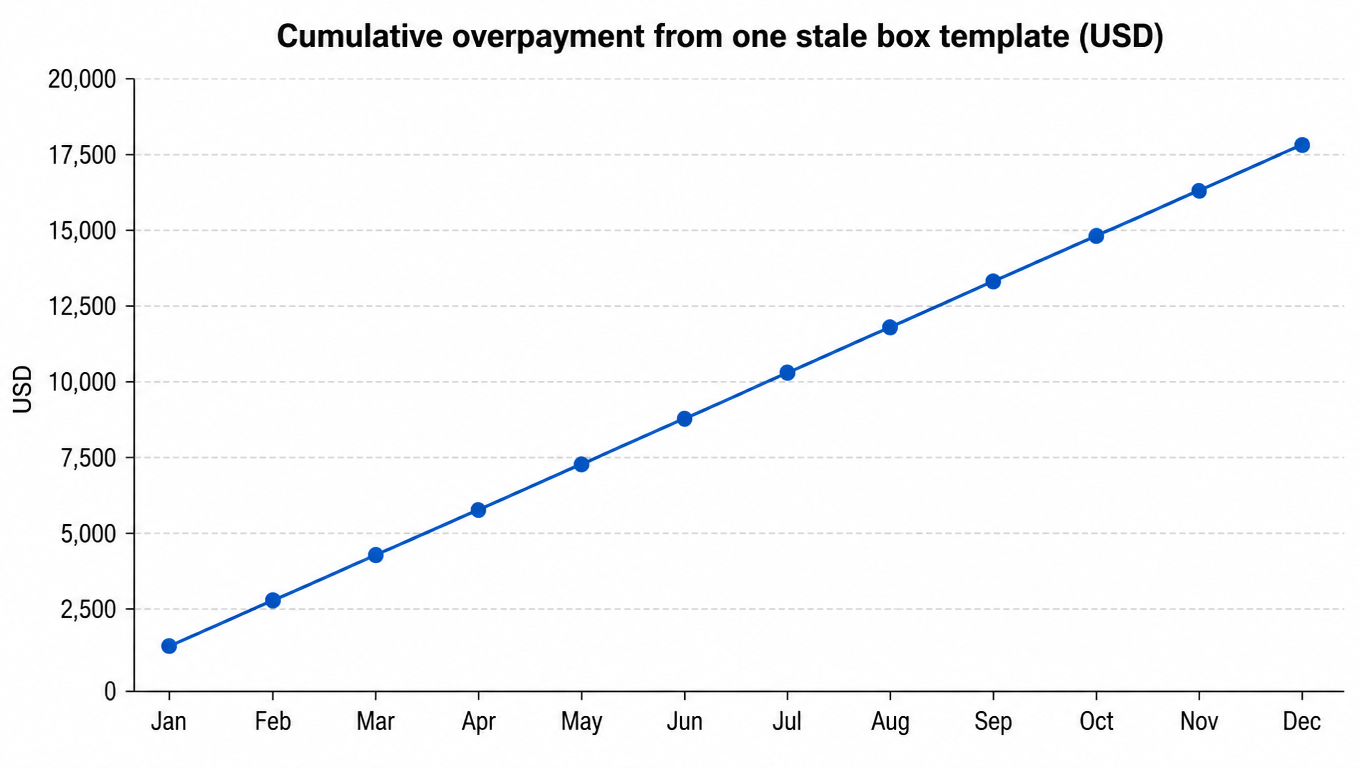
The difference between 5 and 9 pounds at zone 5 ground is roughly $3 per package. For a seller doing 500 orders per month with this SKU, that is $1,500 a month, or $18,000 a year, on a single stale template.
Cumulative overpayment from one stale box template (USD)
The DIM example is only the first hit. Consider a second, bulkier SKU in the same catalog. The stored template says 80 × 14 × 10 inches, which gives a length-plus-girth of 128 inches, just inside the 130-inch ceiling[3] most carriers apply to standard ground rates. The actual box is 82 × 15 × 11 inches, and its length-plus-girth comes to 134 inches. That single inch over the line reclassifies the package into the oversize tier, adding $25 to $40[4] to every shipment. This SKU ships 60 times a month, so the reclassification alone costs $1,500 to $2,400 a month.
Then there is the third hit, the one sellers rarely see: carrier re-weigh and re-measure corrections. When the dims on the label do not match what the carrier's scanners record, the carrier adjusts the charge to the measured values and posts a correction on the invoice, sometimes with an adjustment fee on top[2]. The correction is not an anomaly; it is the system telling you that your master data is wrong, one package at a time.
3. The Error Chain: How Bad Data Flows from WMS to the Invoice
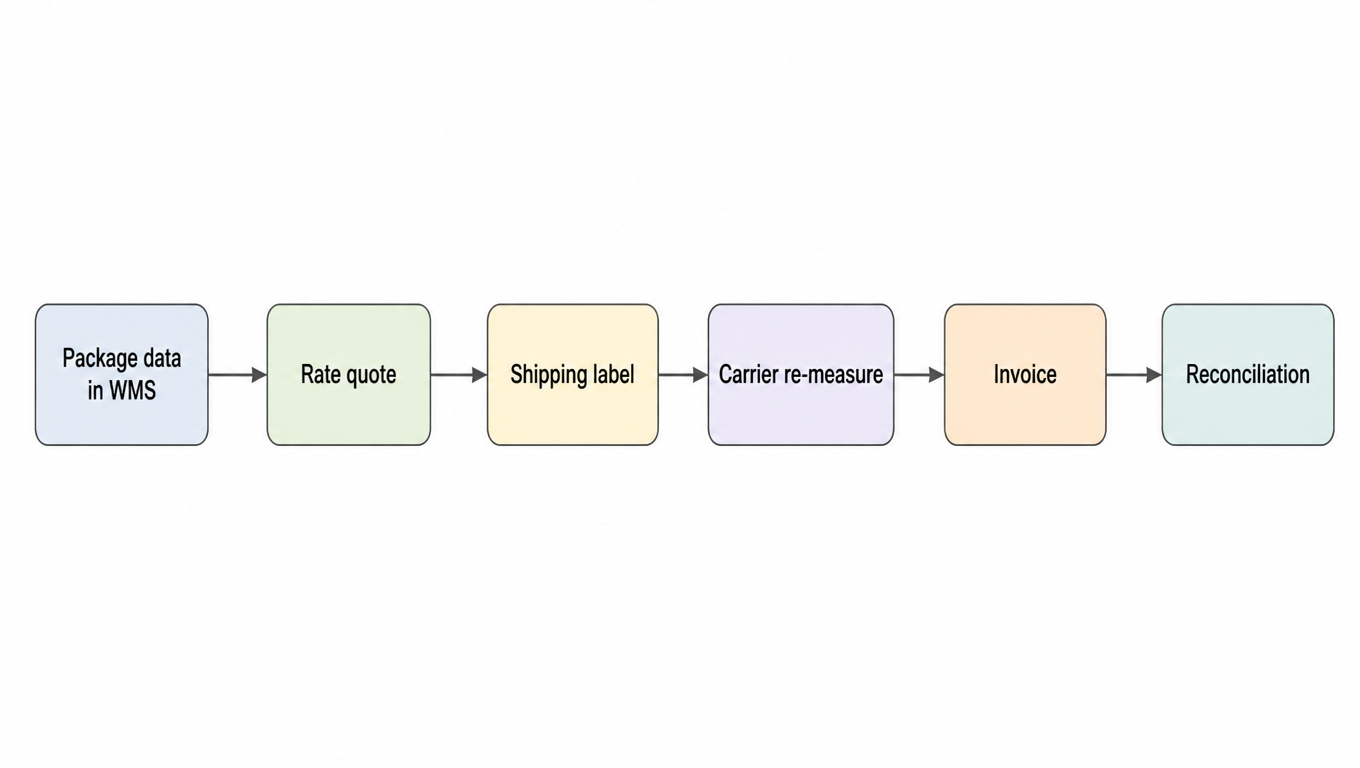
The full life of your shipping data
The chain above is the full life of your shipping data. Package data in the WMS produces a rate quote, the quote becomes a label, the label meets the carrier's own measurements at the sort facility, the corrected measurements become the invoice, and the invoice goes through reconciliation against your records.
Errors can enter at every link. A field mapping that swaps length and girth, a manual entry where 8 becomes 18, a box template that outlived its packaging, a batch import that mixed inches and centimeters. The common thread is that the error enters early and never gets corrected, because each downstream step faithfully trusts the one before it.
Reconciliation is supposed to catch this, and this is why it usually does not. The invoice is checked against the same WMS records that generated the quote. When the carrier bills 9 pounds because the box really is 9 pounds, the reconciliation looks at your record that says 5 pounds and flags a difference, or worse, the reconciliation is done against the label price and the correction slips through entirely. Either way, the audit baseline is the same wrong data, so the error survives every check.
4. The Six Most Common Package Data Errors in WMS Master Data
A packaging data audit is only as good as the list of things you look for. These six errors account for almost every case of rate shopping on wrong data.
Stale box templates. The supplier changed packaging, the product line resized, or the box got a new insert, and the template in the WMS was never updated. The most common error and the most expensive, because it touches every order of that SKU.
Wrong or outdated DIM divisor. The ground divisor is 139 today, but a template built years ago may still divide by 166 or 194[1]. The same box quotes a lower DIM weight than the carrier will bill.
Actual weight stored where billable DIM should be. Light, bulky items are billed on DIM weight, not scale weight. If the WMS stores only the scale weight, every quote for that SKU understates what the carrier charges.
Unit mismatches. Inches and centimeters, pounds and kilograms, mixed inside one template or across a batch import. A 40 × 30 × 20 box priced as 40 × 30 × 20 centimeters is a different package entirely.
Missing oversize and overweight flags. The dimensional data is right, but the template never records that this SKU crosses a surcharge threshold, so the extra charge arrives as a surprise on the invoice.
Poly bag versus box confusion, and multi-piece orders billed as one. A soft mailer gets quoted as a box, or two boxes in one order get quoted as a single package, and the dimensions no longer match what the carrier receives.
5. The Audit: A Field-by-Field Checklist
An audit does not need to be complicated, but it needs to be systematic. Walk every active field that feeds rate quotes and check it against reality.
Dimensions. Measure a physical sample of each top SKU and compare length, width, and height against the WMS record. Allow a tolerance of about ±0.5 inches, since boxes flex slightly when packed.
Weight. Spot-weigh packed parcels and compare against the stored value. Allow ±5%. If the weight in the WMS is a product weight from the supplier sheet, it is probably missing packaging material.
Box templates. Reconcile every active template against current packaging. Delete templates that no longer exist, correct dimensions that changed, and add templates for any box or mailer the warehouse actually uses.
Units. Run one pass over every template for consistency: inches and pounds everywhere, or convert deliberately and document it.
DIM divisor. Confirm the current ground divisor (139)[1] is applied to every template. Old divisors inflate your quotes or, more dangerously, deflate them.
Exceptions. Record oversize and overweight flags on every SKU that crosses a surcharge threshold, so the quote includes the surcharge instead of discovering it on the invoice.
6. Running the Audit: A Five-Step Process
Spot-weighing is the first step of the audit
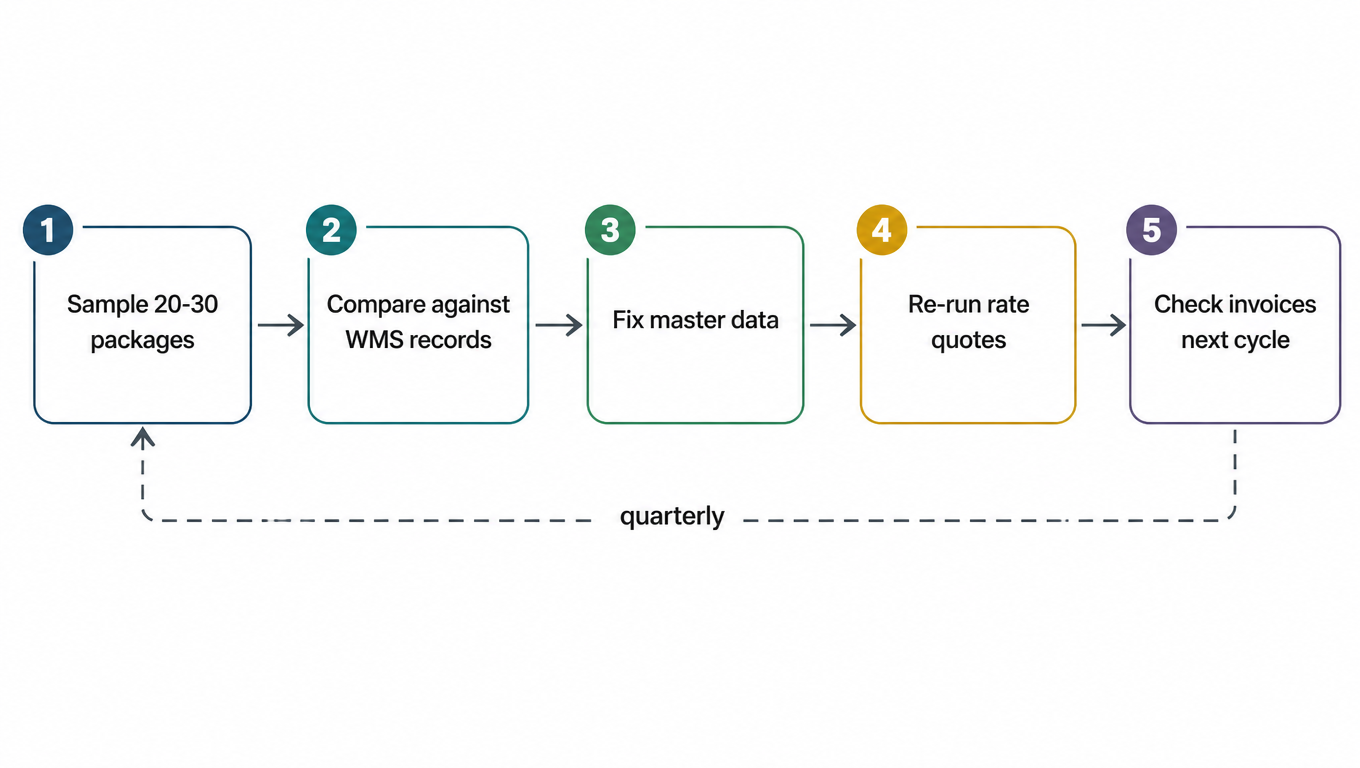
An audit is a loop, not a one-time project. Run it in five steps, and run it on a schedule.
The five-step audit loop, on a quarterly cadence
Sample 20-30 physical packages across your top SKUs. Pull them from the packing line or the shipping queue, not from a shelf of pristine boxes. You want the boxes as they actually ship.
Compare each sample against the WMS record and log every variance: dimensions, weight, template, units, flags. Keep the log, it becomes the evidence for what to fix and later the proof that the fix worked.
Fix the master data. Update templates, correct weights, standardize units, set the flags. Fix the data at the source. Do not patch individual shipments.
Re-run rate quotes on the corrected data. The same SKUs, the same carriers, the same zones. The difference between the old quotes and the new ones is your expected savings.
Check the next billing cycle against actual invoices. Corrections and re-measures should shrink or disappear. If they do not, the master data still has a gap, and the loop starts again.
7. What to Do When the Packed Box Differs from the Rated Box
An order is not one package. It is a chain of records about the same package, written at different times by different systems. The catalog carries a product weight. The WMS carries a predicted box type and its dimensions. The pack station produces the actual box. The rate request carries whatever numbers the software decided to send. Any two of those can disagree, and they often do: the catalog weight omits packaging material, the predicted box is the spec from before last quarter's packaging change, the packer grabbed a larger box because the insert no longer fit, and the rate request is still the snapshot taken when the order was created.
When you find a mismatch, the natural question is "which number is right?" The question that actually matters is narrower and more useful: does the quote and label I already hold still describe the box I am about to hand to the carrier? A record can be wrong and cost nothing, because this order has not been quoted yet. A record can be right and still cost you, because the label was bought on yesterday's data. A variance only starts costing money after a decision has already been executed.
The standard advice is to fix the master data. That is necessary and not sufficient. Correcting the WMS box type changes what the WMS will say about the next order. It does not reach back and change the transactions that already happened: a quote already returned to a customer or a checkout page, a label already purchased and sitting in a print queue, a manifest that already counted that label, a billing record that already carries the charge. Those are issued transactions. They do not update themselves when the template changes.
So a variance resolves into three separate jobs, and each one is verified on its own. One, the data is corrected: the next quote is more accurate, and you verify that by re-quoting. Two, the decision is improved: packaging or carrier choice changed so the real cost is lower, and you verify that against the amount actually charged on the next shipment, not against the quote. Three, the change and the money are recorded: the original quote, the replacement label, the void, the adjustment, and the refund link to each other so the variance can be explained later. You verify that by walking from the shipment back to the paperwork. Fixing a template accomplishes the first job only, and sellers routinely assume it accomplished all three.
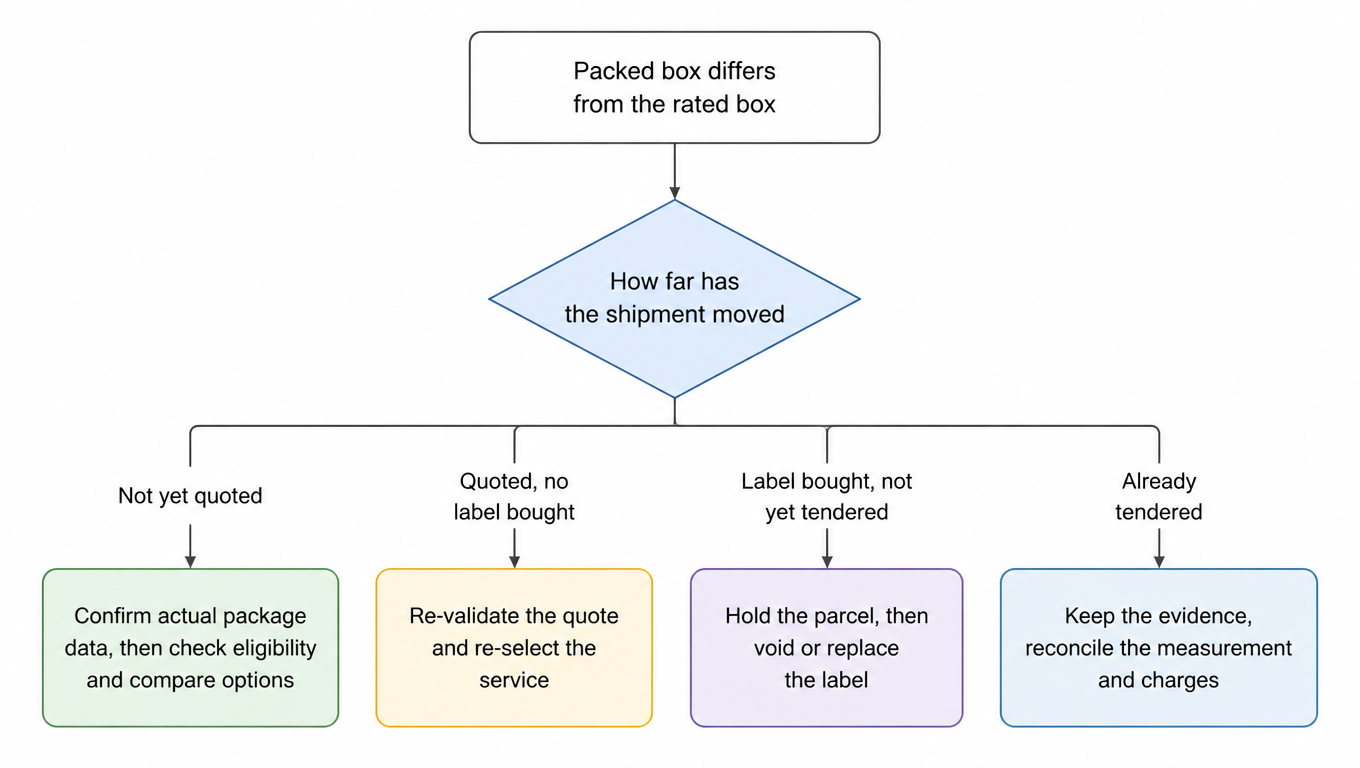
The way to decide what to do is to locate the shipment on three axes at once: which version of the package data you are holding, how far the physical parcel has moved through the fulfillment flow, and what actions that step still allows. Stack the three and each of the four states has exactly one correct order of operations.
Four shipment states, four orders of action
Shipment progress
The decision to make
Not yet quoted
Confirm the actual packaging data, its dimensions, weight, units, and piece count, then check service eligibility and compare options on that version. Nothing has been spent yet, so this is the cheapest moment to be wrong.
Quoted, no label purchased
Treat the existing quote as needing re-validation rather than as a fact. Re-quote and re-select the service on the new data, and decide whether a price already shown to the customer has to change.
Label purchased, not yet tendered
Control physical release first: hold the parcel. Then, under the rules of the carrier and the channel the label was bought through, decide whether to void it, replace it, or reweigh and let the measured adjustment happen. Do not apply the old label while the data is still in dispute.
Already tendered
Preserve the original request, the label, and the tender scan as evidence, then reconcile the measured dimensions and the charges that follow from them. Fix the master data afterward, and leave the historical transaction traceable instead of overwritten.
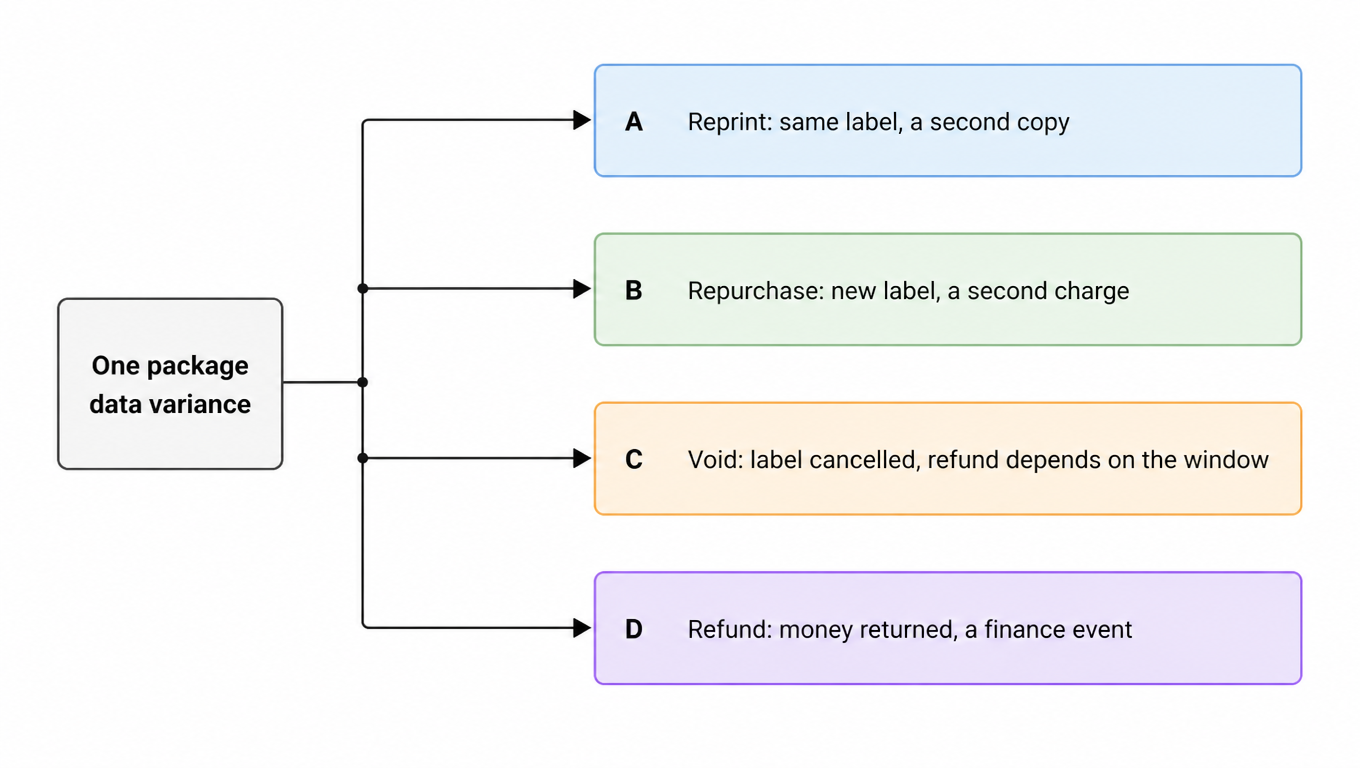
The place this goes wrong most often is a set of four words used as if they were one action. They are four separate events, with different owners and different records.
One variance, four different events
Reprint: the same purchased label is rendered again, no new charge, but you now hold two paper copies pointing at one tracking number, and applying the wrong one is a duplicate-use problem. Repurchase: a new label is bought, a second charge lands on the invoice, and two labels now cover one shipment. Void: the original label is cancelled, and whether the money comes back depends on the carrier's void window and on the rules of the channel you bought through[7], which is short on some channels and handled as a separate refund request on others[8]. Refund: money actually returned to the account, which is a finance event, not a warehouse event. A team that treats these as one action ends up holding two live labels, carrying a duplicate charge, and unable to explain either.
Before you act, capture these six variables. Miss any one of them and the variance becomes impossible to explain later, and impossible to prove closed.
Measured dimensions, actual weight, units, box type, and piece count.
The data version the quote was built on, against the warehouse's current packing result.
Origin ZIP, destination ZIP, service eligibility, and the delivery commitment.
Label purchase, print, affix, and physical tender status.
The link between the original label and the replacement label, plus the charge and refund records.
The confirmation each of warehouse, technology, and finance owes.
Here is that workflow as a table. Four columns, one row per variance you find. Any cell you cannot fill is work that is not finished yet.
What changed
Decisions affected
Who handles it
Evidence of completion
Box type (12 × 8 × 6 becomes 14 × 10 × 8 in)
Service eligibility, carrier choice, the rate shown to the customer
Warehouse confirms the measurement, tech updates the template
Pack-station measurement record plus a screenshot of the new quote
One last thing worth holding on to: correcting master data is a forward-looking action, and handling a variance is a backward-looking one. They use the same numbers but they point at different moments in time. Fixing the box type in the WMS makes the next quote accurate. Linking the quote, the label, the void, the charge, and the refund makes this shipment explainable. Both have to happen before the variance is actually closed. For labels that are already used or too old to void, the logic is different, and the unused and voided shipping labels guide covers that case.
8. After the Audit: Verifying Rates Actually Dropped
The audit is only worth doing if you can prove the rates dropped. Verification is a matter of comparing three things over time.
Re-quote your top SKUs with the corrected data and compare against the quotes from before the audit. This is the direct measurement: same package, same carrier, lower tier, lower number. Then track effective cost per order week over week. Divide total carrier spend by orders shipped, and watch the line move after the fix lands. It will dip when the corrected quotes start producing labels, and it will stay down if the data stays correct.
The most honest signal is the one you cannot fake: re-measure and re-weigh corrections on the invoice. When the carrier's scanners stop disagreeing with your labels, the data is finally aligned. Corrections disappearing is the audit working.
Set the cadence at quarterly, and add a trigger: any packaging change, supplier change, or new SKU resets the clock. Rate shopping only works when the package data feeding it is true, and package data decays with every packaging change the WMS does not hear about. A quarterly audit is the difference between shopping rates on reality and shopping rates on a memory of reality.
EasyShippingX is a channel-neutral shipping layer: one consistent way to compare US domestic carrier options and execute through a portal, a spreadsheet, or an API. Comparing rates on your corrected, true dimensions and weights is exactly the step that turns the audit's savings into cash. See pricing or book a multi-carrier workflow demo.
Run a full audit quarterly, and reset the clock whenever packaging, a supplier, or a new SKU changes. A quarterly cadence is enough to catch stale templates before they cost a full month of overpayments.
When the dimensions or weight on the label don't match what the carrier's scanners record at the sort facility, the carrier bills the measured values and posts a correction[2]. Corrections are the carrier telling you your master data is wrong; they usually shrink or disappear after a proper data audit.
No. Rate shopping takes the dimensions and weight the WMS provides as ground truth. If the input is wrong, the comparison is still computed perfectly, just on the wrong numbers. The audit is what catches bad data; rate shopping then makes the corrected data pay off.
About ±0.5 inches on each dimension and ±5% on weight. Boxes flex slightly when packed, and scale variance is normal. Anything beyond those bands is a real error worth logging and fixing.
No. A template change only affects what the WMS says going forward. Quotes already returned to a customer, labels already purchased, print queues, manifests, and billing records are issued transactions and do not update themselves. Each one has to be handled on its own: re-quote, reprint, void, or reconcile.
No, they are two separate events. Voiding cancels the label; whether money comes back depends on the carrier's void window and the rules of the channel you bought through. A refund is a finance event and has to be recorded separately from the warehouse action that voided the label. Treating them as one is how teams end up with two live labels and a duplicate charge.