
Ecommerce Shipping Guide

How to Evaluate a Shipping Rate Comparison Tool in 2026

This article evaluates rate-comparison workflows and tool requirements. For an actual parcel quote, use the shipping rate calculator.

If you run a small warehouse, a 3PL, or an ecommerce brand that ships from the US, you probably know the exact sequence by heart: open USPS.com, type the address, note the rate. Open UPS, type it again. FedEx, again. Then a regional carrier or two, again. By the time you have five numbers in front of you, ten minutes are gone, and you still have to decide which one to use. This article is about a rate comparison tool that collapses that whole routine into one screen.

Nobody checks five carrier sites for fun. Rates genuinely differ by carrier, by zone, by weight, and by the service you pick, and no one wants to overpay on a shipment they could have shipped cheaper. The problem is that the habit does not scale. A seller shipping a few parcels a week can afford the ritual; a warehouse pushing 60, 100, or 300 shipments a day cannot. Every shipment means retyping the same addresses and weights into a different form, and retyping is exactly where mistakes happen.

2026 gives you a reason to switch: USPS raised rates again, financial pressure persists, regional carriers now cover more lanes, and the cheapest option is increasingly a name you would not have thought to check. This article covers what a rate comparison tool does, why this is the year to switch, the numbers to compare beyond price, the time and money math, a five-point checklist, and a 10-minute switch plan.

Small warehouse owner studies five browser tabs at a desk covered with paperwork.
Rate comparison goes from five tabs to one screen

Why You're Still Checking 5 Carrier Sites

The instinct behind manual comparison is honest. Rates genuinely differ by carrier, by zone, by weight, and by service, and nobody wants to overpay on a shipment they could have shipped cheaper. So you check, the honest instinct of someone who cares about margins, applied with the most inefficient tool available: your own fingers.

The shipping-cost optimization overview places rate comparison among the other ways to improve shipping economics. After evaluating a tool, use the quote-to-final-charge guide to check how its quote will be reconciled with settlement.

The problem is that the habit does not scale. A seller shipping a few parcels a week can afford the ritual. A warehouse pushing 60, 100, or 300 shipments a day cannot. Every shipment means retyping the same addresses and weights into a different form, and retyping is exactly where mistakes happen. Compare a wrong weight and you either overpay for the label or get hit with a billing adjustment later, after the package is already gone.

There is also a quieter cost: the time itself. Five minutes of tab-hopping per shipment is five minutes that could have gone to packing, picking, or answering a customer email. Multiply it across a day of shipments and it stops being a small annoyance and starts being a missing employee.
What a Rate Comparison Tool Does

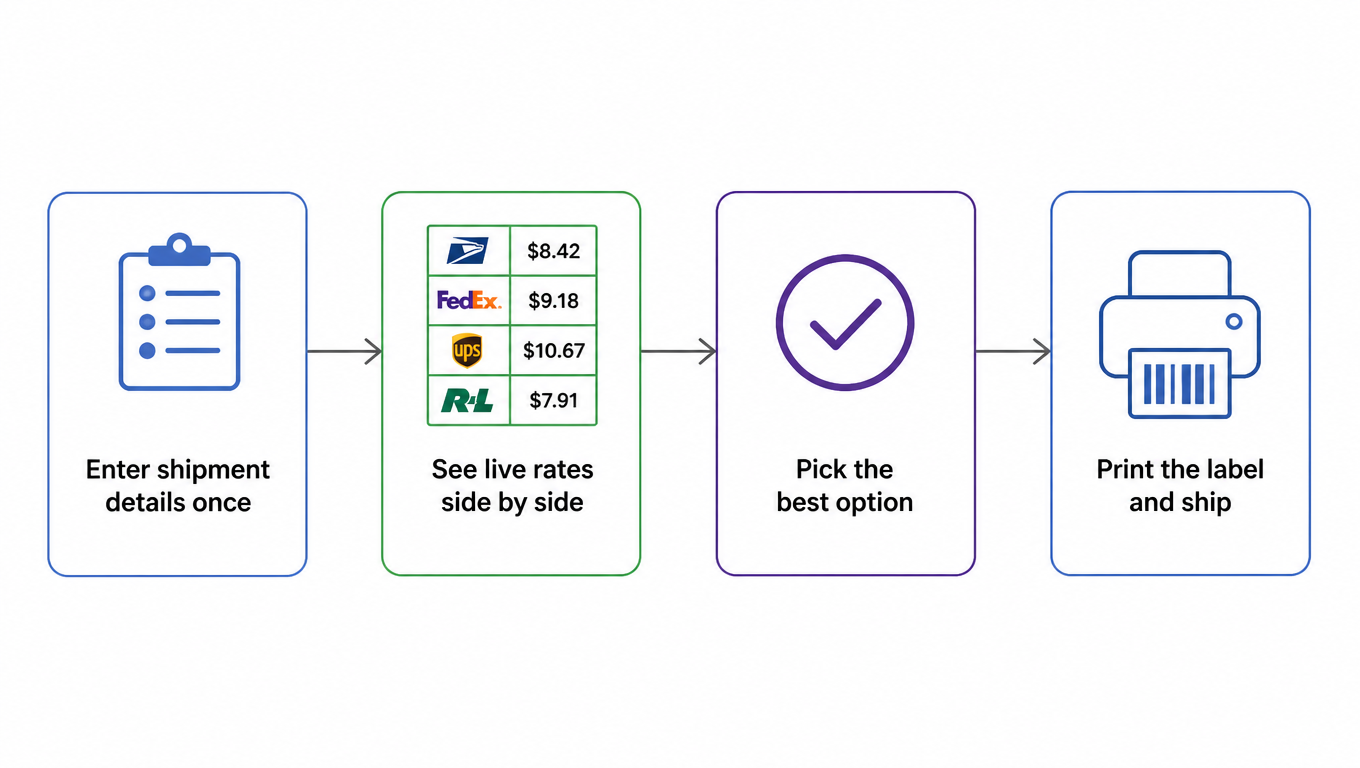
A rate comparison tool is shipping software that pulls live rates from multiple carriers into a single view. You enter the shipment details once: origin, destination, weight, dimensions. The tool queries every carrier it supports, from USPS and the national giants to the regional carriers that cover specific parts of the US, and lays the results out side by side.

Flowchart: enter shipment details once, see live rates side by side, pick the best option, print the label and ship
Enter once, compare side by side, pick the best, print the label

That is the whole pitch. The data you would have typed five times gets typed once. The comparison that used to take ten minutes happens instantly. When you pick a carrier, the tool generates the label from the same information, so the number you compared is the number you pay.

None of this requires a logistics degree. If you can fill in a shipping form, you can use a rate comparison tool. The difference is that the form asks you once and remembers, instead of making you start over on every carrier website.

Why 2026 Is the Year to Switch

USPS raised its rates again in 2026, continuing a run of annual increases that shows no sign of stopping [^1]. For a small warehouse, every increase quietly rewrites the math of which carrier is cheapest on which lane.

The bigger picture behind those increases matters too. USPS has been under sustained financial pressure for years, and that pressure has not gone away [^2]. When a carrier is propping up its revenue with price hikes, the natural conclusion for shippers is simple: do not build your whole operation around a single carrier, because that carrier's price and service are the two things you cannot control.

That is exactly why the comparison habit is worth automating now. Regional carriers have expanded their coverage across more US lanes [^4], which means the cheapest option for a given package is more likely to be a name you would not have thought to check. More carriers, more rate movement, and more annual increases all point in the same direction: eyeballing prices across five tabs is how you miss the savings.

Price Isn't the Only Number to Compare

Price is the number that gets your attention, but it is rarely the only number that matters. Delivery speed and service windows decide whether a package makes its promise date. On a lane where your customer expects delivery in two days, a dollar cheaper from a five-day service is not a saving, it is a refund request waiting to happen.

Dimensional weight is the other trap. Carriers bill by whichever is larger, the actual weight or the dimensional weight [^3], which is calculated from the box's length, width, and height. A light but bulky item, like a pillow or a folded camping chair, can bill as if it weighs three times what it does, and carriers do not all apply the same rules or the same divisor. Two quotes can look identical on weight and differ sharply once the box size is in the equation.

Then come the surcharges. Fuel surcharges, residential delivery fees, and delivery area surcharges all sit on top of the base rate, and they differ by carrier. The sticker rate you see on a carrier website is often not the rate you actually pay. A good rate comparison tool shows the all-in number, which is the only number that means anything.

Reliability rounds out the list. On-time performance and damage rates vary by lane and by carrier, and the cheapest option is not always the cheapest outcome when you factor in a refunded order. Compare speed, size rules, surcharges, and reliability, and price becomes just one row in a table instead of the whole story.

What You Save: Time and Money

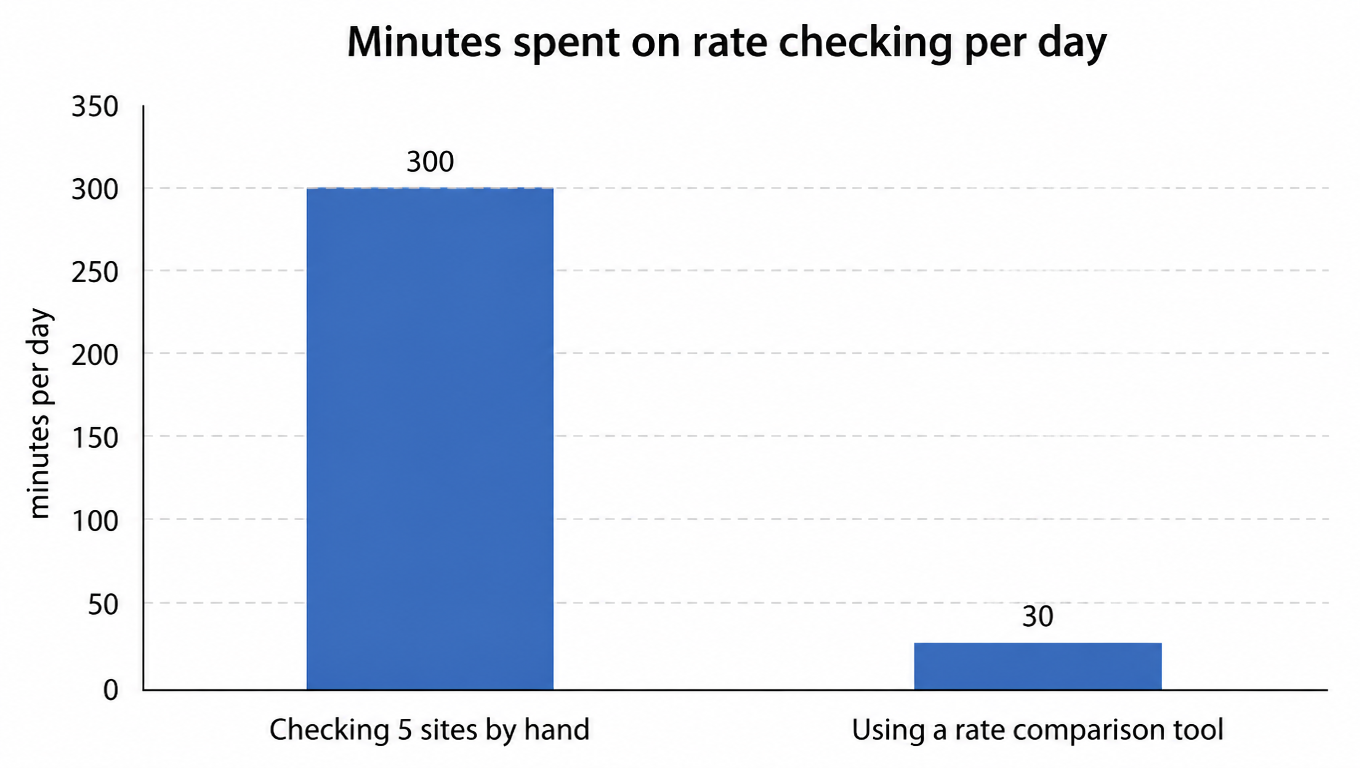
Let's make the time cost concrete. Take a warehouse that ships 60 parcels a day. At five minutes of checking per parcel, that is 300 minutes a day, a full five hours, spent comparing rates before a single label prints. A rate comparison tool turns the same job into roughly 30 seconds per parcel, about 30 minutes a day for the whole batch.

Bar chart: minutes spent on rate checking per day, checking 5 sites by hand 300, using a rate comparison tool 30
Daily rate-checking time drops from 300 minutes to 30

The money side is just as concrete. If a comparison tool finds a rate that is only 50 cents cheaper on average, 60 parcels a day is $30 a day, roughly $900 a month, more than $10,000 a year for one warehouse. You do not need dramatic savings for a rate comparison tool to pay for itself. You need a small, consistent edge on every shipment, and that is exactly what side-by-side pricing delivers.

There is one more saving that is easy to overlook: fewer errors. When details are typed once instead of five times, address mistakes and weight mistakes stop multiplying. Address validation catches a bad ZIP before you print, not after the carrier returns the package. Every avoided reprint and every avoided adjustment is money that never shows up on a savings report but lands in your pocket anyway.

What to Look For in a Rate Comparison Tool

Not all rate comparison tools are equal, and the checklist matters as much as the price tag. First, real-time rates. A tool that quotes from a static rate card will quietly drift out of date after every carrier increase, which defeats the whole purpose. The rates you compare should be the rates you can actually buy today.

Second, carrier coverage. The tool should include USPS and regional carriers, not just the national brands, because the regional options are often where the savings hide. If a tool only compares the two giants, it is still leaving money on the table.

Third, batch capability. High-volume days should not mean high-volume typing. Look for CSV or spreadsheet import, and an API if you have an order system. Fourth, address validation, which catches errors before they become return shipments. Fifth, transparent pricing: a per-label fee you can see in advance beats a surprise line item on your invoice.

Warehouse supervisor sits at an organized desk with a large monitor and neatly stacked parcels.
A rate comparison tool that fits, and the shipping desk stays calm

The common thread is simple. The tool should take work off your plate, not add a sixth site to check. If comparing rates in one screen is faster and clearer than comparing them in five, you have found the right one.

The 10-Minute Switch

You do not need a migration project to test a rate comparison tool. Run your first five shipments of tomorrow through one, next to your usual routine, and compare the numbers and the clock. If the tool does not match or beat what you are doing today, walk away. If it does, you have just found your new default.

The math of 2026 is stacked in favor of switching. Rates are moving more, carriers are changing their price and service mix more often, and the regional options are stronger than they have ever been. Checking five carrier sites by hand made sense when the alternative did not exist. It stopped making sense the day someone built a tool that shows all five rates on one screen.

That tool is the rate comparison tool, and the pitch is short: enter the details once, see every carrier's price side by side, pick the best one, and print. Ten minutes of testing tomorrow is all it takes to get five hours of your day back.

FAQ

You enter the shipment details once: origin, destination, weight, dimensions. The tool queries every carrier it supports, from USPS and the national giants to regional carriers, and lays the live rates out side by side. Pick one and it generates the label, so the rate you compared is the rate you pay. Data you would have typed five times gets typed once, and a ten-minute comparison happens instantly.
USPS raised rates again in 2026 and its financial pressure persists, while regional carriers have expanded coverage across more US lanes. More carriers, more rate movement, and more annual increases all point the same way: eyeballing prices across five tabs is how you miss the savings. Automating the comparison is what keeps you on the best rate even as rates keep moving.
Delivery speed and service windows (can the package make its promise date), dimensional weight rules (carriers bill on the larger of actual or dimensional weight, with different divisors), surcharges (fuel, residential delivery, delivery area, which differ by carrier), and reliability (on-time and damage rates). The sticker rate on a carrier site is often not what you actually pay; compare the all-in number.
A warehouse shipping 60 parcels a day spends about 300 minutes (five hours) comparing rates by hand, versus about 30 minutes with a tool. On money: an average saving of just 50 cents per parcel is $30 a day, more than $10,000 a year for one warehouse. Add fewer errors: with details typed once instead of five times, address and weight mistakes stop multiplying.
A five-point checklist: real-time rates (not a static rate card that drifts out of date after every increase); carrier coverage (must include USPS and regional carriers, not just the two giants); batch capability (CSV or spreadsheet import, plus an API if you have an order system); address validation (catches errors before they become return shipments); and transparent pricing (a per-label fee you can see in advance). In one line: the tool should take work off your plate, not add a sixth site to check.

Want rate comparison grounded in live, trustworthy carrier rates?

EasyShippingX operates in the carrier execution layer (rates, labels, tracking). Your team decides how to compare and which carrier to pick; EasyShippingX makes sure live rates across multiple carriers, label generation, and tracking events work accurately and in real time, so every shipment is grounded in real rates instead of manual notes across five tabs.