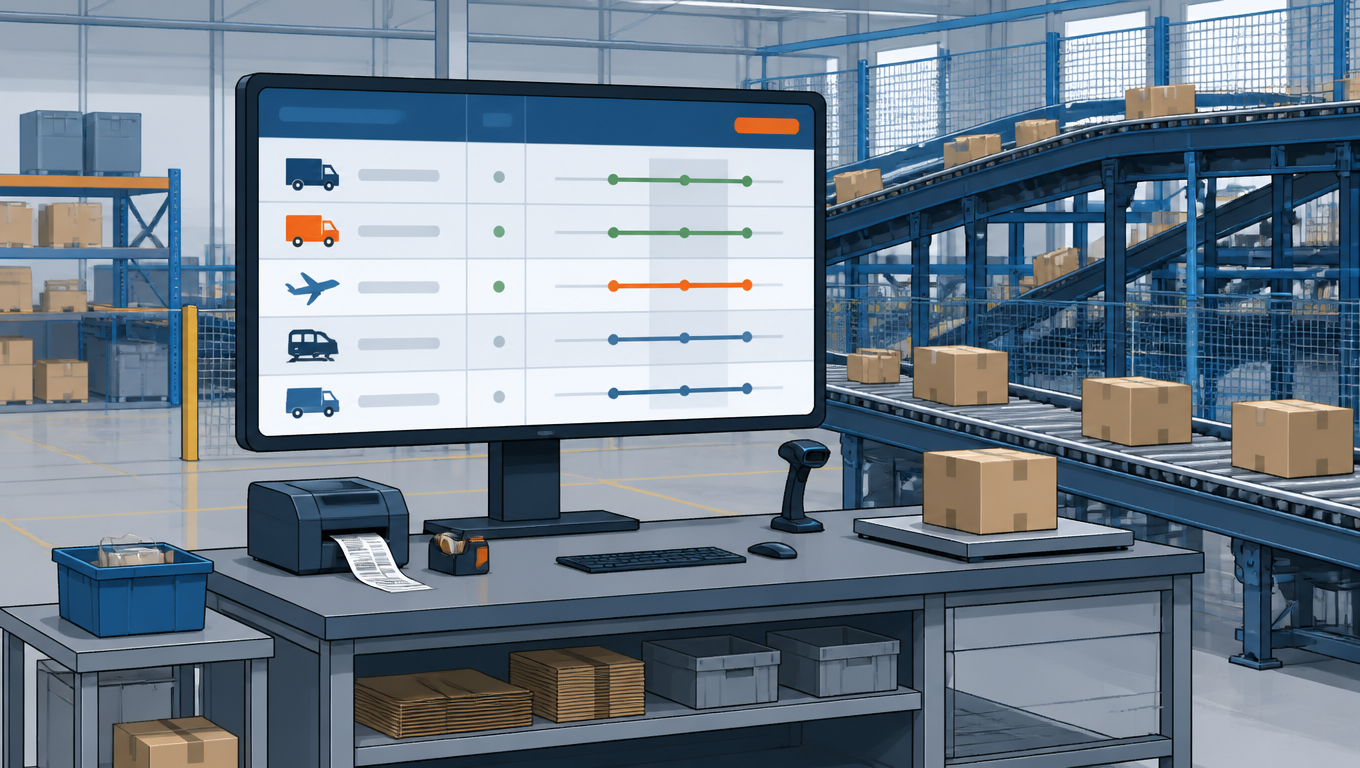
Every seller knows the feeling: the same order shipped on Monday costs $5, and on Friday the identical order costs $12. Nobody changed the product, the zone, or the box. Someone at the packing station simply made a different call, picked a heavier box, chose a faster service, or guessed at the carrier. That drift is not bad luck. It is the predictable result of letting shipping decisions happen by hand, order by order.
The fix is to move those decisions out of the packing station and into a rules system built once at the SKU level. This guide walks through the three layers that make it work: package profiles that define how every SKU ships, carrier routing rules that decide which service wins, and multi-item logic that handles orders with more than one product. We build it with a realistic mixed-catalog seller, four SKUs, real packed measurements, and ten orders run end to end.
Every order is a small auction: one package, a set of eligible services, and exactly one winner
Why SKU-Level Rules Beat Per-Order Guessing
The same order can cost two to three times as much depending on who packs it and which carrier gets picked. The variance does not come from rate cards. It comes from judgment: choosing a box by eye, upgrading to a faster service just in case, or defaulting to the carrier whose app is open. At a small scale those calls cost a dollar here and there. At hundreds of orders a week they quietly turn into thousands of dollars of avoidable spend per year.
Manual decision cost also scales linearly with SKU count. Every new product adds one more set of "what box, what carrier" questions that a human answers fresh on every order. A rules system is the opposite: it is built once, and each new SKU just adds one more profile. The same labor that today re-decides shipping hundreds of times a day is spent once, at configuration time.
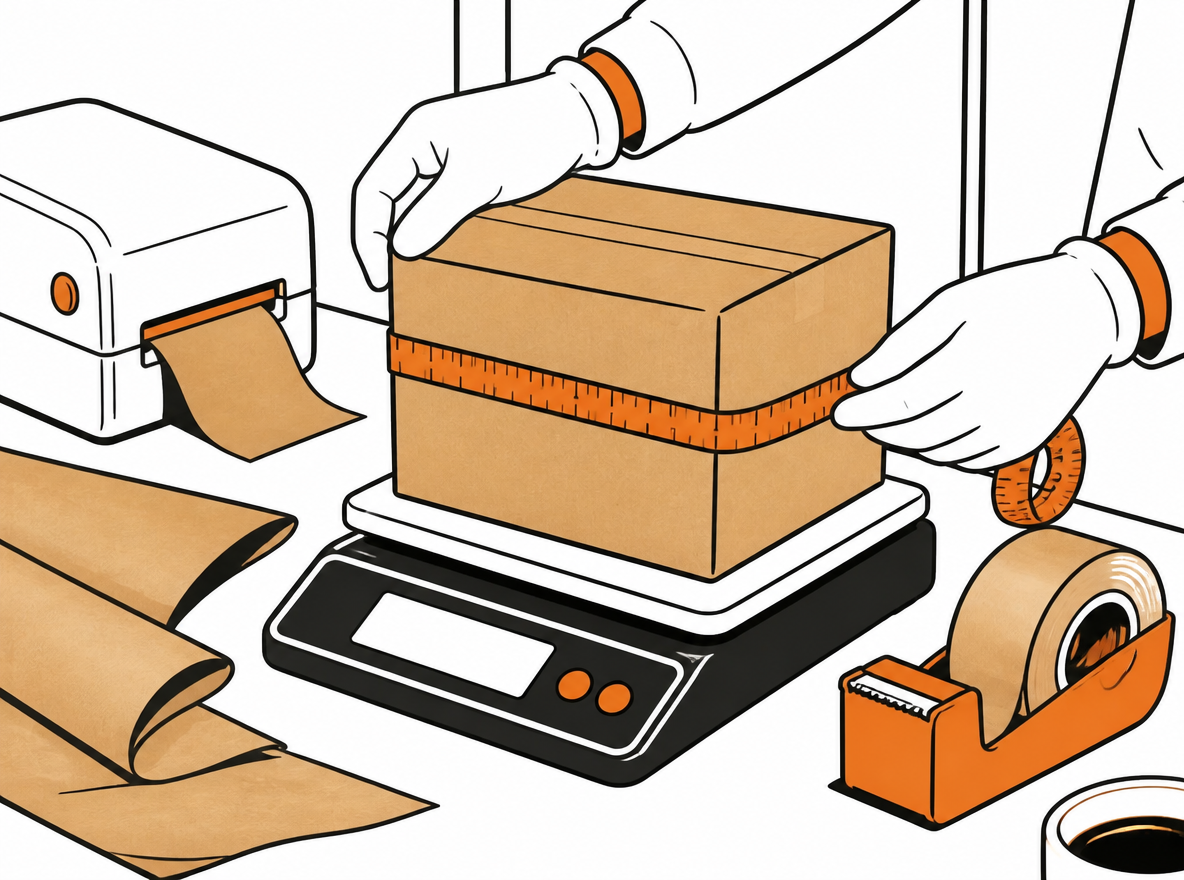
There is a warehouse view too. Packers do not want a judgment call on every order. They want an instruction they can execute at full speed, on every shift, without stopping to think. When the box, the carrier, and the service are decided before the order reaches the station, packing gets faster and mistakes get rarer. That is the real payoff of SKU-level rules: consistency of cost and consistency of execution, at the same time.
The system has three layers. First, a package profile for every SKU that captures how it actually ships and what it can tolerate. Second, carrier routing rules that filter and rank services for each profile. Third, multi-item logic that decides merge or split by comparing real quotes. Each layer is simple on its own. The power comes from stacking them.
The Example Catalog: Four SKUs, Four Rule Classes
To make this concrete, we follow a mid-sized seller with a deliberately mixed catalog. The four SKUs below are chosen so each one represents a different rule class: a light small parcel, a weight-sensitive apparel item, a fragile dim-weight-heavy home product, and an oversized odd-shaped item. If your catalog can produce rules for these four, it can produce rules for almost anything.
SKU
Product
Packing
Packed dims
Packed weight
Typical order
Price
Margin ceiling
A
USB-C wall charger (10W)
Bubble mailer
8 × 6 × 2 in
0.4 lb
1 unit (70%), 2 to 3 units (30%)
$24.99
$5.00
B
Heavyweight hoodie
Poly mailer
14 × 10 × 3 in
1.2 lb
1 unit (60%), 2 units (40%)
$45.00
$8.00
C
Ceramic table lamp
Cushioned box
20 × 14 × 12 in
4.5 lb
1 unit (85%), 2 units (15%)
$79.00
$22.00
D
Folding camp chair
Box, long side
28 × 8 × 8 in
6.8 lb
1 unit (90%)
$129.00
$25.00
A few notes on the numbers. Dimensions and weights are what the product measures once packed, not what the carton says on the spec sheet. The margin ceiling is the maximum shipping cost each SKU can absorb, derived from price and gross margin; we set it at roughly 20% of price so the math stays visible. Example rates throughout this guide are illustrative and rounded, but the decision logic is exactly what runs in production. The margin ceiling is a planning number, not a promise that a service at that price exists for every zone.
Step 1: Build a Package Profile for Every SKU
A package profile is a contract between the catalog and the shipping system. It says: when this SKU ships, here is what it will weigh, here is how it packs, here is what it cannot tolerate, here is the most we will pay, and here is where it goes when nothing qualifies. Seven fields cover the full contract.
Field
What it holds
Why it matters
Predicted packed weight & dimensions
Measured from real packed units, including padding and box variance
Drives dim weight and billable weight; garbage in, garbage out
Restrictions
fragile, hazmat, oversize, or none
Each restriction maps to a service-eligibility filter
Margin ceiling
Max shipping cost this SKU can absorb (from price and gross margin)
Cuts any service whose quote would erase the margin
Eligible carriers & services
Explicit whitelist
Prevents "all carriers open" defaults and off-list choices
Signature / insurance requirements
Enforced service attributes
Acts as a hard filter: services without them are ineligible
Multi-item packaging override
The box profile used when combined with other SKUs
Feeds merge-vs-split logic in Step 3
Fallback path
Exception queue, manual approval, or premium backup carrier
Defines what happens when every service fails
The first field deserves extra care because everything downstream depends on it. Measure actual packed units: box, padding, tape, the whole thing, across a sample of units, and use the conservative end of the range. A lamp that measures 20 × 14 × 12 in when packed by the person who packs fast is the number you ship with, not the 18 × 12 × 10 in the carton was designed for.
Dim weight is where most of the money hides. Carriers bill the greater of actual weight and dim weight, computed as length × width × height divided by a divisor.[1] Major carriers use 139 for domestic ground; some regional carriers use 166, which is friendlier to large boxes.[2] A package that is 20 × 14 × 12 in has a volume of 3,360 cubic inches. Divided by 139 that is 24.2 lb of dim weight; divided by 166 it is 20.2 lb. A 4.5 lb lamp is therefore billed at 24.2 lb or 20.2 lb, depending on the carrier, and that difference is exactly why routing rules exist. Run your own box sizes through the package size checker to see which of your SKUs are paying dim weight today.
USPS applies dim weight only above a volume threshold,[3] so small items like SKU A (96 in³) never see it, while SKU C and SKU D live under it permanently.
SKU
Packed (in, lb)
Dim / billable
Restrictions
Eligible services
Signature / insurance
Fallback
A
8×6×2, 0.4
Actual 0.4 (no dim)
None
USPS Ground Advantage, regional
None
USPS any rate
B
14×10×3, 1.2
Actual 1.2 (no dim)
None
USPS Ground Advantage, UPS Ground, regional
None
UPS Ground
C
20×14×12, 4.5
Dim 24.2 (139) / 20.2 (166)
Fragile
UPS Ground, regional with 166 divisor
$120 insurance required
Exception queue
D
28×8×8, 6.8
Dim 12.9 (139); long side 28 in
Oversized
Regional (local hub), UPS Ground
None
UPS Ground (premium backup)
Measure once, encode it into the catalog, and the packer never re-decides the box
Measure once, encode into the catalog, and the packer never re-decides the box or the carrier again. From the warehouse view, packaging standards make every packing action identical: the same box, the same padding, the same tape pattern, every time. Consistency in packing means consistency in the dim weight you are billed for, and that alone usually recovers the hour spent measuring. For a deeper look at what happens when package data is wrong, see our WMS package data audit guide.
Step 2: Define Carrier Routing Rules
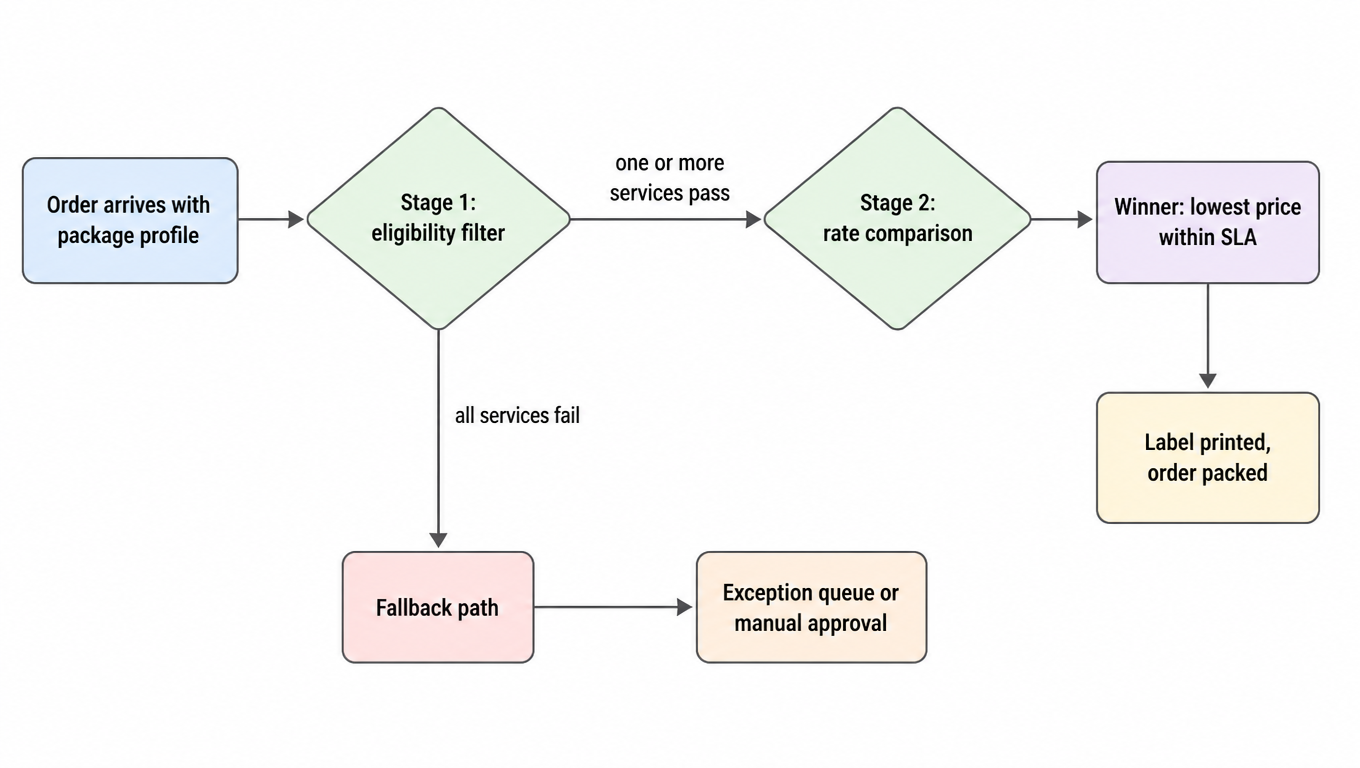
With profiles in place, routing becomes a two-stage filter, and the order of the stages is what makes it safe.
Stage 1 is the eligibility filter. Every service in the catalog is tested against the profile: it must be on the eligible list, it must respect restrictions (no fragile item on a service that handles packages roughly, no oversize item on a service that surcharges long sides), it must offer required signature or insurance, and its quote must fit under the margin ceiling. Anything that fails is out before any comparison happens. This stage is deterministic and cheap, and it prevents the classic failure where a cheap quote is selected first and the required attributes are discovered later.
Stage 2 is rate comparison on the survivors: the portal or API pulls live quotes, and the winner is the lowest price that meets the SLA, or the fastest service that fits under the margin ceiling, depending on how the seller wants to trade off speed and cost. Because Stage 1 already removed ineligible services, Stage 2 never has to choose between a cheap option and a safe one. It only picks among safe options.
Filter eligibility first, then compare rates; the order of the stages is the safety
Routing rules need four dimensions to cover real decisions: zone or distance, speed, weight and dim thresholds, and service class. The zone dimension is what makes regional carriers useful; the thresholds are what keep dim-heavy items off the wrong network; the service class structure is what separates the ground default from expedited exceptions.
SKU
Routing logic
Typical winner
A
Always USPS Ground Advantage, any zone
USPS, ~$4.80
B
Under 1.5 lb: USPS. Over: compare USPS vs UPS Ground
USPS for singles, UPS from 2 units
C
Fragile + $120 insurance: UPS Ground or regional with 166 divisor, lowest quote
Regional (166 divisor), ~$18.40
D
Zone 1 to 4: regional local hub. Beyond: UPS Ground
Regional, ~$15.70; UPS beyond coverage
The regional carrier story deserves its own line, and SKU D demonstrates it. A folding chair is 28 in on its longest side and 1,792 in³ of volume, which triggers both dim weight and long-side surcharges on national networks. A regional carrier with a local hub in the seller's metro area moves that package a short distance at a rate that ignores most of the penalty, which is why D ships regional within its coverage zones and only hands off to UPS Ground when the destination is outside them. This is the single biggest source of savings for sellers with heavy, bulky, or dim-weight-heavy products, and it only exists because the profile flagged the SKU as oversize instead of letting a human pick "whatever is cheapest today." It is the core idea of a multi-carrier shipping strategy applied at the package level.
Service classes follow a simple structure: ground is the default for every profile, and expedited appears only as an explicit exception. Most sellers find that fewer than 5% of orders genuinely need expedited, and every order that takes it without a rule is margin donated to the carrier. If an order really must arrive in two days, the rule says so; otherwise the default holds.
Conflicts between rules are settled by priority, not by whoever wrote them last. The most specific rule wins: a dim-weight threshold beats a zone default, a fragile restriction beats a speed preference, and a margin ceiling beats a brand preference. When two rules could both apply, the one that excludes the package is checked before the one that merely ranks it. That ordering keeps the safe answers ahead of the cheap ones. For a practical guide to encoding this kind of logic without breaking delivery promises, see automating carrier selection without breaking delivery promises.
And when every filter fails, the profile's fallback path takes over, never on-the-spot guessing. The order goes to the exception queue, to manual approval, or to a premium backup carrier, and it gets reviewed instead of shipped blind. From the warehouse view, routing rules remove decision fatigue entirely: the station receives one instruction, the label is already chosen, and the packer's only job is to execute. After go-live, audit how often each fallback actually fires; our post-go-live carrier rule audit guide shows what to look for.
Step 3: Handle Multi-Item Orders Without Losing Money
Multi-item orders are where per-order guessing does the most damage, because the decision is not "which carrier" but "how many packages," and the two answers produce very different bills. The rule is simple: never decide merge or split by feel. Compare real quotes for both configurations and take the cheaper one.
Merge logic is mechanical. Sum the actual weights, upgrade the packaging to the multi-item override profile of the largest or most fragile item, recompute dim weight for the combined box, and pull one quote. Split logic is equally mechanical: quote each item on its own profile and sum. The comparison is then a single arithmetic step, and it is cheap to automate.
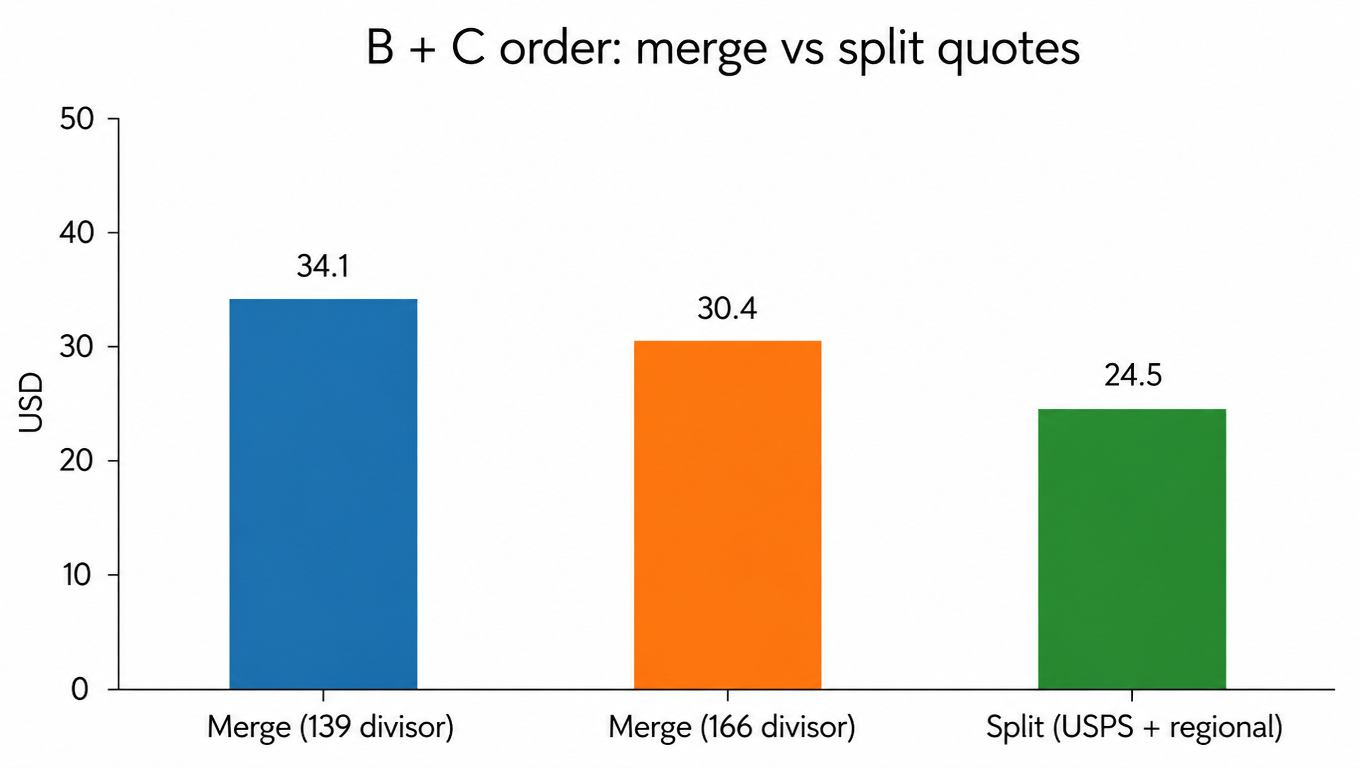
The classic split trigger is a light item paired with a heavy or dim-heavy one. In our catalog, a B+C order (hoodie plus lamp) makes the point painfully. Merged into the lamp's 20 × 14 × 12 in box, the combined package weighs 5.7 lb but bills at 24.2 lb of dim weight on a 139-divisor network, around $34; even on a regional carrier with a 166 divisor it bills at 20.2 lb, around $30. Split, the hoodie ships for about $6 on USPS and the lamp for about $18 on the regional carrier, around $24.50 total. The split saves $6 to $10 on a single order, and that difference is invisible to anyone packing by eye.
Let the quotes decide merge or split
Other split triggers follow the same pattern. Different carriers are strong for different items, so a combination where one item wants USPS and the other wants regional usually splits. Dim penalties on a merged box that no single item would have triggered argue for splitting. Conversely, merge wins when the combined weight stays under a weight threshold, when both items fit the same box profile without upgrading, or when the destination is remote and per-package surcharges punish a second box.
Box recommendation completes the loop. Instead of computing a box from scratch per order, the system matches the item combination against predefined box profiles (the single-item profiles plus the override profiles) and picks the smallest one that fits. The override field in each SKU's profile is exactly this: the box that two units of A use, or the box that a B+C merge would use, defined once and reused everywhere. The packer never measures or searches; the profile answers.
The warehouse view of this step is the same as the last: one instruction, not a judgment call. The label printer outputs "split: package 1 USPS, package 2 regional" and the packer executes both. When a real B+C order ran through the rule set above, the split saved the seller about $6 versus the merged box, and the packer did not spend a second deciding anything. For the same decision at warehouse level, see our multi-warehouse order routing framework.
A Worked Example: 10 Orders Through the Rules
Theory holds up until it meets a week of orders, so here are ten real-shaped orders run through the rule set as an example. Each row shows the order, the package that resulted, the carrier, and the cost. Watch for the two special cases: order 2 and order 4 exercise the multi-item override, and order 7 triggers the fallback path. The figures are illustrative.
#
Order
Package
Carrier
Cost
1
1 × A
8×6×2 mailer, 0.4 lb
USPS Ground Advantage
$4.80
2
2 × A
Override: 9×7×3 mailer, 0.7 lb
USPS Ground Advantage
$5.60
3
1 × B
14×10×3 poly, 1.2 lb
USPS Ground Advantage
$6.10
4
2 × B
Override: 16×12×4 poly, 2.1 lb
UPS Ground (beats USPS quote)
$8.90
5
1 × C
20×14×12 box, insurance $120
Regional (166 divisor)
$18.40
6
1 × D, zone 4
28×8×8 box, 6.8 lb
Regional local hub
$15.70
7
1 × D, zone 8
All eligible services fail margin ceiling
Fallback: exception queue
$26.90 approved manually
8
B + C
Split: B USPS + C regional
Two packages
$24.50
9
A + C
Split: A USPS + C regional
Two packages
$23.20
10
B + D
Split: B USPS + D regional
Two packages
$21.80
Order 2 shows the override doing its job: two chargers merge into the predefined 9×7×3 mailer at 0.7 lb instead of shipping as two loose mailers, and the bill drops from $9.60 to $5.60. Order 4 shows override plus Stage 2: two hoodies at 2.1 lb cross the 1.5 lb threshold, so the system compares USPS and UPS Ground, and UPS wins by $0.50. Order 7 is the fallback in action: a D going to zone 8 sits outside every regional coverage zone, and the UPS Ground quote of $26.90 exceeds the $25.00 margin ceiling, so the order lands in the exception queue and a human approves it. The rule did not ship blind; it surfaced the problem.
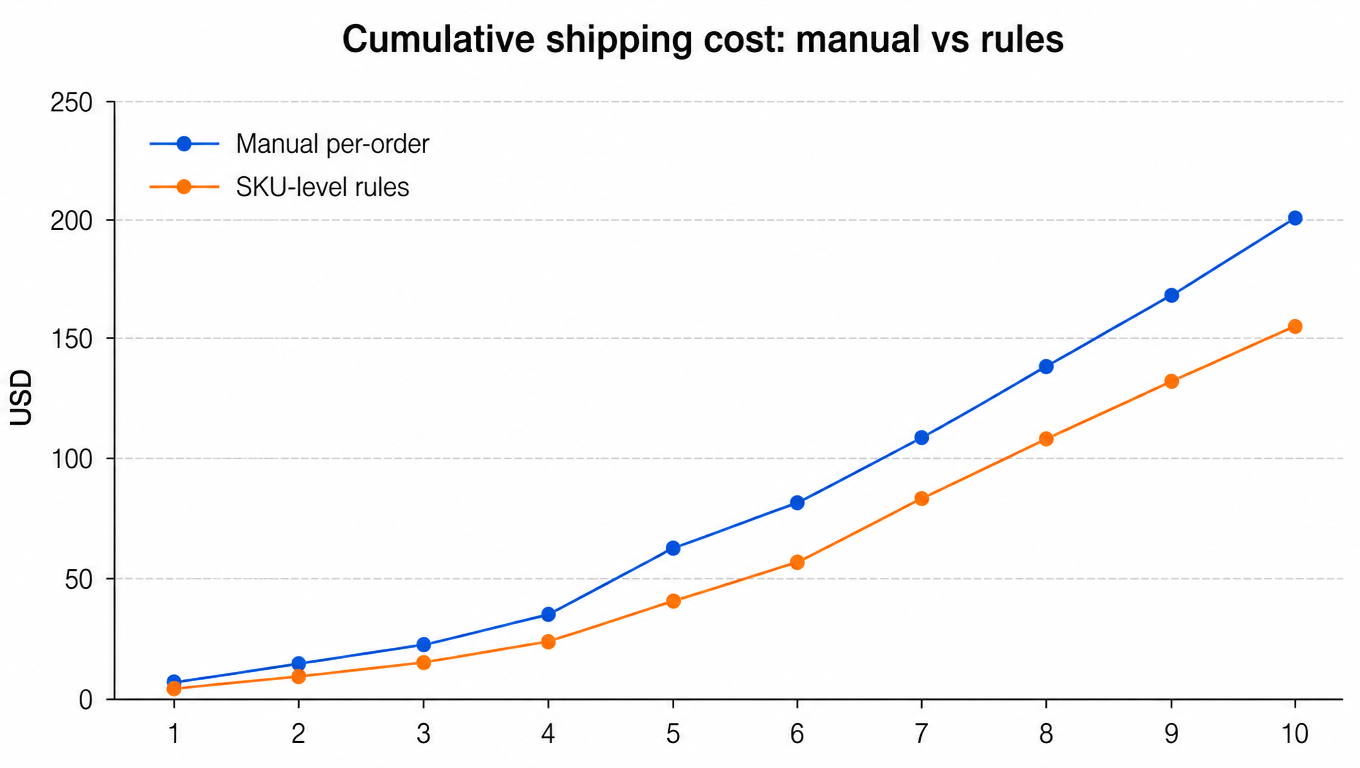
The same ten orders, handled the old way (pick a box by eye, default to whichever carrier app is open, merge everything into one box), tell a different story. Order 1 costs $6.90 because UPS got picked for a light parcel. Order 5 costs $26.80 because the lamp went on a 139-divisor network without shopping the regional quote. Order 8 ships merged at $30.40 because nobody compared the split. The manual tally comes to about $202.60; the rules tally comes to about $155.90.
The same orders, about 23% cheaper under the rules
That is $46.70 saved on ten orders, about 23%, with zero change to product, packaging quality, or delivery speed. Extrapolated across a seller doing 500 orders a week, the same share is roughly $2,300 a week, or over $100,000 a year, before counting the labor saved by removing judgment from the packing station. The rules do not work because the rates are magical. They work because they are consistent, and consistency compounds.
Common Mistakes and How to Fix Them
Ignoring dim weight, which usually means billing surprises on the first invoice of the month. Fix: measure every packed unit, compute dim for anything over a cubic foot of volume, and let the billable weight drive routing, not the scale.
Random box selection: a package that fits three different boxes gets the biggest one available, and dim weight quietly inflates. Fix: enforce the profile's box and override box, and only stock the boxes the profiles reference. If a box is not in a profile, it should not be on the shelf.
No regional logic: sellers with heavy or bulky items who route everything through national networks leave the biggest savings on the table. Fix: profile the dim-heavy SKUs, check regional coverage for the zones you actually ship to, and let the eligible list prefer the local hub where it exists.
Over-splitting: split rules that fire on every multi-item order produce two boxes, two labels, and two per-package surcharges where one box would have won. Fix: compare quotes both ways and only split when the numbers say so. The rule is a comparison, not a preference.
Stale rules: carriers republish rates every January and adjust surcharges mid-year,[4] and a margin ceiling set two years ago is fiction today. Fix: put a review on the calendar after every general rate increase and quarterly for dim-heavy SKUs. Re-pull quotes for a sample of representative orders after each change and adjust ceilings, eligible lists, and thresholds. Rules are a system to maintain, not a document to file. For a review checklist after go-live, see our carrier rule audit guide.
Start Small, Measure, Iterate
Do not build 500 profiles in week one. Start with the top 20% of SKUs by volume, the 80/20 that drives most of your shipments, profile them properly, route them through the two stages, and measure. Track exception orders carefully: every fallback trigger, every manual approval, every off-rule shipment is a signal that a profile, ceiling, or threshold is wrong, and each one tells you exactly which field to adjust.
Measure before and after cost per order on the same population. The comparison in the worked example, manual versus rules on identical orders, is the template: pick a representative week, run the ten-order tally, and re-run it a month after the rules go live. Watch cost per order, exception rate, and pack time. Tighten ceilings, add zones, refine overrides as the data accumulates, and let the rules earn their keep before you extend them to the long tail.
This is also where EasyShippingX fits. Its package profile library is the home for the seven-field schema above; carrier rules turn the two-stage routing into something the system executes instead of a spreadsheet; batch label printing removes the per-order grind from the packing station; and rate comparison, through the portal or the API, is the Stage 2 engine that picks the winner on every order. You design the logic, the system runs it, and the packer just packs.
The three layers close the loop on each other. Package profiles tell the system what an item is and what it can tolerate. Carrier routing turns that into a safe, priced choice on every single order. Multi-item logic decides merge or split by comparing real quotes instead of guessing. Built once, measured continuously, and tightened as rates and volumes change, the system does what no human can: it makes the same correct shipping decision on every order, every shift, at full speed. That consistency is the entire game.
A SKU-level shipping rule is a set of instructions attached to one product (SKU) that decides how it ships before the order reaches the packing station: the box or mailer from its package profile, the eligible carriers and services from its routing rules, and the merge-or-split decision for multi-item orders from comparing real quotes. It replaces per-order human judgment with a decision made once at configuration time.
Never decide by feel. Compute both: merge by summing actual weight, upgrading to the multi-item override box, and recomputing dim weight; split by quoting each item on its own profile and summing. Take whichever is cheaper. Split usually wins when a light item ships with a heavy or dim-heavy one, or when the two items prefer different carriers; merge wins when the combined weight stays under a threshold and the destination is remote.
Carriers bill the greater of actual weight and dim weight (length × width × height ÷ divisor, 139 for most domestic ground networks). A light item in a big box can be billed at several times its actual weight. This is why the package profile stores measured packed dimensions, why dim-heavy SKUs are routed to 166-divisor regional carriers, and why multi-item merges are compared against splits before shipping.
The profile's fallback path takes over, never on-the-spot guessing: the order goes to an exception queue, to manual approval, or to a premium backup carrier, and it is reviewed before it ships. Every fallback trigger is a signal that a profile, margin ceiling, or threshold is wrong, and it tells you exactly which field to adjust.
After every general carrier rate increase (typically January, with mid-year surcharge adjustments) and quarterly for dim-heavy SKUs. Re-pull quotes for a sample of representative orders after each change and adjust margin ceilings, eligible lists, and thresholds. Rules are a system to maintain, not a document to file.
EasyShippingX is a channel-neutral shipping layer: one consistent way to compare US domestic carrier options and execute through a portal, a spreadsheet, or an API. The machinery this guide describes, package profiles, carrier rules, live rate comparison, and merge-split logic, runs on your real shipment data. Run your catalog through the shipping cost calculator, see pricing, or book a multi-carrier workflow demo.