If you run a DTC brand and ship parcels inside the United States, SpeedX is a carrier worth knowing. It is a young last-mile network, founded in 2022, that now reaches 11,347 ZIP codes through eight entry gateways, and it publishes next-day and second-day services plus customs clearance and injection options. This guide is written for brand owners rather than engineers. It covers what SpeedX actually is, what it will and will not do, and what a real integration looks like across labels, tracking, and the order-to-delivery workflow, without assuming you have ever called a carrier API.
A SpeedX integration is three data flows, labels, tracking, and proof of delivery, working between your order system and the carrier
What SpeedX Is
SpeedX is a U.S. ecommerce last-mile carrier founded in 2022[1]. Its official materials address retailers, marketplaces, DTC brands, 3PLs, and logistics providers, and it publishes four service lines: next-day delivery, second-day delivery, customs clearance, and handling and injection for consolidated volume. It is not a freight forwarder or a cross-border line-haul provider; it is the final-mile piece of the journey once goods are already in the United States.
The current network covers 11,347 unique five-digit ZIPs organized into 108 service areas across 40 states and Washington, D.C., with entry through eight gateways: ATL, DFW, EWR, IAH, LAX, MIA, ORD, and SFO[2]. Gateway reach is not identical, so the practical rule is: choose the gateway first for your tender plan, then validate the exact destination ZIP when you create the label. State-level shading on the coverage map means serviceable ZIPs exist in that state, not that every address in the state is covered.
Why does this guide exist? Because carrier marketing tells you what a carrier wants to sell, and a brand owner needs the operational picture: which services are real, where the boundaries are, and how the integration actually works end to end. That is the gap this article fills. For the full last-mile picture, see our guide to last-mile delivery in the USA.
Published Services and Advantages
SpeedX publishes four services[3]. Treat each name as an offer, not as an unconditional per-shipment guarantee: whether a given parcel can actually use a service depends on the destination ZIP, cutoffs, the operating schedule, and the signed agreement.
Service
Published positioning
Confirm before launch
Next-day delivery
U.S. last-mile service for shipments requiring a tighter delivery window
eligible ZIPs, cutoffs, pickup or injection timing, contracted commitment
Second-day delivery
A published option balancing speed with operating cost
origin-destination pairing, weekend rules, and peak arrangements
Customs clearance
A customs step for cross-border goods entering the U.S. final mile
The advantages supported by public sources: delivery visibility (SpeedX publishes live tracking, SMS updates, geolocation data, and photo proof of delivery[4][2], which makes customer-service investigation much easier); a cross-border-to-last-mile handoff (customs, handling, and injection services connect upstream consolidation with U.S. final-mile delivery); tiered transit choices (next-day and second-day on eligible lanes, subject to ZIP validation); injection for consolidated volume (a published offer for logistics providers, meant for planned handoffs rather than ad hoc selection)[5]; and eight entry-gateway options (ATL, DFW, EWR, IAH, LAX, MIA, ORD, SFO) that support different inbound and consolidation routes.
Coverage and Parcel Limits
Unsupported addresses:Delivery to APO/FPO/DPO military or diplomatic addresses and PO Box addresses is not supported, even when the destination ZIP is within the coverage area.
SpeedX currently covers 11,347 unique five-digit ZIPs across 108 service areas in 40 states and Washington, D.C., with entry through eight gateways. The state-level map is a planning view for gateway selection: shading means the current footprint includes serviceable ZIPs in that state, not full-state coverage. For any single order, the exact destination must be validated at label creation, because eligibility is ZIP-level, not state-level.
DAS (delivery-area surcharge) and EDAS (extended delivery-area surcharge) may apply to some destinations[2]. Rules and amounts can vary by contract, so coverage and surcharges are two separate checks: first confirm the destination is serviceable, then confirm DAS or EDAS status against the account contract and the final label result. Never quote a landed cost that assumes no surcharge until both checks have passed.
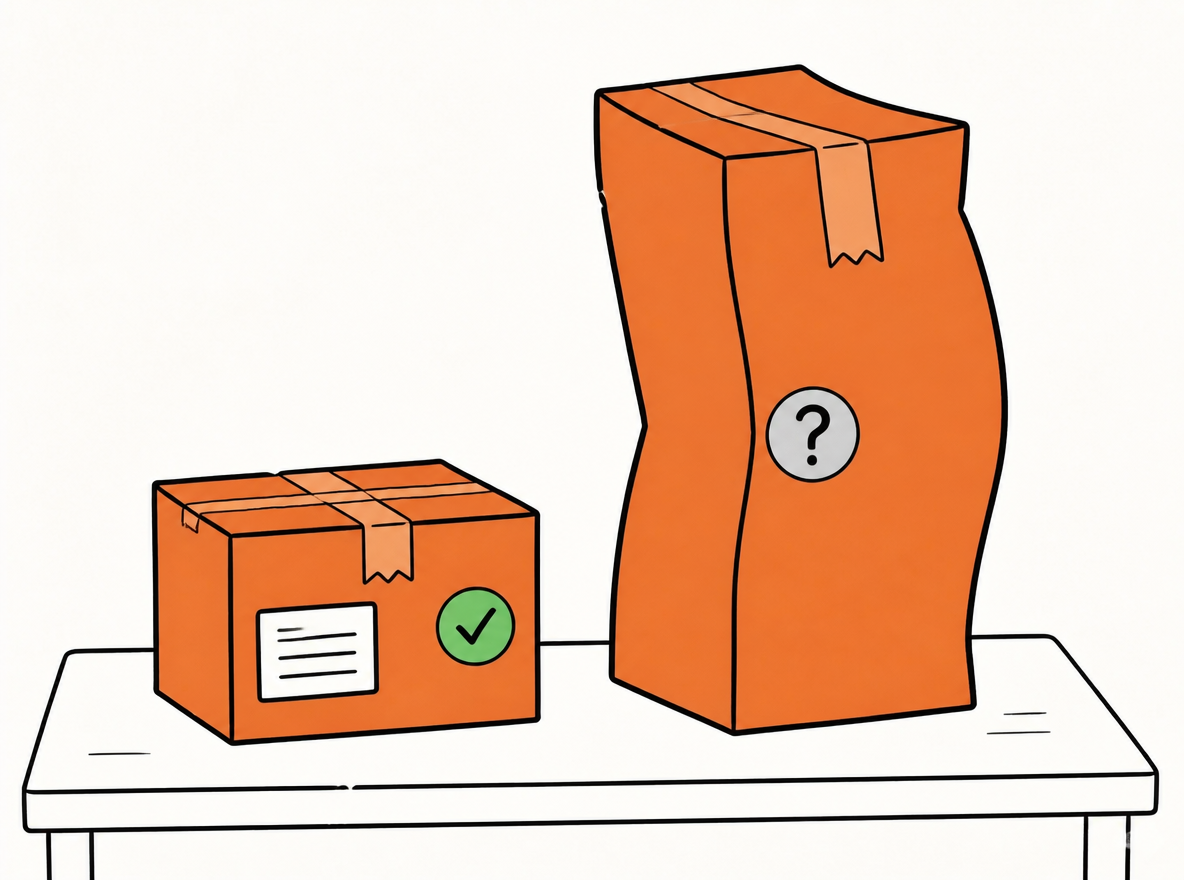
The SpeedX Commercial Team’s SpeedX Fuel Adjustment Update notice lists a permanent oversize adjustment that tests longest side, L+W+H, and weight separately: 24–35.4 in longest side carries $15; over 35.4 in carries $15 plus partner shipping rates. L+W+H of 120–150 cm carries $20; over 150 cm carries $30 plus partner shipping rates. Weight over 30 lb carries $200 plus partner shipping rates. Fixed surcharges are per package. When two types apply, use the higher surcharge; partner shipping rates are provided separately.This is a permanent rate adjustment continuing beyond April 20, 2027.SpeedX oversize charges and acceptance conditions
Parcel acceptance also has boundaries. SpeedX's public parcel-services agreement states that packages over 48 inches in length or over 50 lb require prior written SpeedX approval, and that territory may be changed by ZIP code[6]. This approval threshold differs from oversize charging thresholds; paying a surcharge does not replace written approval or guarantee acceptance below it: restricted commodities, packaging, labeling, and contract rules still apply. And the same caution that applies to services applies to transit names: next-day or second-day should not be treated as a per-shipment guarantee. The actual commitment must align with destination eligibility, induction timing, cutoffs, weekend and peak rules, and the signed service terms.
Good-Fit and Poor-Fit Profiles
Check oversize charges and acceptance separately; obtain required written approval before tender
SpeedX is a strong fit when your volume concentrates inside its current footprint. ecommerce parcels going to serviceable ZIPs, DTC shipments that benefit from live tracking, SMS, and photo proof of delivery, and 3PL or cross-border providers that can inject consolidated volume under manifest and injection rules all sit squarely in the good-fit column.
It is a poor fit when the profile pushes against the network's boundaries: highly dispersed volume that needs one carrier to reach every U.S. address, heavy or long parcels above the published approval thresholds without written approval, or programs that promise buyers a fixed transit time before validating cutoffs, weekends, exceptions, and claims terms.
How a DTC brand should read this: do not treat SpeedX as a single-carrier replacement. Route a slice of volume through SpeedX on serviceable lanes, keep fallback carriers for everything else, and expand only on measured results. For how regional carriers pair with national networks, see our guide to regional parcel carrier networks.
SpeedX Shipping Integration
For a brand owner, integration is simpler than it sounds. It means three data flows working between your order system and the carrier: creating labels, receiving tracking events, and getting proof of delivery. Everything else, manifests, invoices, exceptions, is built on those three flows. The integration section below walks through the architecture, the label lifecycle, tracking, the ecommerce workflow, the 3PL variant, and the risks to plan for.
Integration Architecture
There are two ways to connect SpeedX to your operation. The first is to build directly against the SpeedX API: your developers handle authentication, label creation, tracking polling or webhooks, and error handling themselves. The second is to consume SpeedX through a shipping platform such as EasyShippingX, where SpeedX is one carrier inside a multi-carrier workflow and the platform handles the technical plumbing once. The shipping API page has more on this path.
Whichever path you take, the same components must agree for every shipment: account configuration, service availability for the requested tier, ZIP eligibility, DAS or EDAS status, oversize charges, partner-network quotes, and parcel acceptance. That is why a label request is a validation moment, not just a print moment. The carrier checks the destination and parcel against its rules at the moment the label is created, and your system should surface the result honestly.
API Authentication and Environments
SpeedX integration is authenticated with credentials issued per account, and those credentials are attached to every request you send. You will normally be given two environments: a sandbox, for testing labels and tracking without live charges, and production, for real orders. The sandbox is where you replay real orders, check edge cases, and confirm your error handling before anything touches a customer.
For brand owners the guidance is short: credentials and integration work are handled by your developers or by the shipping platform, not by you. Insist on the same sequence everyone should use: validate in sandbox first, then flip to production with a small batch, then expand.
Creating a SpeedX Shipping Label
Required shipment data. A SpeedX label request needs the essentials you already have in your order system: the origin (warehouse ZIP plus the selected entry gateway), the destination address, the service tier, package weight and dimensions, the commodity, and an order reference. Coverage and surcharge validation all run against this data at label-creation time, so the quality of the label depends on the quality of the data you send.
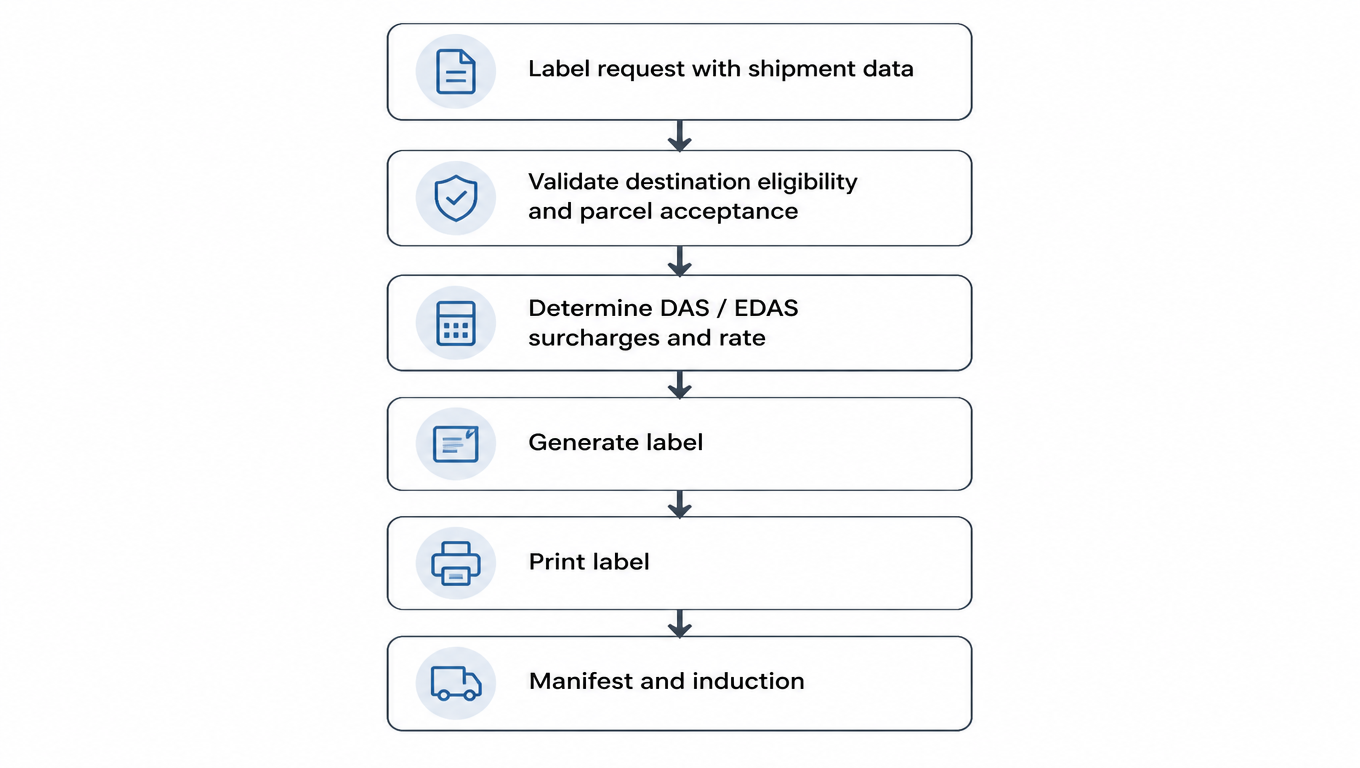
Label request lifecycle. A label request flows through a short, predictable sequence: the request is validated for destination eligibility and parcel acceptance, DAS or EDAS and the rate are determined, the label is generated, printed, and finally manifested and inducted into the network. Obtain complete oversize and partner-network pricing before tender; label creation alone does not confirm all charges or acceptance. Each step is a checkpoint to catch unsuitable shipments before handoff.
The label flow checks coverage and area fees; confirm oversize and partner-network costs separately
customerRefId and duplicate prevention. The order reference you send is not just for your own bookkeeping. It works as an idempotency key: the same reference maps to the same shipment, so retrying a request that timed out does not create a second label or a second charge[7]. This is the single most important detail in the whole integration.
Why should a brand owner care? Because network timeouts happen, and the classic failure is the operator who retries without reusing the key, then discovers two labels, two tracking numbers, and two charges for one order. When you retry, reuse the same reference. When you see a new label appear, check whether the reference was reused first.
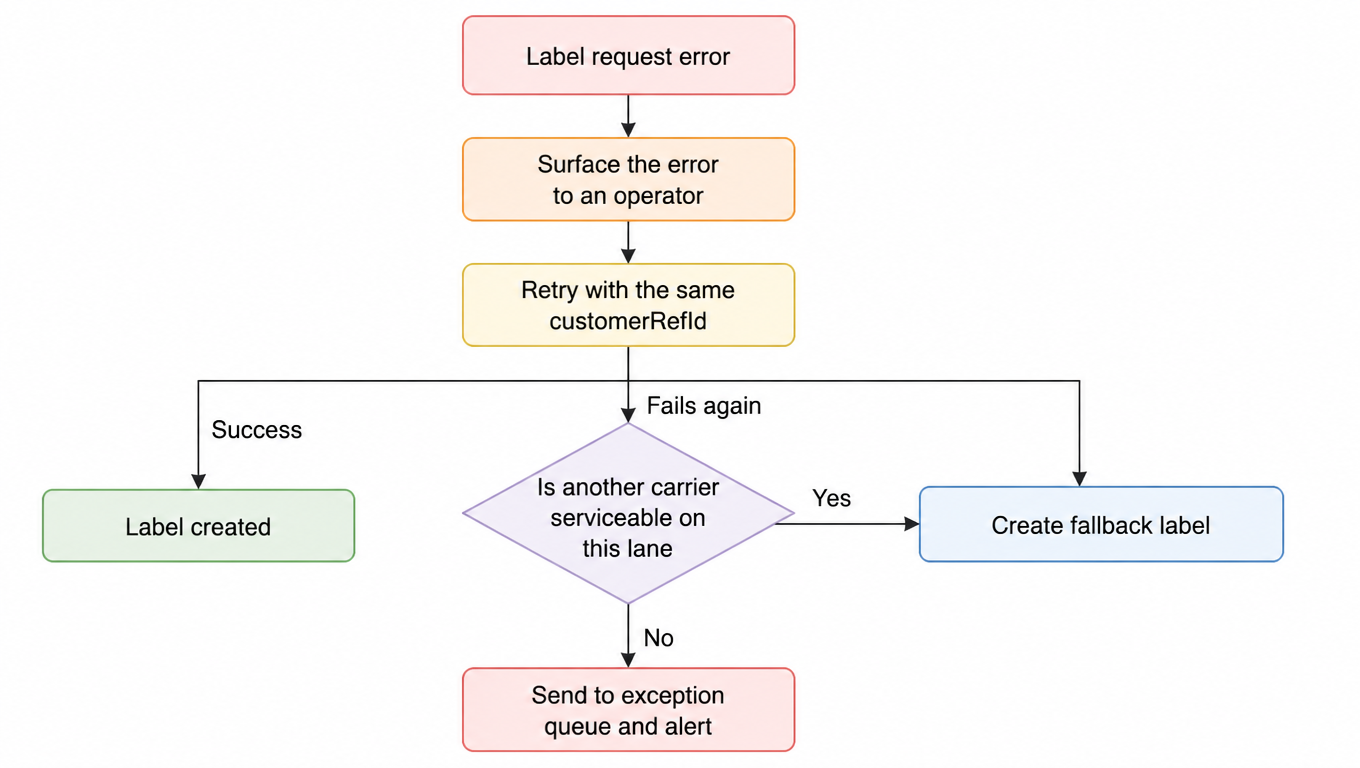
Error handling. Errors fall into a few predictable classes: validation failures (bad address, missing data), service unavailable for a ZIP, surcharge or approval flags, and network timeouts where the outcome is unknown. The handling pattern is the same for all of them: surface the error to an operator, retry idempotently with the same reference, and fall back to another carrier when the lane is not serviceable.
Idempotent retry, fallback carrier, and exception queue give every error a destination
SpeedX Tracking Integration
Tracking API. Every SpeedX shipment gets a tracking number, and that number returns a sequence of events over time[7]. Systems either poll the tracking API on a schedule or receive webhook events pushed to them; either way the data is the same. What a brand owner actually needs from tracking is simple: one tracking number per order, and status data that customer service and your branded tracking page can read without a human chasing the carrier. The tracking API page covers the general pattern.
Event normalization. Raw carrier events come in carrier-specific wording. Normalization maps them to a small, consistent set of statuses: picked up, in transit, out for delivery, delivered, and exception. This matters most in a multi-carrier setup, where SpeedX is one of several carriers and your customer-facing tracking page must not behave differently depending on who is delivering the parcel. Normalize once, and the tracking page stays reliable no matter which carrier handles the order. The full approach lives in our multi-carrier tracking guide.
POD / delivery confirmation. SpeedX publishes live tracking, SMS updates, geolocation data, and photo proof of delivery. The photo POD is the most valuable of these for you: it is the evidence that answers delivery investigations, supports dispute resolution, and backs up claims when a parcel is reported missing or delivered wrongly. Store it with the order, because the photo is the thing customer service will reach for three weeks later.
Ecommerce Order-to-Delivery Workflow
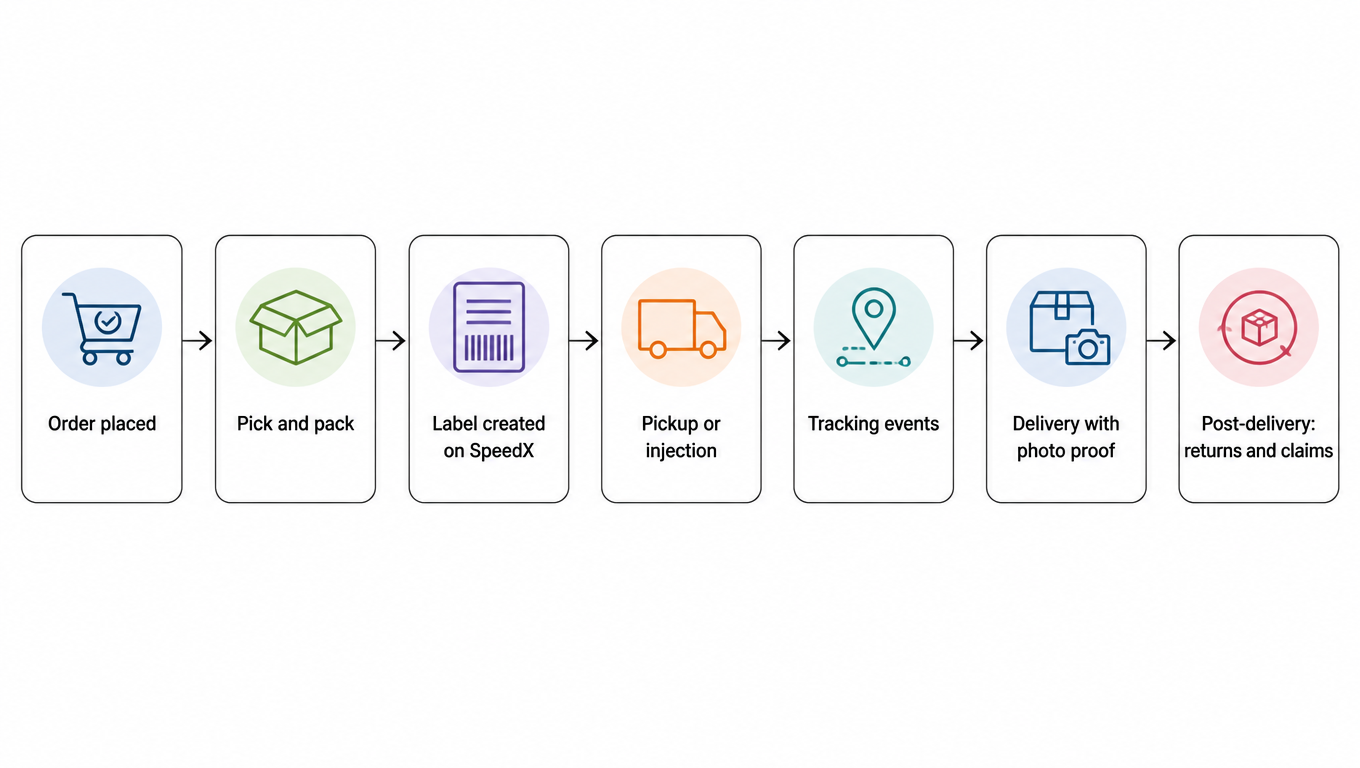
The full flow from a customer's perspective: the order is placed, picked, and packed; a SpeedX label is created; the parcel is picked up or injected; tracking events flow back; the parcel is delivered with photo proof; and post-delivery work, returns and claims, begins. Integration touches the flow at four points: order sync into the shipping system, label creation, tracking updates, and exception handling when something breaks.
Integration touches the order-to-delivery flow at four points
3PL / WMS Workflow
A 3PL uses SpeedX differently from a single brand. Instead of creating one-off labels, a 3PL consolidates volume and injects it under manifests: scheduled appointments, induction scans, and volume minimums replace the per-order rhythm. The customs-clearance and handling services are what make this possible for cross-border clients, because upstream consolidation can be handed off as a batch rather than as individual shipments.
In a WMS, the difference shows up as batch label creation, carrier-selection rules that pick SpeedX only on eligible lanes, and strict multi-client separation so one client's shipments and billing never bleed into another's. If you outsource fulfillment, ask your 3PL three questions before launch: which carriers are injected at which facilities, what the manifest cutoff is, and who owns exception handling when a SpeedX parcel fails.
Integration Risks and Failure Handling
The risks are knowable in advance. Label failures (validation rejections, duplicate labels), tracking gaps (missing scans, late events), DAS or EDAS surprises on destinations you assumed were clean, carrier outages, and invoice variance between what you expected and what you were billed. None of these should be discovered by customers.
The failure-handling patterns are equally standard: rule-based fallback to another carrier on serviceable lanes, idempotent retries with the same reference, exception queues where a human reviews what automation cannot resolve, and alerts so a pattern becomes visible before customers complain. The full staged rollout playbook lives in our low-risk shipping rollout guide.
Risk
Handling pattern
Label failures
idempotent retry with the same customerRefId; surface errors to an operator
Tracking gaps
poll or webhook fallback; alert on missing first scans
DAS / EDAS surprises
validate against the account contract before quoting and at label creation
Carrier outage
rule-based fallback to another carrier on serviceable lanes
Invoice variance
compare expected versus billed per shipment; escalate with POD
Finally, keep the ownership split straight: the brand owns the customer promise, the platform owns routing and technical execution, and the carrier owns delivery. When something goes wrong, the first question should always be which owner the failure belongs to, because that decides who fixes it.
Integration Launch Checklist
Before launch, work through the technical readiness items: sandbox label and tracking tests, a replay of real orders, coverage validation, DAS/EDAS, oversize-threshold and partner-network quote checks, label, manifest, and scan validation, and a limited-lane pilot. Each item exists to catch a class of failure while it is still cheap.
Then gate expansion on measured results, not on enthusiasm: on-time delivery rate, first-scan latency, exception rate, support contacts, and invoice variance. If a lane cannot clear these five metrics in pilot, it does not earn expansion.
Pre-launch Operational Validation
Operational validation mirrors the carrier page's five-step checklist[2]. First, select the entry gateway for your tender plan (ATL, DFW, EWR, IAH, LAX, MIA, ORD, or SFO) and use the state-level view for initial lane screening. Second, at label creation, validate the exact destination eligibility, service tier, and the account-contract DAS or EDAS status.
Third, replay real orders by weight, longest side, L+W+H, commodity, and gateway; include permanent oversize and partner-network costs and identify approval-required or fallback shipments. Fourth, validate the full operational loop: labels, manifests, induction scans, tracking events, delivery photos, address corrections, returns, and claims workflows. Fifth, pilot limited lanes and shipment profiles, then expand based on on-time delivery, first-scan latency, exceptions, support contacts, and invoice variance.
Before go-live, verify the carrier against your real orders, real lanes, and real parcel mix
The integration launch checklist and this operational validation are complementary passes: the checklist proves the technical integration is sound, and the operational validation proves the carrier behaves as advertised on your real orders, your real lanes, and your real parcel mix. Run both, and the go-live decision is based on evidence rather than hope.
Using SpeedX with EasyShippingX
EasyShippingX acts as a channel-neutral shipping layer: it gives you one place to compare U.S. carrier options, including SpeedX[2], and then execute through the Portal, Excel, or the API. In practice this means your team can evaluate SpeedX pricing and onboarding requirements, confirm coverage and parcel acceptance, and route eligible orders to SpeedX inside a multi-carrier workflow while everything else stays on your existing carriers.
Two notes keep expectations honest. First, available features, API fields, tracking mappings, and billing rules depend on your account, product, and contract configuration, so confirm each item with test orders before launch. Second, EasyShippingX compares and routes among carriers; it does not itself provide SpeedX's network, rates, or service commitments. Those come from SpeedX and your agreement with it. See the SpeedX carrier page for the carrier details.
Company information, published services, and tracking capabilities can be verified on the official SpeedX site and its logistics-provider page. Weight, length, and territory terms come from the SpeedX Parcel Services Agreement. Oversize charges come from the SpeedX Commercial Team’s SpeedX Fuel Adjustment Update notice; partner shipping rates are provided separately. What this article deliberately does not claim: no invented API endpoints or field specifications, no rate promises of any kind, and no unconfirmed marketplace native connection capabilities. The coverage map is a state-level planning view of the current operating footprint, not a transit, performance, or rate commitment. Exact eligibility, DAS or EDAS rules, and pricing are always confirmed against the account contract at label creation.
EasyShippingX is a channel-neutral shipping layer: one consistent way to compare US domestic carrier options and execute through a portal, a spreadsheet, or an API. Validate in sandbox with real orders, flip to production with a small batch, then let on-time delivery, first-scan latency, exceptions, and invoice variance decide expansion. See pricing or book a demo.
SpeedX publishes next-day delivery, second-day delivery, customs clearance, and handling and injection services. Availability depends on destination eligibility, operating arrangements, and your contract.
The current footprint contains 11,347 unique five-digit ZIPs across 108 service areas and supports 8 entry gateways. The state-level view supports lane planning, but the exact destination should be validated at label creation for every shipment.
Yes, DAS or EDAS may apply to some destinations. Eligibility and amounts depend on the destination and the active account contract, so check both before quoting and at label creation.
The permanent oversize adjustment tests longest side, L+W+H, and weight separately: 24–35.4 in longest side carries $15; over 35.4 in carries $15 plus partner shipping rates. L+W+H of 120–150 cm carries $20; over 150 cm carries $30 plus partner shipping rates. Weight over 30 lb carries $200 plus partner shipping rates. Fixed surcharges are per package. When two types apply, use the higher surcharge; partner shipping rates are provided separately. This adjustment is permanent and continues beyond April 20, 2027. Charging thresholds differ from acceptance approval: length over 48 in or weight over 50 lb still requires prior written SpeedX approval. Paying a surcharge does not guarantee acceptance.
Length over 48 in or weight over 50 lb requires prior written SpeedX approval. Weight over 30 lb carries a permanent $200 per-package Oversize Surcharge plus partner shipping rates. Payment does not replace approval; contents, packaging, labeling, and account acceptance rules still apply.
Directly, it is a development project: authentication, label lifecycle, idempotent retries, and tracking all need code and testing in sandbox first. Through a shipping platform like EasyShippingX, SpeedX is one carrier inside an existing multi-carrier workflow, and the platform handles the technical plumbing.
Not based on marketing alone. Pilot by lane and shipment profile, then use actual service and invoice data, including on-time delivery, first-scan latency, exceptions, and invoice variance, to decide whether to expand.