Shipping Guide

UniUni vs USPS: Compare Eligibility Before Total Shipping Cost

Check eligibility first, then compare the full cost of the same orders. Neither UniUni nor USPS becomes the default winner from weight, a city name, or a coverage map alone. A warehouse or 3PL also needs handoff cost, first acceptance scans, delivery performance, and billing adjustments in the same evaluation.

This guide provides an evaluation method rather than a universal rate card or a fixed savings promise. Keep the actual enabled product, quote date, and parcel dimensions beside each result so the comparison can be repeated when rates or coverage change.

A warehouse team preparing parcels for a carrier comparison

Identify the product before comparing carriers

UniUni’s API documentation describes rating inputs such as weight, dimensions, destination, and the origin handoff location, with an estimated delivery date in the response. This supports product and parcel-specific rating; it does not establish one price for every account, ZIP, or service. Source: UniUni integration documentation.

Use the official USPS Ground Advantage product page and effective price list for eligibility, dimensions, weight, and rating rules. Record published prices, negotiated account rates, and platform quotes separately; one price does not establish every shipper’s cost. Source: USPS product page; the current Notice 123 is effective October 4, 2026.

What each network actually solves

What UniUni solves is final-mile delivery in dense areas. Its public integration documentation describes rating inputs such as weight, dimensions, destination, and origin handoff location, with an estimated delivery date in the response. The same parcel from the same warehouse can therefore return a different result and transit window depending on product coverage and route density. A regional coverage figure describes a market, not a single shipment.

What USPS solves is deliverability to any address. As a national postal network, its eligibility and rating rules come from published product pages and the effective price list, and its price varies with zone and billable weight. It does not decline a parcel because a route lacks density, which is why it is the most commonly cited alternative for destinations a regional product does not cover.

So this is not a cheap versus expensive comparison. It is low cost inside dense areas with narrower eligibility, against universal availability with distance-based pricing. Declaring a winner from a city name or a coverage map skips the step that actually decides cost: whether this shipment qualifies for a specific product at all.

To evaluate UniUni, share the warehouse ZIP, destination mix, weight, dimensions, and contents. EasyShippingX can screen orders against product coverage and charges, then use a pilot to review the first scan, tracking, available delivery photos, and final billing. Explore UniUni services · See UniUni coverage and tender details.

When comparing USPS options, enter the origin, destination, address type, weight, dimensions, packaging, and contents. EasyShippingX uses those details to show available services and compare costs. After label creation, keep the physical handoff time and first USPS scan in the shipment record. Explore USPS services · See USPS shipping options.

Compare both services on the same worksheet

CheckUniUniUSPSDecision
Account and productExact UniUni product and enabled account eligibilityExact USPS service and account pricePause rate-based routing if eligibility is unconfirmed
Warehouse and ZIPVerify origin handoff hub and destination availabilityVerify address type, lane, and current restrictionsUse an independently verified alternative for uncovered orders
Parcel and contentsValidate weight, dimensions, and contents for the productValidate mailability and billable dimensions for the serviceUse actual weight and dimensions from the same order
Full chargesRetain quote, handoff cost, and applicable extra chargesRetain quote, billable weight, and applicable extra feesCompare the same effective period and charge scope
Execution and billingVerify first scan, exceptions, refunds, and invoiceVerify acceptance, exceptions, refunds, and invoiceExpand only after a small pilot meets your criteria

A coverage percentage is not per-shipment availability. If UniUni is unavailable for an order, intercept it before label creation and validate USPS or another product. Include partner final mile, handoff, transit, fees, and tracking relationships only when the written product rules confirm them.

Put the full charge scope on the same worksheet

Treating a quote as the cost is the most common mistake in this comparison. For the same shipment, both paths must use the same charge scope, otherwise the difference you calculate is only a difference in definitions. Every item below belongs on the worksheet, with its source and effective date noted.

Charge itemWhere it comes fromWhy it changes the result
Base transport chargeEffective quote for the enabled service, priced by billable weight and destinationA wider quote range on one path means the sample must cover both ends
Origin handoff and acceptanceTransfer arrangement from the origin hub to the tender point, cut-off time, and first acceptance scanDifferent arrangements add labor or waiting and change traceability
Accessorial itemsResidential, remote or extended area, fuel, weekend, oversize and similar applicable itemsA lower base price can be reversed by a single accessorial item
Billable weight and dimensionsGreater of actual and dimensional weight, minimum billable weight, and irregular packaging rulesThe same box can map to a different billable weight under two rule sets
Returns and redeliveryHandling and cost ownership for return to sender, address correction, and redeliveryCategories with higher return rates amplify the gap between the two paths
Invoice adjustmentsPost-invoice weight corrections and charge adjustmentsOnly mature invoices confirm the real unit price

An absent quote is not zero cost. When a path is unavailable for a shipment, record it as unavailable and move to a validated alternative rather than entering 0 into the total. If the two quotes were issued too far apart in time, the conclusion does not hold either.

Decide in the order of eligibility, full cost, and execution

StepWhat to verifyIf the check fails
1Account product, origin hub, destination, contents, and parcel eligibilityIntercept and validate an alternative or review manually
2Full quote and handoff cost for the same order and dateComplete the charge scope before deciding
3Written transit conditions, exceptions, and customer promiseKeep a validated path that meets the promise
4Pilot acceptance, delivery, billing, and fallbackHold at small scale or roll back and review
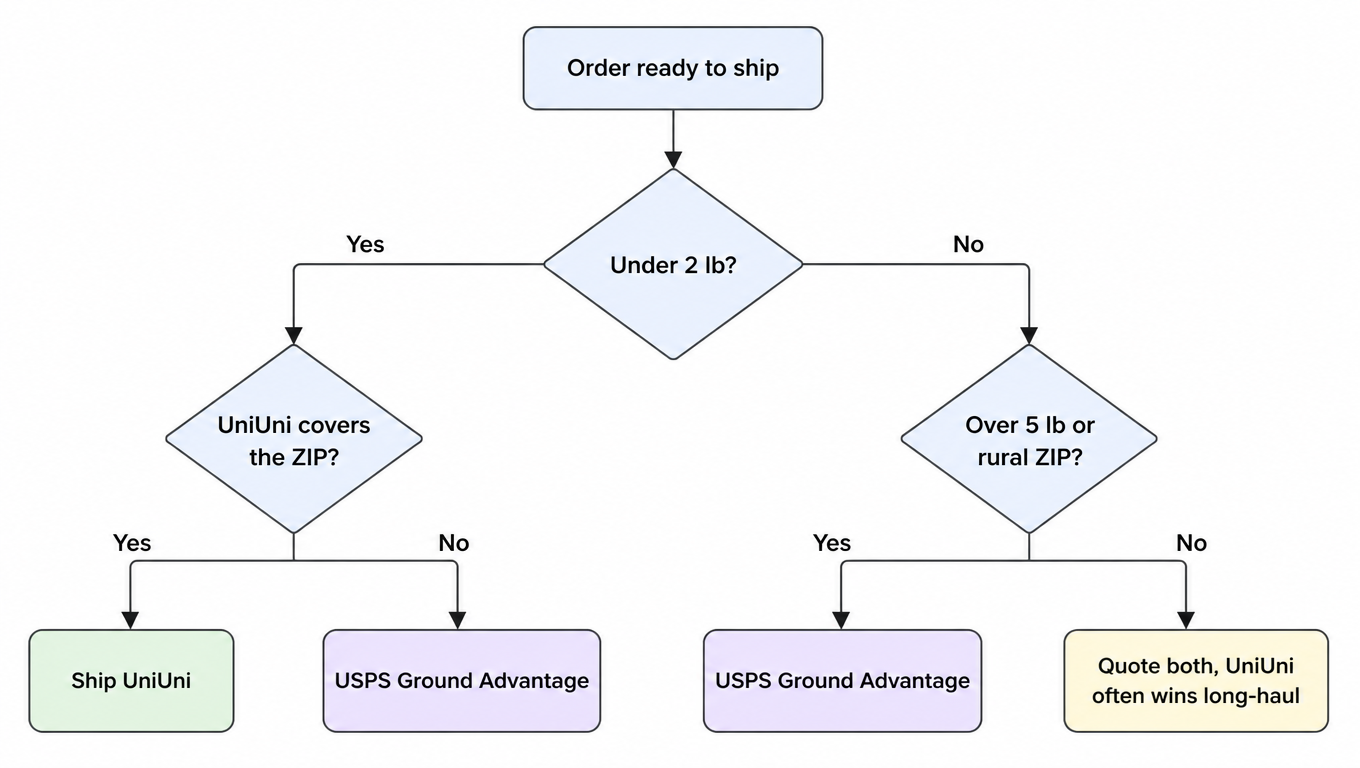
Segmentation flow: split orders by weight and destination, verify coverage and eligibility, then compare full cost and pilot results
Segments organise the evaluation; they are not validated routing rules

Weight bands help with sampling but do not determine a winner. A light parcel may fail a product’s eligibility checks, and a heavier parcel does not establish that USPS is cheaper. Apply the worksheet to every segment and retain each failure reason.

Three evaluation scenarios without a predetermined rate result

Light parcels within a metro: retain each eligible product’s quote, dimensions, handoff cost, and effective date. If both meet the promise, choose using full cost and pilot results. Sharing a city does not establish the same rate or transit.

Orders outside a regional product’s coverage: mark failed destination eligibility as unavailable. Independently validate USPS or another service and retain its quote, address eligibility, and handoff arrangement. An absent quote is not zero cost.

Mixed orders for multiple clients: segment by warehouse, client promise, contents, dimensions, weight, and destination. Keep a same-period control on the existing path for each segment, calculate full charges, and then review mature invoices and exceptions. Client billing and carrier cost have different definitions.

Worked example: turn segments into a difference

If two eligible services have full costs A and B, the difference per order is A − B, and across N eligible orders the segment difference is N × (A − B). The table below is a hypothetical example that illustrates only the arithmetic; the values are placeholders, not quotes and not savings results.

SegmentFull cost per order, path AFull cost per order, path BDifference per order (A − B)Orders this monthSegment difference
Light parcel, same metro$4.20$5.10−$0.90300−$270
Light parcel, cross-country metro$4.60$6.80−$2.20120−$264
Heavy parcel, rural destination$9.40$8.90+$0.5060+$30
Total480−$504

This table shows arithmetic, not a quote. Substitute your own eligible orders, effective quotes, and real counts to get the segment difference that applies to you; add returns, invoice adjustments, and any new labor cost separately instead of multiplying one order’s difference across a whole year.

What a pilot has to record before you expand

The purpose of a pilot is not to confirm which service is cheaper, but to confirm that the worksheet above holds inside your own warehouse. Without records, the pilot ends with an impression rather than a decision.

RecordPassing example
Quote and effective dateQuote stored with the shipment record, with the date it was issued
Label and physical handoffHandoff matches the promise and the first acceptance scan appears inside the agreed window
Delivery result and exceptionsScan trail is complete, and exception handling has a documented entry point and owner
Invoice differenceInvoice matches the quote; any difference traces back to a specific adjustment note
FallbackA failed eligibility check is intercepted before label creation and falls to a validated alternative
OwnershipA named owner for approving expansion, handling failures, and reviewing invoice differences

Organise the pilot by origin hub, destination segment, and parcel profile, cover your highest-volume segments, and let it run through one full settlement cycle before expanding. A sample that is too small turns a one-off exception into a trend, and a sample that is all local hides the real cost of handling uncovered orders.

Apply the comparison in a warehouse or 3PL workflow

Confirm enabled services and handoff arrangements first, then use the Portal, Excel workflow, or API for real order quotes. Validate the onboarding method separately from service eligibility; automatic routing and fallback require configuration and verification in the account workflow.

A small pilot should retain the quote record, the label, the first acceptance scan, the delivery result, and the invoice. Record who approves expansion, who handles eligibility failures, and who reviews quote-to-invoice differences so the packing station does not improvise new rules.

Continue with carrier serviceability validation, multi-carrier strategy, quote versus final charge, and zones, coverage, and delivery area surcharges, or open the UniUni versus USPS carrier comparison.

FAQ

No. Validate service, origin hub, destination, and parcel eligibility before comparing full charges and execution for the same order. Weight or city alone does not identify a winner.
Do not assume a handoff. Intercept before label creation and verify an eligible alternative. Include partner final mile, fees, handoff, and tracking only when the specific product’s written rules confirm it.
Use the effective Notice 123 and actual account quotes, recording service, date, zone, billable weight, dimensions, and applicable extra charges. Published prices do not replace every account’s negotiated rates.
Configure and validate enabled services, eligibility-failure handling, full-charge comparison, and fallback first. Expand gradually after a small pilot rather than switching every order using a fixed weight rule.
Yes, provided each usable service and rate is enabled and verified in the account. Which one becomes the default follows eligibility and full charges, not the brand.
Intercept it before label creation, move it to manual review or an independently verified alternative, and log the failure reason and the person who handled it. Do not let the packing station improvise at the bench.
After every price list update, any product or coverage change, and once each settlement cycle closes. Keep each quote’s effective date beside its amount so the review only touches what changed.

Sources and review scope

Reviewed by the EasyShippingX editorial team on October 4, 2026. The review covers public product and rating-input descriptions, the current USPS price list, and this decision method. It does not verify a reader’s private account prices, enabled services, or customer savings results.