USPS Shipping Guide

USPS Tracking Status Meanings: In Transit to Delivered

In Transit means the package is moving through the USPS network. Out for Delivery means it is on the local route. If it shows Delivered and is missing, check the recorded drop-off location.

USPS tracking shows dated events. Scans can be spaced out while a package moves between facilities. To assess a delay, read the last status and its timestamp alongside the estimated delivery date. USPS status help

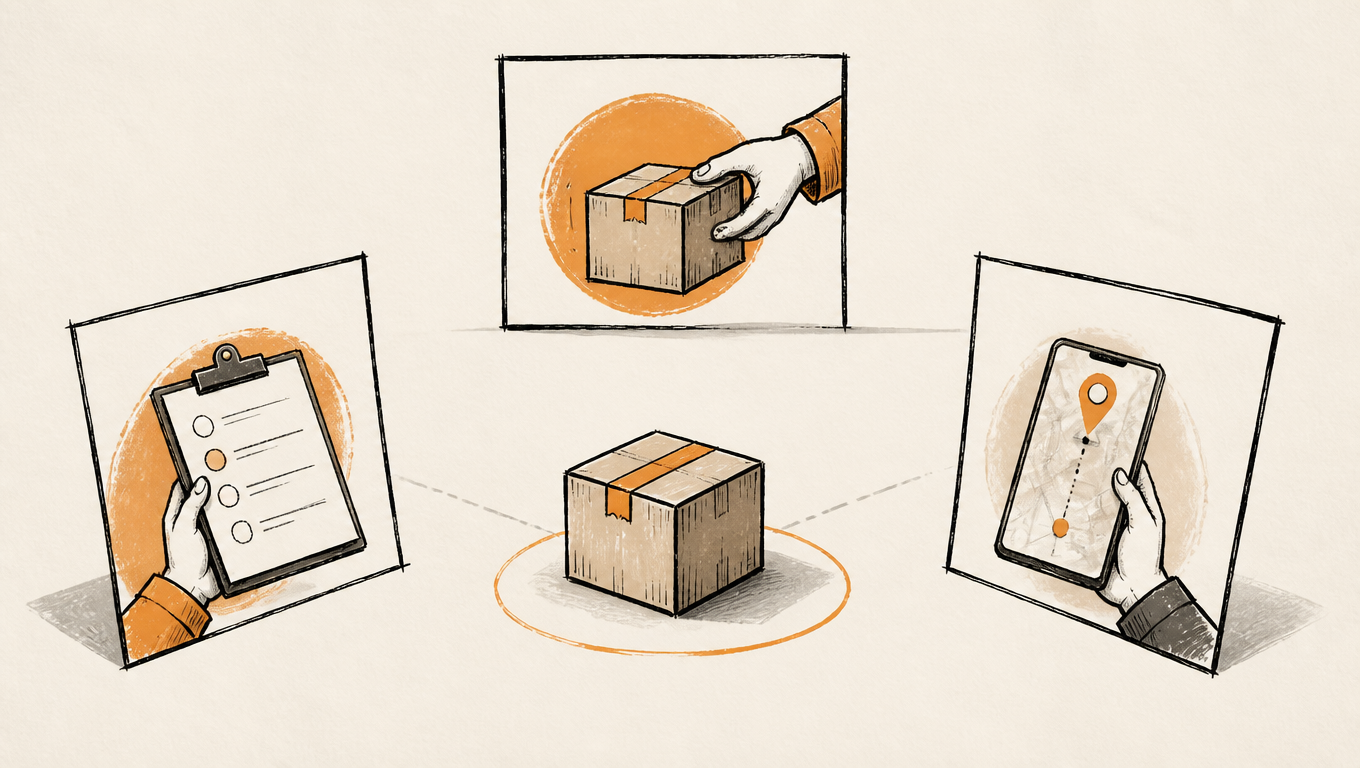
Postal carrier hands a barcoded parcel to a recipient on a neighborhood street.
One label, one chain of scans: the whole journey from creation to delivery

From Label to Delivered: The Life of a USPS Package

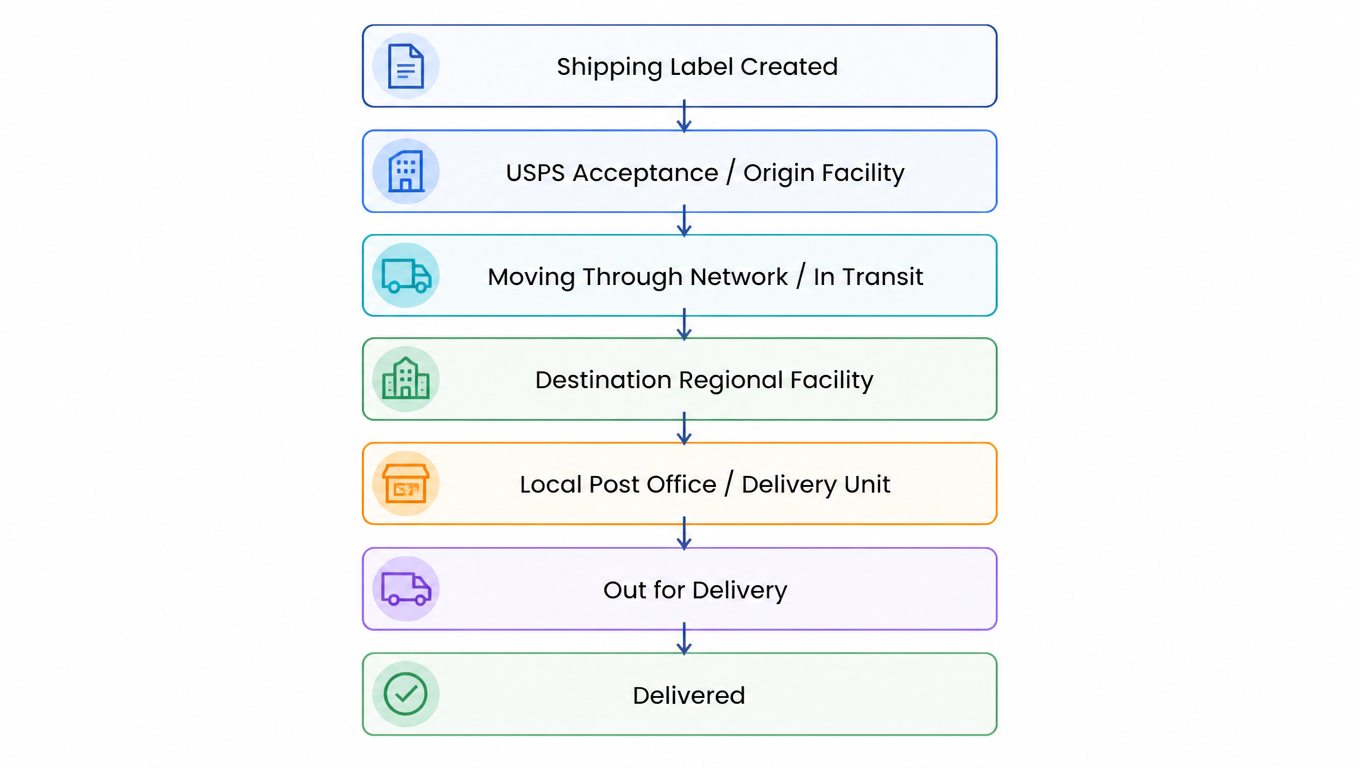
A domestic USPS package normally passes through these stages in order, from handoff to delivery. Treat the chain as a map: for any status you see, you can locate where the package sits on it, what should have happened before, and what should come next.

USPS parcel lifecycle from Shipping Label Created through acceptance, processing, transit and local delivery to Delivered.
The happy path: every status has a seat on this chain

Start with the latest event that names a location. Several Arrived and Departed pairs can reflect handoffs between facilities. Once the parcel reaches the local post office, check whether it goes out for delivery, becomes available for pickup or gets a delivery exception.

Tracking may show a status, a location and an estimated date. Note the last named location, the time of that event and the current estimate. If the order page and USPS disagree, compare the same tracking number and the time the event occurred.

Shipping Label Created and Acceptance: "Label Created" Is Not "Package Received"

Shipping Label Created, USPS Awaiting Item means a label exists and USPS has yet to confirm receipt. If the seller’s ship-by date has passed, ask the seller whether the parcel was handed over and to whom. USPS in Possession of Item means USPS received or collected it. USPS acceptance status help

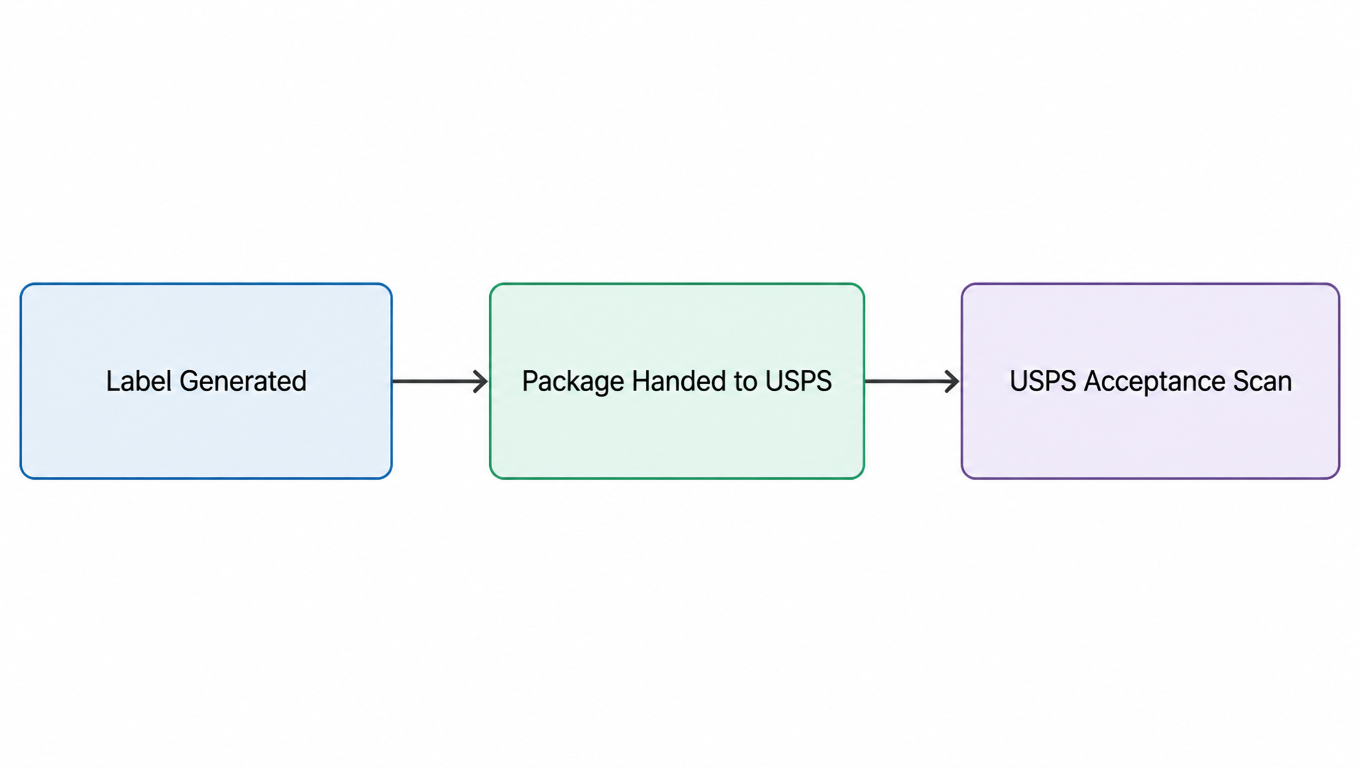
Three distinct events: label generated, parcel handed to USPS and USPS acceptance.
Label generated, package handed over, carrier acceptance: three different facts

Does the shipping partner or USPS have the parcel?

If the message says Picked Up by Shipping Partner, USPS Awaiting Item, or records arrival or departure at the partner’s facility, the parcel is in the partner’s network and USPS is still waiting for it. Ask the seller which partner has it and when the handoff is expected. USPS guidance on shipping partner updates

Shipment Received, Package Acceptance Pending means a USPS facility has received a group of parcels and individual processing is pending. Recipients can watch for the piece-level update. A seller or warehouse can check that the parcel was included and record batch handoff and individual acceptance separately. USPS guidance on pending acceptance

Sellers can state the confirmed handoff in a customer update. For example, “Our warehouse handed the parcel to the shipping partner. USPS tracking still shows it is awaiting the item. We’ll check the next handoff.” For a batch-to-label mismatch, see the USPS manifest troubleshooting guide.

Moving Through the Network: Arrived / Departed, Regional Facilities, and In Transit

Arrived at USPS Facility / Regional Facility and Departed USPS Facility / Regional Facility record the package being scanned into or out of a processing node. To read them, know the three facility types: the local post office and Delivery Unit (last mile), the Regional Facility (collection and distribution for one area), and the Network Distribution Center (long-haul trunk line). Packages move between nodes as handoffs, which is what those Arrived / Departed pairs are.

Arrived at USPS Regional Destination Facility places the parcel at a processing center for the destination region. Look for a later local post office update. Arrived at Post Office means the parcel is being prepared for local delivery. The USPS status guide explains when to follow up at that stage.

Moving Through Network or In Transit to Next Facility means the parcel is being processed or transported. USPS says a facility can appear more than once in the history. Look for a new location, event time or estimated delivery date to see what has changed. USPS in-transit guidance

How to read “On the Way” and “Arriving Late”

Read On the Way with the rest of the event. If it includes USPS Awaiting Item, check the partner handoff. When a USPS facility has posted an event, compare that update with the estimate for your mail service. Arriving Late flags a possible delay. If the estimate passes and no new location appears, use the USPS delayed-mail guidance to check the service standard and contact options.

For example, a seller’s page says “in transit,” while the last USPS message is Departed Shipping Partner Facility, USPS Awaiting Item. Ask the seller for the partner handoff update. If the latest event changes to Arrived at USPS Regional Facility, use the USPS facility history to follow progress.

Out for Delivery and Delivered: What Actually Happens in the Last Mile

Out for Delivery means the local post office has prepared the parcel for delivery. It may arrive separately from regular mail. If it does not arrive that day, recheck tracking and look for a delivery notice. After a full postal business day has passed without delivery, USPS advises sending a service request to your local post office with the tracking number. USPS delivery guidance

Awaiting Delivery Scan or Delivery Status Not Updated means no delivery scan was recorded by 9 p.m. local time on the Out for Delivery date. USPS then expects delivery on the next business day. If more than one full postal business day has passed after this update and the parcel is still missing, submit a service request. USPS guidance on delivery scans

The delivery record may name the mailbox, porch, parcel locker or a person who accepted it. If it says Delivered to Agent for Final Delivery, check the receiving log with the front desk, mailroom or property office before asking the post office to investigate.

Where to look when USPS says Delivered

Open official tracking and note the delivery time and recorded location. At an apartment, ask the property office or mailroom. If a community mailbox contains a parcel-locker key, use the locker number on the tag. Check sheltered spots and ask household members if the location is unclear. After more than one postal business day from the delivery scan, contact the local post office through a service request if the item is eligible. USPS delivered-package guidance

Exceptions: Failed Delivery, Address Problems, Returns, and Missent

Read every exception status with the same three questions: what does it mean, is the package lost, and what should I do? The categories are covered quickly here, with the full status map in the reference table in the next section.

No Access, Notice Left and pickup require different actions

No Access to Delivery Location can follow a locked entrance, a blocked mailbox or another access issue. Clear the obstruction if you can. USPS normally retries the next business day. If the status is more than 24 hours old and the issue remains, submit a service request. For Notice Left because no one could sign or there was no secure place to leave the parcel, follow PS Form 3849 to schedule redelivery or collect it at the listed post office. These notices do not trigger an automatic retry. USPS delivery exception guidance

For Available for Pickup, check the pickup location and hours and bring valid photo ID. Redelivery is unavailable for this status. For Held at Post Office, At Customer Request, check the original Hold Mail or pickup arrangement. USPS follows the instructions on a valid Hold Mail request. If there is no Hold Mail request, follow USPS instructions for pickup. USPS pickup and hold guidance

Insufficient Address or No Such Number means an incomplete or incorrect address is sending the parcel back. Ask the seller to verify the street number, unit and ZIP and confirm what happens after the return. Forwarded can follow an address change or arrival at the wrong delivery post office. Check the address and follow the next tracking update. USPS address and forwarding guidance

Return to Sender can follow an incomplete address, failed forwarding, refusal or unclaimed pickup. Once it returns, the seller can read the reason and decide whether to correct the address and reship or handle it as a return. Missent signals misrouting. Look for a new routing update and follow the service guidance if the estimate passes. USPS definition of missent mail

What to do about a USPS Processing Exception

Processing Exception flags an issue during processing or transport. Read any reason shown after it. The USPS event directory includes a regional transportation delay, for example. If a later facility scan appears, follow the estimate. If it passes, check the USPS delay guidance and service alerts. Have the last event, time and location ready when you ask for help. USPS event directory (PDF)

If the seller requested an intercept, check the request result and current tracking. USPS Package Intercept applies to eligible items. Consult USPS for outcomes and fees.

USPS Tracking Status Reference Table

The table below maps the most common statuses in lifecycle order. Each row answers the same four questions: what tracking shows, what it means in plain English, which stage the package is in, and whether to worry plus what to do.

Tracking showsPlain-English meaningPackage stageWhat to do
Shipping Label Created, USPS Awaiting ItemA label exists; USPS has not confirmed possessionPre-handoffShort: wait; long dwell: check warehouse and consolidator first
Shipping Partner, USPS Awaiting ItemThe partner has handled the parcel. USPS is awaiting handoff.Partner transportAsk the seller to check the handoff
Accepted / USPS in Possession of ItemUSPS scanned and accepted the itemAcceptanceSellers: log the first carrier scan time
Shipment Received, Package Acceptance PendingA USPS facility received the batch. Piece-level processing is pending.Bulk drop-offWatch for a piece-level update. Sellers can check the batch handoff.
Arrived at USPS (Regional) FacilityReached a processing or distribution nodeNetwork processingNormal; wait
Departed USPS (Regional) FacilityLeft the node for the next oneIn transit between nodesNormal; only watch if nothing follows
Moving Through Network / In Transit to Next FacilityThe parcel is being processed or transportedIn transitCompare the latest facility and the delivery estimate
In Transit, Arriving On Time / LateSystem timing estimate; Late just means possibly delayedTransit timingCheck the service standard and USPS guidance if the estimate passes without an update
Arrived at USPS Regional Destination FacilityReached the destination-area center; close to deliveryDestination processingWatch for a local post office update
Arrived at Post Office / Arrival at UnitAt the post office serving the addressLast-mile originWatch for the local delivery update
Out for DeliveryOn today's route; same-day delivery not guaranteedFinal mileCheck the next update and look for a delivery notice
Awaiting Delivery Scan / Delivery Status Not UpdatedNo delivery scan was recorded on the route dateDelivery update pendingFollow the USPS guidance for the delivery scan
No Access to Delivery LocationThe carrier could not reach the delivery locationAccess issueClear access and watch for the next attempt
Notice Left (No Authorized Recipient / No Secure Location)Nobody could sign or there was no secure drop-offDelivery exceptionUse the notice to arrange redelivery or pickup
Delivered, In/At Mailbox / Front Door / Parcel Locker / Left with IndividualDelivered, with the location recordedDeliveredCheck the recorded spot; escalate only if truly missing
Delivered to Agent for Final DeliveryLeft with an agent for final delivery; agent is not the recipientAgent handoffAsk the property office, front desk, or mailroom first
Available for PickupThe parcel is ready for post office pickupPickupCheck the location and hours and bring valid photo ID
Held at Post Office, At Customer RequestThe post office is holding the parcel by requestHoldFollow the Hold Mail instructions or collect it at the post office
Insufficient AddressIncomplete address. The parcel is being returned.Address exceptionVerify the address with the seller and confirm the next step after return
No Such Number / Addressee Unknown / VacantAddress or recipient cannot be verifiedAddress exceptionVerify the order address; fix upstream data
Forwarded / Unable to ForwardRedirected / cannot redirect, returningForwardingExpect delivery to the new address or a return
Refused / UnclaimedDeclined or never picked upPre-returnHandle as a return; do not reship to the same address
Return to SenderPackage is traveling backReturn legRead the cause and coordinate with the sender
MissentSorted the wrong way; being reroutedMisroutingWatch for rerouting and follow up if the estimate passes
InterceptedTracking shows an intercept eventInterceptFollow the intercept outcome and new destination
Processing Exception / Weather Delay / Transportation DelayAn issue during processing or transportDelayRead the specific reason and follow the estimate
Tracking Not AvailableNo record found; see the troubleshooting sectionData layerCheck the number and timing; do not confuse with Label Created

Troubleshooting: Stale Tracking, "Not Available", and How Long to Wait

If you see Tracking Not Available, copy the full number from the shipping email or mailing receipt. Formats vary by service, and some international numbers include letters. After checking the number, ask the sender to confirm handoff or retry official tracking later. Retention periods vary by service. Standard USPS Tracking records are retained for 120 days. See the USPS Tracking Not Available guide for more checks. USPS tracking number help

When tracking stops updating, identify the stage. Ask the seller to verify handoff while USPS is awaiting the item. For a parcel in transit, check the service standard and latest facility. At the delivery stage, use the specific status to decide when to contact the local post office. USPS guidance on delayed mail

SituationLikely meaningAction
Label just created, stuck on Awaiting ItemHandoff not yet confirmedWait; confirm the handoff point with the warehouse or consolidator
Awaiting Item for an unusually long timeHandoff or missed-scan issueContact the sender and investigate
A recent In Transit event existsUsually normalWait
An unusually long scan gapPossible delayMonitor and escalate past your threshold
Arrived at the local post officeNear deliveryWait for the next event
No follow-up after Out for DeliveryA delivery result has yet to appearCheck the next update and follow the delivery-status guidance
Delivered but the package is missingA delivery location was recorded and needs checkingCheck the recorded location and request help if eligible
Return to SenderAddress or delivery problem caused a returnRead the cause and coordinate with the sender

When to use a service request, Missing Mail Search or a claim

  • Service request. Ask the local post office to check a delivery problem, such as a parcel missing after a delivery scan. Follow the timing and eligibility for the status before contacting USPS. Have the tracking number, last event, scan time and locations already checked.
  • Missing Mail Search. Ask USPS to look for the item. The USPS search page allows requests starting seven days after mailing. Gather the sender and recipient addresses, mailing date, tracking number and descriptions of the packaging and contents. Include photos if available.
  • Domestic insurance claim. Check the USPS domestic claims page for eligible loss, damage or missing contents, proof of insurance and the filing period. The window is measured from the mailing date. Track that deadline while a search is pending. For damage, keep the item and its inner and outer packaging.
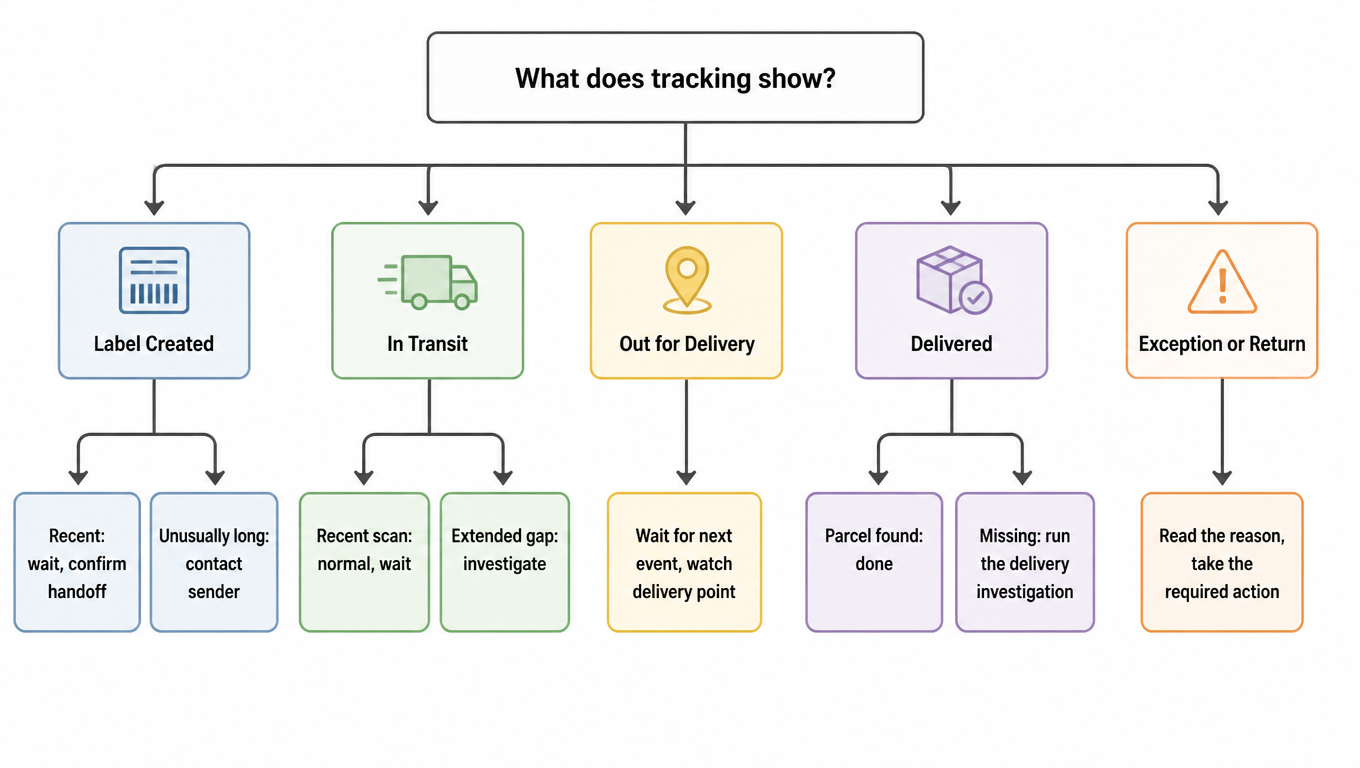
USPS tracking decision tree covering Label Created, In Transit, Out for Delivery, Delivered and Exception statuses.
Locate the stage first, then act: one tree for the common cases

For example, an insured Ground Advantage parcel within the contiguous U.S. has not arrived ten days after mailing. You can start a Missing Mail Search and record the mailing date. The loss-claim window for that service is 15 to 60 days after mailing. If the parcel later arrives damaged, keep the packaging and follow the damage claim instructions.

For Sellers and 3PLs: Turning Tracking into an Operational Signal

If your team needs first-scan, delivery and exception events from multiple carriers in one order system, see how to manage shipment tracking with the Tracking API.

Split first-scan monitoring into two intervals: label creation to warehouse handoff, and warehouse handoff to the first piece-level USPS scan. Use the first to review warehouse processing and the second to check the partner handoff or acceptance scan. Tell customers the latest confirmed stage. See the order and tracking status guide for reconciling records across systems.

The second thing to watch is stuck-shipment detection: set a "no update for more than X hours" alert threshold per service and network stage, then escalate in order: internal alert, customer notification, carrier investigation. The threshold should never be one shared number across all channels: the baseline for a same-metro parcel and a coast-to-coast parcel are different, and peak season calls for looser limits. The value of X comes from your own historical percentiles, not from carrier promises. For consolidation and cross-border flows, Tracking Not Available and missing records have an extra layer of causes, explained in What "USPS Tracking Not Available" Actually Means.

For each exception, record the tracking number, original status, event time, last confirmed handoff, promised delivery date and next owner. Support can relay the Notice Left instructions and verify the address on a return. Warehouse staff can check handoff records on a long Awaiting Item case. Save the service request number or return outcome so the next shift can pick up the case. If many parcels stop updating at once, use the USPS API outage guide to check for a data interruption. For USPS service options, see the USPS carrier overview.

EasyShippingX is a channel-neutral shipping layer: it is not an agent for any single carrier. Instead it compares US domestic carrier options in one place, Portal, Excel, or API, prices on real billable weight, and executes labels. This guide helps you read USPS's status language; when you want to know whether the same parcel is cheaper with USPS or another carrier, run the comparison in the shipping rate calculator or review the plans and pricing.

FAQ

The status confirms that the label exists. If the seller’s ship-by date has passed, ask them to check the warehouse handoff and any shipping partner. USPS in Possession of Item confirms that USPS received or collected the parcel.
It flags a possible delay beyond the estimate. Check the last facility update and the service standard. Use USPS delay guidance if the parcel is overdue and there is no progress.
Check the delivery location and time, then look in the mailbox, parcel locker and building receiving log. If it is still missing more than one postal business day after the scan, submit a USPS service request for an eligible item.
Tracking records a handoff to a receiving agent. Ask your front desk, property office or mailroom to check its receiving log by name and tracking number and confirm how to collect the parcel.
The parcel was misdirected. Watch for a new facility or routing update. If the estimate passes with no progress, follow up according to the service standard.
Start with the last known stage. If USPS is awaiting the item, ask the seller to confirm handoff. If an in-transit parcel has passed its delivery estimate, check USPS delay guidance. If it reached the local route, use the delivery status above to decide when to submit a service request.
There was no delivery scan on the route date. Check whether the package arrived and look for a new event. If it is still missing after more than one full postal business day from that status, submit a service request.
Read any reason in the event and check the last update and delivery estimate. Consult USPS delay guidance when the item is overdue. If USPS is still awaiting a partner handoff, ask the seller first.
Check the reason. USPS normally retries No Access the next business day. For Notice Left because no one could sign or no secure location was available, follow the notice to schedule redelivery or pick it up. USPS status help