Shipping Cost Guide

Residential vs. Commercial Address: How It Affects Your Shipping Costs

Editorial illustration of a delivery driver at the end of a residential driveway, next to a converted garage studio with a small wooden sign by the door.
Illustration of the hypothetical case, not a customer example or an actual account quote.

Take a hypothetical order. A seller ships a $78 desk lamp to a customer in a converted garage studio outside Portland. The checkout form asks for a company name, and the buyer types the studio name, because that is what the studio is called. The rate engine sees a company field, prices the order as a commercial ground shipment at $9.80, and the label prints without a warning. Two days later the parcel is on the porch. Three weeks later the invoice arrives at $16.25: the same transportation charge plus a $6.45 residential surcharge.

At 400 orders a month, that gap is $2,580 of margin that never appeared in a single quote.

Both facts in that example are true. The buyer really does run a business out of that garage. The driver really did walk up a residential driveway and leave the box at a house. Only one of those facts decides what the shipper is charged, and it is not the one most sellers put in the quote.

How the address type is decided: the delivery point, not the recipient

The service does not ask who the recipient is. It classifies the delivery point, using its own address data. Because the classification follows the location rather than the person, four very different businesses can end up on two very different prices.

  • A single-family home. No posted hours, no front desk, a mailbox at the curb, and a driver who walks to the door and can leave the parcel on the porch. Residential. This is the default for most addresses in a DTC order file.
  • A home studio. Same building footprint, same driveway, same porch. The owner may ship forty orders a week and take calls all morning, and from the street the property is indistinguishable from the house next door. For delivery purposes it is residential, which is exactly the trap in the opening example.
  • A storefront. A street-level entrance on a commercial block, posted business hours, and someone standing behind a counter. The driver walks in, hands the parcel to a person, and does not leave it outside. Commercial.
  • An office suite. A floor and suite number inside a multi-tenant building with a lobby, an elevator, and often a mailroom or receiving desk. Commercial, because the delivery ends at a staffed location rather than a doorstep.

Two cases break the neat four-way split. A mixed-use building with retail on the ground floor and apartments above can return a mixed classification. A small office renting a room inside a residential building can be read either way, depending on the unit data held for that building. The same street can carry both classifications, which is why "we deliver to businesses" is never a usable rule.

The cleanest description of how the classification is produced comes from FedEx: every address starts as unknown, and only validation business rules move it to business, residential, or mixed. A location returns mixed specifically when a multi-tenant address holds both business and residential units (FedEx Address Validation documentation).

Why a company name does not make an address commercial

There are two separate records in an order, and sellers routinely merge them.

The first is the business identity: who bought the goods, what name goes on the customs paperwork, which company the invoice is billed to. The second is the delivery point: the physical place where a driver stops, parks, walks, and hands over or drops off a parcel. A company name changes the first record. It does not touch the second.

Editorial illustration of a person typing a company name into an order form while, outside the window, a delivery driver walks up the driveway of an ordinary house.
The company name lives on the form; the driver walks the driveway. Neither changes the other.

Adding a company name, a c/o line, or a suite number does make an address easier to deliver. It gives the driver a sign to look for and helps match the unit. That is a deliverability improvement, not a reclassification. In address data the classification belongs to the location, and the label on the box does not rewrite it.

Three versions of this mistake show up constantly:

  • Treating the company field as a signal. A rate engine that reads a company name and switches to commercial pricing is guessing. The field says something about the buyer, nothing about the driveway.
  • Flipping the residential flag to save money. If a shipper marks a known house as commercial at label creation, the parcel still gets delivered, and the classification is re-derived from the carrier's own data. The difference returns as an invoice adjustment, usually weeks later and usually without an explanation.
  • Assuming an apartment is commercial because of what is inside it. A studio name on an apartment line is still an apartment. The unit is residential even when the tenant is a registered business.

The usable takeaway is narrow: trust a classification returned by an address service, and never trust one inferred from text a customer typed. How to design the validation step itself is covered in evaluating an address validation API.

How the address type changes what you pay: two different charges

Two charges move with the address type, and they are not the same charge. Confusing them is how quotes end up wrong in both directions.

The residential surcharge is a flat per-package accessorial added on top of the transportation charge (UPS residential surcharges). It does not scale with weight or zone, and it is charged per parcel rather than per order, so a two-item order that ships in two boxes to a house carries it twice.

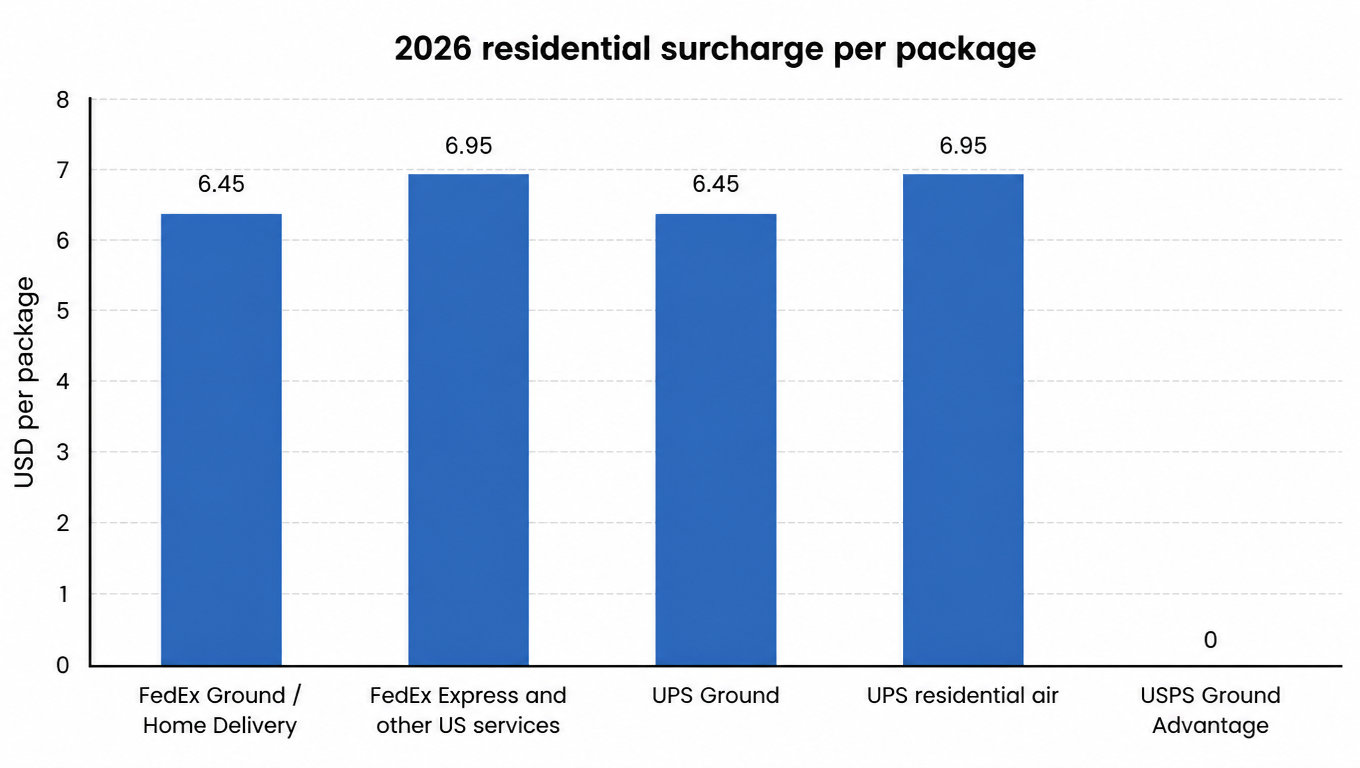
For 2026 the amounts are $6.45 per package for FedEx Ground and Home Delivery and $6.95 per package for FedEx Express and other U.S. package services (FedEx 2026 surcharge and fee changes); UPS applies $6.45 to Ground and $6.95 to its residential air services. USPS is the outlier: its Ground Advantage and Priority Mail price tables carry no residential delivery surcharge, so a house and a storefront in the same zone pay the same postage (USPS Notice 123 price list). These amounts reset with each annual rate change, so a figure copied from last year's quote is not a safe default (FedEx rate and surcharge changes).

The delivery area surcharge (DAS) is a different animal. It is tied to the destination ZIP code, not to the building. FedEx and UPS publish ZIP lists with commercial and residential rates, plus extended and remote tiers for the hardest areas, and assess it per package (UPS delivery area surcharges). Residential DAS rates sit above commercial rates in the same ZIP, so a change in classification can move two numbers at once: the flat residential surcharge and the DAS tier. They stack, so a parcel to a rural home can carry both.

Bar chart: 2026 residential surcharge per package, $6.45 for FedEx Ground and UPS Ground, $6.95 for FedEx Express and UPS residential air, and zero for USPS Ground Advantage
One flat fee at both commercial networks, none at the postal network, and all of it resets each year.

This is why the question "how much does a residential address add?" has no single answer. The amount depends on the service, the network, and the destination ZIP: changing service moves both the base charge and the residential figure, DAS only exists in some ZIPs, and a quote that looked cheap on Ground moves twice when the order is upgraded to Express.

One more line on your own invoices deserves a check: whether your agreement applies the fuel surcharge to accessorials as well as to transportation. Where it does, the fixed residential amount is not the full cost of the classification, and a manual "add $6.45 to the quote" shortcut understates it. How ZIP, zone, and DAS interact is broken down in zones, coverage, and delivery area surcharges, and the gap between quote and final charge in why a rate quote does not match the invoice.

How to confirm the classification before you buy the label

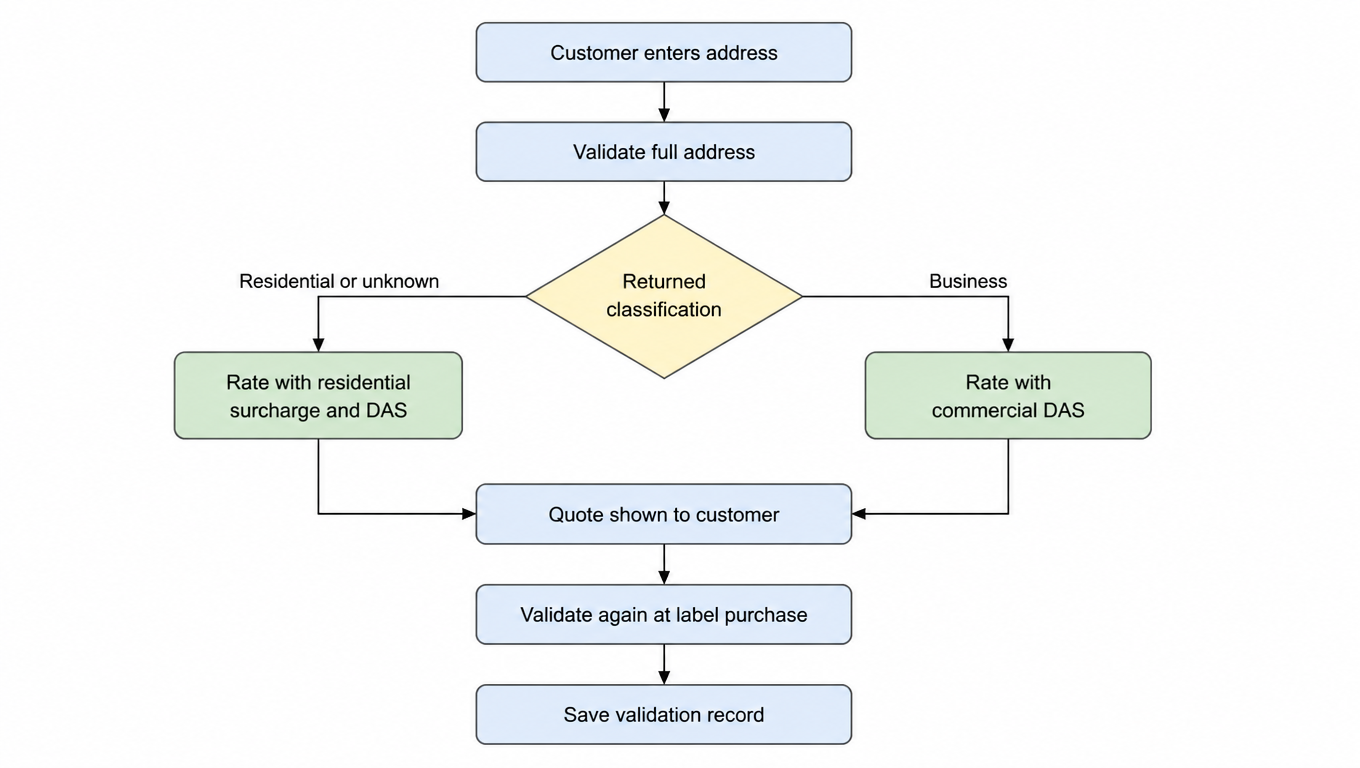
The check takes seconds and removes the guesswork. Put it in the rate path rather than in a rep's memory.

  1. Validate the full address, including street number, street name, unit, city, state, and ZIP. A nine-digit ZIP with no unit data is a weak input, and the unit number is often what separates a mixed result from a clean one.
  2. Read the returned classification. FedEx's Address Validation API identifies an address as business or residential and returns one of those categories, plus mixed or unknown (FedEx Address Validation API). Do not overwrite it with what the customer typed in the company field.
  3. Re-rate with that classification. Run the quote with the correct residential flag and let the rate engine pull the DAS tier for the ZIP, rather than adding a fee by hand.
  4. Validate again at label purchase. The gap between quote and label is where customers edit addresses: a buyer who adds a suite number, or switches from a house to a coworking space, changes the price.
  5. Log the response. Store the timestamp, the validated address, the returned classification, the service quoted, and the amount. That record is what settles an invoice dispute or a customer complaint three weeks later.
Flow chart: validate the full address, read the returned classification, rate either with the residential surcharge and DAS or with commercial DAS, quote, validate again at label purchase, and save the record
Classification enters the quote instead of being corrected by the invoice later.

Two edge cases deserve a rule rather than a judgment call. When validation returns unknown, price it as residential until someone confirms otherwise, because the downside of guessing commercial is an adjustment you cannot bill back. When it returns mixed, check whether the customer supplied a unit number; without one, the residential side of the building is the safer cost assumption.

Classification is not the same question as reachability: a validated address still has to be serviceable, and the two checks do not replace each other. The pre-label pipeline is set out in carrier serviceability validation.

How businesses can stop the quoting surprise

The fix differs by who owns the rate.

Sellers running their own checkout. Audit the shipping settings against last quarter's invoices. Pull every residential surcharge and DAS line the service billed, add them up, and compare that total with what your rate rules recovered from customers. If free-shipping thresholds were set on transportation charges alone, the residential surcharge has been coming out of margin on every order to a house. That is a pricing decision, not a rounding error. The wider cost framework is in how to lower shipping costs.

3PLs and 4PLs quoting on behalf of clients. Put accessorials in writing: which charges pass through, whether DAS is billed at actual or blended, how new surcharges are communicated and when they take effect, and what evidence is needed to dispute a reclassification. A quote that shows an estimated accessorials line and reconciles against the invoice is easier to defend than a single all-in number that quietly absorbs the difference.

Both sides. Keep the address-check record. A seller who discovers a reclassification 30 days after the fact has a bill and no proof. A seller who logged the validation response at quote time has a file: the address as submitted, the classification that came back, and the rate quoted on that basis.

Address type comparison

The four address types plus the one edge case, side by side: what the driver sees, how the location is usually classified, and what follows from it.

Address typeWhat the driver seesUsual classificationCharges that usually apply
Single-family homeDriveway, porch, mailbox at the curb, no posted hoursResidentialResidential surcharge, plus DAS in some ZIPs
Home studio (garage, spare room, backyard shed)The same house and driveway as the neighbors, plus a small sign at mostResidentialResidential surcharge, plus DAS in some ZIPs
StorefrontStreet-level entrance, posted hours, staffed counterCommercialCommercial DAS in some ZIPs, no residential surcharge
Office suite in a multi-tenant buildingLobby, elevator, suite number, often a receiving deskCommercialCommercial DAS in some ZIPs, no residential surcharge
Office inside a residential buildingAn apartment door, or a small room off a residential hallwayMixed, residential, or unknown, depending on unit dataPrice as residential until confirmed

FAQ

No. The company field describes the buyer. The classification belongs to the delivery point and comes from the service's address data.
$6.45 per package for FedEx Ground and Home Delivery and for UPS Ground; $6.95 for FedEx Express and other U.S. package services and for UPS residential air. USPS charges none.
No. The residential surcharge is a flat per-package fee based on the address type. DAS is a per-package fee based on the destination ZIP, with separate commercial and residential rates. One shipment can carry both.
Run it through the address validation service and read the returned classification. FedEx's Address Validation API returns business, residential, mixed, or unknown, and that result is what a rate engine should price against.
No. USPS Ground Advantage and Priority Mail prices follow zone and weight and carry no residential delivery surcharge, so address type does not change postage the way it changes a FedEx or UPS ground invoice.
A validated result can come back mixed when a multi-tenant address holds both business and residential units. Confirm the unit number, and until then cost the shipment as residential.

Price the address, not the assumption

The cheapest way to stop losing money to this is to stop quoting from text. Take the real destination address, run it through validation, read the classification that comes back, then price the full shipment: residential surcharge, the DAS tier for that ZIP, and the base charge together. Do the same comparison across more than one service, because the residential amount and the base charge both move, and the cheapest option for a house is not always the cheapest for a storefront.

EasyShippingX compares carrier options inside the US in one place as a channel-neutral shipping layer and executes them through the Portal, Excel, or the API, so the classification stops being an assumption in a spreadsheet and becomes a field in the rate request. Same parcel, same real address, one more comparison, and the answer becomes something you can check later.